Page 357 of 676

3574-5. Using the driving support systems
4
Driving
LS600h/LS600hL_EE(OM50G20E)
CAUTION
■Handling the camera sensors (if equipped)
Observe the following to ensure that the PCS functions effectively:
●Keep the windshield clean at all times.
PCS effectiveness may be reduced due to the presence of raindrops, condensa-
tion, ice or snow on the windshield.
●Do not subject the camera sensor to a st rong impact or force, and do not disas-
semble the camera sensor.
●Do not change the installation position of the camera sensor, or remove and rein-
stall it. The direction of the camera sensor is precisely adjusted.
●When the windshield fogs up, use the wi ndshield defogger to dry the windshield.
During cold weather, using the heater with air blowing to the feet may allow the
upper part of the windshield to fog up, having a negative effect on the images.
●Do not place anything on the dashboard.
Images reflected on the windshield may reduce the effectiveness of the camera
sensor.
●Do not scratch the camera lens, or let it get dirty.
●Do not attach a sticker or other items to the windshield near the camera sensor.
■Headlights (vehicles with camera sensors)
●Observe the following to ensure proper near-infrared ray projection:
• Keep the headlights clean at all times.
• The detection performance may deteriorate if the high beams are misaligned
or inoperative.
●The near-infrared ray transmitters project strong energy that is not visible.
Although the transmitters normally turn off when the vehicle is stopped, never
look into the headlights for your safety.
Page 381 of 676

3814-5. Using the driving support systems
4
Driving
LS600h/LS600hL_EE(OM50G20E)
CAUTION
■The near-infrared light
NOTICE
■The near-infrared camera
●Make sure the windshield is kept clean.
●System performance may deteriorate if rain water, condensation or ice adheres
to the camera. If you notice the inner lens of the camera is dirty, the garnish will
have to be replaced. Consult any authorized Lexus dealer or repairer, or another
duly qualified and equipped professional.
●Do not subject the camera to strong impacts, or disassemble the camera.
●As the alignment of the camera has been very finely adjusted, do not change or
remove the mounting.
●If the windshield fogs up, defog the windshield using the front defroster.
●Do not dirty or scratch the camera lens.
●Night view may not function properly if an object is placed on the sensor, or any-
thing that blocks the sensor is affixed to the windshield.
Follow these precautions to avoid damage to
or incorrect operation of the Lexus night
view system.
●System performance may deteriorate if the
areas around the headlights are dirty. Clean
the vehicle if it is dirty.
●The near-infrared ray transmitters irradiate
strong energy not visible to the eyes. Do
not stare at the light at close range for a
long time.
Follow these precautions to avoid damage to
or incorrect operation of the Lexus night
view.
Page 390 of 676
390
LS600h/LS600hL_EE(OM50G20E)
5-1. Remote Touch screen
“MAP” button
Press the button to display the current position, cancel the screen scroll, start
guidance, and repeat a voice guidance.
“ •” button
Vehicles with a navigation system
Press this button to scroll the list screen and to change the scale of the map.
Vehicles without a navigation system
Press this button to scroll the list screen.
Remote Touch
The Remote Touch can be used to operate the Remote Touch screens.
For details, refer to “NAVIGATION AND MULTIMEDIA SYSTEM
OWNER’S MANUAL”.
The illustrations below are for left-hand drive vehicles.
Vehicles with a
navigation system
Vehicles without a
navigation system
1
2
Page 396 of 676
3965-1. Remote Touch screen
LS600h/LS600hL_EE(OM50G20E)
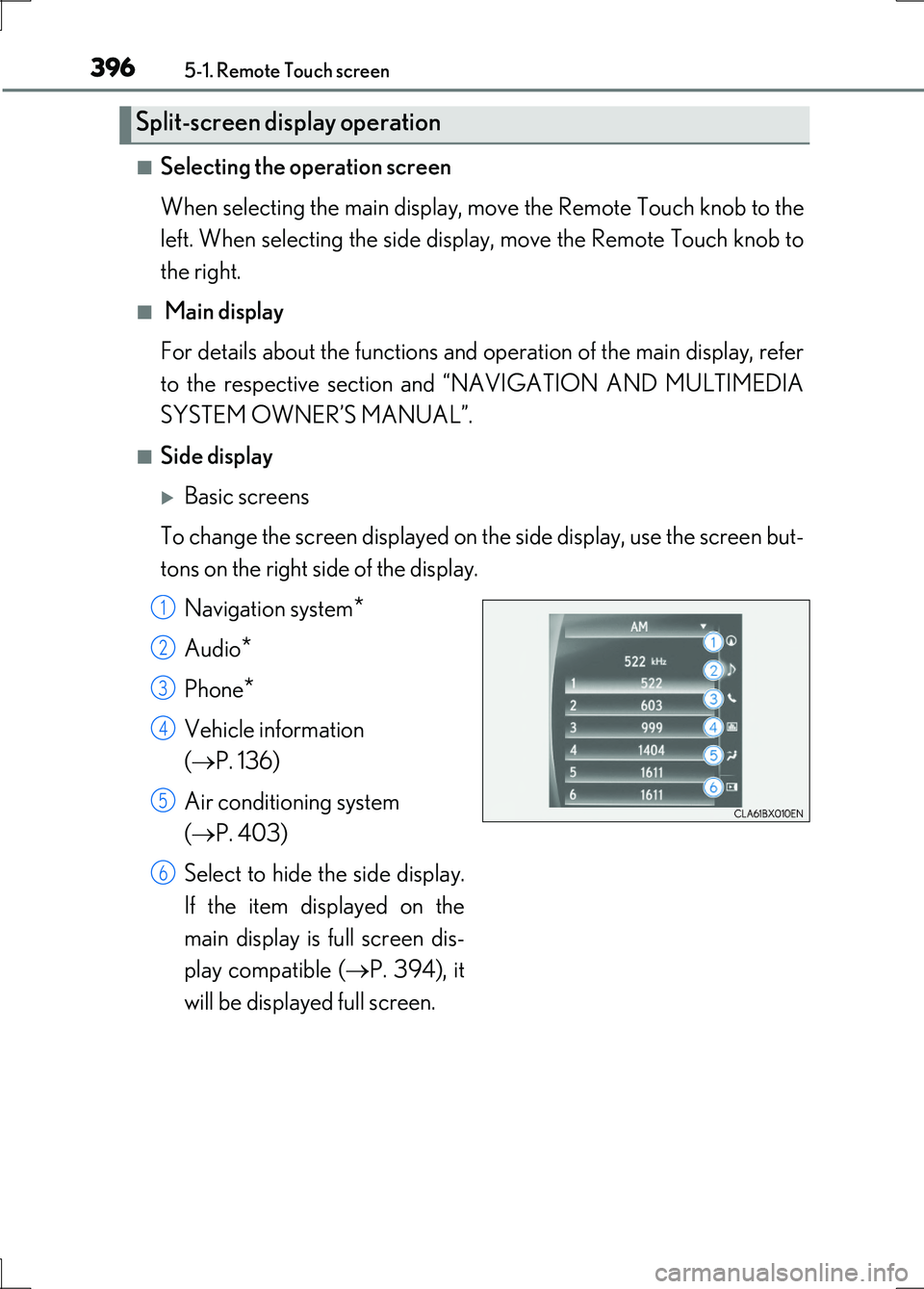
■Selecting the operation screen
When selecting the main display, move the Remote Touch knob to the
left. When selecting the side display, move the Remote Touch knob to
the right.
■ Main display
For details about the functions and operation of the main display, refer
to the respective section and “NAVIGATION AND MULTIMEDIA
SYSTEM OWNER’S MANUAL”.
■Side display
Basic screens
To change the screen displayed on th e side display, use the screen but-
tons on the right side of the display.
Navigation system*
Audio*
Phone*
Vehicle information
( P. 136)
Air conditioning system
( P. 403)
Select to hide the side display.
If the item displayed on the
main display is full screen dis-
play compatible ( P. 394), it
will be displayed full screen.
Split-screen display operation
1
2
3
4
5
6
Page 405 of 676

4055-3. Using the air conditioning system and defogger
5
Interior features
LS600h/LS600hL_EE(OM50G20E)
Without rear air conditioning system
To adjust the fan speed, press or select on the operation
screen to increase the fan speed and or on the operation
screen to decrease the fan speed.
Press to turn the fan off.
To adjust the temperature setting, press or select on the
operation screen to increase the temperature and or on
the operation screen to decrease the temperature.
The air conditioning system switches between individual and simultaneous modes
each time “DUAL” is selected.
When “DUAL” is selected (the indicator will be on) or the passenger’s side tem-
perature control button is pressed, the temperature for the driver and passenger
seats can be adjusted separately.
When the climate control seats are set to “AUTO” mode, the system is operated
automatically according to the set temperature, outside temperature, etc.
To change the air outlets, press
or select an air outlet
switch.
Adjusting the settings manually
1
2
3
Page 406 of 676

4065-3. Using the air conditioning system and defogger
LS600h/LS600hL_EE(OM50G20E)
With rear air conditioning system
To adjust the fan speed, press or select on the operation
screen to increase the fan speed and or on the operation
screen to decrease the fan speed.
Press to turn the fan off.
To adjust the temperature setting, press or select on the
operation screen to increase the temperature and or on
the operation screen to decrease the temperature.
The air conditioning system switches between individual and simultaneous modes
each time “4-ZONE” is selected.
When “4-ZONE” is selected (the indicator will be on) or the passenger’s side
temperature control button is pressed, the temperature for the driver’s, front pas-
senger’s and rear seats ( P. 418) can be adjusted separately.
When the climate control seats are set to “AUTO” mode, the system is operated
automatically according to the set temperature, outside temperature, etc.
To change the air outlets, press
or select an air outlet
switch.
Left-hand front seat
Right-hand front seat
Different air outlets for the driver
and front passenger seats can be
chosen.
1
2
3
1
2
Page 420 of 676
4205-3. Using the air conditioning system and defogger
LS600h/LS600hL_EE(OM50G20E)
■Changing the air outlets
Press .
The air outlets change as follows each time is pressed.
Different air outlets for the right-hand and left-hand rear seats can be chosen.
Air flows as shown below according to the mode selected.
When the indicator on “Air purifier” (on the option control screen) is
on
Upper body
When the indicator on “Air purifier” (on the option control screen) is
off
Upper body
*: Cool air only
* *
Page 430 of 676
4305-4. Using the interior lights
LS600h/LS600hL_EE(OM50G20E)
■Illuminated entry system
The lights automatically turn on/off according to power switch mode, the presence
of the electronic key, whether the doors are locked/unlocked, and whether the doors
are opened/closed.
■To prevent the 12-volt battery from being discharged
If the following lights remain on when the power switch is turned off, the lights will go
off automatically after 20 minutes:
●Interior lights
●Door courtesy lights
●Personal lights
●Inside door handle lights
●Seat belt buckle lights
●Footwell lights
●Power switch light
■Customization
Settings (e.g. The time elapsed before lights turn off) can be changed.
(Customizable features P. 634)
NOTICE
■To prevent 12-volt battery discharge
Do not leave the lights on longer than necessary when the hybrid system is off.