Page 387 of 692
3875-3. Using the audio system
5
Lexus Display Audio system
IS300h_EE(OM53D89E)
Go to “Audio settings”: “MENU” button “Setup” “Audio”
Change sound settings ( P. 386)
Change FM radio settings
( P. 388)
Change DAB settings (if equipped)
( P. 388)
Change iPod settings ( P. 389)
Change USB settings ( P. 389)
Change external video settings
( P. 390)
Change the cover art settings
( P. 390)
Audio settings
Screen for audio settings
1
2
3
4
5
6
7
Page 388 of 692
3885-3. Using the audio system
IS300h_EE(OM53D89E)
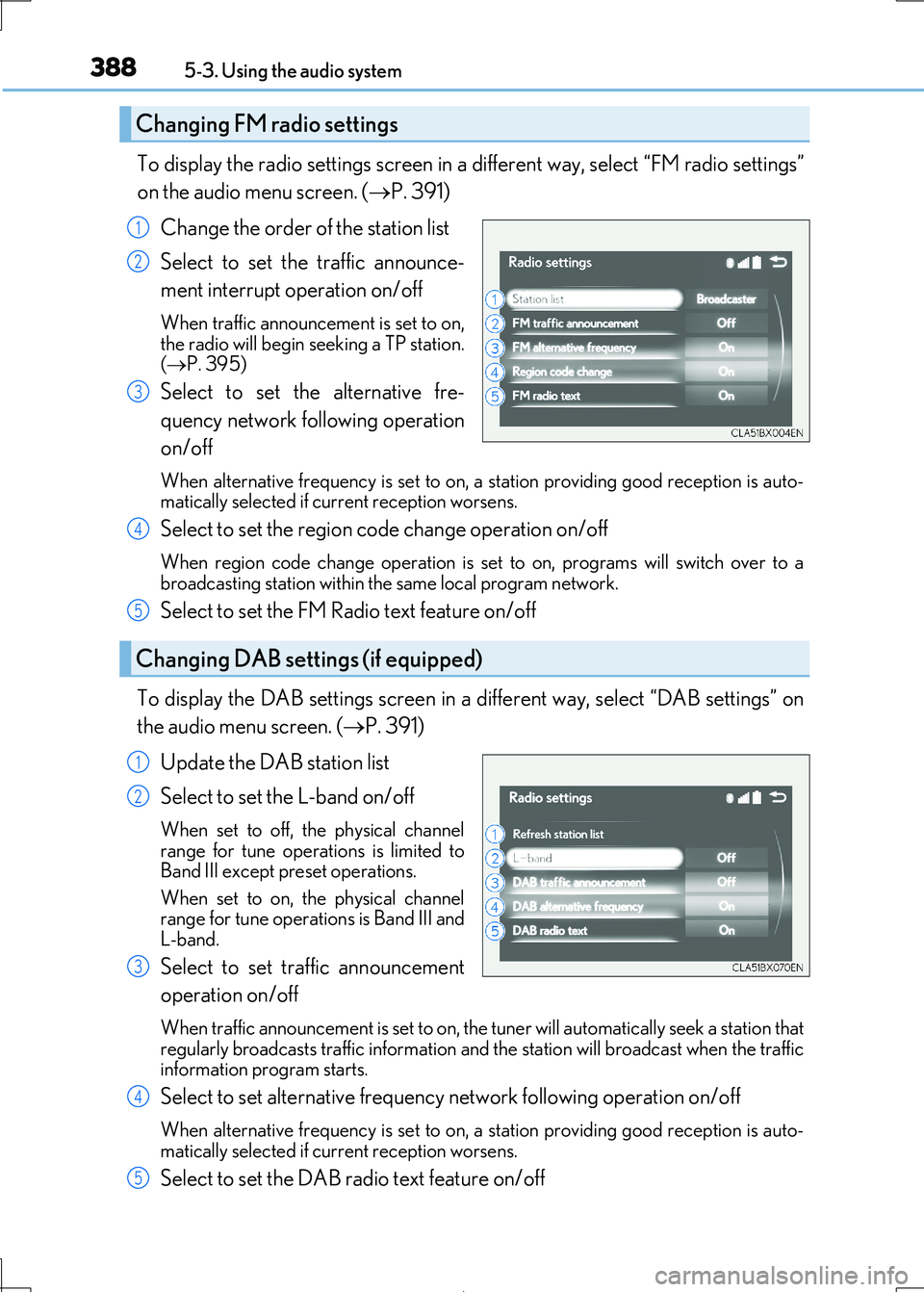
To display the radio settings screen in a different way, select “FM radio settings”
on the audio menu screen. ( P. 391)
Change the order of the station list
Select to set the traffic announce-
ment interrupt operation on/off
When traffic announcement is set to on, the radio will begin seeking a TP station.
( P. 395)
Select to set the alternative fre-
quency network fo llowing operation
on/off
When alternative frequency is set to on, a station providing good reception is auto- matically selected if current reception worsens.
Select to set the region co de change operation on/off
When region code change operation is set to on, programs will switch over to a
broadcasting station within th e same local program network.
Select to set the FM Radio text feature on/off
To display the DAB settings screen in a different way, select “DAB settings” on
the audio menu screen. ( P. 391)
Update the DAB station list
Select to set the L-band on/off
When set to off, the physical channel range for tune operations is limited to
Band III except preset operations.
When set to on, the physical channel range for tune operations is Band III and
L-band.
Select to set traffic announcement
operation on/off
When traffic announcement is set to on, the tuner will automatically seek a station that regularly broadcasts traffic information and the station will broadcast when the traffic
information program starts.
Select to set alternative frequenc y network following operation on/off
When alternative frequency is set to on, a station providing good reception is auto- matically selected if current reception worsens.
Select to set the DAB radio text feature on/off
Changing FM radio settings
1
2
3
Changing DAB settings (if equipped)
4
5
1
2
3
4
5
Page 389 of 692
3895-3. Using the audio system
5
Lexus Display Audio system
IS300h_EE(OM53D89E)
To display the iPod settings screen in a different way, select “iPod settings” on the
audio menu screen. ( P. 391)
Change the screen size (video
mode)
Change the cover art settings
( P. 390)
Adjust the screen quality (video
mode) ( P. 383)
Change video sound input port
To display the USB settings screen in a di fferent way, select “USB settings” on the
audio menu screen. ( P. 391)
Change the screen size (video
mode)
Change the cover art settings
( P. 390)
Adjust the screen quality (video
mode) ( P. 383)
Changing iPod settings
1
2
3
4
Changing USB settings
1
2
3
Page 390 of 692
3905-3. Using the audio system
IS300h_EE(OM53D89E)
To display the external video settings screen in a different way, select “External
video settings” on the audio menu screen. ( P. 391)
Change the screen size
Change the video signal
Adjust the screen quality ( P. 383)
To display the cover art settings screen in a different way, select “Cover art set-
tings” on the audio menu screen. ( P. 391)
Select to set the cover art display of
DISC mode on/off.
Select to set the cover art display of
USB mode on/off.
Change the priority of the cover art
display for USB mode.
Select to set the cover art display of
iPod mode on/off.
Change the priority of the co ver art display for iPod mode.
Changing external video settings
1
2
3
Changing the cover art settings
1
2
3
4
5
Page 391 of 692
3915-3. Using the audio system
5
Lexus Display Audio system
IS300h_EE(OM53D89E)
Go to audio menu screen: Move the controller to the left on the audio top screen
Radio mode
Audio menu screen operation
You can change the settings and control functions for each audio source.
Audio menu screen
ButtonFunctionTarget radio mode
“Seek up”Seeks a station of the nearest frequency (stops
when a station is found) (manual mode)AM, FM“Seek down”
“Rewind”Adjusts the playback offset time on time shift modeDAB“Forward”
“Time shift off”Cancels time shift operationDAB
“Next ensemble”Selects an ensemble (manual mode)DAB“Prev. ensemble”
“Next station”Selects a service (manual mode)DAB“Prev. station”
“FM radio settings”Changes FM radio settings (P. 388)All mode
“DAB settings”Changes DAB settings (P. 388)All mode
Page 392 of 692
3925-3. Using the audio system
IS300h_EE(OM53D89E)
Media mode
ButtonFunctionTarget audio source
“Play”Plays or pauses a track/fileAll media (except A/V)“Pause”
“Track up”
Selects a track/fileAll media (except A/V)“Track down”
“File up”
“File down”
“Folder up”Selects a folder/albumMP3/WMA/AAC
disc, USB audio“Folder down”
“Fast forward”Selects and hold: Fast-f orward or rewind a
track/fileAll media (except A/V)“Fast rewind”
“Repeat”Selects a repeat mode ( P. 393)All media (except A/V)
“Random”Selects a random/shuffle play mode
( P. 393)All media (except A/V)“Shuffle”
“Full screen”Selects a full screen modeiPod, USB video, A/V
“Connect”Connects a Bluetooth® device (P. 412)Bluetooth®
“Cover art set-
tings”Changes the cover art settings ( P. 390)CD, MP3/WMA/AAC
disc, USB, iPod
“iPod settings”Changes iPod settings ( P. 389)iPod
“USB settings”Changes USB settings (P. 389)USB audio/video
“A/V settings”Changes A/V settings (P. 390)A/V
Page 393 of 692
3935-3. Using the audio system
5
Lexus Display Audio system
IS300h_EE(OM53D89E)
Repeat play
ModeAction
“Track repeat”
File/track repeat“Repeat”
“On”
“Folder repeat”Folder/album repeat“Album repeat”
Random/shuffle playback
ModeAction
“1 CD”
Random/shuffle play of the disc/folder/album“Random”
“Shuffle”
“Folder random”
Random/shuffle play of all folders/albums“Album random”
“Album shuffle”
Page 395 of 692
3955-4. Using the radio
5
Lexus Display Audio system
IS300h_EE(OM53D89E)
■Manual tuning (manual screen)
Turn the “TUNE•SCROLL” knob or turn the controller.
■Station list (preset or station list screen)
Select the desired station by pressi ng the “<” or “>” button, turn the
“TUNE•SCROLL” knob, or turnin g and pressing the controller.
Radio stations can be preset.
Search for desired stations.
Turn the controller to sele ct one of the stations and then press the controller
until you hear a beep while on the preset selection screen.
The broadcast you are currently listening to can be re-listened to at any time.
Move the controller to the righ t and then select “Time shift”.
Turn the “TUNE•SCROLL” knob to set the desired offset.
An offset playback time can also be set on the menu screen. (P. 391)
To cancel the time shift operation while in time shift mode, move the controller to the
left and select “Time shift off” . If the time shift display is left showing “-0’ 00”” for 6
seconds without any operation, the ti me shift operation will be canceled.
■Reception sensitivity
●Maintaining perfect radio reception at all times is difficult due to the continually chang- ing position of the antenna, di fferences in signal strength and surrounding objects, such
as trains, transmitters, etc.
●The radio antenna is mounted inside the rear window. To maintain clear radio reception, do not attach metallic window tinting or other metallic objects to the antenna wire
mounted inside the rear window.
■Traffic announcement operation
When traffic announcement is set to on, “TP” will appear on the screen and the radio will
begin seeking a TP station. If the radio seek s out a TP station, a pop-up massage is dis-
played. To listen the program, select “Continue”. When the program ends, the initial
operation will resume.
Setting station presets (preset screen)
Time shift operation (DAB) (if equipped)
1
2
1
2


