Page 352 of 692

3524-5. Using the driving support systems
IS300h_EE(OM53D89E)
◆ECB (Electronically Controlled Brake System)
The electronically controlled system generates braking force corresponding
to the brake operation
◆ABS (Anti-lock Brake System)
Helps to prevent wheel lock when the br akes are applied suddenly, or if the
brakes are applied while drivin g on a slippery road surface
◆Brake assist
Generates an increased level of br aking force after the brake pedal is
depressed when the system detects a panic stop situation
◆VSC (Vehicle Stability Control)
Helps the driver to contro l skidding when swerving suddenly or turning on
slippery road surfaces.
◆VSC+ (Vehicle Stability Control+)
Provides cooperative control of the ABS, TRC, VSC and EPS.
Helps to maintain directional stability when swerving on slippery road sur-
faces by controlling steering performance.
◆TRC (Traction Control)
Helps to maintain drive power and pr event the drive wheels from spinning
when starting the vehicle or accelerating on slippery roads
◆Hill-start assist control
Helps to reduce the backward movement of the vehicle when starting on an
uphill
◆EPS (Electric Power Steering)
Employs an electric motor to reduce the amount of effort needed to turn the
steering wheel.
Driving assist systems
To help enhance driving safety and pe rformance, the following systems oper-
ate automatically in response to various driving situations. Be aware, however,
that these systems are supplementary and should not be relied upon too heav-
ily when operating the vehicle.
Page 356 of 692

3564-5. Using the driving support systems
IS300h_EE(OM53D89E)
■Automatic reactivation of TRC and VSC systems
After turning the TRC and VSC systems off, the systems will be automatically re-enabled in the following situations:
●When the power switch is turned off
●If only the TRC system is tu rned off, the TRC will turn on when vehicle speed increases If both the TRC and VSC syst ems are turned off, automatic re-enabling will not occur
when vehicle speed increases.
■Reduced effectiveness of the EPS system
The effectiveness of the EPS system is reduced to prevent the system from overheating
when there is frequent steering input over an extended period of time. The steering
wheel may feel heavy as a result . Should this occur, refrain from excessive steering input or stop the vehicle and turn the hybrid system off. The EPS system should return to nor-
mal within 10 minutes.
■Operating conditions of emergency brake signal
When the following three conditions are me t, the emergency brake signal will operate:
●The emergency flashers are off
●Actual vehicle speed is over 55 km/h (35 mph)
●The brake pedal is depressed in a manner that cause the system to judge from the vehi-
cle deceleration that this is a sudden braking operation
■Automatic system cancelation of emergency brake signal
The emergency brake signal will turn of f in any of the following situations:
●The emergency flashers are turned on
●The brake pedal is released
●The system judges from the vehicle deceleration that is not a sudden braking operation
Page 374 of 692

3745-1. Basic Operations
IS300h_EE(OM53D89E)
Volume switch
• Increases/decreases volume
• Press and hold: Continuously
increases/decreases volume
Radio mode:
• Press (except manual mode):
Select a radio station
• Press (manual mode): Seek up/
down
• Press and hold (manual mode): Continuously seek up/down
CD, MP3/WMA/AAC disc, Bluetooth®, iPod or USB mode:
• Press: Select a track/file/song/video
• Press and hold: Select a folder/a lbum (MP3/WMA/AAC disc or USB)
“MODE” switch
• Turns the power on, selects audio source
• Press and hold this switch to mute or pause the current operation. To can-
cel the mute or pause, press and hold.
Steering wheel audio switches
Some audio features can be controlled using the switches on the steering
wheel.
Operation may differ depending on the ty pe of audio system or 10.3-inch dis-
play. For details, refer to the manual pr ovided with the audio system or 10.3-
inch display.
Depending on the type of audio source , certain functions may not be avail-
able.
Operating the audio system using the steering wheel switches
1
2
WARNING
■To reduce the risk of an accident
Exercise care when operating the audio switches on the steering wheel.
3
Page 427 of 692
4275-9. Bluetooth® Phone
5
Lexus Display Audio system
IS300h_EE(OM53D89E)
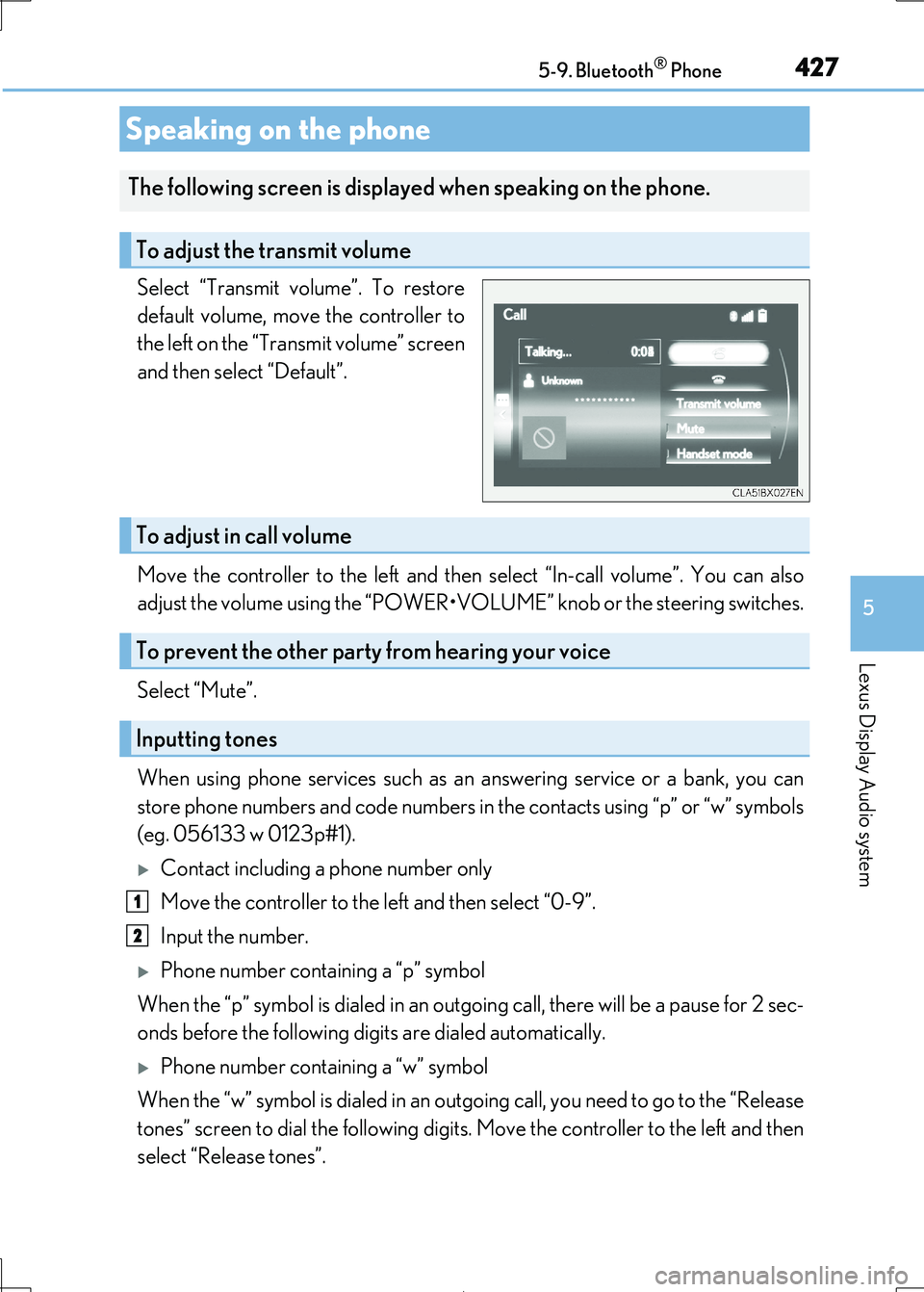
Select “Transmit volume”. To restore
default volume, move the controller to
the left on the “Transmit volume” screen
and then select “Default”.
Move the controller to the left and then select “In-call volume”. You can also
adjust the volume using the “POWER•VOL UME” knob or the steering switches.
Select “Mute”.
When using phone services such as an answering service or a bank, you can
store phone numbers and code numbers in the contacts using “p” or “w” symbols
(eg. 056133 w 0123p#1).
Contact including a phone number only
Move the controller to the left and then select “0-9”.
Input the number.
Phone number containing a “p” symbol
When the “p” symbol is dial ed in an outgoing call, there will be a pause for 2 sec-
onds before the following digits are dialed automatically.
Phone number containing a “w” symbol
When the “w” symbol is dialed in an outgoing call, you need to go to the “Release
tones” screen to dial the following digits. Move the controller to the left and then
select “Release tones”.
Speaking on the phone
The following screen is displa yed when speaking on the phone.
To adjust the transmit volume
To adjust in call volume
To prevent the other party from hearing your voice
Inputting tones
1
2
Page 459 of 692
459
6Interior features
IS300h_EE(OM53D89E)
6-1. Basic operation of
the Remote Touch
screen
Remote Touch .............................460
10.3-inch display ........................ 464
6-2. Using the air conditioning
system
Automatic air conditioning
system .......................................... 466
Heated steering wheel/
seat heaters/
seat ventilator s ......................... 479
6-3. Using the interior lights
Interior lights list........................... 481
• Interior lights ..........................482
• Personal lights .......................482
6-4. Using the storage features
List of storage features ............484
• Glove box .............................. 485
• Console box.......................... 485
•Cup holders/
Bottle holders ........................486
Trunk features............................. 488
6-5. Using the other interior
features
Other interior features ............. 491
• Sun visors ................................. 491
• Vanity mirrors ........................ 491
• Clock ......................................... 491
• Power outlet........................... 492
• Armrest.................................... 493
• Rear sunshade ...................... 493
• Assist grips ............................. 495
• Coat hooks ............................. 495
ERA-GLONASS ...................... 496
Page 480 of 692

4806-2. Using the air conditioning system
IS300h_EE(OM53D89E)
●The heated steering wheel can be used when the power switch is in ON mode.
●The heated steering wheel will automatically turn off after about 30 minutes.
Each time the switch is pressed, the
intensity of the seat heater changes and
the level indicator lights (amber) light
as follows:
Hi (3 segments lit) Mid (2 segments
lit) Lo (1 segment lit) Off
■The seat heaters can be used when
The power switch is in ON mode.
■Seat heater timer control
To enable seat heater timer control, press and hold the driver and front passenger seat heater switches at the same time until a buzzer sounds once. If a seat heater is turned on
while seat heater timer control is enabled, the intensity of the seat heater will automati-
cally change from Hi MidLo.
The timing of the change in seat heater intensity differs depending on the temperature
inside the cabin, etc. when the seat heater is operating.
To disable seat heater timer control, press and hold the driver and front passenger seat heater switches at the same time until a buzzer sounds twice.
Each time the switch is pressed, the
intensity of the seat ventilator changes
and the level indicator lights (green)
light as follows:
Hi (3 segments lit) Mid (2 segments
lit) Lo (1 segment lit) Off
The seat ventilators can be used when the power switch is in ON mode.
Seat heaters
Type A Type B
Seat ventilators
Page 567 of 692

5678-1. Essential information
8
When trouble arises
IS300h_EE(OM53D89E)
Steadily step on the brake pedal with both feet and firmly depress it.
Do not pump the brake pedal repeatedly as this will increase the effort required to
slow the vehicle.
Shift the shift lever to N.
If the shift lever is shifted to N
After slowing down, stop the vehicle in a safe place by the road.
Stop the hybrid system.
If the shift lever cann ot be shifted to N
Keep depressing the brake pedal with both feet to reduce vehicle speed as
much as possible.
To stop the hybrid system, press and
hold the power switch for 2 consec-
utive seconds or more, or press it
briefly 3 times or more in succes-
sion.
Stop the vehicle in a safe place by the road.
If your vehicle has to be stopped in an emergency
Only in an emergency, such as if it becomes impossible to stop the vehicle in
the normal way, stop the vehicl e using the following procedure:
1
2
3
4
3
Press and hold for 2 seconds or more
or press briefly 3 times or more
4
WARNING
■If the hybrid system has to be turned off while driving
Power assist for the steering wheel will be lost, making the steering wheel heavier to turn. Decelerate as much as possible before turning off the hybrid system.
5
Page 572 of 692

5728-2. Steps to take in an emergency
IS300h_EE(OM53D89E)
■While towing
If the hybrid system is off, the power assist for the brakes and steering will not function,
making steering and braking more difficult.
■Wheel nut wrench
Wheel nut wrench is installed in the trunk. ( P. 537)
WARNING
Observe the following precautions. Failure to do so may result in death or serious injury.
■When towing the vehicle
■While towing
●When towing using cables or chains, avoid sudden starts, etc. which place excessive
stress on the towing eyelets, cables or chains. The towing eyelets, cables or chains may become damaged, broken debris ma y hit people, and cause serious damage.
●Do not turn the power switch off.
There is a possibility that the steering wheel is locked and cannot be operated.
■Installing towing eyelet to the vehicle
Make sure that towing eyel et is installed securely.
If not securely installed, towing ey elet may come loose during towing.
Be sure to transport the vehicle with all four
wheels raised off the ground. If the vehicle is
towed with the tires contacting the ground, the
drivetrain and related parts may be damaged, an accident may occur due to a change in
direction of the vehicle or electricity generated
by the operation of the motor may cause a fire to occur depending on the nature of the dam-
age or malfunction.