Page 165 of 676

1653-3. Adjusting the seats
3
Operation of each component
IS200t_EE(OM53D77E)
■Cancelation procedure
Carry only the key you want to cancel and then close the driver’s door. If 2 or
more keys are in the vehicle, the driving position cannot be canceled properly.Turn the engine switch to IGNITION ON mode.
While pressing the “SET” button, press and hold the door lock switch
(either lock or unlock) until the buzzer sounds twice.
If the button could not be canceled, the buzzer sounds continuously for approxi-
mately 3 seconds.
■Recalling the driving position using the memory recall function
●Different driving positions can be registered for each electronic key. Therefore, the
driving position that is recalled may be different depending on the key being carried.
●If a door other than the driver’s door is unlocked with the smart entry & start system, the
driving position cannot be reca lled. In this case, press the driving position button which
has been set.
■Customization
The unlock door settings of the memor y recall function can be customized.
(Customizable features: P. 641)
WARNING
■Seat adjustment caution
Take care during seat adjustment so that the seat does not strike the rear passenger or
squeeze your body against the steering wheel.
1
2
Page 166 of 676
1663-3. Adjusting the seats
IS200t_EE(OM53D77E)
Up
Pull the head restraints up.
Down
Push the head restraint down while
pressing the lock release button.
Up
Pull the head restraints up.
Down
Push the head restraint down while
pressing the lock release button.
Head restraints
Head restraints are provided for all seats.
Front seats
Lock release button
1
2
Rear seats
Lock release button
1
2
Page 167 of 676
1673-3. Adjusting the seats
3
Operation of each component
IS200t_EE(OM53D77E)
■Removing the head restraints
■Installing the head restraints
Front seats
Rear seats
Pull the head restraint up while pressing the lock
release button.
If the head restraint to
uches the ceiling, making
the removal difficult, change the seat height or
angle.
Align the head restraint with the installation
holes and push it down to the lock position.
Press and hold the lock release button when
lowering the head restraint.
Align the head restraint with the installation
holes and push it down to the lowest lock posi-
tion while pressing the lock release button.
Lock release button
Lock release button
Lock release button
Page 168 of 676
1683-3. Adjusting the seats
IS200t_EE(OM53D77E)
■Adjusting the height of the head restraints
■Adjusting the rear seat head restraint
Always raise the head restraint one level from the stowed position when using. Make sure that the head restraints are adjusted
so that the center of the head restraint is closest
to the top of your ears.
WARNING
■Head restraint precautions
Observe the following precautions regarding the head restraints. Failure to do so may
result in death or serious injury.
●Use the head restraints designed for each respective seat.
●Adjust the head restraints to the correct position at all times.
●After adjusting the head restraints, push down on them and make sure they are
locked in position.
●Do not drive with the head restraints removed.
Page 174 of 676
1743-4. Adjusting the steering wheel and mirrors
IS200t_EE(OM53D77E)
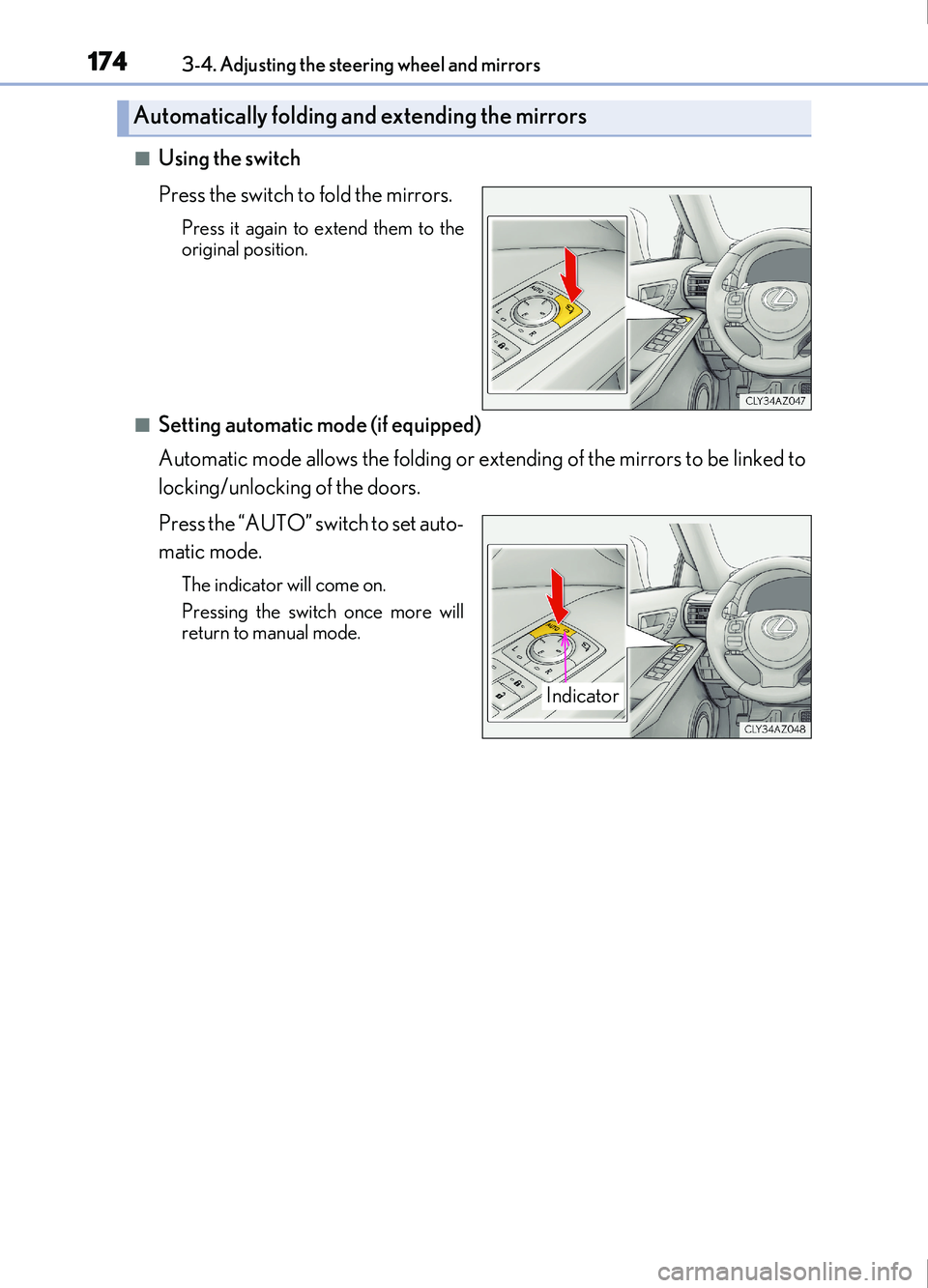
■Using the switch
Press the switch to fold the mirrors.
Press it again to extend them to the
original position.
■Setting automatic mode (if equipped)
Automatic mode allows the folding or extending of the mirrors to be linked to
locking/unlocking of the doors.
Press the “AUTO” switch to set auto-
matic mode.
The indicator will come on.
Pressing the switch once more will
return to manual mode.
Automatically folding and extending the mirrors
Indicator
Page 177 of 676
177
3
Operation of each component
IS200t_EE(OM53D77E)3-5. Opening, closing the windows and moon roof
The power windows can be opened and closed using the switches.
Operating the switch moves the windows as follows:
Closing
One-touch closing
*
Opening
One-touch opening
*
*
: To stop the window partway, operate the switch in the opposite direction.
Press the switch to lock the passenger
window switches.
The indicator will come on.
Use this switch to prevent children from
accidentally opening or closing a pas-
senger window.
Power windows
Opening and closing procedures
1
2
3
4
Window lock switch
Indicator
Page 179 of 676
1793-5. Opening, closing the windows and moon roof
3
Operation of each component
IS200t_EE(OM53D77E)
■Door lock linked window operation
●The power windows can be opened and closed using the mechanical key.*
( P. 615)
●The power windows can be opened and cl osed using the wireless remote control.*( P. 128)
*: These settings must be customized at any authorized Lexus retailer or Lexus autho-
rized repairer, or any reliable repairer.
■When the battery is disconnected
The window lock switch is disabled. If nece ssary, press the window lock switch after
reconnecting the battery.
■Power windows open warning buzzer
The buzzer sounds and a message is shown on the multi-information display in the instru-
ment cluster when the engine switch is turned off and the driver’s door is opened with the
power windows open.
■Customization
Settings (e.g. linked door lock operation) can be changed.
(Customizable features: P. 641)
Page 180 of 676

1803-5. Opening, closing the windows and moon roof
IS200t_EE(OM53D77E)
WARNING
Observe the following precautions.
Failure to do so may result in death or serious injury.
■Closing the windows
●The driver is responsible for all the power window operations, including the operation
for the passengers. In order to prevent acci dental operation, especially by a child, do
not let a child operate the power windows. It is possible for children and other passen-
gers to have body parts caught in the power window. Also, when riding with a child, it
is recommended to use the window lock switch. ( P. 177)
●Check to make sure that all passengers do not have any part of their body in a posi-
tion where it could be caught wh en a window is being operated.
●When using the wireless remote control or mechanical key and operating the power
windows, operate the power window after checking to make sure that there is no pos-
sibility of any passenger having any of their body parts caught in the window. Also do
not let a child operate window by the wireless remote control or mechanical key. It is
possible for children and other passengers to get caught in the power window.
●When exiting the vehicle, turn the engine switch off, carry the key and exit the vehicle
along with the child. There may be accidental operation, due to mischief, etc., that
may possibly lead to an accident.
■Jam protection function
●Never use any part of your body to intent ionally activate the jam protection function.
●The jam protection function may not work if something gets jammed just before the
window is fully closed. Be careful not to ge t any part of your body jammed in the win-
dow.
■Catch protection function
●Never use any part of your body or clothing to intentionally activate the catch protec-
tion function.
●The catch protection function may not work if something gets caught just before the
window is fully opened. Be careful not to get any part of your body or clothing caught
in the window.