Page 100 of 676
1002. Instrument cluster
IS200t_EE(OM53D77E)
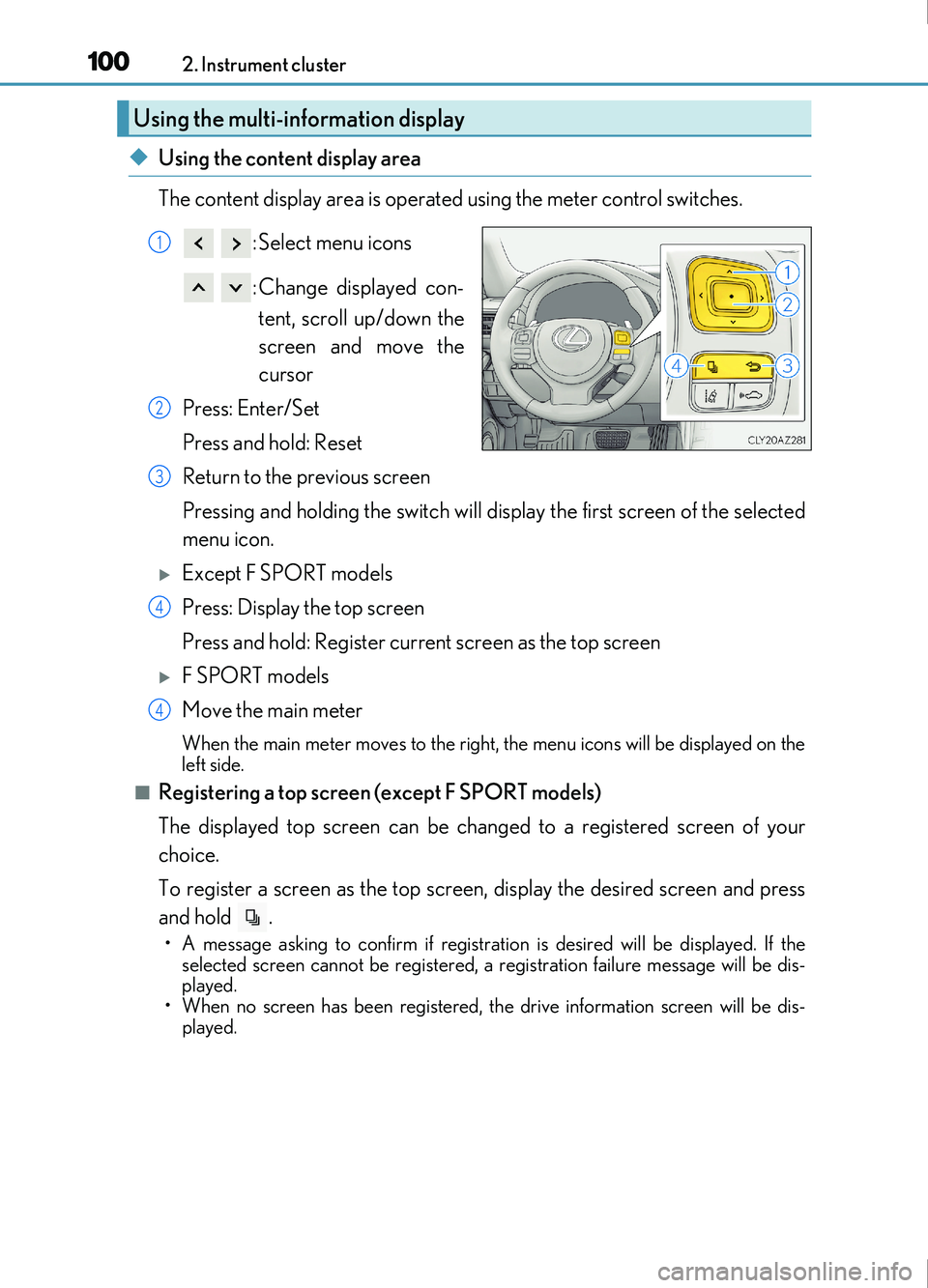
◆Using the content display area
The content display area is operated using the meter control switches. : Select menu icons
: Change displayed con-tent, scroll up/down the
screen and move the
cursor
Press: Enter/Set
Press and hold: Reset
Return to the previous screen
Pressing and holding the switch will display the first screen of the selected
menu icon.
Except F SPORT models
Press: Display the top screen
Press and hold: Register current screen as the top screen
F SPORT models
Move the main meter
When the main meter moves to the right, the menu icons will be displayed on the
left side.
■Registering a top screen (except F SPORT models)
The displayed top screen can be changed to a registered screen of your
choice.
To register a screen as the top screen, display the desired screen and press
and hold .
• A message asking to confirm if registrati on is desired will be displayed. If the
selected screen cannot be registered, a registration failure message will be dis-
played.
• When no screen has been registered, th e drive information screen will be dis-
played.
Using the multi-information display
1
2
3
4
4
Page 101 of 676
1012. Instrument cluster
2
Instrument cluster
IS200t_EE(OM53D77E)
■Resetting drive information
To reset the average fuel economy (after reset)/average vehicle speed (after
reset)/elapsed time (after reset) that are displayed on , display the desired
item and press and hold .
If both of the displayed items are resettable, a message will be displayed asking
which item(s) to reset.
◆Using the odometer/trip meter display area
Items in this area are operated using the odometer/trip meter and trip meter
reset button.
Press: Change displayed item
Each time the button is pressed, the
displayed item will be changed.
Press and hold: Reset
Display the desired trip meter and
press and hold the button to reset the
trip meter.
Page 102 of 676

1022. Instrument cluster
IS200t_EE(OM53D77E)
Select a menu icon to display its content.Drive information ( P. 103)
Select to display various drive data.
Navigation system-linked display (if equipped)
Select to display the following navigation system-linked information.
•Route guidance
• Compass display (heading-up display)
Audio system-linked display (if equipped)
Select to enable selection of an audio source or track on the meter using the meter
control switches.
Driving assist system information (if equipped)
Select to display the operational status of the following systems: • Cruise control ( P. 286)
• Dynamic radar cruise control ( P. 274)
• LDA (Lane Departure Alert with steering control) ( P. 260)
• RSA (Road Sign Assist) ( P. 269)
Stop & Start system information (if equipped) ( P. 106, 290)
Select to display the operational status of the Stop & Start system.
Warning message display ( P. 560)
Select to display warning messages and measures to be taken if a malfunction is
detected.
Settings display ( P. 107)
Select to change the meter display settings and other settings.
Menu icons
Page 103 of 676

1032. Instrument cluster
2
Instrument cluster
IS200t_EE(OM53D77E)
F SPORT models: Some drive information items can only be displayed when the
main meter is in the center position or when it is moved to the right.
■Drive information 1/Drive information 2/Drive information 3
Displays drive information such as the following.
F SPORT models (when the main meter is in the center position): Each item is dis-
played separately.
●Drive information 1
• Current fuel consumption
• Average fuel economy (after reset)
●Drive information 2• Distance (driving range)
• Average vehicle speed (after reset)
●Drive information 3• Average fuel economy (after refuel)
• Elapsed time (after start)
Displayed items (listed below) can be changed on . ( P. 107)
Drive information ( )
ItemContent
Current fuel consumption Displays instantaneous current fuel consumption
Average fuel
economy
After resetDisplays average fuel co nsumption since display
reset
*1, 2
After startDisplays average fuel consumption since engine
start
*2
After refuelDisplays average fuel consumption since refuel*2, 3
Average
vehicle
speedAfter resetDisplays average vehicle speed since display
reset
*1
After startDisplays average vehicle speed since engine start
Elapsed timeAfter resetDisplays elapsed time since display reset*1
After startDisplays elapsed time since engine start
DistanceDriving rangeDisplays driving range with remaining fuel*3, 4
After startDisplays drive distance since vehicle start
OtherBlankNo item
Page 104 of 676

1042. Instrument cluster
IS200t_EE(OM53D77E)
*1: Resetting: P. 101
*2: Use the displayed fuel consumption as a reference.
*3: When only a small amount of fuel is added to the tank, the display may not be
updated.
When refueling, turn the engine switch off. If the vehicle is refueled without turning the
engine switch off, the display may not be updated.
*4: This distance is computed based on your average fuel consumption. As a result, theactual distance that can be driven may differ from that displayed.
■Eco Driving Indicator
P. 113
■Boost gauge/engine oil temperature gauge/engine oil pressure gauge (if
equipped)
*1
Boost gauge
Displays the boost pressure. The
display will change color if the
specified pressure is exceeded.
Engine oil temperature gauge
Displays the engine oil tempera-
ture. The display will flash if the
engine oil temperature exceeds
140 °C (284 °F).
Engine oil pressure gauge
Displays the engine oil pressure. A buzzer will sound and warning message
will be displayed if the engine oil pressure becomes low. ( P. 560)
This display is intended for use as a guid eline. Depending on factors such as the
road surface condition, temperature and vehicle speed, the display may not show
the actual condition of the vehicle.
*1: For F SPORT models, this item is not ava ilable when the main meter is in the center
position.
1
2
3
Page 105 of 676

1052. Instrument cluster
2
Instrument cluster
IS200t_EE(OM53D77E)
■G-force (if equipped) *1
Displays lateral G-forces on the vehicle. Acceleration G-force on the
vehicle
Current G-force value (analyzed
value of front/rear and left/right
G-forces)
Record of the maximum G-forces
This display is intended for use as a guid eline. Depending on factors such as the
road surface condition, temperature and vehicle speed, the display may not show
the actual condition of the vehicle.
●Resetting the record of maximum G-forces
Press and hold to reset the record.
●Peak hold function
If lateral G-forces of 0.5 G or greater are generated, the G-force value
display will turn amber and be held for 2 seconds.
*1: For F SPORT models, this item is not ava ilable when the main meter is in the center
position.
■Sway warning (if equipped)*1
Detects the sway of the vehicle within a lane, which is often associated with a
decrease in the driver’s attention level, and displays the decrease in attention
using a bar display.
The shorter the bar length, the more the driver may need to rest.
This display is a part of the LDA (Lane Departure Alert with steering control) sys-
tem. The display is enabled when the operating conditions of the vehicle sway
warning are met. ( P. 260)
*1: For F SPORT models, this item is not ava ilable when the main meter is in the center
position.
■Gear positions
Displays the current gear position when the shift lever is in D or M.
1
2
3
Page 106 of 676

1062. Instrument cluster
IS200t_EE(OM53D77E)
■Units (if equipped)*2
The units of measure used can be changed while driving.
Unlike the units setting performed on , the units setting performed on can
be changed while driving.
*2: For F SPORT models, this item is not availa ble when the main meter is in the right-side
position.
■Blank (No items)
Displays no drive information contents.
■Stop & Start system operation time (current)/status notification
Displays the current amount of time the engine has been stopped due to the
operation of the Stop & Start system. Also shows the status of the Stop & Start
system with a pop-up display. ( P. 296)
■Stop & Start system total operation time/amount of fuel saved
Press or on the steering wheel to display the following items:
●Stop & Start system operation time (after start/after reset)
Displays the accumulated total of the following:
• Stop & Start system operation time since engine start
• Stop & Start system operation time since display was reset
●Amount of fuel saved (after start/after reset)
Displays the accumulated total of the following:
• Amount of fuel saved since engine start
• Amount of fuel saved since display was reset
Use the displayed amount of saved fuel for reference only.
■Stop & Start system settings
Press on the steering wheel to display the Stop & Start system settings
screen.
On this screen, the following operations can be performed:
● Stop & Start
The length of time the Stop & Start syst em will operate when the “A/C” switch of
the air conditioning system is on can be set to 2 different levels. This setting can
also be changed on .
●Reset
Select to reset the Stop & Start system operation time/amount of fuel saved dis-
play.
To reset, move the cursor to “Reset”, and then press and hold .
Stop & Start system information ( ) (if equipped)
Page 107 of 676
1072. Instrument cluster
2
Instrument cluster
IS200t_EE(OM53D77E)
◆Changing settings
Use the meter control switches on the steering wheel to change settings.Press or to select .
Operate the switches to select a desired item.
Change the setting by referring to the message displayed on the screen.
◆Setting items
■ LDA (Lane Departure Alert with steering control) (if equipped)
( P. 260)
The following LDA system settings can be changed:
Settings display ( )
1
2
3
ItemSettingsDetails
Steering assistOnSelect to enable/disable steering
wheel assistance.
Off
AlertSelect to set a vibrator or buzzer as
the notification method used to warn
the driver.
Alert sensitivityHighSelect to set the warning sensitivity.Normal
Sway warningOnSelect to enable/disable the vehicle
sway warning.
Off
Sway sensitivity
High
Select to set the vehicle sway warning
sensitivity.Medium
Low

