2017 Lexus GS350 parking brake
[x] Cancel search: parking brakePage 3 of 100

2
GS350_200t_QG_OM30G01U_(U)
Garage Door Opener......................................................................................................................78
Hands-free System For Cellular Phone
*
Bluetooth® phone pairing .........................................................................................................56
Contacts transfer .............................................................................................................. ............. 57
Registering the contacts in the favori tes list ...................................................................... 58
Calling by name................................................................................................................ ............. 58
Calling by favorites list ...................................................................................................... ...........59
Calling the message sender ..................................................................................................... .59
Receiving a call ............................................................................................................... ................59
Steering switches .............................................................................................................. .............59
Headlights .............................................................................................................................................. 26
Head-up Display ............................................................................................................................... ... 24
Intuitive Parking Assist ..................................................................................................................... 42
Lexus Enform ............................................................................................................................... .........84
Lexus Enform Safety Connect ......................................................................................................82
LKA (Lane-Keeping Assist) ...........................................................................................................34
Multi-information Display .............................................................................................................. 22
Navigation System Register home .................................................................................................................. ...............52
Destination search - Search by address ..............................................................................53
Destination search - Search points of interest by name ................................................54
Destination search - Search points of interest by category .........................................55
Destination search - Search points of interest by phone number .............................55
Voice Command System ........................................................................................................... 73
Parking Brake .......................................................................................................................................20
Portable Audio Device Ports ........................................................................................................78
Rear Air Conditioning System Control panel .................................................................................................................. ................69
Front controller............................................................................................................... ................69
Remote Touch ............................................................................................................................... .......48
*: These features may be operated by Voice Command (See P.73)
Page 7 of 100

6
GS350_200t_QG_OM30G01U_(U)
: If equipped
*: Refer to “OWNER’S MANUAL”.
Remote Touch screen
Navigation system
P.48
P.52
Brake hold switch P.21
Clock*
Trunk opener main switch*
Audio system P.60
Air conditioning system
P.65
Emergency flasher switch*
See P.9
Engine switch
P.16
Parking brake switches P.20
Floor mats P.11
Page 17 of 100
16
GS350_200t_QG_OM30G01U_(U)
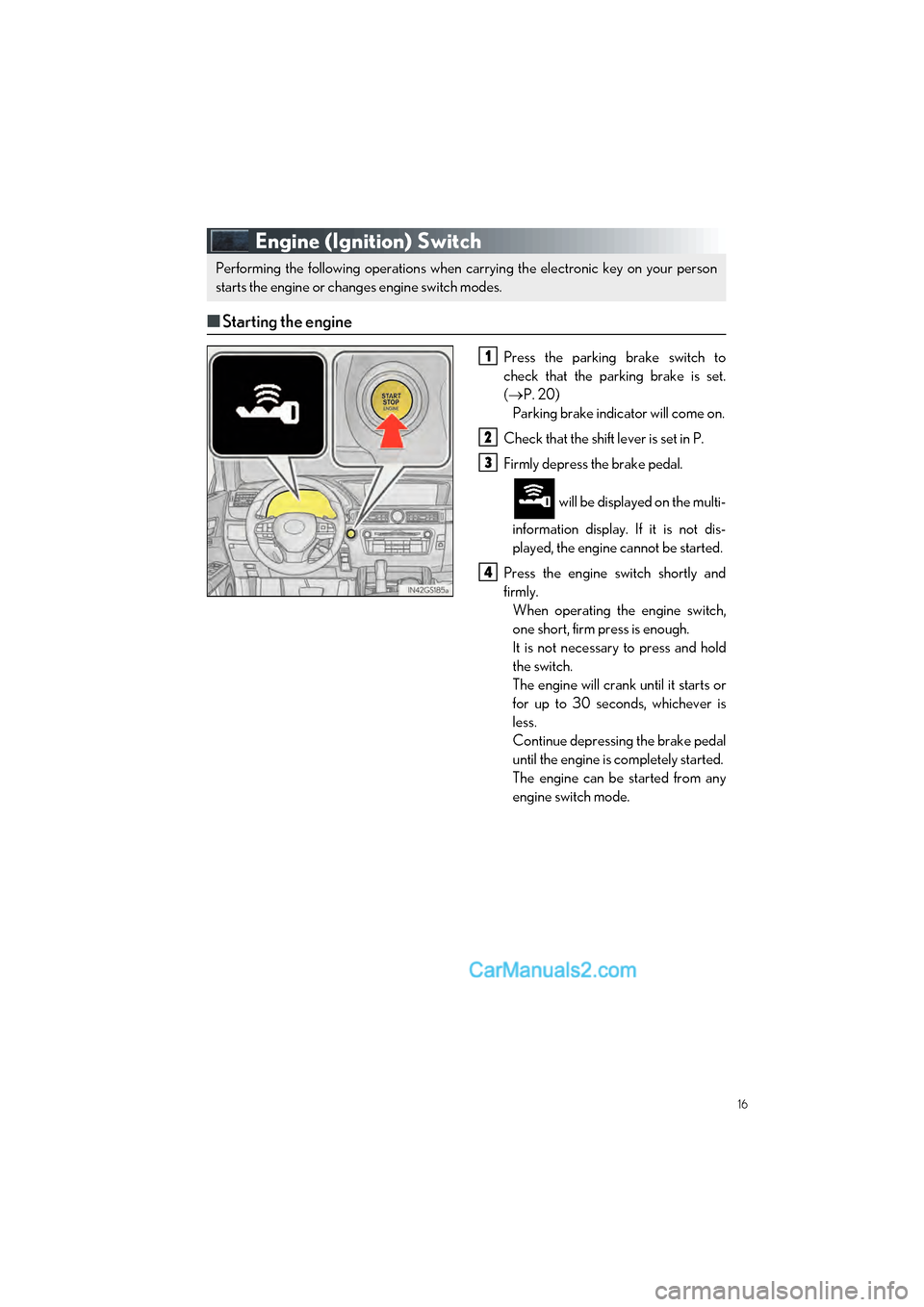
Engine (Ignition) Switch
■Starting the engine
Press the parking brake switch to
check that the parking brake is set.
( P. 20)
Parking brake indicator will come on.
Check that the shift lever is set in P.
Firmly depress the brake pedal.
will be displayed on the multi-
information display. If it is not dis-
played, the engine cannot be started.
Press the engine switch shortly and
firmly. When operating the engine switch,
one short, firm press is enough.
It is not necessary to press and hold
the switch.
The engine will crank until it starts or
for up to 30 seconds, whichever is
less.
Continue depressing the brake pedal
until the engine is completely started.
The engine can be started from any
engine switch mode.
Performing the following operations when carrying the electronic key on your person
starts the engine or changes engine switch modes.
1
2
3
4
Page 18 of 100

17
GS350_200t_QG_OM30G01U_(U)
■Stopping the engine
Stop the vehicle.
Set the parking brake ( P. 20), and shift the shift lever to P.
Press the engine switch.
Release the brake pedal and check that “POWER ON” on the multi-information dis-
play is off.
■ Changing engine switch modes
Modes can be changed by pressing the engine switch with brake pedal released. (The mode
changes each time the switch is pressed.)
Off
*
The emergency flashers can be used.
“POWER ON” will not be displayed on
the multi-information display.
ACCESSORY mode Some electrical components such as the
audio system can be used.
“POWER ON” will be displayed on the
multi-information display.
IGNITION ON mode All electrical components can be used.
“POWER ON” will be displayed on the
multi-information display.
*: If the shift lever is in a position other than
P when turning off the engine, the
engine switch will be turned to ACCES-
SORY mode, not to off.
1
2
3
4
Page 21 of 100

20
GS350_200t_QG_OM30G01U_(U)
Parking Brake
■Manual mode
Sets the parking brake
The parking brake indicator light will
come on.
Press and hold the parking brake
switch if an emergency occurs and it
is necessary to operate the parking
brake while driving.
Releases the parking brake Operate the parking brake switch
while depressing the brake pedal.
Make sure that the parking brake
indicator light goes off.
■ Automatic mode
The parking brake is set or released auto matically according to shift lever operation.
Turns automatic mode on/off
●When the shift lever is moved out of P,
the parking brake will be released.
● When the shift lever is moved into P, the
parking brake will be set.
Operate the shift lever with the brake pedal
depressed.
U.S.A. Canada
1
2
Page 90 of 100

What to do if...
89
GS350_200t_QG_OM30G01U_(U)
List of Warning/Indicator Lights
Immediately stop the vehicle in a safe place and contact your Lexus dealer.
Continuing to drive the vehicle may be dangerous.
(U.S.A.)
Brake system warning light
(Canada)
Immediately stop the vehicle in a safe place and contact your Lexus dealer.
Charging system warning light*1
Have the vehicle inspected by your Lexus dealer immediately.
(U.S.A.)
Malfunction
indicator lamp(Flashes)
“AFS OFF” indicator*1
(Canada)
(Flashes)
Brake hold operated indicator
SRS warning light(Flashes)(U.S.A.)
Parking brake
indicator
(U.S.A.)
ABS warning light(Flashes)
(Canada)
(Canada)Brake system warning light
Electric power steering
system warning light
(Blinking and then continu-
ously on)Tire pressure warning light
(Flashes)
PCS (Pre-Collision System)
warning light
*1
Slip indicatorLKA warning light*1
For further information, refer to the OWNER’S MANUAL.
Page 91 of 100

90
What to do if...
GS350_200t_QG_OM30G01U_(U)
Follow the correction procedures.
Low fuel level warning lightMaster warning light
Seat belt reminder light
(Illuminates without
blinking)
Tire pressure warning light*2
See the OWNER’S MANUAL
Turn signal indicatorIntuitive parking assist
indicator
*1, 3
Headlight indicator (U.S.A.)“AFS OFF” indicator*1
Tail light indicator (Canada)
(Flashes)
Slip indicator
Headlight high beam indicatorVSC OFF indicator
Automatic High Beam
indicator
*1(Flashes
faster)
PCS (Pre-Collision System)
warning light
*1
Cruise control indicator
BSM (Blind Spot Monitor)
outside rear view mirror
indicators
*1
Dynamic radar cruise control
indicator
*1BSM (Blind Spot Monitor)
indicator
*1
Cruise control “SET” indicatorBrake hold standby
indicator
LKA indicator*1Brake hold operated
indicator
For further information, refer to the OWNER’S MANUAL.
Page 92 of 100

What to do if...
91
GS350_200t_QG_OM30G01U_(U)
*1: If equipped
*2: It also comes on due to natural causes such as natural air leaks and tire inflation pressurechanges caused by temperature. Adjust the tire inflation pressure to the specified level.
The light will turn off after a few minutes. In cas e the light does not turn off even if the tire
inflation pressure is adjusted, have th e system checked by your Lexus dealer.
*3: Refer to “NAVIGATION SYSTEM OWNER’S MANUAL”.
See the OWNER’S MANUAL
Low outside temperature
indicator(U.S.A.)Parking brake
indicator
Eco Driving Indicator Light(Canada)
“AIR BAG ON/
OFF” indicator
●Drive mode indicators
Except F SPORT models
Eco drive mode indicator“SPORT” indicator*1
“SPORT S” indicator*1“SPORT S+” indicator*1
“Customize” indicator*1Snow mode indicator
F SPORT models
Eco drive mode indicator“SPORT S” indicator
“SPORT S+” indicator“CUSTOMIZE” indicator
Snow mode indicator
For further information, refer to the OWNER’S MANUAL.