Page 99 of 600
99
2. Instrument cluster
2
Instrument cluster
GS450h_300h_OM_OM30F92E_(EE) Warning lights inform the driver of malfunctions in the indicated vehicle’s sys-
tems.
Warning lights
*
1
Brake system warning light ( P. 460) *
2, 3
(If equipped)
“AFS OFF” indicator (
P. 462)
* 2, 4
Charging system warning
light (P. 460) *
1, 3
Brake hold operated
indicator (
P. 462)
* 2
Malfunction indicator
lamp ( P. 460) *
3
Parking brake indicator (
P. 462)
* 2
SRS warning light ( P. 460) *
1
Brake system warning light (
P. 462)
* 1
ABS warning light ( P. 461)
Low fuel level warning light ( P. 462)
* 2
Electric power steering
system warning light (
P. 461)Seat belt reminder light ( P. 462)
* 2, 3
(If equipped)
PCS (Pre-Crash Safety
system) warning light (
P. 461) *
2
Master warning light ( P. 462)
* 1
Slip indicator (
P. 461) *
2
(If equipped)
Tire pressure warning light (
P. 463)
(If equipped)
LKA warning light ( P. 463)
Page 105 of 600

105
2. Instrument cluster
2
Instrument cluster
GS450h_300h_OM_OM30F92E_(EE) Engine coolant temperature gauge
Displays the engine coolant temperature
Tachometer/Hybrid System Indicator
Tachometer:
Displays the engine speed
in revolutions per minute.
Hybrid System Indicator:
Displays hybrid system outp ut or regeneration level (P. 108)
Outside temperature
Displays the outside temperature within the range of -40 C (-40 F) to 50 C
(122 F). Low outside temperature indicator comes on when the ambient temperature
is 3 C (37 F) or lower.
Clock
Time displayed is linked to the anal og clock on the instrument panel. (P. 378)
Speedometer
Displays the vehicle speed
Fuel gauge
Displays the quantity of fuel remaining in the tank
Multi-information display
Presents the driver with a variety of driving-related data ( P. 111)
Displays warning messages in case of a malfunction (P. 466)
Odometer, trip meter, maintenance required information and speed warning
display
Odometer:
Displays the total distance the vehicle has been driven
Trip meter:
Displays the distance the vehicle has been driven since the meter was last reset. Trip
meters “A” and “B” can be used to record and display different distances inde-
pendently.
Maintenance required information:
Page 109 of 600
109
2. Instrument cluster
2
Instrument cluster
GS450h_300h_OM_OM30F92E_(EE)
■Tachometer
Hybrid System Indicator switches to the tach ometer when driving mode is in sport mode.
The settings of the tachometer display can be changed on the multi-information display.
( P. 111)
■Engine speed
On hybrid vehicles, engine speed is precis ely controlled in order to help improve fuel
efficiency and reduce exhaust emissions etc.
There are times when the engine speed that is displayed may differ even when vehicle
operation and driving conditions are the same.
■Outside temperature display
●In the following situations, the correct outside temperature may not be displayed, or the
display may take longer than normal to change.
Page 113 of 600
113
2. Instrument cluster
2
Instrument cluster
GS450h_300h_OM_OM30F92E_(EE) Items displayed can be switched by pressing or of the meter control
switches to select and pressing or .
■Current fuel consumption
*1
Displays the current rate of fuel consumption
■Average fuel economy (after reset *2
/after start/after refuel) *1
Displays the average fuel consumption since the function was reset, the hybrid
system was started, and the vehicle was refueled, respectively Use the displayed average fuel consumption as a reference.
■Average speed (after reset *2
/after start) *1
Displays the average vehicle speed since the function was reset and the
hybrid system was started, respectively
■Elapsed time (after reset *2
/after start) *1
Displays the elapsed time since the function was reset and the hybrid system
was started, respectively
■Distance (range/after start) *1
Displays the estimated maximum distance that can be driven with the quantity
of fuel remaining and the distance driven after the hybrid system was started
respectively.
Page 129 of 600
129
2. Instrument cluster
2
Instrument cluster
GS450h_300h_OM_OM30F92E_(EE) Press the “MENU” button on the Remote Touch, then select on the “Menu”
screen.
■Trip information
If the “Energy monitor” or “Past record” screen is displayed, select “Trip
infor-
mation”.
Resetting the consumption data
Fuel consumption in the past 15
minutes
Current fuel consumption
Regenerated energy in the past
15 minutes
One symbol indicates 50 Wh.
Up to 5 symbols are shown.
Average vehicle speed since the hybrid system was started.
Elapsed time since the hybrid system was started.
Cruising range ( P. 130)
Average fuel consumption for the past 15 minutes is divided by color into past
averages and averages attained since the power switch was last turned to ON
mode. Use the displayed average fuel consumption as a reference.
The image is an example only, and may vary slightly from actual conditions.
Consumption
1
2
3
4
5
6
7
Page 130 of 600

1302. Instrument cluster
GS450h_300h_OM_OM30F92E_(EE)
■Past record
If the “Energy monitor” or “Trip informat ion” screen is displayed, select “Past
record”.
Resetting the past record data
Best recorded fuel consumption
Average fuel consumption
Previous fuel consumption record
Updating the average fuel con-
sumption data
The average fuel consumption his-
tory is divided by color into past
averages and the average fuel con-
sumption since the last updated. Use
the displayed average fuel consump-
tion as a reference.
The image is an example only, and may vary slightly from actual conditions.
■Updating the past record data
Update the average fuel consumption by selecting “Update” to measure the current fuel
consumption again.
■Resetting the data
The fuel consumption data can be deleted by selecting “Clear”.
■Cruising range
Displays the estimated maximum distance that can be driven with the quantity of fuel remaining.
This distance is computed based on your average fuel consumption.
As a result, the actual distance that can be driven may differ from that displayed.
1
2
3
4
5
Page 131 of 600
131
2. Instrument cluster
2
Instrument cluster
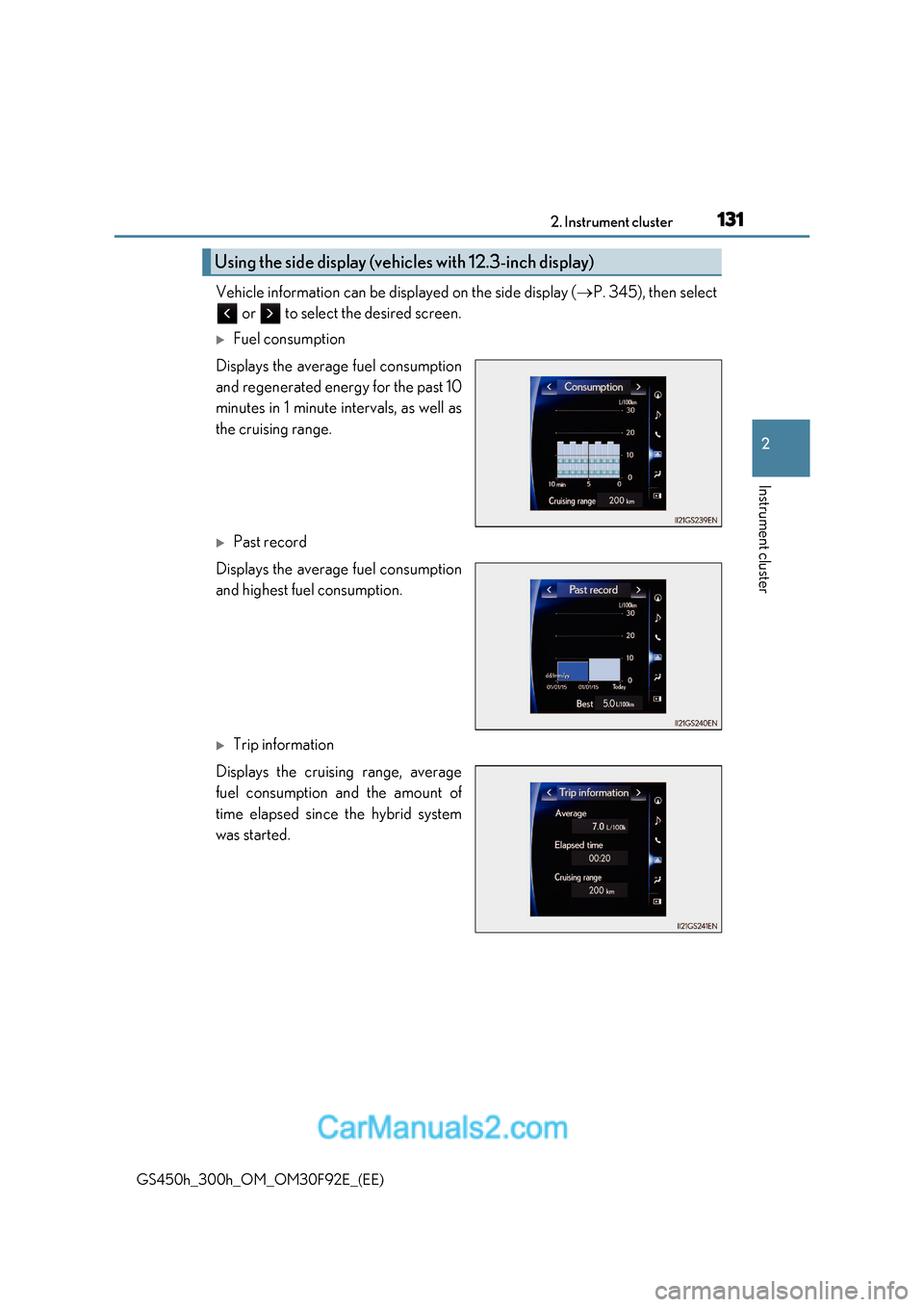
GS450h_300h_OM_OM30F92E_(EE) Vehicle information can be displayed on the side display (
P. 345), then select
or to select the desired screen.
Fuel consumption
Displays the average fuel consumption
and regenerated energy for the past 10
minutes in 1 minute intervals, as well as
the cruising range.
Past record
Displays the average fuel consumption
and highest fuel consumption.
Trip information
Displays the cruising range, average
fuel consumption and the amount of
time elapsed since the hybrid system
was started.
Using the side display (vehic les with 12.3-inch display)
Page 199 of 600

199
4Driving
GS450h_300h_OM_OM30F92E_(EE) 4-1. Before driving
Driving the vehicle.................... 200
Cargo and luggage .................. 208
Trailer towing (vehicles without towing package) .....209
Trailer towing (vehicles with towing package)....................... 210
4-2. Driving procedures Power (ignition) switch ..............217
EV drive mode ............................ 222
Hybrid transmission .................. 224
Turn signal lever .......................... 231
Parking brake .............................. 232
Brake Hold....................................235
4-3. Operating the lights and wipers
Headlight switch ......................... 237
AHS (Adaptive High-beam System)......................................... 241
Automatic High Beam ............. 246
Fog light switch .......................... 250
Windshield wipers and washer.................................. 251 4-4. Refueling
Opening the fuel tank cap ..... 257
4-5. Using the driving support systems
Lexus Safety System+ ................261
PCS (Pre-Crash Safety system) ........................................ 270
LKA (Lane-Keeping Assist) .......................................... 282
RSA (Road Sign Assist) ............291
Dynamic radar cruise control with full-speed
range ............................................ 296
Cruise control ............................ 308
Driving mode select switch ...... 311
BSM (Blind Spot Monitor) ...... 314