Page 187 of 640
CT200h_OM_OM76215U_(U)
1874-4. Refueling
4
DrivingPress the opener to open the fuel
filler door.
Turn the fuel tank cap slowly to open
and hang it on the back of the fuel
filler door.
WA R N I N G
■When refueling
Observe the following precautions to prevent fuel overflowing from the fuel tank:
●Securely insert the fuel nozzle into the fuel filler neck.
●Stop filling the tank after the fuel nozzle automatically clicks off.
●Do not top off the fuel tank.
NOTICE
■Refueling
Do not spill fuel during refueling.
Doing so may damage the vehicle, such as causing the emission control system to
operate abnormally or damaging fuel system components or the vehicle’s painted sur-
face.
Opening the fuel tank cap
1
2
Page 188 of 640
188
CT200h_OM_OM76215U_(U)4-4. Refueling
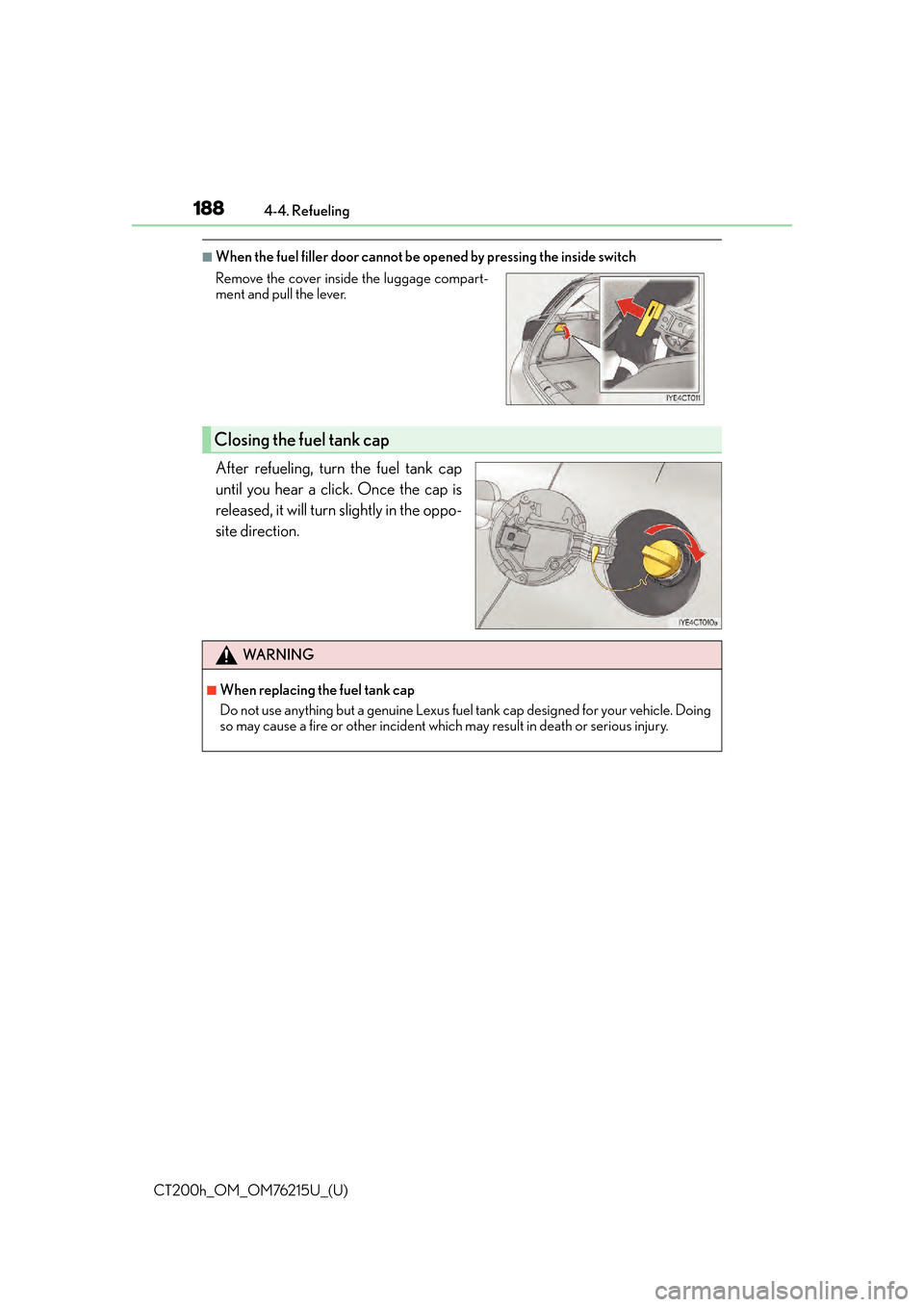
■When the fuel filler door cannot be
opened by pressing the inside switch
After refueling, turn the fuel tank cap
until you hear a click. Once the cap is
released, it will turn slightly in the oppo-
site direction.
Remove the cover inside the luggage compart-
ment and pull the lever.
Closing the fuel tank cap
WA R N I N G
■When replacing the fuel tank cap
Do not use anything but a genuine Lexus fuel tank cap designed for your vehicle. Doing
so may cause a fire or other incident whic h may result in death or serious injury.
Page 234 of 640

234
CT200h_OM_OM76215U_(U)4-5. Using the driving support systems
The image is blurry
Dirt or foreign matter (such as water
droplets, snow, mud etc.) is adhering to
the camera.Flush the camera with a large quantity of
water and wipe the camera lens clean
with a soft and wet cloth.
The image is out of alignment
The camera or surrounding area has
received a strong impact.Have the vehicle inspected by your Lexus
dealer.
The guide lines are very far out of alignment
The camera position is out of alignment.Have the vehicle inspected by your Lexus
dealer.
• The vehicle is tilted (there is a heavy
load on the vehicle, tire pressure is low
due to a tire puncture, etc.)
• The vehicle is used on an incline.If this happens due to these causes, it
does not indicate a malfunction.
Back up while visually checking the vehi-
cle’s surroundings.
The estimated course lines move even though the steering wheel is straight
There is a malfunction in the signals being
output by the steering sensor.Have the vehicle inspected by your Lexus
dealer.
Guide lines are not displayed
The back door is open.
Close the back door.
If this does not resolve the symptom, have
the vehicle inspected by your Lexus
dealer.
The estimated course lines are not displayed
• Battery power is low.
• The steering sensor has been rein-
stalled.
• There is a malfunction in the signals
being output by the steering sensor.Stop the vehicle, and turn the steering
wheel as far as it will go to the left and
right.
If this does not resolve the symptom, have
the vehicle inspected by your Lexus
dealer.
Likely causeSolution
Page 249 of 640

249
CT200h_OM_OM76215U_(U)4-6. Driving tips
4
Driving
Winter driving tips
●Use fluids that are appropriate to the prevailing outside temperatures.
•Engine oil
• Engine/power control unit coolant
• Washer fluid
●Have a service technician inspect the condition of the 12-volt battery.
●Have the vehicle fitted with four snow tires or purchase a set of tire chains for
the front tires.
Ensure that all tires are the same size and br and, and that chains match the size of the
tires.
Perform the following according to the driving conditions:
●Do not try to forcibly open a window or move a wiper that is frozen. Pour
warm water over the frozen area to melt the ice. Wipe away the water imme-
diately to prevent it from freezing.
●To ensure proper operation of the climate control system fan, remove any
snow that has accumulated on the air inlet vents in front of the windshield.
●Check for and remove any excess ice or snow that may have accumulated on
the exterior lights, vehicle’s roof, chassis, around the tires or on the brakes.
●Remove any snow or mud from the bottom of your shoes before getting in the
vehicle.
Carry out the necessary preparations and inspections before driving the vehi-
cle in winter. Always drive the vehicle in a manner appropriate to the prevail-
ing weather conditions.
Preparation for winter
Before driving the vehicle
Page 259 of 640
259
CT200h_OM_OM76215U_(U)5-1. Basic Operations
5
Audio system
AUX port/USB port
■iPod
Press down and release the lid.
Open the cover and connect an
iPod using an iPod cable.
Turn on the power of the iPod if it is
not turned on.
■USB memoryPress down and release the lid.
Open the cover and connect the USB memory device.
Turn on the power of the USB memory device if it is not turned on.
■Portable audio playerPress down and release the lid.
Open the cover and connect the portable audio player.
Turn on the power of the portable audio player if it is not turned on.
Connect an iPod, USB memory device or portable audio player to the AUX
port/USB port as indicated below. Press the “CD•AUX” button to select
“iPod”, “USB” or “AUX”.
Connecting using the AUX port/USB port
1
2
1
2
1
2
Page 320 of 640

320
CT200h_OM_OM76215U_(U)5-10. Bluetooth
®
Bluetooth®
■Conditions under which th
e system will not operate
●If using a cellular phone that does not support Bluetooth®
●If the cellular phone is switched off
●If you are outside service range
●If the cellular phone is not connected
●If the cellular phone’s battery is low
●If the cellular phone is behind the seat or in the glove box or console box
●If metal is covering or touching the portable player/phone
■Signal status
This display may not correspond exact ly with the cellular phone itself.
■When using the hands-free system
●The audio system and voice guidance are muted when making a call.
●If both parties speak at the same time, it may be difficult to hear.
●If the incoming call volume is ov erly loud, an echo may be heard.
●Try to face toward the microphone as much as possible when speaking.
●In the following circumstances, it may be difficult to hear the other party:
• When driving on unpaved roads
• When driving at high speeds
• When a window is open
• When the air conditioning is blowing directly on the microphone
• When the air conditioning is set to high
■When transferring ownership of the vehicle
Be sure to initialize the system to prevent pe rsonal data from being improperly accessed.
( P. 3 0 7 )
■For detailed information about Handsfree Phone System
For assistance with pairing and operatin g your cell phone, go to the website
www.lexus.letstalk.com.
■About Bluetooth®
Bluetooth is a registered trademark of
Bluetooth SIG, Inc.
Page 330 of 640
330
CT200h_OM_OM76215U_(U)5-11. Basic Operations (Lexus Display Audio System)
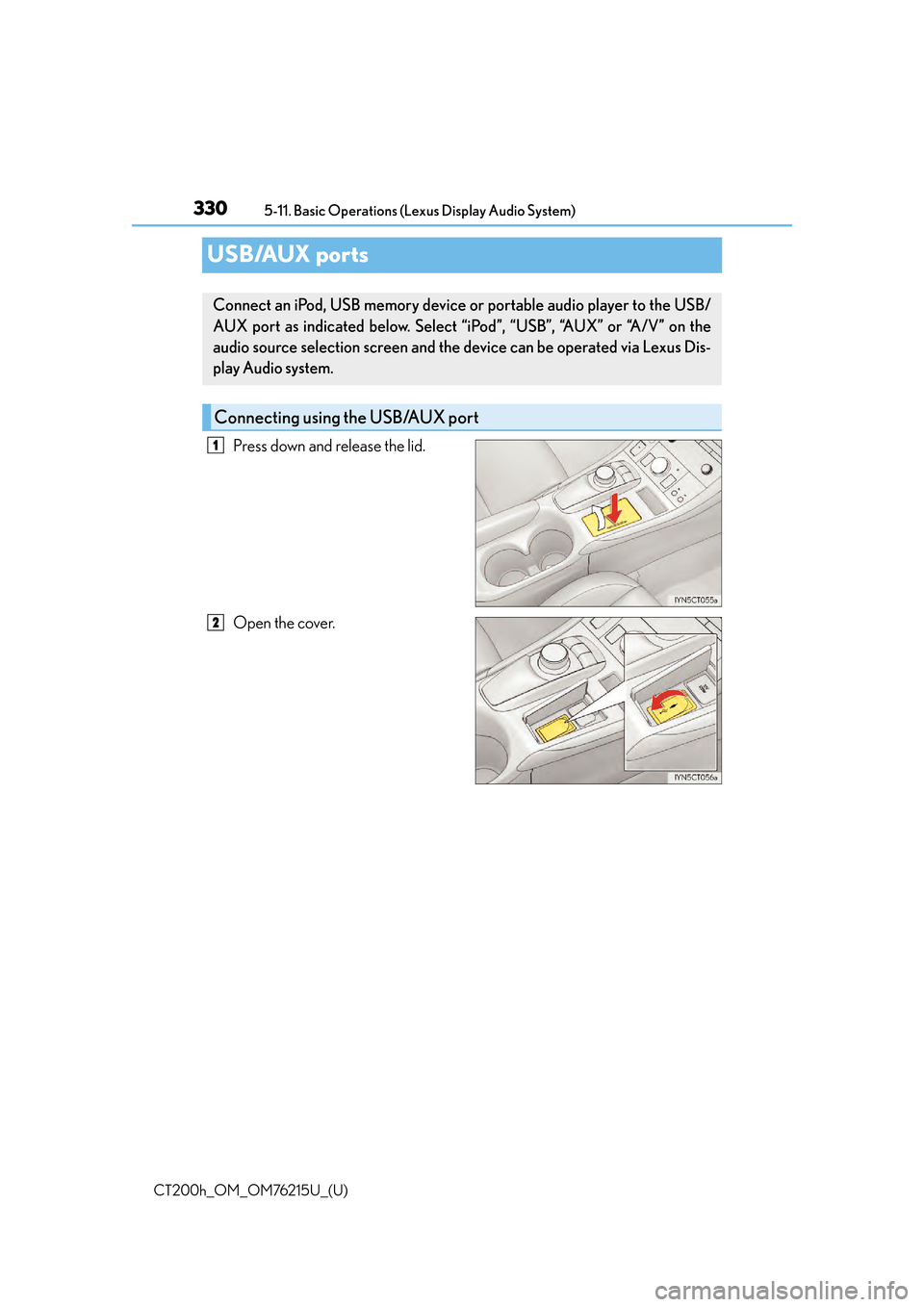
USB/AUX ports
Press down and release the lid.
Open the cover.
Connect an iPod, USB memory device or portable audio player to the USB/
AUX port as indicated below. Select “iPod”, “USB”, “AUX” or “A/V” on the
audio source selection screen and the device can be operated via Lexus Dis-
play Audio system.
Connecting using the USB/AUX port
1
2
Page 331 of 640
CT200h_OM_OM76215U_(U)
3315-11. Basic Operations (Lexus Display Audio System)
5
Audio system
■iPod
Open the cover and connect an iPod using an iPod cable.
Turn on the power of the iPod if it is not turned on.
■USB memory
Open the cover and connect the USB memory device.
Turn on the power of the USB memory device if it is not turned on.
■Portable audio player
Open the cover and connect the portable audio player.
Turn on the power of the portable audio player if it is not turned on.
WA R N I N G
■While driving
Do not connect a device or operate the device controls.