2017 KIA SOUL phone
[x] Cancel search: phonePage 312 of 589
![KIA SOUL 2017 Owners Manual Audio system
577
If there are connected devices
Select the [PHONE]
button on the
audio system ➟ Select [Settings] ➟
Select [Connections] ➟ Select
Bluetooth®Wireless Technology device
to connect](/manual-img/2/54636/w960_54636-311.png "KIA SOUL 2017 Owners Manual Audio system
577
If there are connected devices
Select the [PHONE]
button on the
audio system ➟ Select [Settings] ➟
Select [Connections] ➟ Select
Bluetooth®Wireless Technology device
to connect")
Audio system
577
If there are connected devices
Select the [PHONE]
button on the
audio system ➟ Select [Settings] ➟
Select [Connections] ➟ Select
Bluetooth®Wireless Technology device
to connect ➟ Select [Connect] ➟
Connect
Bluetooth®Wireless Technology.
✽ ✽ NOTICE
• Only one Bluetooth®Wireless
Technology device can be connect-
ed at a time.
• When a Bluetooth
®Wireless
Technology device is connected,
other devices cannot be paired.
Accepting/rejecting phone calls
Receiving phone calls with
Bluetooth®Wireless Technology con-
nected.
(1) Caller name: If the caller number is in your contacts, the correspon-
ding name is displayed.
(2) Incoming phone number: Incoming phone number is displayed.
(3) Accept: Accept call.
(4) Reject: Reject call.
✽ ✽ NOTICE
• When the incoming call screen is
displayed, audio mode and the set-
tings screen cannot be shown.
Only call volume control is sup-
ported.
• Some Bluetooth
®Wireless Technology
devices may not support the call
reject function.
• Some Bluetooth
®Wireless Technology
devices may not support the phone
number display function.
Page 313 of 589
![KIA SOUL 2017 Owners Manual Audio system
78
5
Operation during calls
Incoming call with Bluetooth®
Wireless Technology connected ➟
Select [Accept].
(1) Call duration: Call duration display.
(2) Caller name: If the caller nu](/manual-img/2/54636/w960_54636-312.png "KIA SOUL 2017 Owners Manual Audio system
78
5
Operation during calls
Incoming call with Bluetooth®
Wireless Technology connected ➟
Select [Accept].
(1) Call duration: Call duration display.
(2) Caller name: If the caller nu")
Audio system
78
5
Operation during calls
Incoming call with Bluetooth®
Wireless Technology connected ➟
Select [Accept].
(1) Call duration: Call duration display.
(2) Caller name: If the caller number is in your contacts, the corresponding
name is displayed.
(3) Incoming phone number: Incoming phone number is displayed.
(4) Keypad: Number keypad for Automatic Response Service input
is displayed.
(5) Private: Call is transferred to a cell phone.
(6) Outgoing Volume: Adjust outgo- ing voice volume.
(7) End: End call.
✽ ✽ NOTICE
• Some Bluetooth®Wireless Technology
devices may not support the
Private function.
• The outgoing voice volume may vary depending on the type of
Bluetooth
®Wireless Technology
device. If the outgoing voice vol-
ume is too high or low, adjust the
Out Vol.
Favorites
Select the [PHONE] button on the
audio system ➟ Select [Favorites] ➟
Favorites list displayed.
(1) Favorites list: A list of paired favorites is displayed.
Connect a call when selected. (2) Add to Favorites: Add a down-
loaded phone number to favorites.
(3) Delete: Delete a saved favorites.
✽ ✽ NOTICE
• Up to 20 favorites can be paired
for each paired Bluetooth®
Wireless Technology device.
• Favorites can be accessed when the Bluetooth
®Wireless Technology
device they were paired from is
connected.
• The audio system does not down- load favorites from Bluetooth
®
Wireless Technology devices.
Favorites must be newly saved
before use.
• To add to favorites, contacts must be downloaded first.
• Saved favorites are not updated even if the contacts of the connected
Bluetooth
®Wireless Technology
device are changed. In this case,
favorites need to be deleted and
added again.
Page 314 of 589
![KIA SOUL 2017 Owners Manual Audio system
579
Call history
Select the [PHONE]button on the
audio system ➟ Select [Call history]
➟ Call history is displayed.
(1) Call history: Display the down- loaded call history list.
Connec](/manual-img/2/54636/w960_54636-313.png "KIA SOUL 2017 Owners Manual Audio system
579
Call history
Select the [PHONE]button on the
audio system ➟ Select [Call history]
➟ Call history is displayed.
(1) Call history: Display the down- loaded call history list.
Connec")
Audio system
579
Call history
Select the [PHONE]button on the
audio system ➟ Select [Call history]
➟ Call history is displayed.
(1) Call history: Display the down- loaded call history list.
Connect a call when selected.
(2) Sort by: Sort by all calls, dialed calls, received calls or missed calls.
(3) Download: Download call history from connected
Bluetooth®Wireless
Technology devices.
✽ ✽ NOTICE
• Up to 50 dialed, received and
missed calls are saved.
• When the latest call history is received, the existing call history is
deleted.
Contacts
Select the [PHONE] button on the
audio system ➟ Select [Contacts] ➟
Select letter (ABC) ➟ Contacts dis-
played.
(1) Contacts: Display downloaded contacts.
Connect a call when selected.
(2) Download: Download contacts from connected
Bluetooth®
Wireless Technology devices.
✽ ✽NOTICE
• Up to 2,000 contacts can be saved.
• In some cases, additional confir-
mation from your Bluetooth
®
Wireless Technology device is nec-
essary when downloading con-
tacts. If downloading of contacts
unsuccessful, consult your
Bluetooth
®Wireless Technology
device’s settings or the audio
screen to approve the download.
• Contacts without phone numbers are not displayed.
Page 315 of 589
![KIA SOUL 2017 Owners Manual Audio system
80
5
Dial
Select the [PHONE] button on the
audio ➟Select [Dial].
(1) Phone number entry window: The phone number entered using the
keypad is displayed.
(2) Clear - Press to delete indi](/manual-img/2/54636/w960_54636-314.png "KIA SOUL 2017 Owners Manual Audio system
80
5
Dial
Select the [PHONE] button on the
audio ➟Select [Dial].
(1) Phone number entry window: The phone number entered using the
keypad is displayed.
(2) Clear - Press to delete indi")
Audio system
80
5
Dial
Select the [PHONE] button on the
audio ➟Select [Dial].
(1) Phone number entry window: The phone number entered using the
keypad is displayed.
(2) Clear - Press to delete individual digits.
- Press and hold to delete theentire phone number.
(3) Keypad: Enter phone number.
(4)
Bluetooth®Wireless Technology
phone name
- The name of the connected
Bluetooth®Wireless Technology
device is displayed.
- Contacts matching the keypad number/letter input are displayed.(5) Call
- Enter and select a phone num-ber to call.
- Select without entering a phone number to see the most recent
dialed call.
Setup
Select the [PHONE] button on the
audio ➟Select [Settings].
- For phone Setup, refer to Setup page ➟Select [Bluetooth].
Page 316 of 589
Audio system
581
Siri
✽
✽NOTICE - Using Siri
• If you want to use Siri, you have to
connect your iOS device to multi-
media system through Bluetooth
®
Wireless Technology. (Please
check whether your iOS device
supports Siri and turning Siri On)
• If the iOS version is changed, the functions and response may be dif-
ferent according to the iOS device
and the latest version.
• Siri automatically stops in the fol- lowing events.
1) Outgoing and incoming phone calls.
2) Media (USB, etc.) is connected. (Siri mode is maintained when
iPod
®s are connected)
3) Rear camera is activated (option).
4) Vehicle is started or engine is turned off.
5) Screen transition buttons, such as RADIO or MEDIA, are
selected. (Continued)(Continued)
6) When a pop-up message is dis- played on the screen due to
accidental execution of Siri.
• The microphone is located above the driver’s seat. To ensure proper
Siri, state your voice while main-
taining proper driving posture.
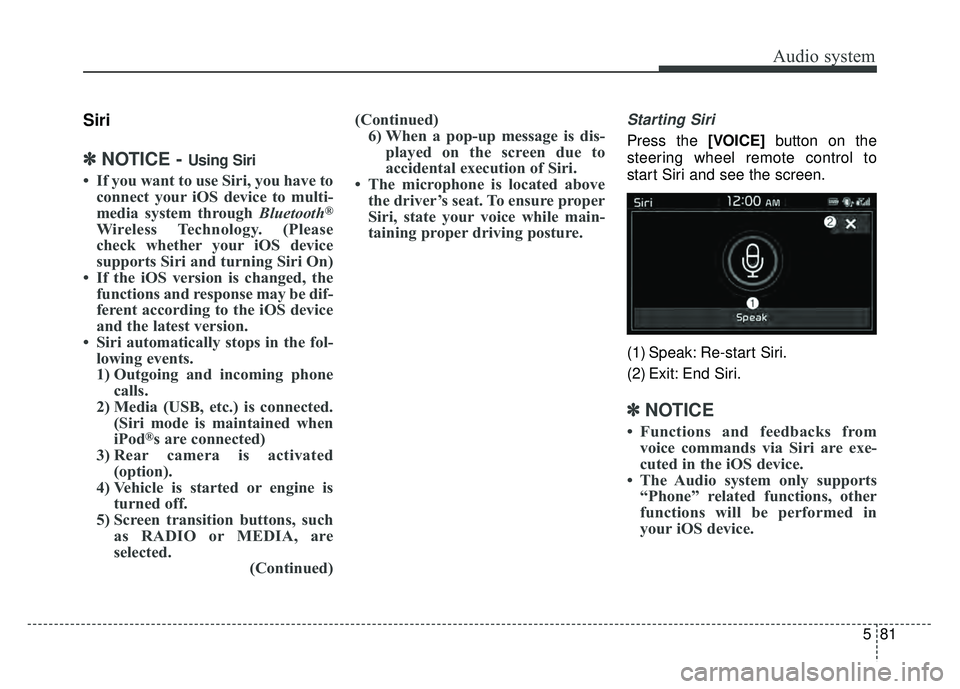
Starting Siri
Press the [VOICE] button on the
steering wheel remote control to
start Siri and see the screen.
(1) Speak: Re-start Siri.
(2) Exit: End Siri.
✽ ✽ NOTICE
• Functions and feedbacks from
voice commands via Siri are exe-
cuted in the iOS device.
• The Audio system only supports “Phone” related functions, other
functions will be performed in
your iOS device.
Page 576 of 589
Index
2I
Air bag warning label . . . . . . . . . . . . . . . . . . . . . . . . . . 3-68
Air bag warning light . . . . . . . . . . . . . . . . . . . . . . . . . . 3-45
Air bags. . . . . . . . . . . . . . . . . . . . . . . . . . . . . . . . . . . . \
. 3-42Operation . . . . . . . . . . . . . . . . . . . . . . . . . . . . . . . . . 3-43
Air bag warning light . . . . . . . . . . . . . . . . . . . . . . . . 3-45
SRS components and functions . . . . . . . . . . . . . . . . 3-46
Occupant Detection System . . . . . . . . . . . . . . . . . . . 3-49
Driver's and passenger's front air bag . . . . . . . . . . . 3-56
Side air bag. . . . . . . . . . . . . . . . . . . . . . . . . . . . . . . . 3-59
Curtain air bag . . . . . . . . . . . . . . . . . . . . . . . . . . . . . 3-61
Inflation conditions . . . . . . . . . . . . . . . . . . . . . . . . . 3-63
Non-inflation conditions . . . . . . . . . . . . . . . . . . . . . 3-65
SRS Care . . . . . . . . . . . . . . . . . . . . . . . . . . . . . . . . . 3-67
Air bag warning label. . . . . . . . . . . . . . . . . . . . . . . . 3-68
Air cleaner . . . . . . . . . . . . . . . . . . . . . . . . . . . . . . . . . . 8-48\
Filter replacement. . . . . . . . . . . . . . . . . . . . . . . . . . . 8-48
Air conditioning system lubricants. . . . . . . . . . . . . . . . . 9-6
Anti-lock brake system (ABS) . . . . . . . . . . . . . . . . . . . 6-36
Appearance care . . . . . . . . . . . . . . . . . . . . . . . . . . . . . 8-106 Exterior care . . . . . . . . . . . . . . . . . . . . . . . . . . . . . . 8-106
Interior care . . . . . . . . . . . . . . . . . . . . . . . . . . . . . . 8-112
AUDIO (With Touch Screen) . . . . . . . . . . . . . . . . . . . 5-46 Feature of Your Audio . . . . . . . . . . . . . . . . . . . . . . . 5-47
Radio Mode . . . . . . . . . . . . . . . . . . . . . . . . . . . . . . . 5-53
SiriusXM Radio Mode . . . . . . . . . . . . . . . . . . . . . . 5-55
Media Mode . . . . . . . . . . . . . . . . . . . . . . . . . . . . . . . 5-57 Phone Mode . . . . . . . . . . . . . . . . . . . . . . . . . . . . . . . 5-73
Siri Mode . . . . . . . . . . . . . . . . . . . . . . . . . . . . . . . . . 5-81
Setup Mode . . . . . . . . . . . . . . . . . . . . . . . . . . . . . . . 5-82
AUDIO (Without Touch Screen) . . . . . . . . . . . . . . . . . 5-10 Feature of Your Audio . . . . . . . . . . . . . . . . . . . . . . . 5-11
Radio Mode . . . . . . . . . . . . . . . . . . . . . . . . . . . . . . . 5-16
SiriusXM Radio Mode . . . . . . . . . . . . . . . . . . . . . . 5-18
Media Mode . . . . . . . . . . . . . . . . . . . . . . . . . . . . . . . 5-20
Phone Mode . . . . . . . . . . . . . . . . . . . . . . . . . . . . . . . 5-35
Siri Mode . . . . . . . . . . . . . . . . . . . . . . . . . . . . . . . . . 5-43
Setup Mode . . . . . . . . . . . . . . . . . . . . . . . . . . . . . . . 5-44
Audio system . . . . . . . . . . . . . . . . . . . . . . . . . . . . . . . . . 5-2 Antenna . . . . . . . . . . . . . . . . . . . . . . . . . . . . . . . . . . . 5-\
2
Audio remote control . . . . . . . . . . . . . . . . . . . . . . . . . 5-3
AUX and USB port . . . . . . . . . . . . . . . . . . . . . . . . . . 5-4
Speaker lights . . . . . . . . . . . . . . . . . . . . . . . . . . . . . . . 5-4
Auto light position . . . . . . . . . . . . . . . . . . . . . . . . . . . . 4-90
Automatic climate control system . . . . . . . . . . . . . . . 4-114 Automatic heating and air conditioning. . . . . . . . . 4-115
Manual heating and air conditioning . . . . . . . . . . . 4-116
System operation . . . . . . . . . . . . . . . . . . . . . . . . . . 4-123
Climate control air filter. . . . . . . . . . . . . . . . . . . . . 4-125
Air Conditioning refrigerant label . . . . . . . . . . . . . 4-126
Automatic transaxle . . . . . . . . . . . . . . . . . . . . . . . . . . . 6-18 Sports mode . . . . . . . . . . . . . . . . . . . . . . . . . . . . . . . 6-20
Shift-lock override . . . . . . . . . . . . . . . . . . . . . . . . . . 6-22
Good driving practices . . . . . . . . . . . . . . . . . . . . . . . 6-23
A