Page 247 of 589
Audio system
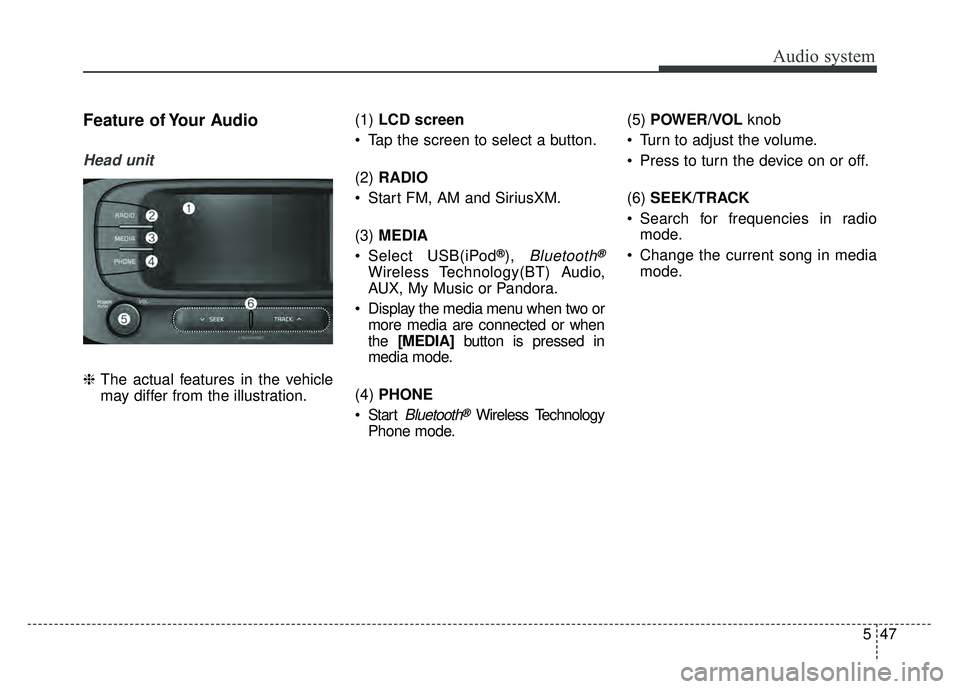
(7)SETUP/CLOCK
Access Display, Sound, Date/Time, Bluetooth, System and Display Off
settings.
Press and hold to set the date/time.
(8) MENU
Display additional menus available on the current screen.
(9) BACK
Return to the previous screen. (10)
TUNE knob
Turn to navigate through the sta- tions/songs list.
Press to select an item.
(11) PRESET
Move to the previous/next preset page in radio mode.
(12) RESET
Shutdown and restart the system.
12
5
Page 248 of 589

Audio system
Steering wheel remote control
❈The actual features in the vehicle
may differ from the illustration.
(1) MODE
Press the button to change the mode in the following order: Radio
➟ Media.
Press and hold the button to turn off.
(2) VOLUME
Press to adjust the volume. (3)
UP/DOWN
Press the button in radio mode to search Presets.
Press and hold the button in radio mode to search frequencies.
Press the button in media mode to change the current song.
Press and hold the button in media mode to quick search through
songs.
(4) VOICE
Pressing the button - If Siri is not active: Starts Siri.
- If Siri is active: Re-starts Siri.
Pressing and holding the button: Siri is deactivated.
(5) CALL
Pressing the button - If not in
Bluetooth®Wireless
Technology Handsfree mode or
receiving a phone call.
First press: Display Dial Number
screen.
Second press: Automatically dis-
play the most recently Dialed call
number. Third press: Dial the phone num-
ber entered.
- Press in the Incoming Call notifi- cation screen to accept the
phone call.
- Press in
Bluetooth®Wireless
Technology Handsfree mode to
switch to the waiting call.
Pressing and holding the button - If not in
Bluetooth®Wireless
Technology Handsfree mode or
receiving a phone call, the most
recently Dialed Call number is
dialed.
- Press in
Bluetooth®Wireless
Technology Handsfree mode to
transfer the call to your cell
phone.
- Press in cell phone mode to switch to
Bluetooth®Wireless
Technology Handsfree mode.
(6) END
Press in
Bluetooth®Wireless
Technology Handsfree mode to
end the phone call.
Press in the incoming call screen to reject the call.
513
Page 251 of 589
![KIA SOUL 2017 Owners Manual Audio system
16
5
Radio
Switching between FM, AM and
SiriusXM
Press the [RADIO] button on the
audio system to switch between FM,
AM and SiriusXM.
Searching frequencies
Search frequencies by pressing](/manual-img/2/54636/w960_54636-250.png "KIA SOUL 2017 Owners Manual Audio system
16
5
Radio
Switching between FM, AM and
SiriusXM
Press the [RADIO] button on the
audio system to switch between FM,
AM and SiriusXM.
Searching frequencies
Search frequencies by pressing")
Audio system
16
5
Radio
Switching between FM, AM and
SiriusXM
Press the [RADIO] button on the
audio system to switch between FM,
AM and SiriusXM.
Searching frequencies
Search frequencies by pressing the
[SEEK/TRACK] button on the prod-
uct. Presets
Save up to 36 frequently used sta-
tions.
1. Press and hold the desired slot
from 1 through 36. This saves the
current station in the selected slot.
If the slot is empty, simply press-
ing saves the station to the slot.
2. To save in slots numbered 7 or higher, press the [PRESET] but-
ton to move to the previous/next
page and save.
To listen to a preset station, press
the desired station in the list. Menu
Press the [MENU]
button, and select
the desired function.
List: A list of all stations available in the current location of the vehicle is
displayed. Press the desired sta-
tion. Press the [Refresh] to update
the list of available stations.
Scan: All stations available in the current location of the vehicle are
played for five seconds each.
Information: View detailed station information. Station Info should be
enabled if information wants to be
shown.
Sound Settings: Audio sound set- tings can be changed.
Station Info: Set whether to receive station information such as Station
Name, Program Type or Information.
Page 252 of 589
Audio system
517
✽
✽NOTICE - SiriusXM®Satellite
Radio information
• Satellite Radio channels: Enjoy SiriusXM Satellite Radio
with a 3-month trial subscription
to the Sirius Select package. You’ll
get over variable channels, includ-
ing commercialfree music, plus all
your favorite sports, exclusive
talk, entertainment, and a selec-
tion of premium programming.
For more information and a com-
plete list of SiriusXM channels,
visit siriusxm.com in the United
States, siriusxm.ca in Canada, or
call SiriusXM at 1-888-539-7474.
• Satellite Radio reception factors: To receive the satellite signal, your
vehicle has been equipped with a
satellite radio antenna located on
the roof of your vehicle. The vehi-
cle roof provides the best location
for an unobstructed, open view of
the sky, a requirement of a satellite
radio system. Like AM/FM, there
are several factors that can affect
satellite radio reception perform-
ance: (Continued)(Continued)
- Antenna obstructions: For opti-mal reception performance, keep
the antenna clear of snow and
ice build-up and keep luggage
and other material as far away
from the antenna as possible.
• SiriusXM Satellite Radio service: SiriusXM is a subscription-based
satellite radio service that broad-
casts music, sports, news and
entertainment programming to
radio receivers, which are avail-
able for installation in motor vehi-
cles or factory installed, as well as
for the home, portable and wire-
less devices, and through an Internet
connection on a personal computer.
Vehicles that are equipped with a
factory installed SiriusXM Satellite
Radio system include:
- Hardware and an introductorytrial subscription term, which
begins on the date of sale or lease
of the vehicle.
- For a small upgrade fee, access to SiriusXM music channels, and
other select channels over the
Internet using any computer con-
nected to the Internet (U.S. cus-
tomers only).
(Continued)(Continued)
• SiriusXM services require a sub-
scription sold separately, or as a
package, by Sirius XM Radio Inc.
If you decide to continue service
after your trial, the subscription
plan you choose will automatically
renew thereafter and you will be
charged according to your chosen
payment method at then-current
rates. Fees and taxes apply. To
cancel you must call SiriusXM at
1-866-635-2349. See SiriusXM
Customer Agreement for complete
terms at www.siriusxm.com.
SiriusXM U.S. satellite and data
services are available only in the
48 contiguous states, DC and
Puerto Rico (with coverage limita-
tions). SiriusXM satellite service is
also available in Canada; see
www.siriusxm. ca. All fees and
programming subject to change.
Sirius, XM and all related marks
and logos are trademarks of Sirius
XM Radio Inc.
Page 253 of 589
![KIA SOUL 2017 Owners Manual Audio system
18
5
SiriusXM
Switching between FM, AM and
SiriusXM
Press the [RADIO] button on the
audio system to switch between FM,
AM and SiriusXM.
Searching channels
Search channels by pressing the](/manual-img/2/54636/w960_54636-252.png "KIA SOUL 2017 Owners Manual Audio system
18
5
SiriusXM
Switching between FM, AM and
SiriusXM
Press the [RADIO] button on the
audio system to switch between FM,
AM and SiriusXM.
Searching channels
Search channels by pressing the")
Audio system
18
5
SiriusXM
Switching between FM, AM and
SiriusXM
Press the [RADIO] button on the
audio system to switch between FM,
AM and SiriusXM.
Searching channels
Search channels by pressing the
[SEEK/TRACK] button on the prod-
uct. Replay
Press the TUNE
knob to play a
replay.
Presets
Save up to 36 frequently used sta-
tions.
1. Press and hold the desired slot from 1 through 36. This saves the
current station in the selected slot.
2. To save in slots numbered 7 or higher, press the [PRESET] but-
ton to move to the previous/next
page and save.
To listen to a preset station, press
the desired station in the list. Menu
Press the [MENU]
button, and select
the desired function.
List: A list of all stations available in the current location of the vehicle is
displayed. Press the desired sta-
tion.
Categories: Channels can be searched by category.
Direct Tune: The desired channel can be selected by entering num-
bers.
Sound Settings: Audio sound set- tings can be changed.
Tag Song: Tag the current song information.
When an Apple device (iPhone
®,
iPod®) is connected, tagged song
information is sent automatically to
the connected device.
✽ ✽ NOTICE
Up to 50 songs can be tagged.
Scan: All stations available in the
vehicle’s current location are
played for ten seconds each.
Program Schedule: View the pro- gram schedule.
Page 269 of 589
Audio system
34
5 Playback
Press the [MEDIA]
button, and
select [Pandora].
✽ ✽ NOTICE
• Pandora®: Connect a smartphone
to listen to Pandora®Radio.
• Apple devices must be connected via USB cable and Android
devices must be connected via
Bluetooth
®Wireless Technology in
order to run Pandora®.
Menu
Press the [MENU] button, and select
the desired function.
Quit: Exit Pandora
®mode and
return to previous audio mode.
Sound Settings: Audio sound set- tings can be changed.
Page 278 of 589
Audio system
543
Siri
✽
✽NOTICE - Using Siri
• If you want to use Siri, you have to
connect your iOS device to multi-
media system through Bluetooth
®
Wireless Technology. (Please
check whether your iOS device
supports Siri and turning Siri On)
• If the iOS version is changed, the functions and response may be dif-
ferent according to the iOS device
and the latest version.
• Siri automatically stops in the fol- lowing events.
1) Outgoing and incoming phone calls.
2) Media (USB, etc.) is connected. (Siri mode is maintained when
iPod®s are connected)
3) Rear camera is activated (option).
4) Vehicle is started or engine is turned off.
5) Screen transition buttons, such as RADIO or MEDIA, are
selected. (Continued)(Continued)
6) When a pop-up message is dis- played on the screen due to
accidental execution of Siri.
• The microphone is located above the driver’s seat. To ensure proper
Siri, state your voice while main-
taining proper driving posture.
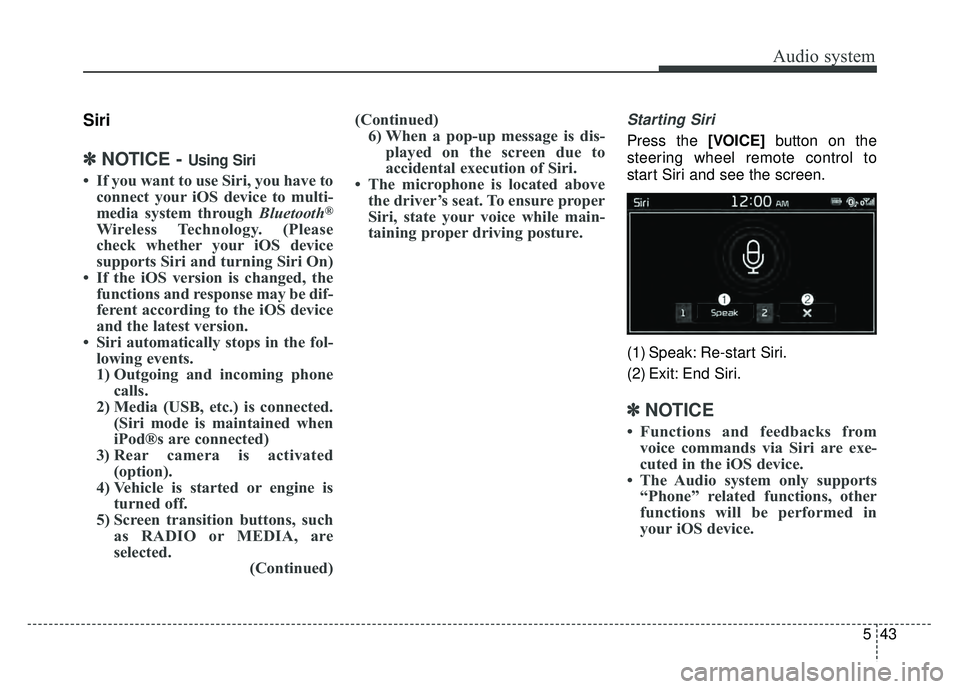
Starting Siri
Press the [VOICE] button on the
steering wheel remote control to
start Siri and see the screen.
(1) Speak: Re-start Siri.
(2) Exit: End Siri.
✽ ✽ NOTICE
• Functions and feedbacks from
voice commands via Siri are exe-
cuted in the iOS device.
• The Audio system only supports “Phone” related functions, other
functions will be performed in
your iOS device.
Page 282 of 589
Audio system
547
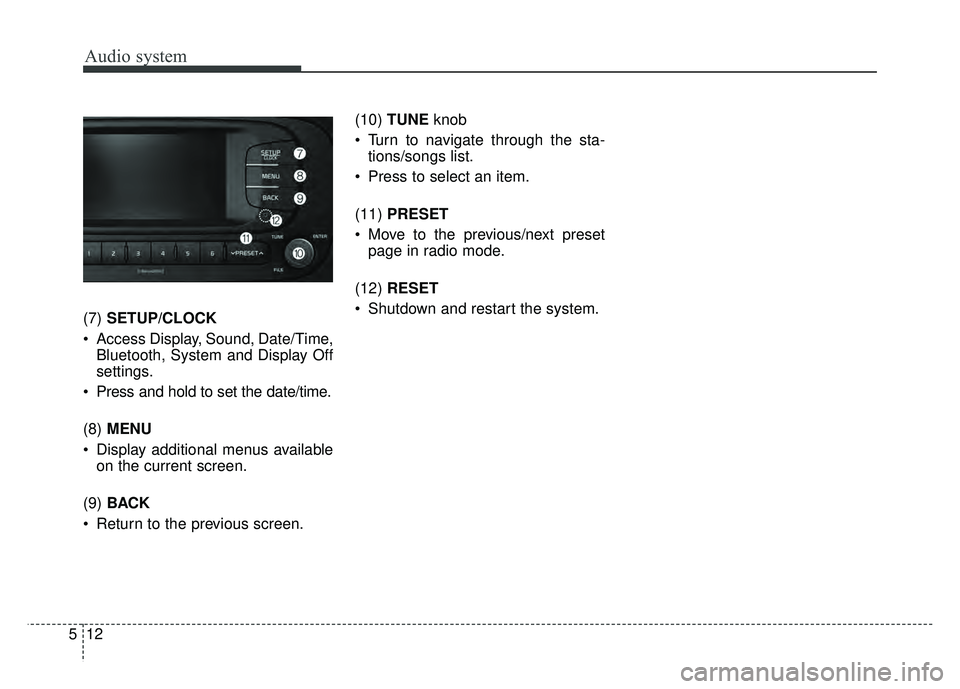
Feature of Your Audio
Head unit
❈The actual features in the vehicle
may differ from the illustration. (1)
LCD screen
Tap the screen to select a button.
(2) RADIO
Start FM, AM and SiriusXM.
(3) MEDIA
Select USB(iPod
®), Bluetooth®
Wireless Technology(BT) Audio,
AUX, My Music or Pandora.
Display the media menu when two or more media are connected or when
the [MEDIA] button is pressed in
media mode.
(4) PHONE
Start
Bluetooth®Wireless Technology
Phone mode. (5)
POWER/VOL knob
Turn to adjust the volume.
Press to turn the device on or off.
(6) SEEK/TRACK
Search for frequencies in radio mode.
Change the current song in media mode.
![KIA SOUL 2017 Owners Manual Audio system
34
5 Playback
Press the [MEDIA]
button, and
select [Pandora].
✽ ✽ NOTICE
• Pandora®: Connect a smartphone
to listen to Pandora®Radio.
• Apple devices must be connected via USB c](/manual-img/2/54636/w960_54636-268.png "KIA SOUL 2017 Owners Manual Audio system
34
5 Playback
Press the [MEDIA]
button, and
select [Pandora].
✽ ✽ NOTICE
• Pandora®: Connect a smartphone
to listen to Pandora®Radio.
• Apple devices must be connected via USB c")