Page 379 of 576

Driving your vehicle
66
5
Speed setting (ASCC)
To set cruise control speed:
1.Press the CRUISE button, to turn
the system on. The CRUISE indi-
cator in the instrument cluster will
illuminate.
2. Accelerate to the desired speed. (110 mph) : when there is no
vehicle in front
mph) : when there is a vehicle in
front 3. Move the lever down (to SET-),
and release it at the desired
speed. The set speed and vehicle
to vehicle distance on the LDC
screen will illuminate.
4.Release the accelerator pedal. The desired speed will automatically be
maintained.
If there is a vehicle in front of you, thespeed may decrease to maintain thedistance to the vehicle ahead.
On a steep grade, the vehicle mayslow down or speed up slightly whilegoing uphill or downhill. To increase cruise control set
speed:
Follow either of these procedures:
Move the lever up (to RES+), and hold it. Your vehicle set speed will
increase by 10 km/h (5 mph).
Release the lever at the speed you
want.
Move the lever up (to RES+), and release it immediately. The cruising
speed will increase by 1.0 km/h (1
mph) each time you move the lever
up (to RES+) in this manner.
ASCC will operate to a maximum setting of 180 km/h (110 mph).
However all local speed limit laws
must be followed.
OUMA054200
OUMA054201
OUMA054202
Page 388 of 576
575
Driving your vehicle
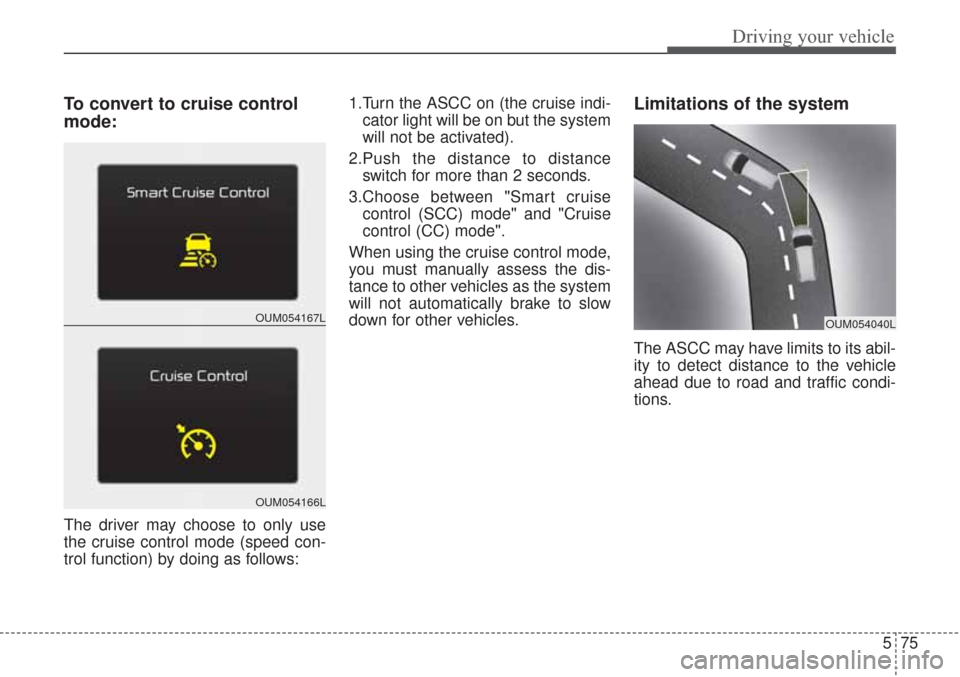
To convert to cruise control
mode:
The driver may choose to only use
the cruise control mode (speed con-
trol function) by doing as follows:1.Turn the ASCC on (the cruise indi-
cator light will be on but the system
will not be activated).
2.Push the distance to distance switch for more than 2 seconds.
3.Choose between "Smart cruise control (SCC) mode" and "Cruise
control (CC) mode".
When using the cruise control mode,
you must manually assess the dis-
tance to other vehicles as the system
will not automatically brake to slow
down for other vehicles.
Limitations of the system
The ASCC may have limits to its abil-
ity to detect distance to the vehicle
ahead due to road and traffic condi-
tions.
OUM054167L
OUM054166L
OUM054040L
Page 395 of 576

Driving your vehicle
82
5
When Active ECO is activated:
The acceleration may slightly be
reduced even though you depress
the accelerator fully.
The air conditioner performance may be limited
The shift pattern of the automatic transaxle may change.
The engine noise may get louder.
The above situations are normal
conditions when the Active Eco
System is activated to improve fuel
efficiency. Limitation of Active ECO opera-
tion:
If the following conditions occur while
Active ECO is operating, the system
operation is limited even though
there is no change in the ECO indi-
cator.
When the coolant temperature is
low:
The system will be limited until
engine performance becomes nor-
mal.
When driving up a hill: The system will be limited to gain
power when driving uphill because
the engine torque is restricted.
When using manual mode: The system will be limited accord-
ing to the shift location.
When the accelerator pedal is deeply depressed for a few sec-
onds:
The system will be limited, judging
that the driver wants to speed up.SPORT mode
SPORT mode focuses on
dynamic driving by auto-
matically adjusting the
steering wheel, engine
and transaxle system.
button is pressed and
the SPORT mode is
selected, the SPORT
indicator (yellow) will illu-
minate.
is activated, and the
engine start/stop button
is turned off and on it will
change to NORMAL
mode. To turn on the
SPORT mode press
DRIVE MODE button
again.
SPORT
Page 397 of 576

Driving your vehicle
84
5
The Blind Spot Detection System
(BSD) uses a radar sensor to alert
the driver.
It senses the rear side territory of the
vehicle and provides and indication
to the driver. (1) BSD (Blind Spot Detection)
The warning range depends onyour vehicle speed. However, if
your vehicle is about 10 km/h (6
mph) faster than the other vehi-
cle, the system will not warn you.
(2) LCA (Lane Change Assist) When a vehicle approaches youat high speed, the system will
warn you.
(3) RCTA (Rear Cross Traffic Alert) When your vehicle moves rear-ward, and the sensor detects an
approaching vehicle in the left or
right side, the system will warn
you.
BLIND SPOT DETECTION SYSTEM (BSD) (IF EQUIPPED)
WARNING- BSD
Limitations
The Blind Spot Detection System (BSD) is a supplemen-
tal system. Do not solely rely
on the system and always pay
attention to drive safely.
The Blind Spot Detection System may not detect every
object alongside the vehicle
and is not a substitute for
proper and safe lane chang-
ing procedures. Always drive
safely and use caution when
changing lanes.
OUM054176L
Page 410 of 576
597
Driving your vehicle
Remember, your vehicle does notrequire extended warm-up. After
the engine has started, allow the
engine to run for 10 to 20 seconds
prior to placing the vehicle in gear.
In very cold weather, however, give
your engine a slightly longer warm-
up period.
Don't "lug" or "over-rev" the engine. Lugging is driving too slowly in a
very high gear resulting in engine
bucking. If this happens, shift to a
lower gear. Over-revving is racing
the engine beyond its safe limit.
This can be avoided by shifting at
the recommended speed. Use your air conditioning sparingly.
The air conditioning system is
operated by engine power so your
fuel economy is reduced when you
use it.
Open windows at high speeds can reduce fuel economy.
Fuel economy is less in crosswinds and headwinds. To help offset
some of this loss, slow down when
driving in these conditions.
Keeping a vehicle in good operating
condition is important both for econ-
omy and safety. Therefore, have an
authorized Kia dealer perform
scheduled inspections and mainte-
nance.
WARNING - Engine off
during motion
Never turn the engine off to
coast down hills or anytime the
vehicle is in motion. The power
steering and power brakes will
not function properly without
the engine running. In addition,
turning off the ignition while
driving could engage the steer-
ing wheel lock resulting in loss
of vehicle steering. Keep the
engine on and downshift to an
appropriate gear for engine
braking effect.
Page 415 of 576

Driving your vehicle
102
5
Driving off-road
Drive carefully off-road because your
vehicle may be damaged by rocks or
roots of trees. Become familiar with
the off-road conditions where you
are going to drive before you begin
driving.
Highway driving
Tires
Adjust the tire inflation pressures to
specification. Low tire inflation pres-
sures will result in overheating and
possible failure of the tires.
Avoid using worn or damaged tires
which may result in reduced traction
or tire failure.
Never exceed the maximum tire
inflation pressure shown on the tires.
Fuel, engine coolant and engine
oil
High speed travel consumes more
fuel than urban motoring. Do not for-
get to check both the engine coolant
and engine oil.
Drive belt
A loose or damaged drive belt may
result in overheating of the engine.
WARNING- Under/over inflated tires
Always check the tires for proper
inflation before driving.
Underinflated or overinflated
tires can cause poor handling,
loss of vehicle control, and sud-
den tire failure leading to acci-
dents, injuries, and even death.
For proper tire pressures, refer to
“Tires and wheels” in section 8.
WARNING- Tire tread
Always check the tire tread
before driving your vehicle.
Worn-out tires can result in loss
of vehicle control. Worn-out tires
should be replaced as soon as
possible. For further information
and tread limits, refer to "Tires
and wheels" in section 7.
Page 419 of 576

Driving your vehicle
106
5
If you are considering towing with
your vehicle, you should first check
with your country's Department of
Motor Vehicles to determine their
legal requirements.
Since laws vary the requirements for
towing trailers, cars, or other types of
vehicles or apparatus may differ. Ask
an authorized Kia dealer for further
details before towing.
You may require an additional wiring
harness connector to install a trailer
hitch. Please contact an authorized
Kia dealer for more details. Your vehicle can tow a trailer.* To
identify what the vehicle trailering
capacity is for your vehicle, you
should read the information in
“Weight of the trailer” that appears
later in this section.Remember that trailering is different
than just driving your vehicle by itself.
Trailering means changes in han-
dling, durability, and fuel economy.
Successful, safe trailering requires
correct equipment, and it has to be
used properly.
This section contains many time-
tested, important trailering tips and
safety rules. Many of these are
important for your safety and that of
your passengers. Please read this
section carefully before you pull a
trailer.
Load-pulling components such as
the engine, transaxle, wheel assem-
blies, and tires are forced to work
harder against the load of the added
weight. The engine is required to
operate at relatively higher speeds
and under greater loads. This addi-
tional burden generates extra heat.
The trailer also adds considerably to
wind resistance, increasing the
pulling requirements.
TRAILER TOWING
CAUTION - Trailer
installation
Follow instructions in this sec-tion when pulling a trailer.Pulling a trailer improperly candamage your vehicle and resultin costly repairs not covered byyour warranty.
WARNING- Towing a trailer
Always check your towing
equipment to confirm correct
equipment size and installation
before use. Using incompatible
or incorrectly installed trailer
equipment can effect the vehi-
cle operation and endanger you
and your passengers.
WARNING- Weight limits
Before towing, make sure the
total trailer weight, GCW (gross
combination weight), GVW
(gross vehicle weight), GAW
(gross axle weight) and trailer
tongue load are all within the
limits.
Page 425 of 576

Driving your vehicle
112
5
If you do decide to pull a trailer
Here are some important points if
you decide to pull a trailer:
Consider using a sway control. You
can ask a hitch dealer about sway
control.
Do not do any towing with your vehi- cle during its first 2,000 km (1,200
miles) in order to allow the engine to
properly break in. Failure to heed
this caution may result in serious
engine or transaxle damage.
When towing a trailer, be sure to con- sult an authorized Kia dealer for fur-
ther information on additional require-
ments such as a towing kit, etc.
Always drive your vehicle at a mod- erate speed (less than 100 km/h (60
mph)).
On a long uphill grade, do not exceed 70 km/h (45 mph) or the
posted towing speed limit, whichever
is lower.
The chart contains important consid- erations that have to do with weight: ItemTheta II 2.0 Theta II 2.4 Lambda II 3.3
Maximum trailer
weight Without brake
System
750 (1,650) 750 (1,650) 750 (1,650)
With brakeSystem907 (2,000) 907 (2,000) 907 (2,000)
With trailer package
1,587 (3,500) - 2,267 (5,000)
Maximum tongue weight
159 (350) 127 (280) 226 (500)
To identify what the vehicle trailering capacity is for your vehicle, you should
read the information in “Weight of the Trailer” that appears later in this sec-
tion.
[kg (lbs.)]