2017 KIA RIO HATCHBACK key battery
[x] Cancel search: key batteryPage 207 of 532

Features of your vehicle
4137
When connecting a Bluetooth®
Phone
Before connecting the head unitwith the mobile phone, check to
see that the mobile phone sup-
ports Bluetooth
®features.
Even if the phone supports Bluetooth
®,
the phone will not be found during
device searches if the phone has
been set to hidden state or the
Bluetooth
®power is turned off.
Disable the hidden state or turn on
the Bluetooth
®power prior to
searching/connecting with the Head
unit.
If you do not want an automatic con- nection with your Bluetooth
®device,
turn off the Bluetooth®feature with-
in your mobile phone.
The Handsfree call volume and quality may differ depending on the
mobile phone. Park the vehicle when connecting
the head unit with the mobile
phone.
Bluetooth
®connection may become
intermittently disconnected in some
mobile phones. Follow these steps
to try again.
1. Within the mobile phone, turn the Bluetooth
®function off/on
and try again.
2. Turn the mobile phone power Off/On and try again.
3. Completely remove the mobile phone battery, reboot, and then
again.
4. Reboot the audio system and try again.
5. Delete all paired devices, pair and try again.
Voice Recognition
(if equipped)
When using the voice recognitionfeature, only commands listed
within the user's manual are sup-
ported.
Be aware that during the operation of the voice recognition system,
pressing any key other than the key terminate voice recogni-
tion mode.
For optimal voice recognition per- formance, position your head
below the microphone above the
driver’s seat and maintain proper
position when speaking voice com-
mands.
Within the following situations, voice recognition may not function
properly due to external sound.
- When the windows and sunroof are open
- When the blower AC/heater is set to high
- When entering and passing through tunnels
(Continued)
Page 274 of 532

Features of your vehicle
204
4
✽
✽
NOTICE - USING THE
iPod®DEVICE
• iPod®is a registered trademark of
Apple Inc.
• In order to use the iPod
®while
operating the keys, you must use a
dedicated iPod
®cable. (the cable
that is supplied when purchasing
iPod
®/iPhone®products)
• If the iPod®is connected to the
vehicle while it is playing, a high
pitch sound could occur for
approximately 1-2 seconds imme-
diately after connecting. If possi-
ble, connect the iPod
®to the vehi-
cle with the iPod®stopped/paused.
• During ACC ON state, connecting the iPod
®through the iPod®cable
will charge the iPod®through the
car audio system.
• When connecting with the iPod
®
cable, make sure to fully insert the
jack to prevent communication
interference. (Continued)(Continued)
• When the EQ features of an exter-
nal device, such as the iPod
®, and
the audio system are both active,
EQ effects could overlap and
cause sound deterioration and dis-
tortion. Whenever possible, turn
off the EQ feature within the
external device upon use by con-
necting with the audio system.
• Noise may occur when an iPod
®or
AUX device is connected. When
such devices are not being used,
disconnect the device for storage.
• When the iPod
®or AUX device
power is connected to the power
jack, playing the external device
may result in noise. In such cases,
disconnect the power connection
before use.
• Skipping or improper operation may occur depending on the char-
acteristics of your iPod
® /iPhone®
device. (Continued)(Continued)
• If your iPhone
®is connected to
both the Bluetooth®Wireless
Technology and USB, the sound
may not be properly played. In
your iPhone
®, select the Dock con-
nector or Bluetooth®Wireless
Technology to change the sound
output (source).
• iPod
®mode cannot be operated
when the iPod®cannot be recog-
nized due to versions that do not
support communication protocols.
• For fifth generation iPod
®Nano
devices, the iPod®may not be rec-
ognized when the battery level is
low. Please charge the iPod
®for
use.
• Search/play orders shown within the iPod
®device may differ with
the orders shown within the audio
system.
• If the iPod
®malfunctions due to an
iPod®device defect, reset the iPod®
and try again. (To learn more, refer
to your iPod®manual) (Continued)
Page 317 of 532

55
Driving your vehicle
Illuminated ignition switch
(if equipped)
Whenever a front door is opened, the
ignition switch will illuminate for your
convenience, provided the ignition
switch is not in the ON position. The
light will go off immediately when the
ignition switch is turned on. It will
also go off after about 30 seconds
when the door is closed.
Ignition switch position
LOCK
The steering wheel locks to protect
against theft. The ignition key can be
removed only in the LOCK position.
When turning the ignition switch to
the LOCK position, push the key
inward at the ACC position and turn
the key toward the LOCK position.
The anti-theft steering column lock is
not a substitute for the parking brake.
Before leaving the driver’s seat,
always make sure the shift lever is
engaged in 1st gear for the manual
transaxle or P (Park) for automatic
transaxle, set the parking brake fully
and shut the engine off.
ACC (Accessory)
The steering wheel is unlocked and
electrical accessories are operative.
If difficulty is experienced turning the
ignition switch to the ACC position,
turn the key while turning the steer-
ing wheel right and left to release the
tension.
ON
The warning lights can be checked
before the engine is started. This is
the normal running position after the
engine is started.
Do not leave the ignition switch ON ifthe engine is not running to preventbattery discharge.
START
Turn the ignition switch to the START
position to start the engine. The
engine will crank until you release
the key; then it returns to the ON
position. The brake warning light can
be checked in this position.
KEY POSITIONS
OTD059016OUB051001
Page 324 of 532
Driving your vehicle
12
5
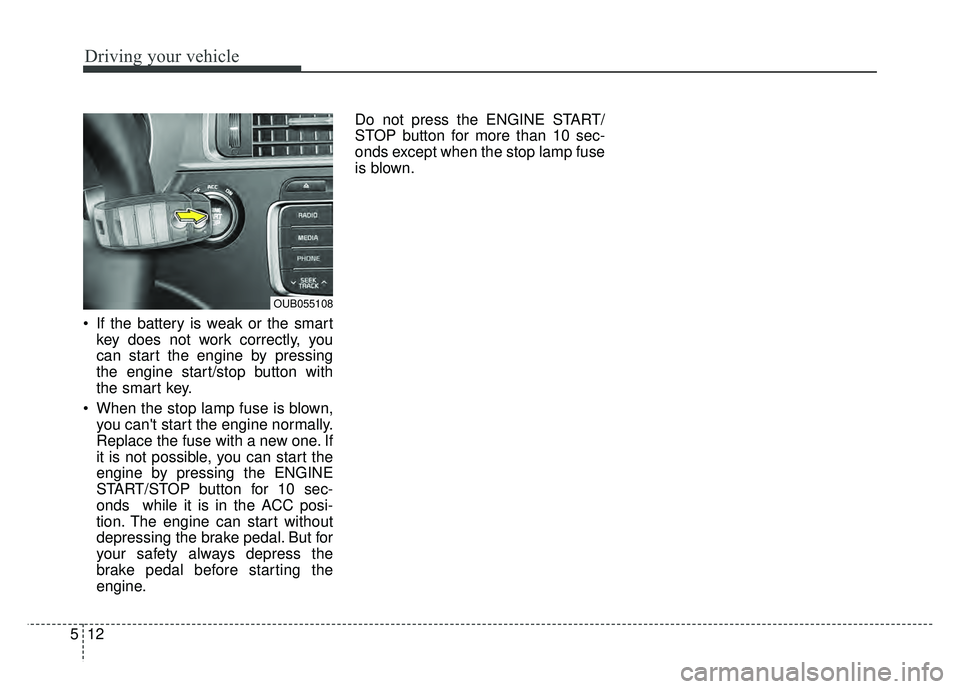
If the battery is weak or the smart
key does not work correctly, you
can start the engine by pressing
the engine start/stop button with
the smart key.
When the stop lamp fuse is blown, you can't start the engine normally.
Replace the fuse with a new one. If
it is not possible, you can start the
engine by pressing the ENGINE
START/STOP button for 10 sec-
onds while it is in the ACC posi-
tion. The engine can start without
depressing the brake pedal. But for
your safety always depress the
brake pedal before starting the
engine. Do not press the ENGINE START/
STOP button for more than 10 sec-
onds except when the stop lamp fuse
is blown.
OUB055108
Page 527 of 532

Index
6I
Interior care··················\
··················\
··················\
··············7-96
Interior features··················\
··················\
··················\
······4-118Ashtray ··················\
··················\
··················\
················4-118
Cigarette lighter ··················\
··················\
··················\
···4-118
Clothes hanger ··················\
··················\
··················\
·····4-123
Cup holder ··················\
··················\
··················\
···········4-118
Digital clock and calendar ··················\
··················\
·····4-122
Floor mat anchor(s) ··················\
··················\
···············4-123
Power outlet ··················\
··················\
··················\
·········4-121
Shopping bag holder ··················\
··················\
···············4121
Sliding armrest ··················\
··················\
··················\
····4-120
Sunvisor ··················\
··················\
··················\
···············4-120
Interior light ··················\
··················\
··················\
·············4-85
Interior overview··················\
··················\
··················\
········2-4
ISG system ··················\
··················\
··················\
···············5-40
Jack and tools··················\
··················\
··················\
···········6-14
Jump starting··················\
··················\
··················\
··············6-5
Key positions ··················\
··················\
··················\
·············5-5
Keys ··················\
··················\
··················\
··················\
·········4-3 Immobilizer key··················\
··················\
··················\
·····4-11
Remote(or Smart) key battery replacement ················4-10 Label
Air bag warning label ··················\
··················\
··············3-54
Refrigerant label ··················\
··················\
··················\
····8-10
Tire sidewall labeling ··················\
··················\
··············7-56
Tire specification and pressure label ··················\
·········8-10
Vehicle certification label ··················\
··················\
··········8-9
LCD display warning··················\
··················\
·················4-70\
Light bulbs ··················\
··················\
··················\
···············7-77
Lighting··················\
··················\
··················\
··················\
··4-77 Battery saver function··················\
··················\
··············4-77
Lower anchor ··················\
··················\
··················\
···········3-29
Lubricants and capacities··················\
··················\
·············8-7
Luggage net ··················\
··················\
··················\
···········4-115
Luggage tray ··················\
··················\
··················\
··········4-116
Maintenance ··················\
··················\
··················\
·············4-57 Explanation of scheduled maintenance items ·············7-32
Maintenance services·············\
··················\
··················\
····7-4
Maintenance under severe usage conditions ···············7-30
Normal maintenance schedule··················\
··················\
···7-9
Owner maintenance ··················\
··················\
··················\
·7-6
Scheduled maintenance service ··················\
··················\
·7-8
Tire maintenance ··················\
··················\
··················\
···7-56
J
L
M
K
Page 528 of 532

I7
Index
Maintenance schedule··················\
··················\
··················\
7-8
Maintenance under severe usage conditions ·················7-30\
Normal maintenance schedule··················\
··················\
···7-9
Maintenance services ··················\
··················\
··················\
·7-4
Manual climate control system··················\
··················\
··4-88 Air conditioning ··················\
··················\
··················\
····4-94
Climate control air filter ··················\
··················\
··········4-96
Heating and air conditioning ··················\
··················\
···4-89
Manual transaxle··················\
··················\
··················\
······5-13
Memory fuse ··················\
··················\
··················\
············7-67
Mirrors ··················\
··················\
··················\
··················\
···4-43 Day/night rearview mirror ··················\
··················\
·······4-43
Folding the outside rearviwe mirror ··················\
··········4-45
Inside rearview mirror ··················\
··················\
·············4-43
Outside rearview mirror ··················\
··················\
··········4-43
Remote control ··················\
··················\
··················\
······4-44
Multi fuse ··················\
··················\
··················\
·················7-68\
Occupant detection system ··················\
··················\
········3-37
Odometer ··················\
··················\
··················\
·················4-49\
Oil (Engine) ··················\
··················\
··················\
·············7-35
Outside rearview mirror··················\
··················\
·············4-43
Outside rearview mirror remote control ··················\
······4-44
Overheats ··················\
··················\
··················\
··················\
·6-8
Owner maintenance ··················\
··················\
··················\
···7-6 Parking brake··················\
··················\
··················\
··5-24, 7-41
Power brakes ··················\
··················\
··················\
············5-22
Power outlet ··················\
··················\
··················\
···········4-121
Power window lock button ··················\
··················\
········4-29
Pre-tensioner seat belt··················\
··················\
················3-18
Push starting··················\
··················\
··················\
···············6-7
Rear seat··················\
··················\
··················\
··················\
···3-9
Rear-Camera Display··················\
··················\
·················4-76\
Recommended cold tire inflation pressures ··················\
7-51
Recommended lubricants and capacities ··················\
·······8-7
Recommended SAE viscosity number ··················\
········8-8
Refrigerant label ··················\
··················\
··················\
······8-10
Remote control (Mirror) ··················\
··················\
············4-44
Remote keyless entry ··················\
··················\
··················\
·4-9
Remote(or Smart) key battery replacement ··················\
·4-11
Replacement light bulb ··················\
··················\
··············7-78
Road warning ··················\
··················\
··················\
·············6-2
Rocking the vehicle ··················\
··················\
··················\
·5-48
O
P
R