Page 313 of 514

Driving your vehicle
52
5
Malfunction indicator
The AVSM OFF indicator will illumi-
nate when the engine start/stop but-
ton is turned ON, but should go off
after approximately 3 seconds. If theindicator does not come on, or con-
tinuously remains on after coming
on for about 3 seconds when you
turn the engine start/stop button tothe ON position, or if the indicator
comes on while driving, the AVSM is
not working properly. We recom-
mend have the system checked by
an authorized Kia dealer. The AVSM OFF indicator may illu-
minate when the ESC indicator or
SCC indicator comes on, but itdoes not indicate malfunction of
the AVSM.
OKH053118
WARNING
The AVSM is not a substitute for
safe driving practices but a sup-
plementary function only. It isthe responsibility of the driver to
always check the speed and the
distance to the vehicle ahead.
WARNING
Even if there is a malfunction to the brake operating of the
AVSM, when you depress the
brake pedal, the brake is oper-
ating normally. But, the AVSMbrake operating does not
operate even in certain haz-
ardous situations.
The AVSM is designed to function above approximately
15 km/h (9.3 mph) and below
approximately 180 km/h (111.8mph).
The AVSM does not react to
- Persons or animals.
- Oncoming vehicles in theopposite lane or the vehicle
in the intersection.
- Stopped objects.
The AVSM can not detect the objects certainly, when:
- The sensors are stained withdirt or covered.
(Continued)■Type A■ Type B
Page 314 of 514
553
Driving your vehicle
(Continued)- There is heavy rain or heavysnow.
- There is interference by elec- tromagnetic waves.
- There are strong radar reflections.
- Driving in curve.
- Driving uphill or downhill.
- Driving in areas under con- struction.
- The object ahead is very nar- row such as motorcycles or
bicycles.
- The vehicle cuts in suddenly.
The AVSM brake operating does not operates, if the driv-er does not release the accel-erator pedal or does not oper-ate the brake pedal.
Page 315 of 514

Driving your vehicle
54
5
The Autonomous Emergency
Braking (AEB) helps avoid accidents
by identifying critical situations early
and warning the driver.
AUTONOMOUS EMERGENCY BRAKING (AEB) (IF EQUIPPED)
WARNING
Take the following precautions
when using the Autonomous
Emergency Braking (AEB):
This system is only a supple- mental system and it is not
intended to, nor does it replace
the need for extreme care and
attention of the driver. The
sensing range and objects
detectable by the sensors are
limited. Pay attention to the
road conditions at all times.
NEVER drive too fast for the road conditions or too quicklywhen cornering.
Always drive cautiously to pre- vent unexpected and sudden
situations from occurring. AEB
does not stop the vehicle com-
pletely and does not avoid col-lisions.
(Continued)(Continued)
AEB operates according tothe distance from the vehicle
ahead, relative velocity, anddriver's operation of the brake
or accelerator pedal. Do not
drive dangerously to inten-
tionally operate the AEB.
ALWAYS check the speed and the distance to the vehicle
ahead. The AEB is not a substi-
tute for safe driving practices.
Page 316 of 514
555
Driving your vehicle
AEB Operation
Warning message
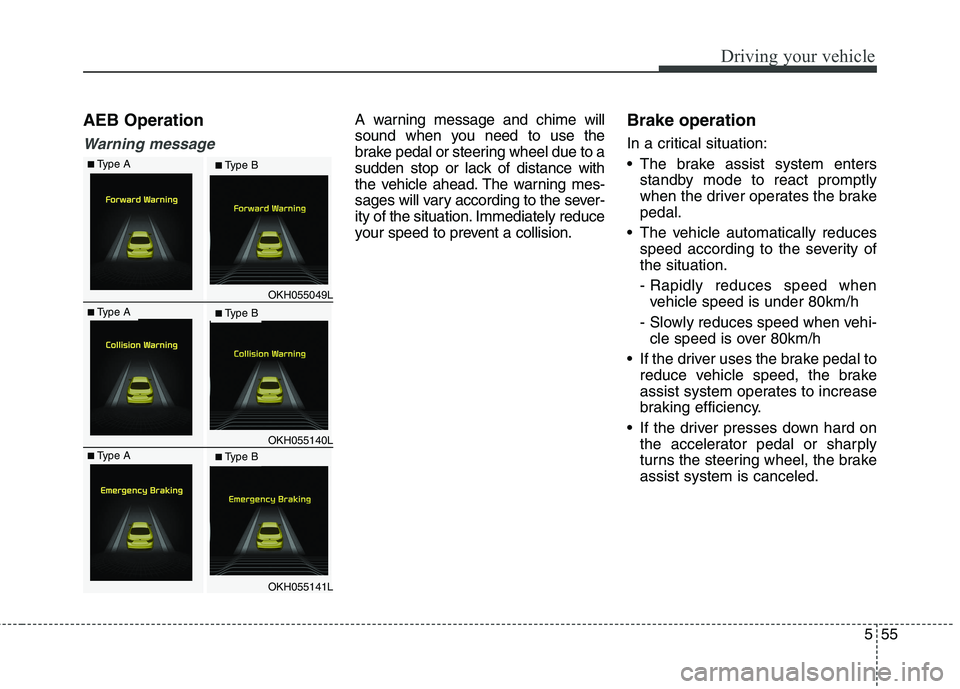
A warning message and chime will
sound when you need to use the
brake pedal or steering wheel due to a
sudden stop or lack of distance with
the vehicle ahead. The warning mes-
sages will vary according to the sever-
ity of the situation. Immediately reduce
your speed to prevent a collision.Brake operation
In a critical situation:
The brake assist system enters
standby mode to react promptly
when the driver operates the brakepedal.
The vehicle automatically reduces speed according to the severity ofthe situation.
- Rapidly reduces speed whenvehicle speed is under 80km/h
- Slowly reduces speed when vehi- cle speed is over 80km/h
If the driver uses the brake pedal to reduce vehicle speed, the brake
assist system operates to increase
braking efficiency.
If the driver presses down hard on the accelerator pedal or sharply
turns the steering wheel, the brakeassist system is canceled.
OKH055049L
OKH055140L
OKH055141L
■Type A■ Type B
■Type A■ Type B
■Type A■ Type B
Page 318 of 514

557
Driving your vehicle
Malfunction indicator
When the AEB system is turnedoff, the AEB warning light turns on.
(Warning message does not comeon.) If the sensor or cover is dirty or
obscured with foreign matter such
as snow, the AEB warning light
and message comes on. In this
case, the AEB system may not
function temporarily, but it does notindicate a malfunction of the AEB
system. Clean the sensor or cover
by using a soft cloth.
If there is a malfunction with the AEB system, the AEB warning light and
message will come on. We recom-
mend that the vehicle be checked by
an authorized Kia dealer.
When the ESC (Electronic Stability Control) or SCC (Smart CruiseControl) message comes on the
AEB warning message may come
on but it does not indicate a mal-function of the AEB system.
OKH045518L
■Warning light TTTTyyyyppppeeee AAAA TTTTyyyyppppeeee BBBB
TTTTyyyyppppeeee AAAA TTTTyyyyppppeeee BBBB■Warning messageOKH055151/OKH055152
WARNING
Even if there is a malfunction to the brake operation of the
AEB, when you depress the
brake pedal, the brake oper-
ates normally. AEB brakeoperation does not operate in
certain hazardous situations.
The AEB is designed to func- tion above approximately 8
km/h and below approximate-
ly 180 km/h.
The AEB does not detect:
- Persons or animals.
- Oncoming vehicles in theopposite lane or a vehicle in
an intersection.
- Stopped objects.
(Continued)
Page 326 of 514
565
Driving your vehicle
Attributes of SMART MODE.
If the accelerator pedal is pressedgently, your vehicle will recognize it
as a economic driving style. After
some time, the system will automat-
ically shift to SMART ECO MODE.
If you press the accelerator pedal frequently and heavily in SMARTECO MODE, the system will auto-
matically shift to SMART NORMALMODE.
Even when driving style has not changed from SMART ECO
MODE, if your vehicle is driven
uphill considerably, the system will
detect the gradient. Then, the
SMART system will automatically
change the setting to the SMART
NORMAL MODE temporarily.
Once your vehicle is out of the hilly
ground, your vehicle will automati-
cally return to the SMART ECOMODE. The SMART system will recognize
sudden and repetitive acceleration or
steering as aggressive driving and
automatically turn to the SMART
SPORT MODE. Your vehicle will run
at a lower gear in SMART SPORTMODE compared to those in
SMART NORMAL MODE.
The vehicle's start and stop
response rate will become faster.
When the SMART SPORT MODE is activated, and you take your feet
off the accelerator pedal, the vehi-
cle will remain in low gear and you
may sense engine brake. This is
due to necessary preparatory time
for the next acceleration and is
only normal.
The SMART SPORT MODE is acti- vated only when very aggressiveand high speed is detected.
Therefore, in average driving
styles, the SMART system will
select either SMART ECO or
SMART NORMAL MODE. The artificial intelligence algorithm
will instantly calculate each driver's
style of driving. So if the driver is
changed to a different person, the
algorithm will measure accordingly.
Page 332 of 514
571
Driving your vehicle
✽✽NOTICE
During normal cruise control oper- ation, when the SET switch is acti-
vated or reactivated after applying
the brakes, the cruise control will
energize after approximately 3 sec-
onds. This delay is normal.
To activate cruise control, depress the brake pedal at least once after
pressing the Engine Start/Stop
button to the ON position or start-
ing the engine. This is to check if
the brake switch which is impor-
tant part to cancel cruise control is
in normal condition.Cruise control switch
CRUISE : Turns cruise control sys- tem on or off.
CANCEL: Cancels cruise control
operation.
RES+: Resumes or increases cruise control speed.
SET-: Sets or decreases cruise con- trol speed. To set cruise control speed:
1. Move the lever up (to CRUISE), to
turn the system on. The CRUISE
indicator light will illuminate.
2. Accelerate to the desired speed, which must be more than 30 km/h(20 mph).
OKH052119LOKH052058
Page 334 of 514

573
Driving your vehicle
To temporarily accelerate with
the cruise control on:
If you want to speed up temporarily
when the cruise control is on,
depress the accelerator pedal.
Increased speed will not interfere
with cruise control operation orchange the set speed.
To return to the set speed, take your
foot off the accelerator pedal.
If you move the lever down (to SET-)
at increased speed, the cruisingspeed will be set again.To cancel cruise control, do
one of the following:
Depress the brake pedal.
Shift into N (Neutral) with an auto-
matic transaxle.
Move up the lever (to CANCEL) located on the steering wheel.
Decrease the vehicle speed lower than the memory speed by 20 km/h (12 mph).
Decrease the vehicle speed to less than approximately 30 km/h (20mph). Increasing the vehicle speed to
more than approximately 200 km/h(125 mph).
The ESC is operating.
Downshifting to the 2nd gear with manual mode.
Operating the EPB switch. Do not operate the parking brake while
driving except in an emergency sit-uation.
Each of these actions will cancel
cruise control operation (the setspeed in the instrument cluster willgo off), but it will not turn the system off. If you wish to resume cruise con-trol operation, move up the lever (toRES+) located on your steering wheel. You will return to your previ-ously preset speed.
OKH052061