Page 336 of 514

575
Driving your vehicle
➀Cruise indicator
➁ Set speed
➂ Vehicle-to-vehicle distance The smart cruise control system
allows you to program the vehicle tomaintain constant speed and dis-
tance detecting the vehicle ahead
without depressing the acceleratorpedal.
✽✽
NOTICE
To activate smart cruise control,
depress the brake pedal at least once
after pressing the Engine Start/Stop
button to the ON position or starting
the engine. This is to check if the
brake switch which is important
part to cancel smart cruise control is
in normal condition.
ADVANCED SMART CRUISE CONTROL SYSTEM (IF EQUIPPED)
WARNING
If the smart cruise control is left on, (cruise indicator light
in the instrument cluster illu-
minated) the smart cruise con-
trol can be activated uninten-
tionally. Keep the smart cruise
control system off (cruise indi-
cator light off) when the smart
cruise control is not used.
Use the smart cruise control system only when traveling
on open highways in good
weather.
Do not use the smart cruise control when it may not be
safe to keep the car at a con-
stant speed. For instance,
driving in heavy or varying
traffic, or on slippery (rainy,
icy or snow-covered) or wind-
ing roads or steep hills.
Pay particular attention to the driving conditions whenever
using the smart cruise controlsystem.
(Continued)
WARNING
For your safety, please read the
owner's manual before using
the smart cruise control system.
OKH055063K
■ Type A■ Type B
Page 339 of 514

Driving your vehicle
78
5
Smart Cruise control will be tem-
porarily canceled when:
Cancelled manually
The brake pedal is depressed.
Move down the lever (to CANCEL) located on the steering wheel.
The advanced smart cruise control
turns off temporarily when the indica-
tor on the LCD display turns off.
The CRUISE indicator is illuminated
continuously. Cancelled automatically
The driver's door is opened.
The shift lever is shifted to N
(Neutral), R (Reverse) or D (Drive).
The EPB (electronic parking brake) is applied.
The vehicle speed is over 190km/h (120mph)
The vehicle stops on a steep incline.
The ESC, TCS or ABS is operating.
The ESC is turned off.
The sensor or the cover is dirty or blocked with foreign matter.
When the vehicle is stopped for over 5 minutes.
The vehicle stops and go repeat- edly for a long period of time.
The driver starts driving by pushing the lever up (RES +) or down (SET
-), approximately 3 seconds after
the vehicle is stopped by the Smart
Cruise Control System with no
other vehicle ahead.
The driver starts driving by depressing the accelerator pedal,
move up the lever (to RES+) or
down (to SET-), if a vehicle stops
far away ahead of the your vehicle. The accelerator pedal is continu-
ously depressed for more than 1
minute. Each of these actions will cancel the
smart cruise control operation. (the
set speed and vehicle to vehicle dis-
tance on the LCD display will go off.)
In a condition the smart cruise con- trol is cancelled automatically, the
smart cruise control will not resume
even though the RES+ or SET-
lever is moved. Also, the EPB (elec-
tronic parking brake) will be applied
when the vehicle is stopped.
CAUTION
If the smart cruise control is
cancelled by other than the rea-sons mentioned, we recom-mend have the system checked by an authorized Kia dealer.
OKH052067
Page 340 of 514
579
Driving your vehicle
If the system is cancelled, the warn- ing chime will sound and a message
will appear for a few seconds.
You must adjust the vehicle speed by
depressing the accelerator or brakepedal according to the road condition
ahead and driving condition.
Always check the road conditions.
Do not rely on the warning chime.
To resume cruise control setspeed:
If any method other than the CRUISE
lever was used to cancel cruising
speed and the system is still activat-
ed, the cruising speed will automati-
cally resume when you move the
lever up/down (to RES+ or SET-).
If you move the lever up (to RES+), the speed will resume to the recently
set speed. It will not resume if the
vehicle speed has dropped below
approximately 30km/h (20mph).
✽✽ NOTICE
Always check the road conditions
when you move the lever up (to RES+)
to resume speed.
OKH052066
OKH055068L
■
Type A ■Type B
Page 341 of 514

Driving your vehicle
80
5
To turn cruise control off:
Move the lever up (to CRUISE). (the
CRUISE indicator light in the instru-ment cluster will go off). Vehicle to vehicle distance setting
To set vehicle to vehicle distance:
This function allows you to program
the vehicle to maintain relative dis-
tance to the vehicle ahead without
depressing the accelerator pedal or
brake pedal.
The vehicle to vehicle distance will
automatically activate when the
smart cruise control system is on.
Select the appropriate distance according to road conditions and
vehicle speed.Each time the button is pressed, the
vehicle to vehicle distance changes
as follows:
For example, if you drive at 90 km/h (56 mph), the distance maintain as
follows;
Distance 4 - approximately 52.5 m
Distance 3 - approximately 40 m
Distance 2 - approximately 32.5 m
Distance 1 - approximately 25 m
✽✽
NOTICE
The 'Distance 4' is always set when
the system is used for the first time
after starting the engine.
OKH052064
OKH052069 Distance 4 Distance 3 Distance 2
Distance 1
Page 342 of 514

581
Driving your vehicle
■Type A■Type B
Distance 4 Distance 3
Distance 2 Distance 1
The vehicle will maintain the set speed, when the lane ahead is clear.
The vehicle will slow down or speed up to maintain the selected distance, when there is a vehicle ahead of you in the lane. (A vehicle will appear in
front of your vehicle in the LCD display only when there is an actual vehi-
cle in front of you)
If the vehicle ahead speeds up, your vehicle will travel at a steady cruising speed after accelerating to the selected speed.
OKH053070/OKH053071
CAUTION
The warning chime sounds
and malfunction indicatorblinks if it is hard to maintain the selected distance to thevehicle ahead.
If the warning chime sounds, actively adjust the vehiclespeed by depressing the brake pedal according to theroad condition ahead anddriving condition.
Even if the warning chime is not activated, always payattention to the driving condi-tions to prevent dangeroussituations from occurring.Distance 4Distance 3
Distance 2Distance 1
OKH055148K
Page 343 of 514

Driving your vehicle
82
5
In traffic situation
In traffic, your vehicle will stop if the
vehicle ahead of you stops. Also, if
the vehicle ahead of you starts
moving, your vehicle will start as
well. However, if the vehicle stops
for more than 3 seconds, you must
depress the accelerator pedal,
move up the lever (to RES+) or
down (to SET-) to start driving.
If you push the advanced smart cruise control lever (RES+ or SET-)
while Auto Hold and advanced
smart cruise control is operating
(The green AUTO HOLD indicator),
Auto Hold will be released regard-
less of accelerator pedal operation
and the vehicle will start to move.
Distance to distance vehicle sen-
sor
The sensor detects the distance to
the vehicle ahead.
If the sensor is covered with dirt or
other foreign matter, the vehicle to
vehicle distance control may not
operate correctly.
Always keep the area in front of the sensor clean.
CAUTION
If the vehicle ahead (vehiclespeed: less than 30km/h) disap-pears to the next lane, the warn- ing chime will sound and a mes-sage will appear. Adjust yourvehicle speed for vehicles or objects that can suddenlyappear in front of you bydepressing the brake pedal according to the road conditionahead and driving condition.
OKH053072L
OKH055073L
OKH055074K
■ Type A■Type B
■Type A■Type B
Page 345 of 514
Driving your vehicle
84
5
To convert to cruise control mode:
The driver may choose to only use
the cruise control mode (speed con-
trol function) by doing as follows: 1. Turn the smart cruise control sys-
tem on (the cruise indicator light
will be on but the system will not
be activated).
2. Push the distance to distance switch for more than 2 seconds.
3. Choose between "Smart cruise control(SCC) mode" and "Cruisecontrol(CC) mode". Limitations of the system
The smart cruise control system may
have limits to its ability to detect dis-
tance to the vehicle ahead due to
road and traffic conditions.
WARNING
When using the cruise control
mode, you must manuallyaccess the distance to other
vehicles as the system will not
automatically brake to slow
down for other vehicles.
OBH058029OKH055106L
OKH055107L
■ Type A■ Type B
■Type A■ Type B
Page 346 of 514
585
Driving your vehicle
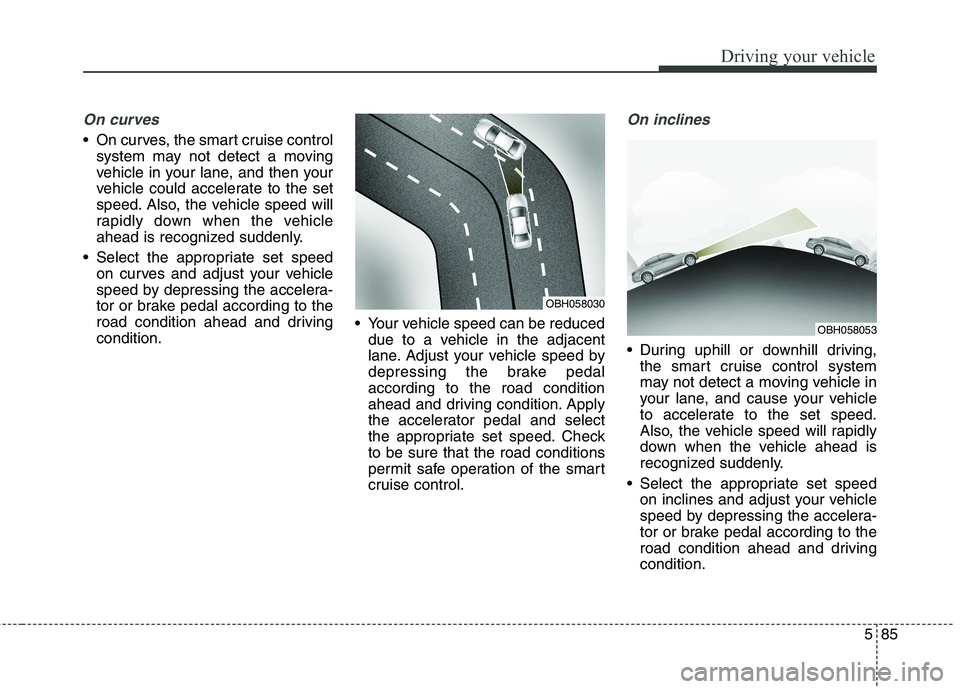
On curves
On curves, the smart cruise controlsystem may not detect a moving
vehicle in your lane, and then your
vehicle could accelerate to the set
speed. Also, the vehicle speed will
rapidly down when the vehicle
ahead is recognized suddenly.
Select the appropriate set speed on curves and adjust your vehicle
speed by depressing the accelera-
tor or brake pedal according to the
road condition ahead and drivingcondition. Your vehicle speed can be reduced
due to a vehicle in the adjacent
lane. Adjust your vehicle speed by
depressing the brake pedalaccording to the road condition
ahead and driving condition. Apply
the accelerator pedal and select
the appropriate set speed. Checkto be sure that the road conditions
permit safe operation of the smart
cruise control.
On inclines
During uphill or downhill driving,the smart cruise control system
may not detect a moving vehicle in
your lane, and cause your vehicle
to accelerate to the set speed.
Also, the vehicle speed will rapidly
down when the vehicle ahead is
recognized suddenly.
Select the appropriate set speed on inclines and adjust your vehicle
speed by depressing the accelera-
tor or brake pedal according to the
road condition ahead and drivingcondition.
OBH058053
OBH058030

