Page 218 of 488
143
Features of your vehicle
4
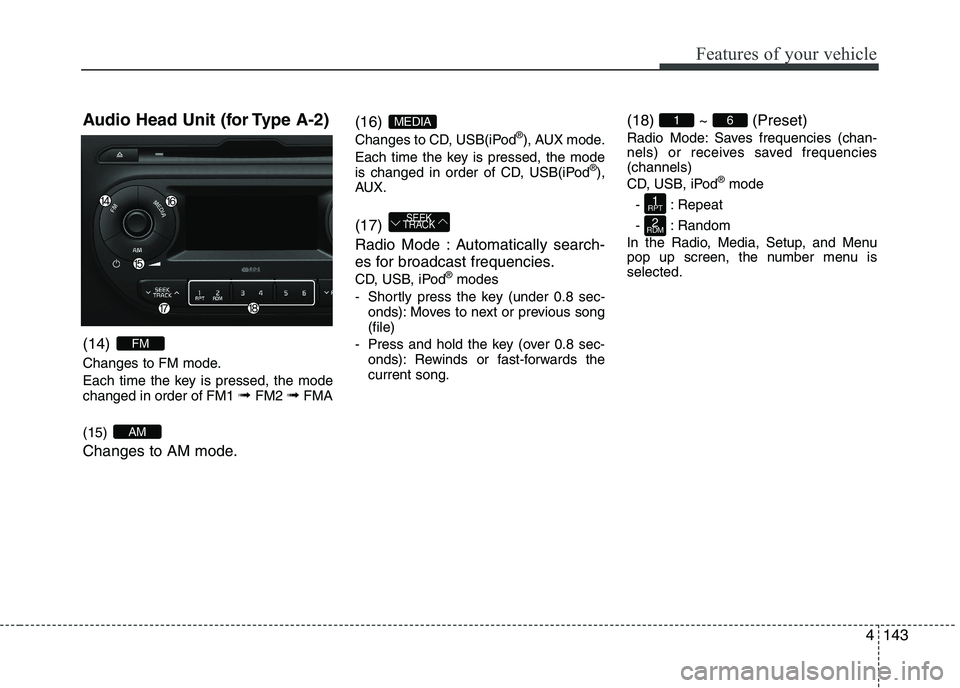
Audio Head Unit (for Type A-2) (14)
Changes to FM mode.
Each time the key is pressed, the mode changed in order of FM1
➟ FM2 ➟FMA
(15)
Changes to AM mode. (16)
Changes to CD, USB(iPod
®
), AUX mode.
Each time the key is pressed, the mode
is changed in order of CD, USB(iPod ®
),
AUX. (17)
Radio Mode : Automatically search-
es for broadcast frequencies.
CD, USB, iPod ®
modes
- Shortly press the key (under 0.8 sec- onds): Moves to next or previous song (file)
- Press and hold the key (over 0.8 sec- onds): Rewinds or fast-forwards thecurrent song. (18) ~ (Preset)
Radio Mode: Saves frequencies (chan-
nels) or receives saved frequencies(channels)
CD, USB, iPod
®
mode
- : Repeat
- : Random
In the Radio, Media, Setup, and Menu
pop up screen, the number menu isselected.
2
RDM
1
RPT
61
SEEK
TRACK
MEDIA
AM
FM
Page 219 of 488
Features of your vehicle
1444(19)
- Shortly press the key (under 0.8 sec-
onds) : Moves to the Display, Sound,
Clock, Phone, System setting modes
- Press and hold the key (over 0.8 sec- onds) : Move to the Time settingscreen (20) TUNE knob
Radio mode : Changes frequency by
turning the knob left/right
CD, USB, iPod
®
mode: Searches songs
(files) by turning the knob left/right.❈ When the desired song is displayed,
press the knob to play the song.
Moves focus in all selection menus and
selects menus
Page 221 of 488
Features of your vehicle
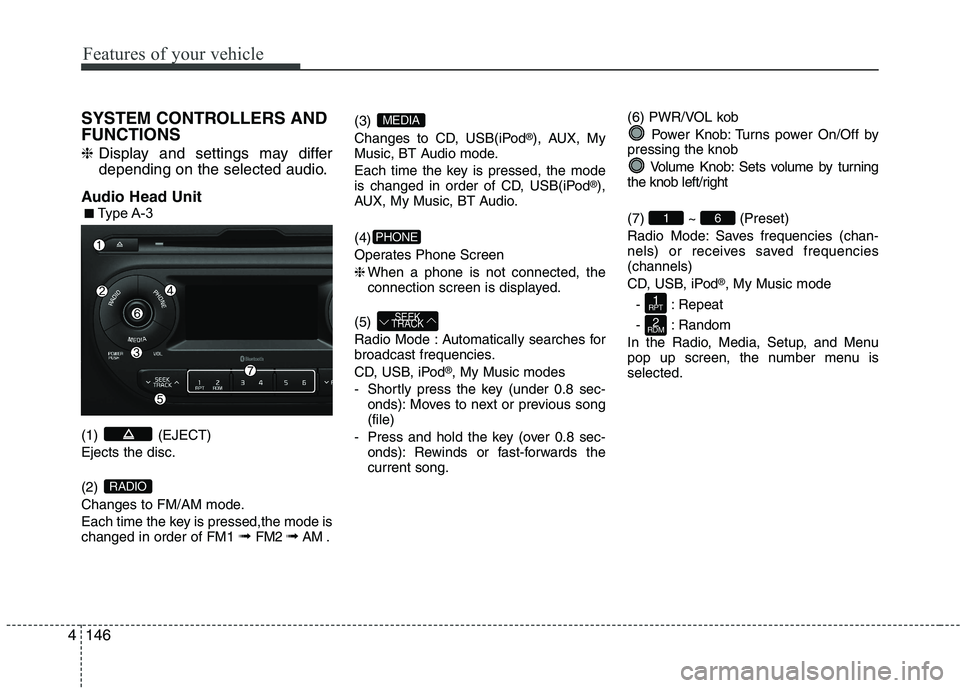
1464SYSTEM CONTROLLERS AND FUNCTIONS ❈
Display and settings may differ
depending on the selected audio.
Audio Head Unit (1) (EJECT) Ejects the disc. (2)
Changes to FM/AM mode.
Each time the key is pressed,the mode is changed in order of FM1 ➟
FM2 ➟AM . (3)
Changes to CD, USB(iPod
®
), AUX, My
Music, BT Audio mode.
Each time the key is pressed, the mode
is changed in order of CD, USB(iPod ®
),
AUX, My Music, BT Audio. (4)
Operates Phone Screen❈ When a phone is not connected, the
connection screen is displayed.
(5)
Radio Mode : Automatically searches for
broadcast frequencies.
CD, USB, iPod ®
, My Music modes
- Shortly press the key (under 0.8 sec- onds): Moves to next or previous song (file)
- Press and hold the key (over 0.8 sec- onds): Rewinds or fast-forwards thecurrent song. (6) PWR/VOL kob
Power Knob: Turns power On/Off by
pressing the knob
Volume Knob: Sets volume by turning
the knob left/right (7) ~ (Preset)
Radio Mode: Saves frequencies (chan-
nels) or receives saved frequencies(channels)
CD, USB, iPod ®
, My Music mode
- : Repeat
- : Random
In the Radio, Media, Setup, and Menu
pop up screen, the number menu isselected.
2
RDM
1
RPT
61
SEEK
TRACK
PHONE
MEDIA
RADIO
■■ Type A-3
Page 222 of 488

147
Features of your vehicle
4
(8)
Each time the button is shortly pressed (under 0.8 seconds), sets screen Off
➟
Screen On ➟Screen Off
❈ Audio operation is maintained and
only the screen will be turned Off. In
the screen Off state, press any key to
turn the screen On again. (9)
- Press the key (under 0.8 seconds):
Previews each broadcast for 5 sec- onds each
- Press and hold the key (over 0.8 sec- onds): Previews the broadcasts saved
in Preset ~ for 5 secondseach.
- Press the key (under 0.8 seconds): Previews each song (file) for 10 sec- onds each
❈ Press the key again to continue listen- ing to the current song (file).
(10)
- Shortly press the key (under 0.8 sec- onds) : Moves to the Display, Sound,
Clock, Phone, System setting modes
- Press and hold the key (over 0.8 sec- onds) : Move to the Time setting screen (11)
Displays menus for the current mode. ❈
iPod ®
List : Move to parent category
(12)
CD MP3, USB mode : Folder Search
(13) TUNE knob
Radio mode : Changes frequency by
turning the knob left/right
CD, USB, iPod ®
, My Music mode:
Searches .songs (files) by turning the
knob left/right. ❈ When the desired song is displayed,
press the knob to play the song.
Moves focus in all selection menus and
selects menus
FOLDER
MENU
SETUP CLOCK
61
SCAN
DISP
Page 223 of 488
Features of your vehicle
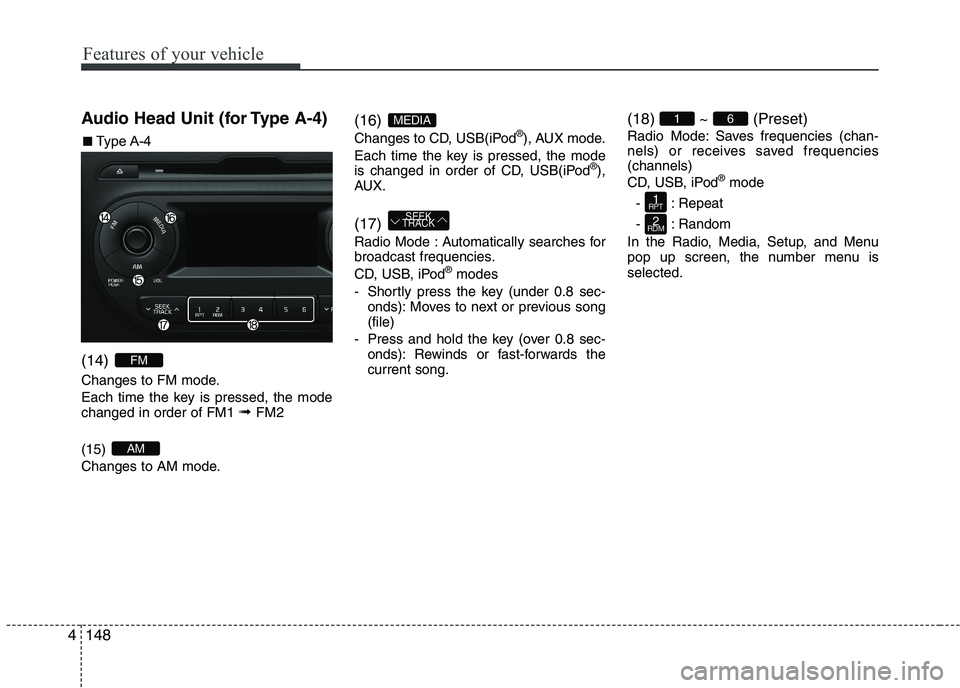
1484Audio Head Unit (for Type A-4) (14)
Changes to FM mode.
Each time the key is pressed, the mode changed in order of FM1
➟ FM2
(15)
Changes to AM mode. (16)
Changes to CD, USB(iPod
®
), AUX mode.
Each time the key is pressed, the mode
is changed in order of CD, USB(iPod ®
),
AUX. (17)
Radio Mode : Automatically searches for
broadcast frequencies.
CD, USB, iPod ®
modes
- Shortly press the key (under 0.8 sec- onds): Moves to next or previous song (file)
- Press and hold the key (over 0.8 sec- onds): Rewinds or fast-forwards thecurrent song. (18) ~ (Preset)
Radio Mode: Saves frequencies (chan-
nels) or receives saved frequencies(channels)
CD, USB, iPod
®
mode
- : Repeat
- : Random
In the Radio, Media, Setup, and Menu
pop up screen, the number menu isselected.
2
RDM
1
RPT
61
SEEK
TRACK
MEDIA
AM
FM
■■ Type A-4
Page 224 of 488
149
Features of your vehicle
4
(19)
- Shortly press the key (under 0.8 sec-
onds) : Moves to the Display, Sound,
Clock, Phone, System setting modes
- Press and hold the key (over 0.8 sec- onds) : Move to the Time settingscreen (20) TUNE knob
Radio mode : Changes frequency by
turning the knob left/right
CD, USB, iPod
®
mode: Searches songs
(files) by turning the knob left/right.❈ When the desired song is displayed,
press the knob to play the song.
Moves focus in all selection menus and
selects menus
SETUP CLOCK
Page 225 of 488
Features of your vehicle
1504SETUP
Type A-1, Type A-2
Display Settings
Press the key Select [Display]
through TUNE knob or key
Select menu through TUNE knob
Mode Pop up
[Mode Pop up] Changes . selec- tion mode
or
key to display the mode
change pop up screen.
Scroll text
[Scroll text] Set /
Maintains scroll
: Scrolls only one (1) time.
Song Info
When playing an MP3 file, select the
desired display info from ‘Folder/File’ or
‘Album/Artist/Song’. Sound Settings
Press the key Select [Sound]
through TUNE knob or key
Select
menu through TUNE knob
❈ Display and settings may differ
depending on the selected audio.2
RDM
OFF
ON
OFFON
MEDIARADIO
ON
1
RPT
Page 227 of 488
Features of your vehicle
1524CLOCK SETTINGS
Press the key Select [Clock]
through TUNE knob or key
Select menu through TUNE knob
❈
Display and settings may differ
depending on the selected audio. Clock Settings
This menu is used to set the time.
Select [Clock Settings] Set through
TUNE knob Press TUNE knob
❈
Adjust the number currently in focus to set the [hour] and press the tune knob
to set the [minute]. Day/Calendar Settings
This menu is used to set the date (DD/MM/YYYY).
Select [Day Settings] Set through
TUNE knob Press TUNE knob
❈Display and settings may differ
depending on the selected audio.
❈ Adjust the number currently in focus to
make the settings and press the tune
knob to move to the next setting. (Set
in order of Year/Month/Day)
3


![KIA PICANTO 2017 Owners Manual Features of your vehicle
1504SETUP
Type A-1, Type A-2
Display Settings
Press the key Select [Display]
through TUNE knob or key
Select menu through TUNE knob
Mode Pop up
[Mode Pop up] Changes](/manual-img/2/57964/w960_57964-224.png "KIA PICANTO 2017 Owners Manual Features of your vehicle
1504SETUP
Type A-1, Type A-2
Display Settings
Press the key Select [Display]
through TUNE knob or key
Select menu through TUNE knob
Mode Pop up
[Mode Pop up] Changes")
![KIA PICANTO 2017 Owners Manual Features of your vehicle
1524CLOCK SETTINGS
Press the key Select [Clock]
through TUNE knob or key
Select menu through TUNE knob
❈
Display and settings may differ
depending on the selected audio](/manual-img/2/57964/w960_57964-226.png "KIA PICANTO 2017 Owners Manual Features of your vehicle
1524CLOCK SETTINGS
Press the key Select [Clock]
through TUNE knob or key
Select menu through TUNE knob
❈
Display and settings may differ
depending on the selected audio")