Page 185 of 488
Features of your vehicle
110
4
These compartments can be used to
store small items required by the driver
or passengers.
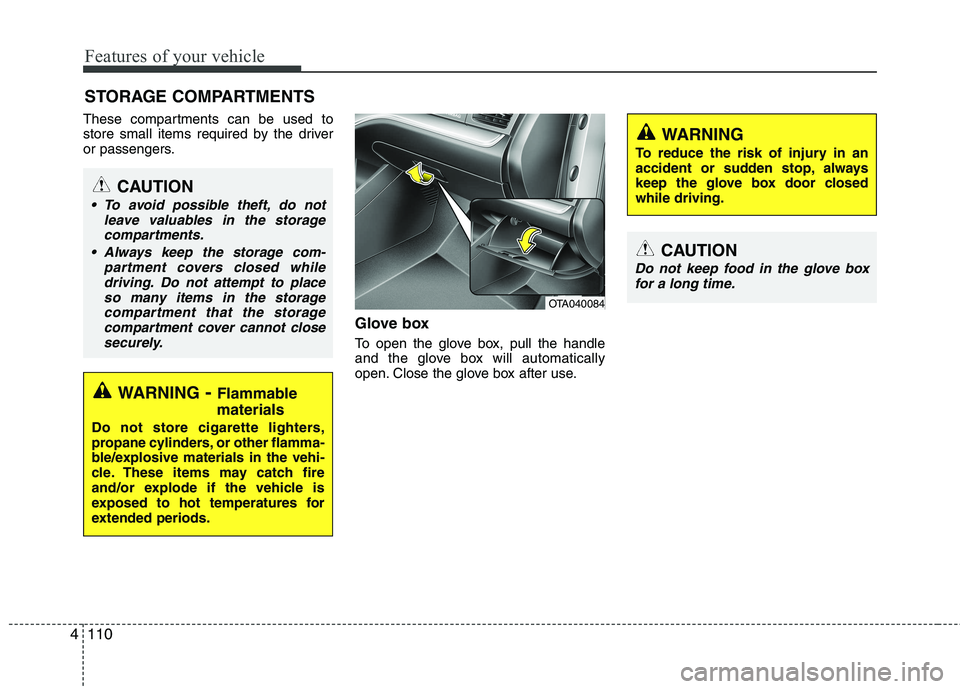
Glove box
To open the glove box, pull the handle
and the glove box will automatically
open. Close the glove box after use.
STORAGE COMPARTMENTS
WARNING
- Flammable
materials
Do not store cigarette lighters,
propane cylinders, or other flamma-
ble/explosive materials in the vehi-
cle. These items may catch fire
and/or explode if the vehicle is
exposed to hot temperatures for
extended periods.
CAUTION
To avoid possible theft, do not leave valuables in the storagecompartments.
Always keep the storage com- partment covers closed whiledriving. Do not attempt to place
so many items in the storage compartment that the storagecompartment cover cannot close securely.
OTA040084
WARNING
To reduce the risk of injury in an
accident or sudden stop, always
keep the glove box door closedwhile driving.
CAUTION
Do not keep food in the glove box for a long time.
Page 188 of 488
4113
Features of your vehicle
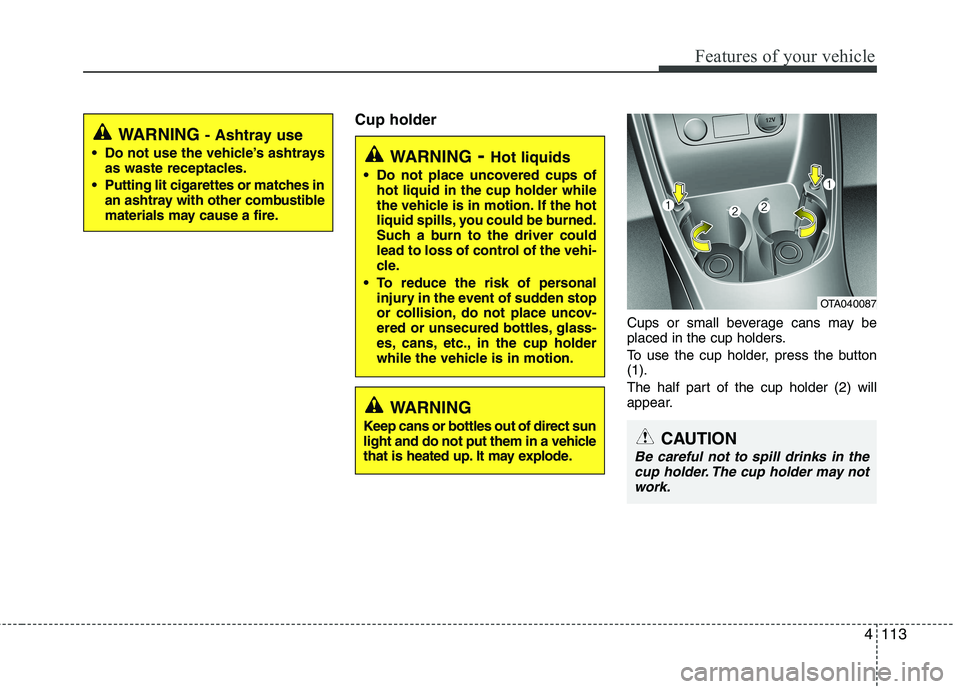
Cup holderCups or small beverage cans may be
placed in the cup holders.
To use the cup holder, press the button (1).
The half part of the cup holder (2) will
appear.
WARNING- Hot liquids
Do not place uncovered cups of hot liquid in the cup holder while
the vehicle is in motion. If the hot
liquid spills, you could be burned.
Such a burn to the driver could
lead to loss of control of the vehi-
cle.
To reduce the risk of personal injury in the event of sudden stop
or collision, do not place uncov-
ered or unsecured bottles, glass-
es, cans, etc., in the cup holder
while the vehicle is in motion.
OTA040087
CAUTION
Be careful not to spill drinks in the
cup holder. The cup holder may notwork.
WARNING
Keep cans or bottles out of direct sun
light and do not put them in a vehicle
that is heated up. It may explode.
WARNING - Ashtray use
Do not use the vehicle’s ashtrays as waste receptacles.
Putting lit cigarettes or matches in an ashtray with other combustible
materials may cause a fire.
Page 190 of 488
4115
Features of your vehicle
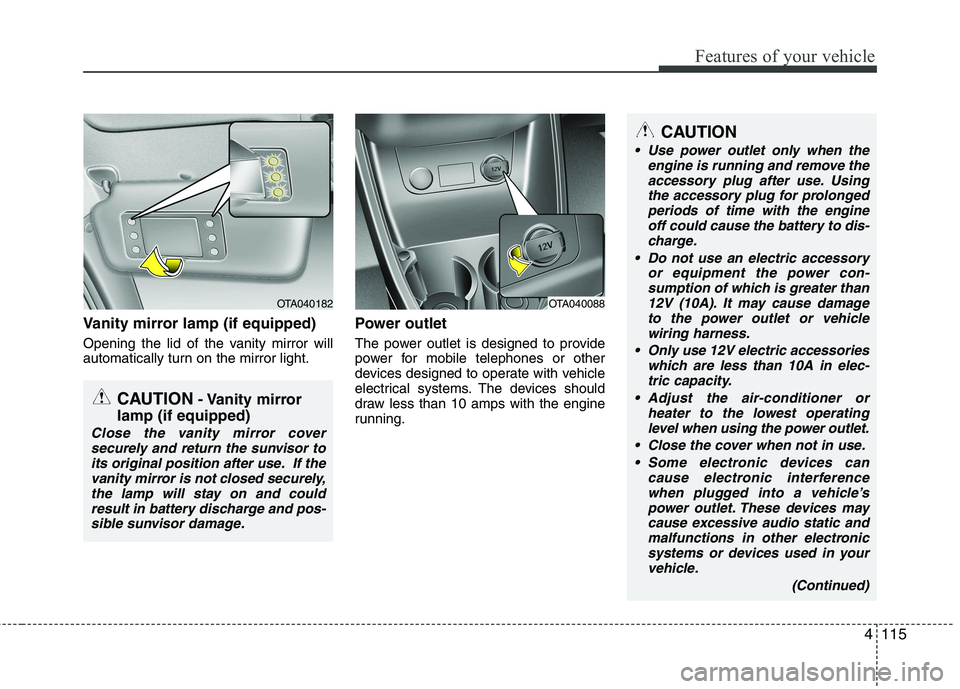
Vanity mirror lamp (if equipped)
Opening the lid of the vanity mirror will
automatically turn on the mirror light.Power outlet
The power outlet is designed to provide
power for mobile telephones or other
devices designed to operate with vehicle
electrical systems. The devices should
draw less than 10 amps with the engine
running.
OTA040182
CAUTION
- Vanity mirror
lamp (if equipped)
Close the vanity mirror cover securely and return the sunvisor to
its original position after use. If the vanity mirror is not closed securely,the lamp will stay on and couldresult in battery discharge and pos-
sible sunvisor damage.
OTA040088
CAUTION
Use power outlet only when the engine is running and remove the
accessory plug after use. Using the accessory plug for prolongedperiods of time with the engineoff could cause the battery to dis-
charge.
Do not use an electric accessory or equipment the power con-sumption of which is greater than
12V (10A). It may cause damage to the power outlet or vehiclewiring harness.
Only use 12V electric accessories which are less than 10A in elec-
tric capacity.
Adjust the air-conditioner or heater to the lowest operatinglevel when using the power outlet.
Close the cover when not in use. Some electronic devices can cause electronic interferencewhen plugged into a vehicle’spower outlet. These devices maycause excessive audio static and
malfunctions in other electronicsystems or devices used in your vehicle.
(Continued)
Page 191 of 488
Features of your vehicle
116
4
Digital clock
Whenever the battery terminals or relat-
ed fuses are disconnected, you must
reset the time.
When the ignition switch is in the ACC or
ON position, the clock buttons operate as
follows:
Setup the clock (Type A, Type B)
With audio off
1. Press the [SETUP] / [CLOCK] button
until the clock of the display blinks.
2. Set the clock by turning the knob(1) and press it.
WARNING
Do not put a finger or a foreign ele-
ment (pin, etc.) into a power outlet
and do not touch with a wet hand.
You may get electrocuted or fire
may occur.
(Continued)
Make sure that the electric devices are plugged in securely. Ifnot, it could cause a malfunctionof electric systems.
If you use an electric device with a battery, electric current mayflow from the electric device intothe vehicle and may cause a mal-
function of electric systems. Onlyuse electric devices which couldprevent flowing of current into the vehicle.
OTA045545K
OTA045089K
■ Type A
■Type B
Page 193 of 488
Features of your vehicle
118
4
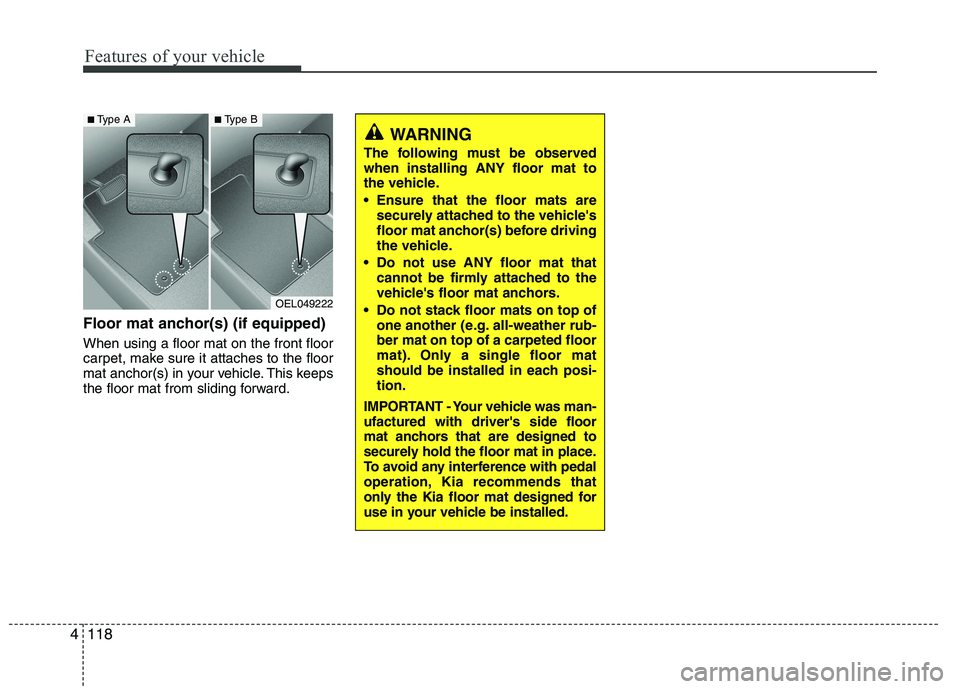
Floor mat anchor(s) (if equipped) When using a floor mat on the front floor
carpet, make sure it attaches to the floor
mat anchor(s) in your vehicle. This keeps
the floor mat from sliding forward.
OEL049222
■ Type A■Type B
WARNING
The following must be observed when installing ANY floor mat to
the vehicle.
Ensure that the floor mats are securely attached to the vehicle's
floor mat anchor(s) before driving
the vehicle.
Do not use ANY floor mat that cannot be firmly attached to the
vehicle's floor mat anchors.
Do not stack floor mats on top of one another (e.g. all-weather rub-ber mat on top of a carpeted floor
mat). Only a single floor mat
should be installed in each posi-tion.
IMPORTANT - Your vehicle was man-ufactured with driver's side floor
mat anchors that are designed to
securely hold the floor mat in place.
To avoid any interference with pedal
operation, Kia recommends that
only the Kia floor mat designed for
use in your vehicle be installed.
Page 216 of 488
141
Features of your vehicle
4
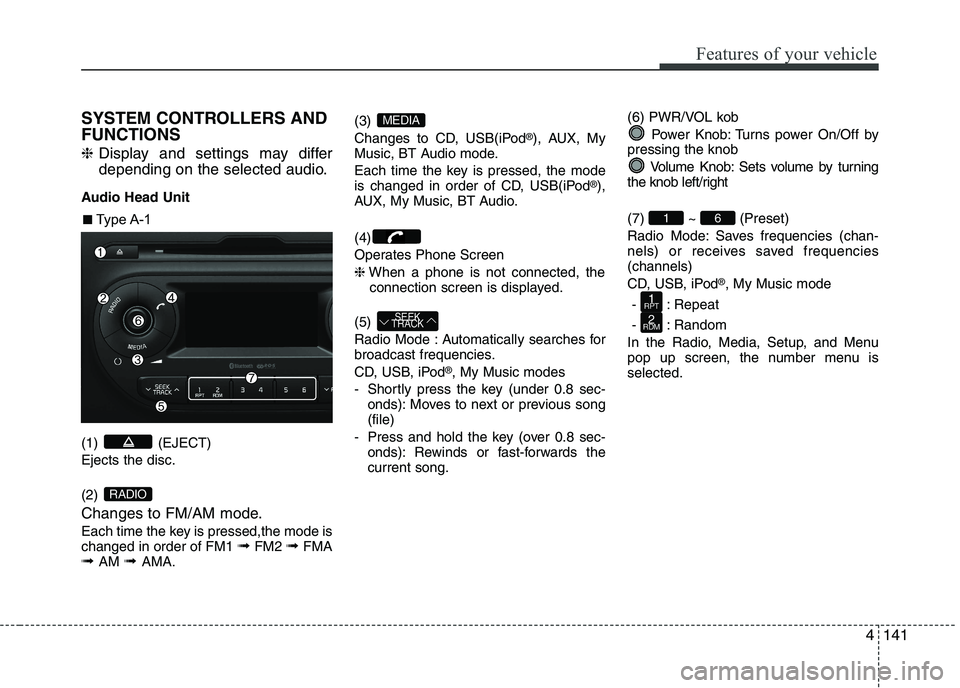
SYSTEM CONTROLLERS AND FUNCTIONS ❈
Display and settings may differ
depending on the selected audio.
Audio Head Unit (1) (EJECT) Ejects the disc. (2)
Changes to FM/AM mode.
Each time the key is pressed,the mode is changed in order of FM1 ➟FM2 ➟FMA
➟ AM ➟ AMA. (3)
Changes to CD, USB(iPod
®
), AUX, My
Music, BT Audio mode.
Each time the key is pressed, the mode
is changed in order of CD, USB(iPod ®
),
AUX, My Music, BT Audio. (4)
Operates Phone Screen❈ When a phone is not connected, the
connection screen is displayed.
(5)
Radio Mode : Automatically searches for
broadcast frequencies.
CD, USB, iPod ®
, My Music modes
- Shortly press the key (under 0.8 sec- onds): Moves to next or previous song (file)
- Press and hold the key (over 0.8 sec- onds): Rewinds or fast-forwards thecurrent song. (6) PWR/VOL kob
Power Knob: Turns power On/Off by
pressing the knob
Volume Knob: Sets volume by turning
the knob left/right (7) ~ (Preset)
Radio Mode: Saves frequencies (chan-
nels) or receives saved frequencies(channels)
CD, USB, iPod ®
, My Music mode
- : Repeat
- : Random
In the Radio, Media, Setup, and Menu
pop up screen, the number menu isselected.
2
RDM
1
RPT
61
SEEK
TRACK
MEDIA
RADIO
■■ Type A-1
Page 218 of 488
143
Features of your vehicle
4
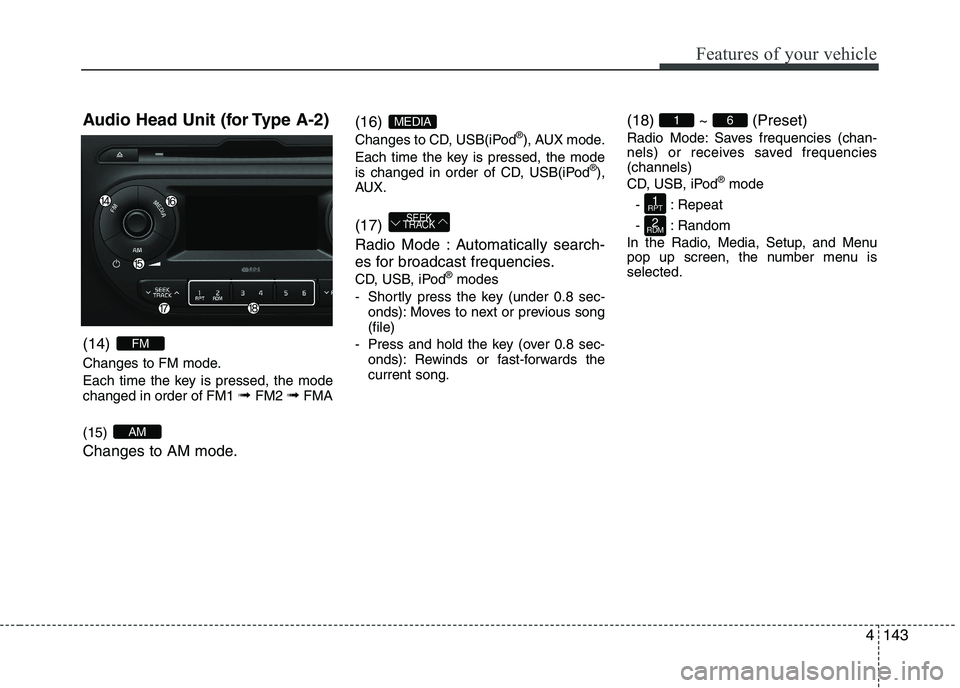
Audio Head Unit (for Type A-2) (14)
Changes to FM mode.
Each time the key is pressed, the mode changed in order of FM1
➟ FM2 ➟FMA
(15)
Changes to AM mode. (16)
Changes to CD, USB(iPod
®
), AUX mode.
Each time the key is pressed, the mode
is changed in order of CD, USB(iPod ®
),
AUX. (17)
Radio Mode : Automatically search-
es for broadcast frequencies.
CD, USB, iPod ®
modes
- Shortly press the key (under 0.8 sec- onds): Moves to next or previous song (file)
- Press and hold the key (over 0.8 sec- onds): Rewinds or fast-forwards thecurrent song. (18) ~ (Preset)
Radio Mode: Saves frequencies (chan-
nels) or receives saved frequencies(channels)
CD, USB, iPod
®
mode
- : Repeat
- : Random
In the Radio, Media, Setup, and Menu
pop up screen, the number menu isselected.
2
RDM
1
RPT
61
SEEK
TRACK
MEDIA
AM
FM
Page 221 of 488
Features of your vehicle
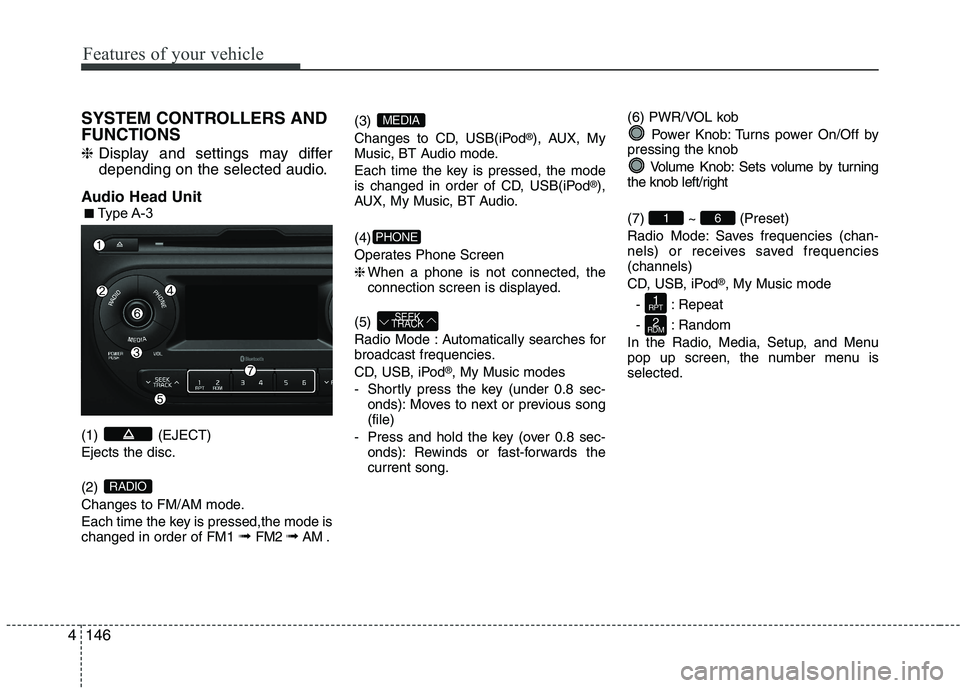
1464SYSTEM CONTROLLERS AND FUNCTIONS ❈
Display and settings may differ
depending on the selected audio.
Audio Head Unit (1) (EJECT) Ejects the disc. (2)
Changes to FM/AM mode.
Each time the key is pressed,the mode is changed in order of FM1 ➟
FM2 ➟AM . (3)
Changes to CD, USB(iPod
®
), AUX, My
Music, BT Audio mode.
Each time the key is pressed, the mode
is changed in order of CD, USB(iPod ®
),
AUX, My Music, BT Audio. (4)
Operates Phone Screen❈ When a phone is not connected, the
connection screen is displayed.
(5)
Radio Mode : Automatically searches for
broadcast frequencies.
CD, USB, iPod ®
, My Music modes
- Shortly press the key (under 0.8 sec- onds): Moves to next or previous song (file)
- Press and hold the key (over 0.8 sec- onds): Rewinds or fast-forwards thecurrent song. (6) PWR/VOL kob
Power Knob: Turns power On/Off by
pressing the knob
Volume Knob: Sets volume by turning
the knob left/right (7) ~ (Preset)
Radio Mode: Saves frequencies (chan-
nels) or receives saved frequencies(channels)
CD, USB, iPod ®
, My Music mode
- : Repeat
- : Random
In the Radio, Media, Setup, and Menu
pop up screen, the number menu isselected.
2
RDM
1
RPT
61
SEEK
TRACK
PHONE
MEDIA
RADIO
■■ Type A-3