2017 KIA NIRO charging
[x] Cancel search: chargingPage 179 of 552

Features of your vehicle
76
4
Device in wireless charger
(if equipped)
If a smart phone is still left on the
wireless charging pad unattended,
even when the Engine start/stop but-
ton is turned to the ACC or OFF posi-
tion. And the instrument panel's one
time driving information mode has
finished, a warning message will lit
up on the instrument panel.
❈ For more details, refer to “Smart
Phone Wireless Charger” in this
chapter. Check Hybrid system
This warning message illuminates
when there is a problem with the
hybrid control system.
Refrain from driving when the warn-
ing message is displayed.
In this case, have your vehicle inspect-
ed by an authorized Kia dealer.
Check Hybrid system. Turn off engine.
This warning message illuminates
when there is a problem with the
hybrid system. The “ ” indicator
will blink and a warning chime will
sound until the problem is solved.
In this case, have your vehicle inspect-
ed by an authorized Kia dealer. Check Hybrid system. Do not start engine.
This warning message illuminates
when the hybrid battery power
(SOC) level is low. A warning chime
will sound until the problem is solved.
In this case, have your vehicle inspect-
ed by an authorized Kia dealer.
Stop vehicle and check power supply
This warning message illuminates
when a failure occurs in the power
supply system.
In this case, park the vehicle in a
safe location and tow your vehicle to
the nearest authorized Kia dealer
and have the vehicle inspected.
Page 185 of 552

Features of your vehicle
82
4
Malfunction Indicator
Lamp (MIL)
This warning light illuminates:
Once you set the Engine Start/Stop Button to the ON posi-
tion.
- It remains on until the engine isstarted.
When there is a malfunction with the emission control system.
In this case, have your vehicle
inspected by an authorized Kia
dealer.
Charging System
Warning Light
This warning light illuminates:
Once you set the Engine Start/Stop Button to the ON posi-
tion.
- It remains on until the engine isstarted.
When there is a malfunction with either the alternator or electrical
charging system.
If there is a malfunction with either
the alternator or electrical charging
system:
1.Drive carefully to the nearest safe location and stop your vehicle.
2.Turn the engine off and check the alternator drive belt for looseness
or breakage.
If the belt is adjusted properly,
there may be a problem in the elec-
trical charging system.
In this case, have your vehicle
inspected by an authorized Kia
dealer as soon as possible.
CAUTION - Catalytic
Converter Damage
If the Malfunction Indicator Lamp (MIL) illuminates, poten-tial catalytic converter damageis possible which could result inloss of engine power.
In this case, have your vehicleinspected by an authorized Kiadealer as soon as possible.
CAUTION - Malfunction
Indicator Lamp (MIL)
Driving with the Malfunction Indicator Lamp (MIL) on maycause damage to the emissioncontrol systems which couldaffect drivability and/or fueleconomy.
Page 214 of 552
4111
Features of your vehicle
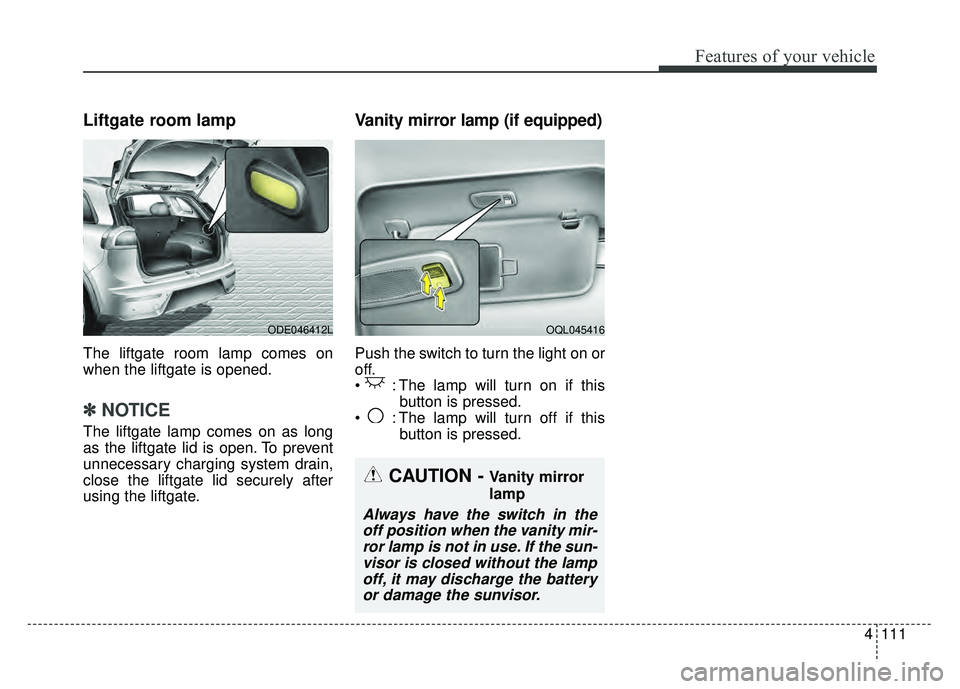
Liftgate room lamp
The liftgate room lamp comes on
when the liftgate is opened.
✽ ✽NOTICE
The liftgate lamp comes on as long
as the liftgate lid is open. To prevent
unnecessary charging system drain,
close the liftgate lid securely after
using the liftgate.
Vanity mirror lamp (if equipped)
Push the switch to turn the light on or
off.
: The lamp will turn on if this
button is pressed.
: The lamp will turn off if this button is pressed.
OQL045416ODE046412L
CAUTION - Vanity mirror
lamp
Always have the switch in theoff position when the vanity mir-ror lamp is not in use. If the sun-visor is closed without the lampoff, it may discharge the batteryor damage the sunvisor.
Page 243 of 552

Features of your vehicle
140
4
Only use 12V electric accessories
which are less than 10A in electric
capacity.
Adjust the air-conditioner or heater to the lowest operating level when
using the power outlet.
Close the cover when not in use.
Some electronic devices can cause electronic interference when
plugged into a vehicle’s power out-
let. These devices may cause
excessive audio static and malfunc-
tions in other electronic systems or
devices used in your vehicle.
Push the plug in as far as it will go. If good contact is not made, the
plug may overheat and the fuse
may open.
Plug in battery equipped electronic devices with reverse current pro-
tection. The current from the bat-
tery may flow into the vehicle’s
electri cal/electronic system and
cause system malfunction.USB charger (if equipped)
The USB charger is designed to
recharge batteries of small size elec-
trical devices using a USB cable. The
electrical devices can be recharged
when the Engine Start/Stop button is
in ACC/ON/START position.
The battery charging state may be
monitored on the electrical device.
Disconnect the USB cable from the
USB port after use.
WARNING - Electric shock
Do not put a finger or a foreign
element (pen, etc.) into a power
outlet and do not touch with a
wet hand. You may receive an
electric shock.
ODE046434
Page 244 of 552

4141
Features of your vehicle
Some devices are not supportedfor fast charging but will be
charged with normal speed.
Use the USB charger when the engine is running to prevent bat-
tery discharge.
Only devices that fit the USB port can be used.
The USB charger can be used only for battery charging purposes.
Battery chargers cannot be charged.AC inverter (if equipped)
The AC inverter supplies 115V/150W
electric power to operate electric
accessories or equipment.
If you wish to use the AC inverter,
open up the AC inverter cover and
connect a plug to it. The AC inverter
supplies electric power when engine
is running.
✽ ✽ NOTICE
• Rated voltage : AC 115V
• Maximum electric power : 150W
• In order to avoid an electrical sys-
tem failure, electric shock, etc., be
sure to read owner's manual
before use.
• Be sure to close the cover except for when in use.
ODE046034N
Page 245 of 552
Features of your vehicle
142
4
To prevent the battery from being dis-
charged, do not use the AC inverter
while the engine is not running.
After using an electric accessory or equipment, pull the plug out. Leaving
the accessory or equipment plugged
in for a long time may cause battery
discharge.
Do not use an electric accessory or equipment the power consumption of
which is greater than 150W (115V).
When the AC inverter input voltage is less than 11.3V, automatically turn off
the power.
AC inverter will operate as normal
when the voltage is increased.
When the AC inverter input voltage is less than 10.7V, power will turn
off. The AC inverter will operate as
normal when the voltage is
increased. While the power consumption of
some electrical devices/appliances
may be within the AC inverter’s
electric power range, it may mal-
function in below cases.
- If the device/appliance requireshigh electric power for initial start
up
- If the device/appliance processes precise/very accurate data
- If the device/appliance requires very stable supply of electricityWireless smart phone charg-
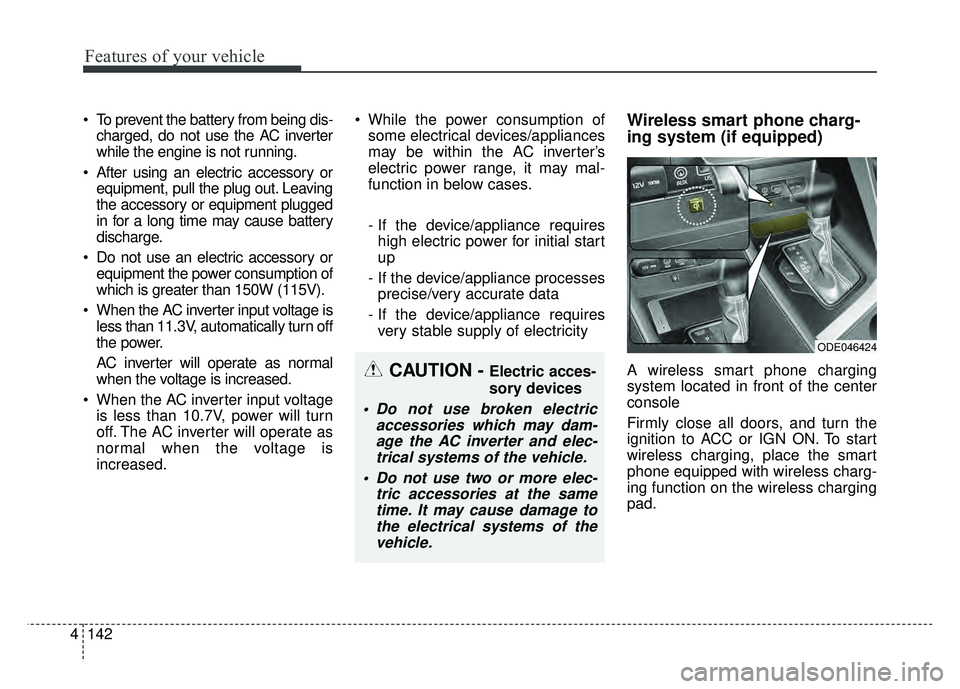
ing system (if equipped)
A wireless smart phone charging
system located in front of the center
console
Firmly close all doors, and turn the
ignition to ACC or IGN ON. To start
wireless charging, place the smart
phone equipped with wireless charg-
ing function on the wireless charging
pad.CAUTION - Electric acces-
sory devices
Do not use broken electric accessories which may dam-age the AC inverter and elec-trical systems of the vehicle.
Do not use two or more elec- tric accessories at the sametime. It may cause damage tothe electrical systems of thevehicle.
ODE046424
Page 246 of 552
4143
Features of your vehicle
For best wireless charging results,
place the smart phone on the center
of the charging pad.
The wireless charging system is
designed for one smart phone
equipped with QI per single usage
only. Please refer to the smart phone
accessory cover or the smart phone
manufacturer homepage to check
whether your smart phone supports
QI function.Wireless smart phone charging
1. Remove any object on the smartphone charging pad including the
smart key. If there is any foreign
object on the pad other than a
smart phone, the wireless charging
function may not operate properly.
2. Place the smart phone on the cen- ter of the wireless charging pad.
3. The indicator light will change to orange once the wireless charging
begins. After the charging is com-
plete, the orange light will change
to green.
4. You can choose to turn the wireless charging function to either ON or
OFF by selecting the USM on the
instrument cluster. (Please refer to
“Instrument Cluster” for details).
If the wireless charging does not
work, gently move your smart phone
around the pad until the charging
indicator light turns orange.
Depending on the smart phone, the
charging indicator light may not turn
green even after the charging is com-
plete. If the wireless charging is not func-
tioning properly, the orange light will
blink and flash for ten seconds then
turn off. In such cases, remove the
smart phone from the pad and
replace it on the pad again, or double
check the charging status.
If you leave the smart phone on the
charging pad when the vehicle igni-
tion is in OFF, the vehicle will alert
you through warning messages and
sound (applicable for vehicles with
voice guidance function) after the
‘Good bye’ function on the instru-
ment cluster ends.
Page 247 of 552
Features of your vehicle
144
4
✽
✽
NOTICE
• When the interior temperature of
the wireless charging system rises
above a set temperature, the wire-
less charging will cease to func-
tion. After the interior tempera-
ture drops below the threshold,
the wireless charging function will
resume.
• The wireless charging may not function properly when there is a
heavy accessory cover on the
smart phone.
• The wireless charging will stop when using the wireless smart key
search function to prevent radio
wave disruption.
• The wireless charging will stop when the smart key is moved out
of the vehicle with the ignition in
ON.
• The wireless charging will stop when any of the doors is opened
(applicable for vehicles equipped
with smart keys). (Continued)CAUTION - Liquid in
Wireless Smart Phone
Charger
To prevent liquid from damag- ing the wireless smart phonecharging system in your vehi-cle, be sure not to spill liquidover the charging system whencharging your phone.
CAUTION - Metal in
Wireless Charging System
If any metallic object such as coins is located between thewireless charging system andthe smart phone, the chargingmay be disrupted. Also, themetallic object may heat up andpotentially damage the chargingsystem. If there is any metallicobject between the smart phoneand the charging pad, immedi-ately remove the smart phone.Remove the metallic object afterit has cooled down.
WARNING - Distracted
driving
Driving while distracted can
result in a loss of vehicle con-
trol that may lead to an acci-
dent, severe personal injury,
and death. The driver’s primary
responsibility is in the safe and
legal operation of a vehicle, and
use of any handheld devices,
other equipment, or vehicle sys-
tems which take the driver’s
eyes, attention and focus away
from the safe operation of a
vehicle or which are not permis-
sible by law should never be
used during operation of the
vehicle.