Page 351 of 516
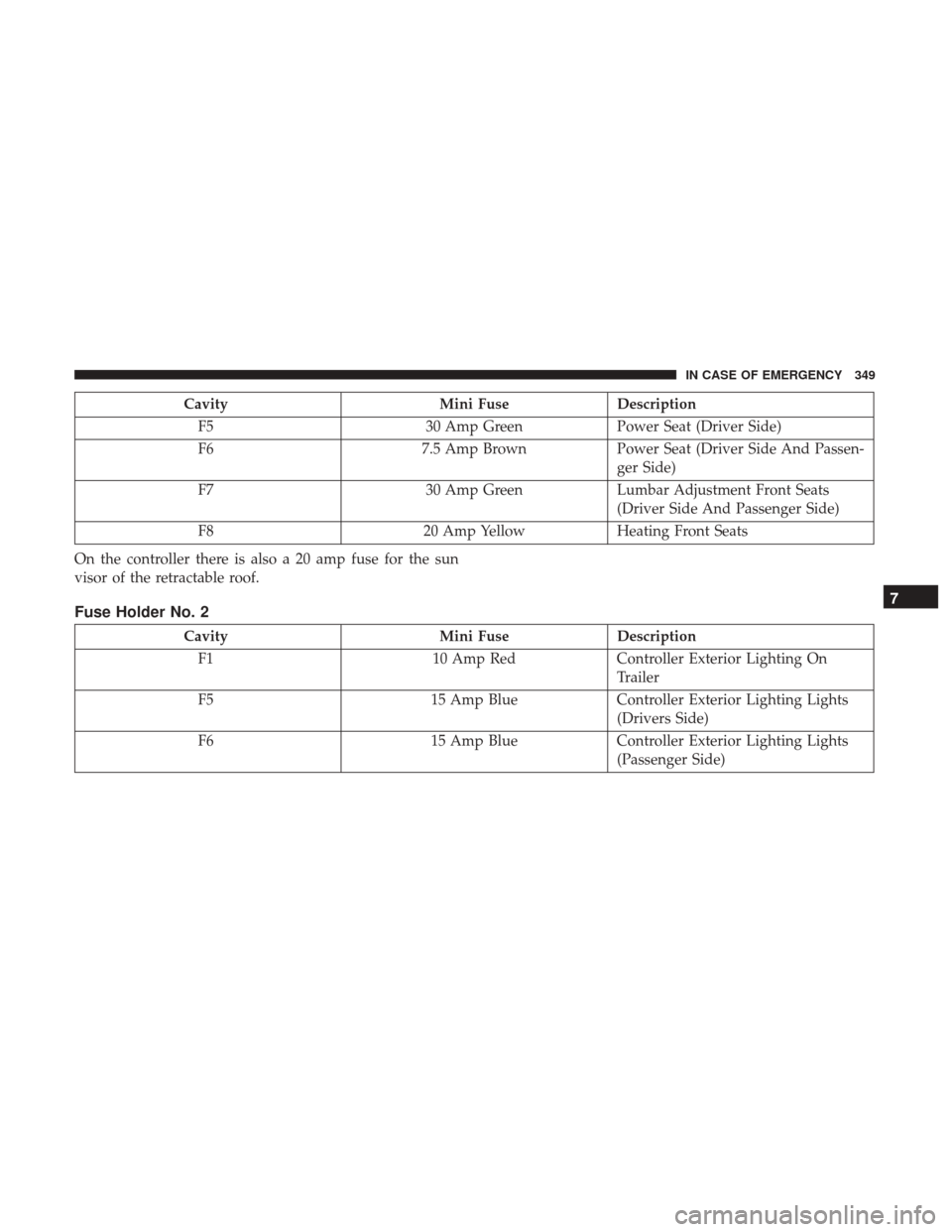
CavityMini FuseDescription
F5 30 Amp GreenPower Seat (Driver Side)
F6 7.5 Amp BrownPower Seat (Driver Side And Passen-
ger Side)
F7 30 Amp GreenLumbar Adjustment Front Seats
(Driver Side And Passenger Side)
F8 20 Amp YellowHeating Front Seats
On the controller there is also a 20 amp fuse for the sun
visor of the retractable roof.
Fuse Holder No. 2
Cavity Mini FuseDescription
F1 10 Amp RedController Exterior Lighting On
Trailer
F5 15 Amp BlueController Exterior Lighting Lights
(Drivers Side)
F6 15 Amp BlueController Exterior Lighting Lights
(Passenger Side)
7
IN CASE OF EMERGENCY 349
Page 377 of 516

SCHEDULED SERVICING
Your vehicle is equipped with an automatic oil change
indicator system. The oil change indicator system will
remind you that it is time to take your vehicle in for
scheduled maintenance.
Based on engine operation conditions, the oil change
indicator message will illuminate in the instrument cluster.
This means that service is required for your vehicle.
Operating conditions such as frequent short-trips, trailer
tow and extremely hot or cold ambient temperatures will
influence when the “Change Oil” or “Oil Change Re-
quired” message is displayed. Severe Operating Condi-
tions can cause the change oil message to illuminate as
early as 3,500 miles (5,600 km) since last reset. Have your
vehicle serviced as soon as possible, within the next
500 miles (805 km).
Your authorized dealer will reset the oil change indicator
message after completing the scheduled oil change.
NOTE:Under no circumstances should oil change inter-
vals exceed 10,000 miles (16,000 km), one year or 350 hours
of engine run time, whichever comes first. The 350 hours of
engine run or idle time is generally only a concern for fleet
customers. Severe Duty All Models
Change Engine Oil at 4,000 miles (6,500 km) if the vehicle
is operated in a dusty and off road environment or is
operated predominately at idle or only very low engine
RPM’s. This type of vehicle use is considered Severe Duty.
NOTE:
The Oil Change Indicator will not illuminate under
these conditions.
Once A Month Or Before A Long Trip:
• Check engine oil level.
• Check windshield washer fluid level.
• Check the tire inflation pressures and look for unusual
wear or damage.
• Check the fluid levels of the coolant reservoir, and brake
master cylinder reservoir, and fill as needed.
• Check function of all interior and exterior lights.
8
SERVICING AND MAINTENANCE 375
Page 379 of 516
Mileage or time passed
(whichever comes first)
10,000
20,000
30,000
40,000
50,000
60,000
70,000
80,000
90,000
100,000
110,000
120,000
130,000
140,000
150,000
Or Years: 1 2 3 4 5 6 7 8 9 10 11 12 13 14 15
Or Kilometers:
16,000
32,000
48,000
64,000
80,000
96,000
112,000
128,000
144,000
160,000
176,000
192,000
208,000
224,000
240,000
Check operation of lighting sys-
tem (headlamps, direction indi-
cators, hazard warning lights,
luggage compartment, passen-
ger compartment, glove com-
partment, instrument panel
warning lights, etc.). •••••••••••••••
Check and, if necessary, top up
fluid levels (brakes/hydraulic
clutch, windshield washer, bat-
tery, engine coolant, etc.). •••••••••••••••
Check engine control system
operation (via diagnostic tool). •••••••••••••••
Visually inspect condition of:
exterior bodywork, underbody
protection, pipes and hoses (ex-
haust - fuel system - brakes),
rubber elements (boots,
sleeves, bushings, etc.). •••• • • •
8
SERVICING AND MAINTENANCE 377
Page 428 of 516

NOTE:When the vehicle has not been started or driven for
at least 30 days, an Extended Park Start Procedure is
required to start the vehicle. Refer to “Starting The Engine”
in “Starting And Operating” for further information.
CAUTION!
Before removal of the positive and negative terminals
to the battery, wait at least a minute with ignition
switch in the OFF position and close the drivers door.
When reconnecting the positive and negative terminals
to the battery be sure the ignition switch is in the OFF
position and the drivers door is closed.
BODYWORK
Protection From Atmospheric Agents
Vehicle body care requirements vary according to geo-
graphic locations and usage. Chemicals that make roads
passable in snow and ice and those that are sprayed on
trees and road surfaces during other seasons are highly
corrosive to the metal in your vehicle. Outside parking,
which exposes your vehicle to airborne contaminants, road
surfaces on which the vehicle is operated, extreme hot or cold weather and other extreme conditions will have an
adverse effect on paint, metal trim, and underbody protec-
tion.
The following maintenance recommendations will enable
you to obtain maximum benefit from the corrosion resis-
tance built into your vehicle.
What Causes Corrosion?
Corrosion is the result of deterioration or removal of paint
and protective coatings from your vehicle.
The most common causes are:
•
Road salt, dirt and moisture accumulation.
• Stone and gravel impact.
• Insects, tree sap and tar.
• Salt in the air near seacoast localities.
• Atmospheric fallout/industrial pollutants.
Body And Underbody Maintenance
Cleaning Headlights
Your vehicle is equipped with plastic headlights and fog
lights that are lighter and less susceptible to stone breakage
than glass headlights.
426 SERVICING AND MAINTENANCE
Page 448 of 516

Lights, Doors & Locks, Engine Off Options, Compass
Settings, Audio, Phone/Bluetooth, Radio Setup, Restore
Settings and Clear Personal Data.
NOTE:Only one touchscreen area may be selected at a
time.
When making a selection, press the button on the touch-
screen to enter the desired mode. Once in the desired
mode, press and release the preferred setting and make
your selection. Once the setting is complete, either press
the Back Arrow button on the touchscreen or the Back
button on the faceplate to return to the previous menu or press the “X” button on the touchscreen to close out of the
settings screen. Pressing the Up or Down Arrow buttons on
the right side of the screen will allow you to toggle up or
down through the available settings.
NOTE:
All settings should be changed with the ignition in
the “RUN” position.
Display
After pressing the “Display” button on the touchscreen, the
following settings will be available:
Setting Name Selectable Options
Display Mode AutoManual
Brightness +–
Add Display Brightness With Head- lights ON
Add Display Brightness With Head- lights OFF
Language EnglishEspañolFrançais
Touchscreen Beep
446 MULTIMEDIA
Page 454 of 516

Setting NameSelectable Options
LaneSense Strength — If Equipped Low
Medium High
NOTE: When this feature is selected, it sets the strength of the steering wheel feedback for potential lane departures.
The amount of directional torque the steering system can apply to the steering wheel to correct for vehicle lane de-
parture can be set at “Low,” “Medium” or “High.”
Blind Spot Alert — If Equipped Off
LightsLights & Chime
NOTE:
•When this feature is selected, the Blind Spot Alert feature can be set to Off, Lights or Lights and Chime. The Blind
Spot Alert feature can be activated in Lights mode. When this mode is selected, the Blind Spot Monitor (BSM) sys-
tem is activated and will only show a visual alert in the outside mirrors. When Lights & Chime mode is activated,
the Blind Spot Monitor (BSM) will show a visual alert in the outside mirrors as well as an audible alert when the
turn signal is on. When Off is selected, the Blind Spot Monitor (BSM) system is deactivated.
•If your vehicle has experienced any damage in the area where the sensor is located, even if the fascia is not dam-
aged, the sensor may have become misaligned. Take your vehicle to an authorized dealer to verify sensor align-
ment. A sensor that is misaligned will result in the BSM not operating to specification.
Electric Park Brake Service Mode — If Equipped On Off
NOTE: This feature provides a means for a technician or vehicle owner to utilize a vehicle integrated, menu driven
system, to command the electric park brake retraction, to service the rear foundation brakes (brake pads, calipers, ro-
tors, etc.).
452 MULTIMEDIA
Page 456 of 516
Lights
After pressing the “Lights” button on the touchscreen, the
following settings will be available:
Setting NameSelectable Options
Headlight Sensitiv- ity — If Equipped Level 1
Level 2Level 3
NOTE:
•When this feature is selected, it allows the Headlight Sensitivity to be adjusted according to three levels.
•The greater the sensitivity set, the less the external light variation required to turn on the lights (e.g. with a setting
on level 3 at sunset the headlights turn on earlier than in levels 1 and 2). To change the Headlight Sensitivity set-
ting, press the “1,” “2” or “3” button on the touchscreen to select your desired Headlight Sensitivity level.
Headlight Off Delay 0 sec30 sec 60 sec 90 sec
Greeting Lights — If Equipped On
Off
Automatic High
Beam Headlamps — If Equipped On
Off
Daytime Running Lights — IfEquipped Ye s
N o
NOTE: When this feature is selected, the headlights will turn on while the engine is running.
454 MULTIMEDIA
Page 457 of 516
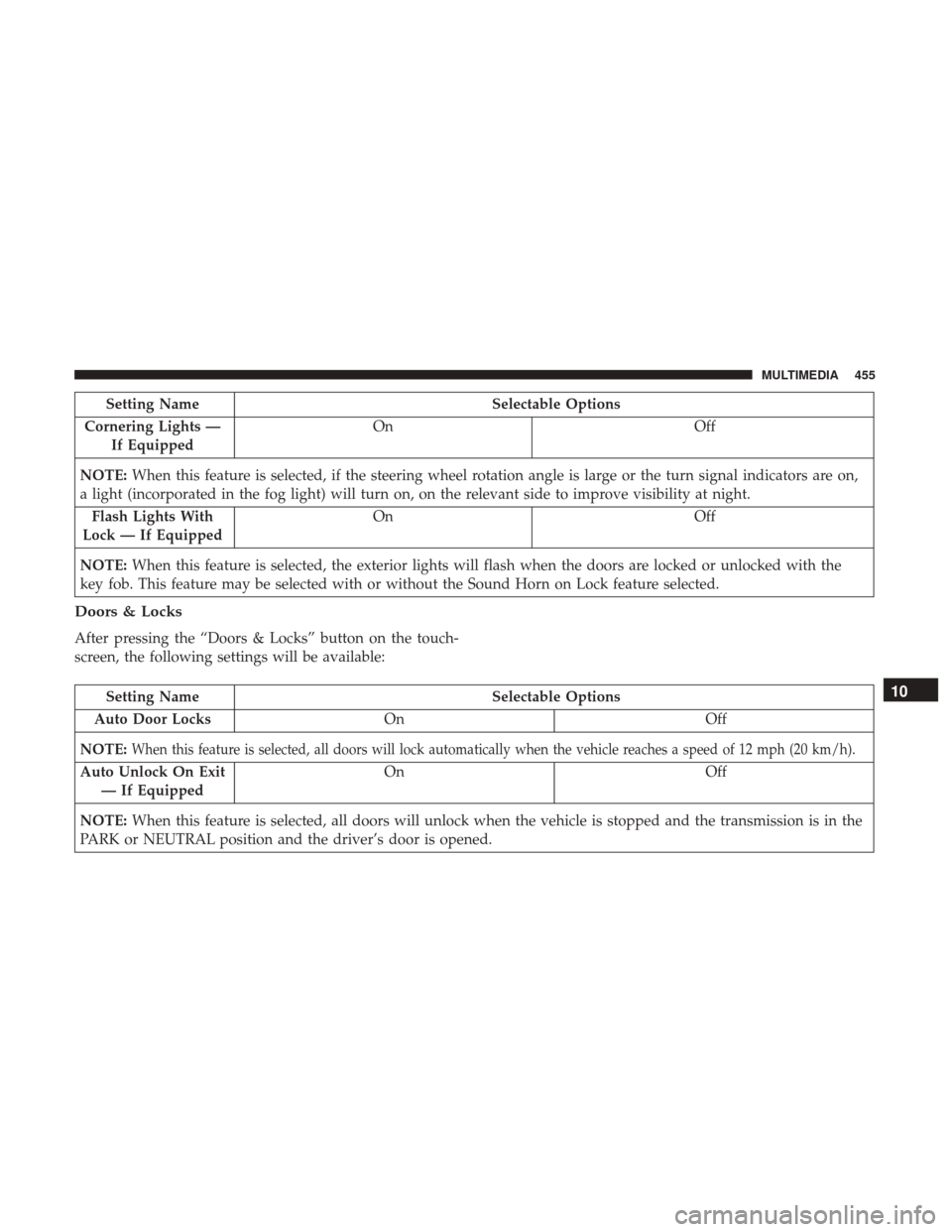
Setting NameSelectable Options
Cornering Lights — If Equipped On
Off
NOTE: When this feature is selected, if the steering wheel rotation angle is large or the turn signal indicators are on,
a light (incorporated in the fog light) will turn on, on the relevant side to improve visibility at night.
Flash Lights With
Lock — If Equipped On
Off
NOTE: When this feature is selected, the exterior lights will flash when the doors are locked or unlocked with the
key fob. This feature may be selected with or without the Sound Horn on Lock feature selected.
Doors & Locks
After pressing the “Doors & Locks” button on the touch-
screen, the following settings will be available:
Setting Name Selectable Options
Auto Door Locks On Off
NOTE:
When this feature is selected, all doors will lock automatically when the vehicle reaches a speed of 12 mph (20 km/h).
Auto Unlock On Exit — If Equipped On Off
NOTE: When this feature is selected, all doors will unlock when the vehicle is stopped and the transmission is in the
PARK or NEUTRAL position and the driver’s door is opened.
10
MULTIMEDIA 455