2017 JEEP RENEGADE light
[x] Cancel search: lightPage 218 of 516

WARNING!(Continued)
stays on after you start the vehicle, or if it comes on as
you drive, have an authorized dealer service the air bag
system immediately.
Redundant Air Bag Warning Light
If a fault with the Air Bag Warning Light is
detected, which could affect the Supplemental
Restraint System (SRS), the Redundant Air Bag
Warning Light will illuminate on the instrument
panel. The Redundant Air Bag Warning Light will stay on
until the fault is cleared. In addition, a single chime will
sound to alert you that the Redundant Air Bag Warning
Light has come on and a fault has been detected. If the
Redundant Air Bag Warning Light comes on intermittently
or remains on while driving have an authorized dealer
service the vehicle immediately. For additional information
regarding the Redundant Air Bag Warning Light, refer to
“Warning/Indicator Lights And Messages” in “Getting To
Know Your Instrument Panel” section of this manual.
Front Air Bags
This vehicle has front air bags and lap/shoulder belts for
both the driver and front passenger. The front air bags are
a supplement to the seat belt restraint systems. The driver front air bag is mounted in the center of the steering wheel.
The passenger front air bag is mounted in the instrument
panel, above the glove compartment. The words “SRS
AIRBAG” or “AIRBAG” are embossed on the air bag
covers.
Front Air Bag And Knee Impact Bolster Locations
1 — Driver And Passenger Front Air Bags
2 — Driver Knee Impact Bolster/Supplemental Driver Knee Air Bag
3 — Passenger Knee Impact Bolster
216 SAFETY
Page 221 of 516
WARNING!
•Do not drill, cut, or tamper with the knee impact
bolsters in any way.
• Do not mount any accessories to the knee impact
bolsters such as alarm lights, stereos, citizen band
radios, etc.
Supplemental Driver Knee Air Bag
This vehicle is equipped with a Supplemental Driver Knee
Air Bag mounted in the instrument panel below the
steering column. The Supplemental Driver Knee Air Bag
provides enhanced protection during a frontal impact by
working together with the seat belts, pretensioners, and
front air bags.
Supplemental Side Air Bags
Your vehicle is equipped with two types of side air bags:
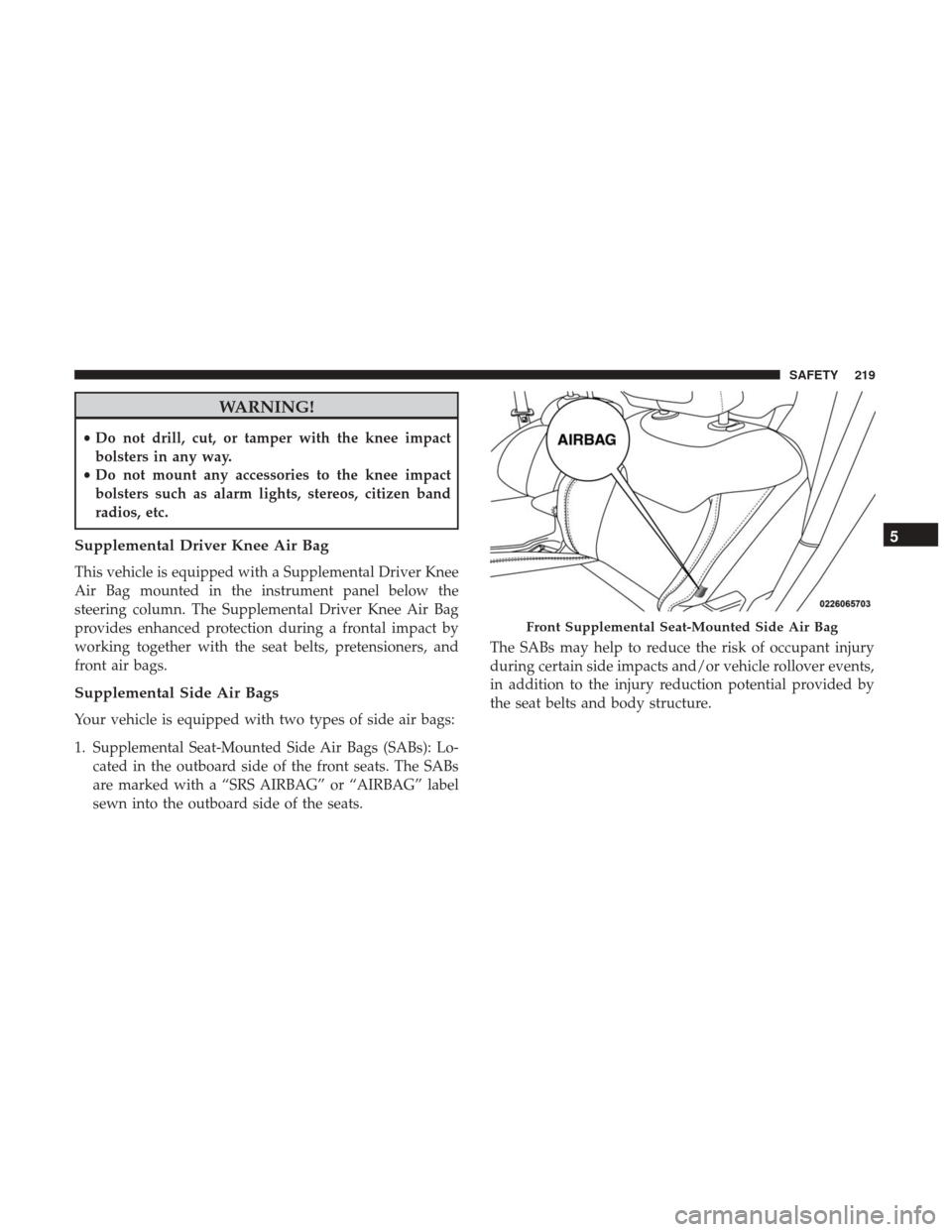
1. Supplemental Seat-Mounted Side Air Bags (SABs): Lo- cated in the outboard side of the front seats. The SABs
are marked with a “SRS AIRBAG” or “AIRBAG” label
sewn into the outboard side of the seats. The SABs may help to reduce the risk of occupant injury
during certain side impacts and/or vehicle rollover events,
in addition to the injury reduction potential provided by
the seat belts and body structure.
Front Supplemental Seat-Mounted Side Air Bag
5
SAFETY 219
Page 225 of 516

The SABICs may help reduce the risk of partial or complete
ejection of vehicle occupants through side windows in
certain rollover or side impact events.
The Occupant Restraint Controller (ORC) monitors the
internal circuits and interconnecting wiring associated
with electrical Air Bag System Components listed below:
Air Bag System Components
•Occupant Restraint Controller (ORC)
• Air Bag Warning Light
•Steering Wheel and Column
• Instrument Panel
• Knee Impact Bolsters
• Driver and Front Passenger Air Bags
• Supplemental Side Air Bags
• Supplemental Knee Air Bags
• Front and Side Impact Sensors
• Seat Belt Pretensioners
• Seat Track Position Sensors
• Seat Belt Buckle Switch
If A Deployment Occurs
The front air bags are designed to deflate immediately after
deployment.
NOTE: Front and/or side air bags will not deploy in all
collisions. This does not mean something is wrong with the
air bag system.
If you do have a collision which deploys the air bags, any
or all of the following may occur:
• The air bag material may sometimes cause abrasions
and/or skin reddening to the occupants as the air bags
deploy and unfold. The abrasions are similar to friction
rope burns or those you might get sliding along a carpet
or gymnasium floor. They are not caused by contact with
chemicals. They are not permanent and normally heal
quickly. However, if you haven’t healed significantly
within a few days, or if you have any blistering, see your
doctor immediately.
• As the air bags deflate, you may see some smoke-like
particles. The particles are a normal by-product of the
process that generates the non-toxic gas used for air bag
inflation. These airborne particles may irritate the skin,
eyes, nose, or throat. If you have skin or eye irritation,
rinse the area with cool water. For nose or throat
5
SAFETY 223
Page 226 of 516

irritation, move to fresh air. If the irritation continues,
see your doctor. If these particles settle on your clothing,
follow the garment manufacturer ’s instructions for
cleaning.
Do not drive your vehicle after the air bags have deployed.
If you are involved in another collision, the air bags will
not be in place to protect you.
WARNING!
Deployed air bags and seat belt pretensioners cannot
protect you in another collision. Have the air bags, seat
belt pretensioners, and the seat belt retractor assem-
blies replaced by an authorized dealer immediately.
Also, have the Occupant Restraint Controller System
serviced as well.
NOTE:
• Air bag covers may not be obvious in the interior trim,
but they will open during air bag deployment.
• After any collision, the vehicle should be taken to an
authorized dealer immediately.
Enhanced Accident Response System
In the event of an impact, if the communication network
remains intact, and the power remains intact, depending
on the nature of the event, the ORC will determine whether
to have the Enhanced Accident Response System perform
the following functions:
• Cut off fuel to the engine.
• Flash hazard lights as long as the battery has power or
until the hazard light button is pressed. The hazard
lights can be deactivated by pressing the hazard light
button.
• Turn on the interior lights, which remain on as long as
the battery has power or for 15 minutes from the
intervention of the Enhanced Accident Response Sys-
tem.
• Unlock the power door locks.
• Turn off the Fuel Pump Heater — If Equipped.
• Turn off the HVAC Blower Motor.
• Close the HVAC Circulation Door.
224 SAFETY
Page 227 of 516

Enhanced Accident Response System Reset
Procedure
After the event occurs, when the system is active, a
message regarding fuel cutoff is displayed. Turn the igni-
tion switch from ignition AVV/START or MAR/ACC/
ON/RUN to ignition STOP/OFF/LOCK. Carefully check
the vehicle for fuel leaks in the engine compartment and on
the ground near the engine compartment and fuel tank
before resetting the system and starting the engine.
Depending on the nature of the event the left and right turn
signal lights, located in the instrument panel, may both be
blinking and will continue to blink. In order to move your
vehicle to the side of the road, you must follow the system
reset procedure.
Customer ActionCustomer Will See
NOTE: Each step MUST BE held for at least two sec-
onds
1. Turn ignition STOP/
OFF/LOCK. (Turn Signal
Must be placed in Neutral
State).
2. Turn ignition MAR/ Right turn light BLINKS.
Customer Action Customer Will See
NOTE: Each step MUST BE held for at least two sec-
onds
ACC/ON/RUN. Left turn light is OFF.
3. Turn right turn signal
switch ON. Right turn light is ON
SOLID.
Left turn light BLINKS.
4. Place turn signal in
neutral state. Right turn light is OFF.
Left turn light BLINKS.
5. Turn left turn signal
switch ON. Right turn light BLINKS.
Left turn light is ON
SOLID.
6. Place turn signal in
neutral state. Right turn light BLINKS.
Left turn light is OFF.
7. Turn right turn signal
switch ON. Right turn light is ON
SOLID.
Left turn light BLINKS.
8. Place turn signal in
neutral state. Right turn light is OFF.
Left turn light BLINKS
9. Turn left turn signal
switch ON. Right turn light is ON
SOLID.
Left turn light is ON
5
SAFETY 225
Page 228 of 516

Customer ActionCustomer Will See
NOTE: Each step MUST BE held for at least two sec-
onds
SOLID.
10. Turn left turn signal
switch OFF. (Turn Signal
Switch Must be placed in
Neutral State). Right turn light is OFF.
Left turn light is OFF.
11. Turn ignition STOP/
OFF/LOCK.
12. Turn ignition MAR/
ACC/ON/RUN. (Entire
sequence needs to be
completed within one
minute or sequence will
need to be repeated). System is now reset and
the engine may be started.
Turn hazard flashers OFF
(Manually)
If a reset procedure step is not completed within 60
seconds, then the turn signal lights will blink and the reset
procedure must be performed again in order to be success-
ful.Maintaining Your Air Bag System
WARNING!
• Modifications to any part of the air bag system could
cause it to fail when you need it. You could be
injured if the air bag system is not there to protect
you. Do not modify the components or wiring, in-
cluding adding any kind of badges or stickers to the
steering wheel hub trim cover or the upper right side
of the instrument panel. Do not modify the front
bumper, vehicle body structure, or add aftermarket
side steps or running boards.
• It is dangerous to try to repair any part of the air bag
system yourself. Be sure to tell anyone who works on
your vehicle that it has an air bag system.
• Do not attempt to modify any part of your air bag
system. The air bag may inflate accidentally or may
not function properly if modifications are made.
Take your vehicle to an authorized dealer for any air
bag system service. If your seat, including your trim
cover and cushion, needs to be serviced in any way
(including removal or loosening/tightening of seat
attachment bolts), take the vehicle to your authorized
(Continued)
226 SAFETY
Page 247 of 516
Air Bag Warning Light
The Air Bag warning lightwill turn on for four to
eight seconds as a bulb check when the ignition switch
is first turned to ON/RUN. If the light is either not on
during starting, stays on, or turns on while driving,
have the system inspected at an authorized dealer as
soon as possible. This light will illuminate with a single
chime when a fault with the Air Bag Warning Light has
been detected, it will stay on until the fault is cleared. If
the light comes on intermittently or remains on while
driving, have an authorized dealer service the vehicle
immediately. Refer to “Occupant Restraints” in “Safety”
for further information.
Defroster
Check operation by selecting the defrost mode and place
the blower control on high speed. You should be able to
feel the air directed against the windshield. See your
authorized dealer for service if your defroster is inoper-
able.
Floor Mat Safety Information
Always use floor mats designed to fit the footwell of your
vehicle. Use only floor mats that leave the pedal area
unobstructed and that are firmly secured so that they cannot slip out of position and interfere with the pedals or
impair safe operation of your vehicle in other ways.
WARNING!
An improperly attached, damaged, folded, or stacked
floor mat, or damaged floor mat fasteners may cause
your floor mat to interfere with the accelerator, brake,
or clutch pedals and cause a loss of vehicle control. To
prevent SERIOUS INJURY or DEATH:
•
ALWAYS securely attach
your floor mat using
the floor mat fasteners. DO NOT install your floor
mat upside down or turn your floor mat over.
Lightly pull to confirm mat is secured using the
floor mat fasteners on a regular basis.
• ALWAYS REMOVE THE EXISTING FLOOR MAT
FROM THE VEHICLE
before installing any
other floor mat. NEVER install or stack an addi-
tional floor mat on top of an existing floor mat.
•ONLY install floor mats designed to fit your vehicle.
NEVER install a floor mat that cannot be properly
attached and secured to your vehicle. If a floor mat
needs to be replaced, only use a FCA approved floor mat
for the specific make, model, and year of your vehicle.
(Continued)
5
SAFETY 245
Page 248 of 516

WARNING!(Continued)
•ONLY use the driver ’s side floor mat on the driver ’s
side floor area. To check for interference, with the
vehicle properly parked with the engine off, fully
depress the accelerator, the brake, and the clutch
pedal (if present) to check for interference. If your
floor mat interferes with the operation of any pedal,
or is not secure to the floor, remove the floor mat
from the vehicle and place the floor mat in your
trunk.
• ONLY use the passenger ’s side floor mat on the
passenger ’s side floor area.
• ALWAYS make sure objects cannot fall or slide into
the driver ’s side floor area when the vehicle is
moving. Objects can become trapped under accelera-
tor, brake, or clutch pedals and could cause a loss of
vehicle control.
• NEVER place any objects under the floor mat (e.g.,
towels, keys, etc.). These objects could change the
position of the floor mat and may cause interference
with the accelerator, brake, or clutch pedals.
(Continued)
WARNING! (Continued)
•If the vehicle carpet has been removed and re-
installed, always properly attach carpet to the floor
and check the floor mat fasteners are secure to the
vehicle carpet. Fully depress each pedal to check for
interference with the accelerator, brake, or clutch
pedals then re-install the floor mats.
• It is recommended to only use mild soap and water
to clean your floor mats. After cleaning, always check
your floor mat has been properly installed and is
secured to your vehicle using the floor mat fasteners
by lightly pulling mat.
246 SAFETY