Page 360 of 655

Example 1– Placing a call from handsfree
phonebook:1. Push the
switch located on the steer-
ing wheel.
2. Wait for the indicator to change to
and speak “ Phone”.
You can also speak “Phone” and then “Call
successively.
3. Speak “Call ”. When options (Home, Work, etc.) are registered
to a name in the contact list of a cellular phone,
the option can be commanded directly.
Example, “Call Steve Brown Work” or “Call Steve
Brown Other”
4. The system prompts you to speak or select an item number from the displayed list. To
select a displayed matching item, speak a
number from between 1 and 6.
If the selected number has more than one phone
number registered to it, the phone number list is
displayed.
Example 2– Playing radio:
1. Push the
switch located on the steer-
ing wheel.
2. Wait for the indicator to change to
and speak “Audio”.
3. Speak “Play FM” to turn on the FM radio.
Command list
To use the Voice Recognition function, you can
speak commands in the order of 1st command,
2nd command and 3rd command. You can also
operate the system with directly speaking the
2nd or 3rd command.
Variable numbers or words such as names can
be applied in < > when speaking a command.
For additional information, refer to the separate
Navigation System Owner’s Manual (if so
equipped) for the navigation command.
JVH1486M
Monitor, climate, audio, phone and voice recognition systems4-143
Page 361 of 655
General command
CommandAction
Show More Commands Displays other commands of the same category.
Go Back Corrects the last recognition result to return to the previous screen.
Exit Cancels Voice Recognition.
Next Skips to the next page.
Previous Skips to the previous page.
General phone command
The following commands can be used during the Voice Recognition session.
CommandAction
Dial The system makes a call to a spoken phone number.
Change Number Corrects the phone number when it is not recognized (available during phone number entry) .
4-144Monitor, climate, audio, phone and voice recognition systems
Page 362 of 655

Phone command
1st command 2nd command 3rd command4th commandAction
Phone Call < 1–6 > Makes a call to a contact that is stored on the cellular phone. Select from the
list of displayed contacts on the right side of the screen.
Call Make a call to a contact that is stored on the cellular phone.
Make a call to a contact that is stored on the cellular phone. You can select
type from , , or .
Dial <#> Dial Makes a call to a spoken phone number.
Change Number Changes the number to call.
Dial Make a call to a spoken phone number.
Speak “3 columns or 4 columns (1–****)”
Make a call to a spoken phone number.
Speak “7 columns or 10 columns or 11 columns or 3 columns” (“911 or “411”
or 611”)
Recent Calls < 1–6 > Makes a call to the recent incoming, outgoing, or missed call number.
Read Text < 1–6 > PlayListens to recent text message received.
Reply Replies to received message.
Call Calls the sender of the message.
Send Text < phonebook name> Selects a text message from the list and sends it to a contact name. You can
select type from , , , or .
< phonebook name>< type>
Phonebook < phonebook name> Makes a call to a contact that is stored on the cellular phone. You can select
type from “Work”, “Mobile”, “Home”, or “Other”. Select “Reply” to reply to a
message. Select “Call” to call the sender.
< phonebook name>< type>
Favorites < favorite name >
< 1–6 > Accesses frequently called contacts by storing them in the favorites list.
< favorite name >
< Type>
Monitor, climate, audio, phone and voice recognition systems4-145
Page 363 of 655

1st command 2nd command 3rd command4th commandAction
Redial Makes a call to the last outgoing phone number.
International Call < phone number > Makes an international call by allowing more than 11 digits to be spoken. You
may need to include the international call prefixes and country codes.
Add Phone Use this command to connect a compatible Bluetooth ® device to the system.
Follow the on-screen instructions to complete the pairing process from your
handset.
Call < Name >
Work < 1–6 >
To call someone’s work place, say the person’s name stored in the phonebook
on your cellular phone between “Call” and “Work”.
Call < Name >
Cellular < 1–6 >
To call someone’s cellular phone, say the person’s name stored in the phone-
book on your cellular phone between “Call” and “Mobile”.
Call < Name >
Home < 1–6 >
To call someone’s home, say the person’s name stored in the phonebook on
your cellular phone between “Call” and “Home”.
Call < Name >
Other < 1–6 >
To call someone at a place categorized as “Other”, say the person’s name
stored in the phonebook on your cellular phone between “Call” and “Other”.
NOTE:
The system can read out SMS text messages in voice.
However, it cannot always read the text correctly.
4-146Monitor, climate, audio, phone and voice recognition systems
Page 364 of 655
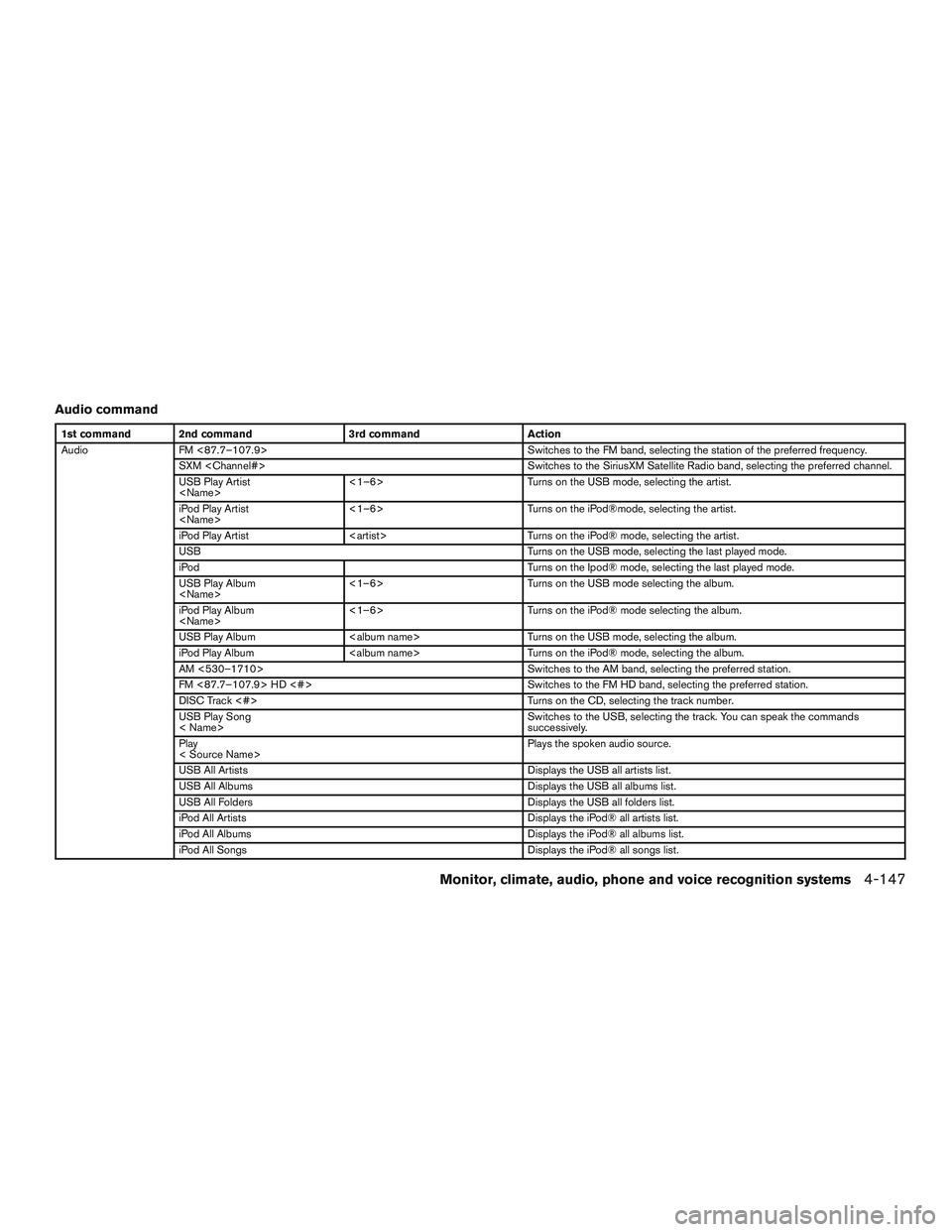
Audio command
1st command 2nd command3rd commandAction
Audio FM <87.7–107.9> Switches to the FM band, selecting the station of the preferred frequency.
SXM Switches to the SiriusXM Satellite Radio band, selecting the preferred channel.
USB Play Artist
<1–6>
Turns on the USB mode, selecting the artist.
iPod Play Artist
<1–6>
Turns on the iPod®mode, selecting the artist.
iPod Play Artist Turns on the iPod® mode, selecting the artist.
USB Turns on the USB mode, selecting the last played mode.
iPod Turns on the Ipod® mode, selecting the last played mode.
USB Play Album
<1–6>
Turns on the USB mode selecting the album.
iPod Play Album
<1–6>
Turns on the iPod® mode selecting the album.
USB Play Album Turns on the USB mode, selecting the album.
iPod Play Album Turns on the iPod® mode, selecting the album.
AM <530–1710> Switches to the AM band, selecting the preferred station.
FM <87.7–107.9> HD <#> Switches to the FM HD band, selecting the preferred station.
DISC Track <#> Turns on the CD, selecting the track number.
USB Play Song
< Name> Switches to the USB, selecting the track. You can speak the commands
successively.
Play
< Source Name> Plays the spoken audio source.
USB All Artists Displays the USB all artists list.
USB All Albums Displays the USB all albums list.
USB All Folders Displays the USB all folders list.
iPod All Artists Displays the iPod® all artists list.
iPod All Albums Displays the iPod® all albums list.
iPod All Songs Displays the iPod® all songs list.
Monitor, climate, audio, phone and voice recognition systems4-147
Page 365 of 655

Notes on operating audio by Voice Recog-
nition● An audio device connected via Blutooth ®
cannot be operated with the Voice Recogni-
tion system. Source change is only available
for Bluetooth®streaming audio.
● Song title and Artist name information will be
overwritten when another iPod®/iPhone®
is connected after song titles and artists
names in the previously connected
iPod®/iPhone® have been installed. ●
If two USB devices are connected at the
same time, voice operation will only be avail-
able for use with one registered and se-
lected device. When selecting “YES” in the
pop-up screen that displays after a new
USB audio device is connected, the USB
audio device is registered in the Voice Rec-
ognition system and is selected automati-
cally. One iPod® and one USB device can
be registered in the system. If a USB audio
device is newly registered, old data is over-
written. It may take a few moments to regis-
ter an audio device. If you want to enable
voice operation for music stored on a previ-
ously registered audio device, select the de-
vice you want to use in advance. For addi-
tional information, refer to the �Voice
Recognition settings� in this section. Even when a device has been previously
registered, simply connecting the device will
not result in it being selected automatically.
●
The Voice Recognition system may not
function when the song information is too
long (artist names, album titles, song
titles, and playlists, etc.)
● The SXM function will not operate without
a subscription to SiriusXM Satellite Ra-
dio.
Information command
1st command 2nd command Action
Information Voice Menu Connects to the INFINITI InTouchTMServices Response Specialists. For additional
information, refer to the Navigation System Owner’s Manual for details.
Fuel Prices Displays the fuel prices.
Weather Forecast Displays the weather forecast.
Current Weather Displays the nearby weather (current weather) .
Sports Scores Displays the sports scores.
Traffic Information* Turns the traffic information system on or off.
Route Information* Displays the route information.
*: Models with navigation system only.
4-148Monitor, climate, audio, phone and voice recognition systems
Page 366 of 655
Vehicle Information Command
1st Command2nd Command Action
Vehicle Info. Temperature <60–90 (°F)>/ <18–32 (°C)> Change the set temperature.
Climate Control ON/OFF Turns on/off the Climate Control system.
Fuel Economy Displays fuel economy information.
Energy Flow (models with hybrid system) Displays energy flow information.
NOTE:
The Fuel Prices, Weather Forecast, Current Weather, Sports Scores and Traffic Information will not operate without a subscription to
SiriusXM Radio
Monitor, climate, audio, phone and voice recognition systems4-149
Page 367 of 655
VOICE RECOGNITION SETTINGS
Voice recognition functions can be set.1. Press the SETTING button.
2. Touch the “Voice Recognition” key.
3. Touch the item you want to set.
Available settings ● “Minimize Voice Feedback” key:
Set the Minimize Voice Feedback function “ON”
key (short feedback) . ● “Audio Device Setting” key
Select an audio device to be operated via voice
recognition system from the list of devices regis-
tered to the in-vehicle audio system. The device
with an indicator light illuminated can be oper-
ated with voice recognition system.
CUSTOMER ASSISTANCE
For assistance or inquiries about Infiniti
InTouchTM, or to order updated map data for the
navigation system (if so equipped) , it is recom-
mended that you contact an INFINITI retailer.
TROUBLESHOOTING GUIDE
4-150Monitor, climate, audio, phone and voice recognition systems


