2017 Hyundai Sonata light
[x] Cancel search: lightPage 390 of 563
5-82
Driving your vehicleThe warning light illumi-
nates on the LCD display,
when you cancel the AEB
system. The driver can
monitor the AEB ON/OFF status on
the LCD display. If the warning light
remains ON when the AEB is acti-
vated, have the system checked by
an authorized HYUNDAI dealer.
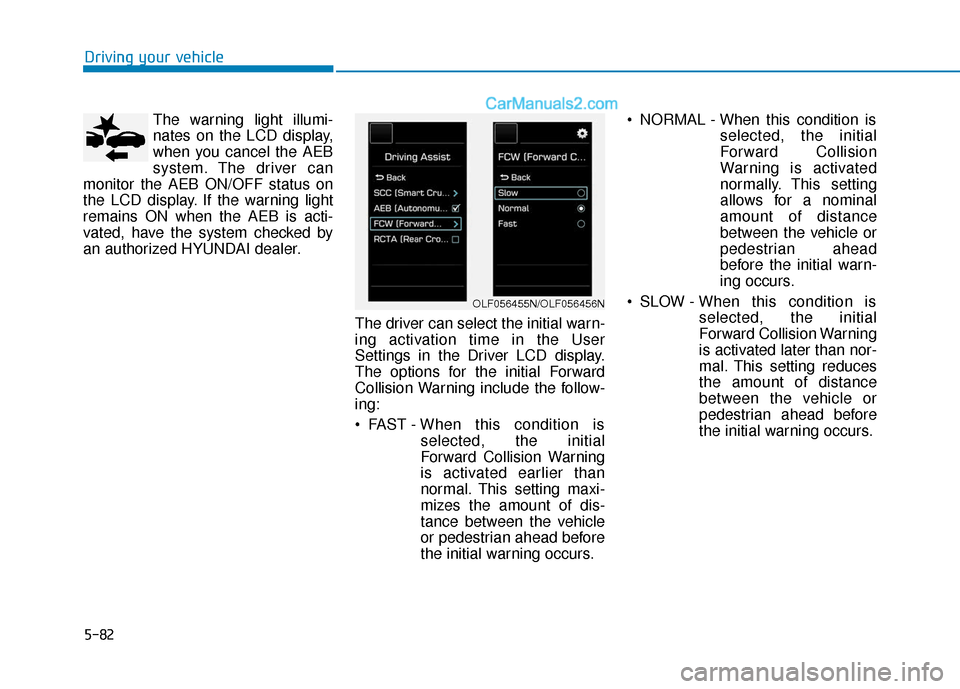
The driver can select the initial warn-
ing activation time in the User
Settings in the Driver LCD display.
The options for the initial Forward
Collision Warning include the follow-
ing:
FAST - When this condition is
selected, the initial
Forward Collision Warning
is activated earlier than
normal. This setting maxi-
mizes the amount of dis-
tance between the vehicle
or pedestrian ahead before
the initial warning occurs. NORMAL - When this condition is
selected, the initial
Forward Collision
Warning is activated
normally. This setting
allows for a nominal
amount of distance
between the vehicle or
pedestrian ahead
before the initial warn-
ing occurs.
SLOW - When this condition is selected, the initial
Forward Collision Warning
is activated later than nor-
mal. This setting reduces
the amount of distance
between the vehicle or
pedestrian ahead before
the initial warning occurs.
OLF056455N/OLF056456N
Page 394 of 563

5-86
Driving your vehicle
AEB front radar sensor
In order for the AEB system to oper-
ate properly, always make sure the
radar sensor lens cover is clean and
free of dirt, snow, and debris. Dirt,
snow, or foreign substances on the
lens may adversely affect the sens-
ing performance of the radar.
Warning message and warninglight
When the sensor lens cover is
blocked with dirt, snow, or debris, the
AEB system operation may stop
temporarily. If this occurs, a warning
message will appear on the LCD dis-
play. Remove any dirt, snow, or
debris and clean the radar sensor
lens cover before operating the AEB
system.
OLF054032N
OLF056453NThe AEB system logic operates
within certain parameters, such
as the distance from the vehicle
or pedestrian ahead, the speed
of the vehicle ahead, and the
driver's vehicle speed. Certain
conditions such as inclement
weather and road conditions
may affect the operation of the
AEB system.
WARNING
The braking control cannot
completely stop the vehicle nor
avoid all collisions. The driver
should hold the responsibility
to safely drive and control the
vehicle.
WARNING
Page 395 of 563

5-87
Driving your vehicle
5
Do not apply foreign objectssuch as a bumper sticker or a
bumper guard near the radar
sensor. Doing so may adversely
affect the sensing performance
of the radar.
Always keep the radar sensor and lens cover clean and free of
dirt and debris.
Use only a soft cloth to wash the vehicle. Do not spray pressur-
ized water directly on the sensor
or sensor cover.
Be careful not to apply unneces- sary force on the radar sensor or
sensor cover. If the sensor is
forcibly moved out of proper
alignment, the AEB system may
not operate correctly. In this
case, a warning message may
not be displayed. Have the vehi-
cle inspected by an authorized
HYUNDAI dealer. If the front bumper becomes
damaged in the area around the
radar sensor, the AEB system
may not operate properly. Have
the vehicle inspected by an
authorized HYUNDAI dealer.
Use only genuine HYUNDAI parts to repair or replace a dam-
aged sensor or sensor cover. Do
not apply paint to the sensor
cover.
System malfunction
When the AEB is not working prop-erly, the AEB warning light ( )
will illuminate and the warning
message will appear for a few sec-
onds. After the message disap-
pears, the master warning light
( ) will illuminate. In this case,
have the vehicle inspected by an
authorized HYUNDAI dealer.
The AEB warning message may appear along with the illumination
of the ESC warning light.
NOTICE
OLF056473N
Page 397 of 563

5-89
Driving your vehicle
5
Limitations of the system
The Automatic Emergency Braking
(AEB) system is designed to monitor
the vehicle ahead or a pedestrian in
the roadway through radar signals
and camera recognition to warn the
driver that a collision is imminent,
and if necessary, apply emergency
braking.
In certain situations, the radar sen-
sor or the camera may not be able to
detect the vehicle or pedestrian
ahead. In these cases, the AEB sys-
tem may not operate normally. The
driver must pay careful attention in
the following situations where the
AEB operation may be limited.
Detecting vehicles
The sensor may be limited when:
- The radar sensor or camera isblocked with a foreign object or
debris
- Inclement weather such as heavy rain or snow obscures the field of
view of the radar sensor or camera
- There is interference by electro- magnetic waves
- There is severe irregular reflection from the radar sensor
- The vehicle in front is too small to be detected by the camera recog-
nition system (for example a motor-
cycle or a bicycle, etc.)
- The vehicle in front is an oversize vehicle or trailer that is too big to
be detected by the camera recog-
nition system (for example a tractor
trailer, etc.)
- The driver's field of view is not well illuminated (either too dark or too
much reflection or too much back-
light that obscures the field of view) - The vehicle in front does not have
their rear lights properly turned ON
- The outside brightness changes suddenly, for example when enter-
ing or exiting a tunnel
- The vehicle in front is driving errat- ically
Page 400 of 563

5-92
Driving your vehicle
Detecting pedestrians
The sensor may be limited when:
- The pedestrian is not fully detectedby the camera recognition system,
for example, if the pedestrian is
leaning over or is not fully walking
upright
- The pedestrian is moving very quickly or appears abruptly in the
camera detection area
The pedestrian is wearing clothing
that easily blends into the back-
ground, making it difficult to be
detected by the camera recogni-
tion system
- The outside lighting is too bright (e.g. when driving in bright sunlight
or in sun glare) or too dark (e.g.
when driving on a dark rural road
at night)
- It is difficult to detect and distin- guish the pedestrian from other
objects in the surroundings, for
example, when there is a group of
pedestrians or a large crowdInformation
In some instances, the AEB system
may be cancelled when subjected to
electromagnetic interference.
Information
This device complies with Part 15 of
the FCC rules.
Operation is subject to the following
two conditions:
1. This device may not cause harmful interference, and
2. This device must accept any inter- ference received, including interfer-
ence that may cause undesired
operation.
i
i
Do not use the Automatic
Emergency Braking system
when towing a vehicle.
Application of the AEB system
while towing may adversely
affect the safety of your vehi-
cle or the towing vehicle
Use extreme caution when the
vehicle in front of you has
cargo that extends rearward
from the cab, or when the
vehicle in front of you has
higher ground clearance.
The AEB system is designed
to detect and monitor the vehi-
cle ahead or detect a pedestri-
an in the roadway through
radar signals and camera
recognition. It is not designed
to detect bicycles, motorcy-
cles, or smaller wheeled
objects such as luggage bags,
shopping carts, or strollers.
Never try to test the operation
of the AEB system. Doing so
may cause severe injury or
death.
WARNING
Page 401 of 563

5-93
Driving your vehicle
5
Hazardous Driving Conditions
When hazardous driving conditions
are encountered such as water,
snow, ice, mud or sand:
Drive cautiously and allow extra dis-
tance for braking.
Avoid sudden movements in braking
or steering.
If stuck in snow, mud, or sand, use
second gear. Accelerate slowly to
avoid spinning the drive wheels.
Use sand, rock salt, or other non-slip
material under the drive wheels to
provide traction when stuck in ice,
snow, or mud.
Rocking the Vehicle
If it is necessary to rock the vehicle
to free it from snow, sand, or mud,
first turn the steering wheel right and
left to clear the area around your
front wheels. Then, shift back and
forth between R (Reverse) and a for-
ward gear.
Try to avoid spinning the wheels, and
do not race the engine.
To prevent transmission wear, wait
until the wheels stop spinning before
shifting gears. Release the accelera-
tor pedal while shifting, and press
lightly on the accelerator pedal while
the transmission is in gear. Slowly
spinning the wheels in forward and
reverse directions causes a rocking
motion that may free the vehicle.If the tires spin at high speed the
tires can explode, and you or oth-
ers may be injured. Do not attempt
this procedure if people or objects
are anywhere near the vehicle.
The vehicle can overheat causing
an engine compartment fire or
other damage. Spin the wheels as
little as possible and avoid spin-
ning the wheels at speeds over 35
mph (56 km/h) as indicated on the
speedometer.
NOTICE
S S
P
P E
EC
CI
IA
A L
L
D
D R
RI
IV
V I
IN
N G
G
C
C O
O N
ND
DI
IT
T I
IO
O N
NS
S
Downshifting with an automatic
transmission while driving on
slippery surfaces can cause an
accident. The sudden change in
tire speed could cause the tires
to skid. Be careful when down-
shifting on slippery surfaces.
WARNING
Page 402 of 563
5-94
Driving your vehicle
If you are still stuck after rocking
the vehicle a few times, have the
vehicle pulled out by a tow vehicle
to avoid engine overheating, pos-
sible damage to the transmission,
and tire damage. See "Towing" in
chapter 6.
To prevent damage to the trans-
mission, turn OFF the ESC prior to
rocking the vehicle.
Smooth Cornering
Avoid braking or gear changing in
corners, especially when roads are
wet. Ideally, corners should always
be taken under gentle acceleration.
Driving at Night
Night driving presents more hazards
than driving in the daylight. Here are
some important tips to remember:
Slow down and keep more dis- tance between you and other vehi-
cles, as it may be more difficult to
see at night, especially in areas
where there may not be any street
lights.
Adjust your mirrors to reduce the glare from other driver’s head-
lamps.
Keep your headlamps clean and properly aimed. Dirty or improperly
aimed headlamps will make it
much more difficult to see at night.
Avoid staring directly at the head- lamps of oncoming vehicles. You
could be temporarily blinded, and it
will take several seconds for your
eyes to readjust to the darkness.
NOTICE
Page 403 of 563
5-95
Driving your vehicle
5
Driving in the Rain
Rain and wet roads can make driving
dangerous. Here are a few things to
consider when driving in the rain or
on slick pavement:
Slow down and allow extra follow-ing distance. A heavy rainfall
makes it harder to see and increas-
es the distance needed to stop
your vehicle.
Turn OFF your Cruise Control. (if equipped)
Replace your windshield wiper blades when they show signs of
streaking or missing areas on the
windshield.
Be sure your tires have enough tread. If your tires do not have
enough tread, making a quick stop
on wet pavement can cause a skid
and possibly lead to an accident.
Refer to "Tire Tread" in chapter 7.
Turn on your headlamps to make it easier for others to see you.
Driving too fast through large pud- dles can affect your brakes. If you
must go through puddles, try to
drive through them slowly. If you believe your brakes may be
wet, apply them lightly while driv-
ing until normal braking operation
returns.
Hydroplaning
If the road is wet enough and you are
going fast enough, your vehicle may
have little or no contact with the road
surface and actually ride on the
water. The best advice is SLOW
DOWN when the road is wet. The
risk of hydroplaning increases as the
depth of tire tread decreases. (Refer
to "Tire Tread" in chapter 7.)
Driving in Flooded Areas
Avoid driving through flooded areas
unless you are sure the water is no
higher than the bottom of the wheel
hub. Drive through any water slowly.
Allow adequate stopping distance
because brake performance may be
reduced.
After driving through water, dry the
brakes by gently applying them sev-
eral times while the vehicle is moving
slowly.