2017 Hyundai Santa Fe Sport USB
[x] Cancel search: USBPage 19 of 614
25
Your vehicle at a glance
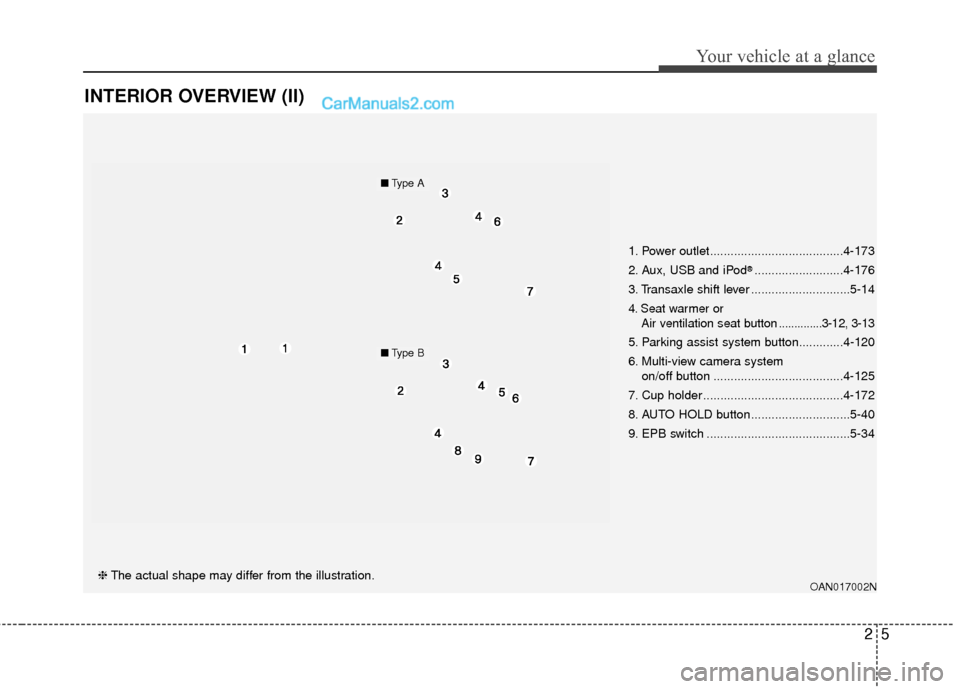
INTERIOR OVERVIEW (II)
OAN017002N❈The actual shape may differ from the illustration. 1. Power outlet.......................................4-173
2. Aux, USB and iPod
®..........................4-176
3. Transaxle shift lever .............................5-14
4. Seat warmer or Air ventilation seat button ..............3-12, 3-13
5. Parking assist system button.............4-120
6. Multi-view camera system
on/off button ......................................4-125
7. Cup holder .........................................4-172
8. AUTO HOLD button.............................5-40
9. EPB switch ..........................................5-34
■ Type A
■Type B
Page 100 of 614
Welcome system . . . . . . . . . . . . . . . . . . . . . . . . . . 4-144
. . . . . . . . . . . . . . . . . . . . . . . . . . 4-144
. . . . . . . . . . . . . . . . . 4-144
Defroster . . . . . . . . . . . . . . . . . . . . . . . . . . . . . . . . 4-145
. . . . . . . . . . . . . . . . . . . . . . . 4-145
. . . . . . . . . . . . . . . . . . . . . . . . . . . 4-146
Manual climate control system . . . . . . . . . . . . . . 4-147
. . . . . . . . . . . . . . . . . . 4-148
. . . . . . . . . . . . . . . . . . . . . . . . . . . . 4-153
. . . . . . . . . . . . . . . . . . . . . . 4-155
refrigerant and compressor lubricant . . . . . . . . . 4-156
. . . . . . . . . . . . . 4-156
Automatic climate control system. . . . . . . . . . . . 4-157
. . . . . . . . . 4-158
. . . . . . . . . . . 4-159
Windshield defrosting and defogging . . . . . . . . . 4-165
. . . . . . . . . . . . . . . . 4-165
. . . . . . . . . . . . . . 4-166
Storage compartments . . . . . . . . . . . . . . . . . . . . . 4-169
. . . . . . . . . . . . . . . . . . . . . . . 4-169
. . . . . . . . . . . . . . . . . . . . . . . . . . . . . . . . . . 4-16\
9
. . . . . . . . . . . . . . . . . . . . . . . . . . . . . . . . . . 4-17\
0
. . . . . . . . . . . . . . . . . . . . . . . . . . . . . 4-170
. . . . . . . . . . . . . . . . . . . . . . . . . . . . . . . 4-171
Interior features . . . . . . . . . . . . . . . . . . . . . . . . . . 4-172
. . . . . . . . . . . . . . . . . . . . . . . . . . . . . . . . . 4-172
. . . . . . . . . . . . . . . . . . . . . . . . . . . . . . . . . . . 4-\
173
. . . . . . . . . . . . . . . . . . . . . . . . . . . . . . . . 4-173
. . . . . . . . . . . . . . . . . . . . . . . . . . . . . . 4-175
USB and iPod
®port . . . . . . . . . . . . . . . . . . . . . 4-176
. . . . . . . . . . . . . . . . . . . . . . . . . 4-176
. . . . . . . . . . . . . . . . . . . . . . . . 4-177
. . . . . . . . . . . . . . . . . . . . . . . . . . . . . . . . 4-179
Exterior features. . . . . . . . . . . . . . . . . . . . . . . . . . 4-180
. . . . . . . . . . . . . . . . . . . . . . . . . . . . . . . . . . 4-18\
0
Audio system . . . . . . . . . . . . . . . . . . . . . . . . . . . . . 4-182
. . . . . . . . . . . . . . . . . . . . . . . . . . . . . . . . . . . 4-\
182
. . . . . . . . . . . . . . . . . . 4-182
. . . . . . . . . . . . . . . . . . . . . 4-184
4
Page 273 of 614
Features of your vehicle
176
4
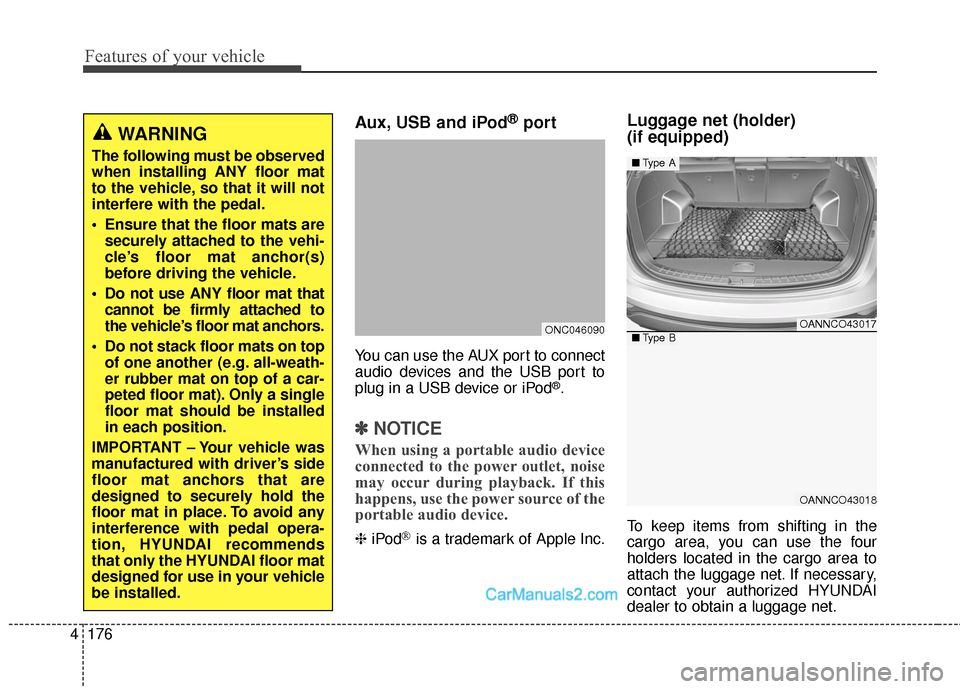
Aux, USB and iPod®port
You can use the AUX port to connect
audio devices and the USB port to
plug in a USB device or iPod
®.
✽ ✽
NOTICE
When using a portable audio device
connected to the power outlet, noise
may occur during playback. If this
happens, use the power source of the
portable audio device.
❈ iPod®is a trademark of Apple Inc.
Luggage net (holder)
(if equipped)
To keep items from shifting in the
cargo area, you can use the four
holders located in the cargo area to
attach the luggage net. If necessary,
contact your authorized HYUNDAI
dealer to obtain a luggage net.
WARNING
The following must be observed
when installing ANY floor mat
to the vehicle, so that it will not
interfere with the pedal.
Ensure that the floor mats are
securely attached to the vehi-
cle’s floor mat anchor(s)
before driving the vehicle.
Do not use ANY floor mat that cannot be firmly attached to
the vehicle’s floor mat anchors.
Do not stack floor mats on top of one another (e.g. all-weath-
er rubber mat on top of a car-
peted floor mat). Only a single
floor mat should be installed
in each position.
IMPORTANT – Your vehicle was
manufactured with driver’s side
floor mat anchors that are
designed to securely hold the
floor mat in place. To avoid any
interference with pedal opera-
tion, HYUNDAI recommends
that only the HYUNDAI floor mat
designed for use in your vehicle
be installed.
ONC046090OANNCO43017
OANNCO43018
■ Type A
■Type B
Page 280 of 614
4183
Features of your vehicle
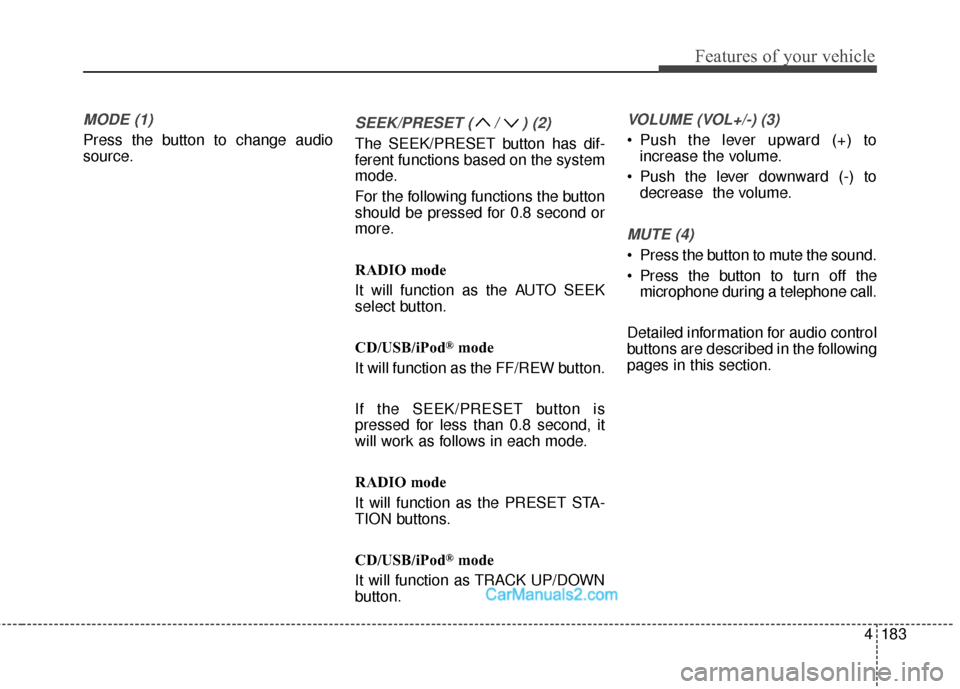
MODE (1)
Press the button to change audio
source.
SEEK/PRESET ( / ) (2)
The SEEK/PRESET button has dif-
ferent functions based on the system
mode.
For the following functions the button
should be pressed for 0.8 second or
more.
RADIO mode
It will function as the AUTO SEEK
select button.
CD/USB/iPod
®mode
It will function as the FF/REW button.
If the SEEK/PRESET button is
pressed for less than 0.8 second, it
will work as follows in each mode.
RADIO mode
It will function as the PRESET STA-
TION buttons.
CD/USB/iPod
®mode
It will function as TRACK UP/DOWN
button.
VOLUME (VOL+/-) (3)
• Push the lever upward (+) to increase the volume.
Push the lever downward (-) to decrease the volume.
MUTE (4)
Press the button to mute the sound.
Press the button to turn off themicrophone during a telephone call.
Detailed information for audio control
buttons are described in the following
pages in this section.
Page 285 of 614
Features of your vehicle
188
4
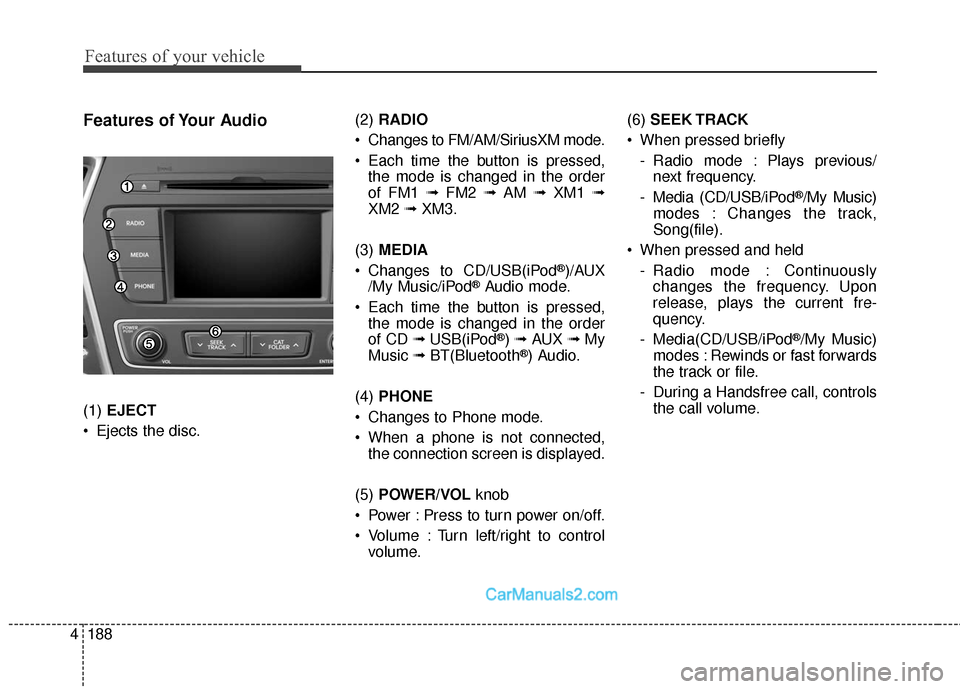
Features of Your Audio
(1) EJECT
Ejects the disc. (2)
RADIO
Changes to FM/AM/SiriusXM mode.
Each time the button is pressed, the mode is changed in the order
of FM1 ➟ FM2 ➟AM ➟XM1 ➟
XM2 ➟XM3.
(3) MEDIA
Changes to CD/USB(iPod
®)/AUX
/My Music/iPod®Audio mode.
Each time the button is pressed, the mode is changed in the order
of CD ➟ USB(iPod
®) ➟ AUX ➟My
Music ➟BT(Bluetooth®) Audio.
(4) PHONE
Changes to Phone mode.
When a phone is not connected, the connection screen is displayed.
(5) POWER/VOL knob
Power : Press to turn power on/off.
Volume : Turn left/right to control volume. (6)
SEEK TRACK
When pressed briefly - Radio mode : Plays previous/next frequency.
- Media (CD/USB/iPod
®/My Music)
modes : Changes the track,
Song(file).
When pressed and held - Radio mode : Continuouslychanges the frequency. Upon
release, plays the current fre-
quency.
- Media(CD/USB/iPod
®/My Music)
modes : Rewinds or fast forwards
the track or file.
- During a Handsfree call, controls the call volume.
Page 286 of 614
4189
Features of your vehicle
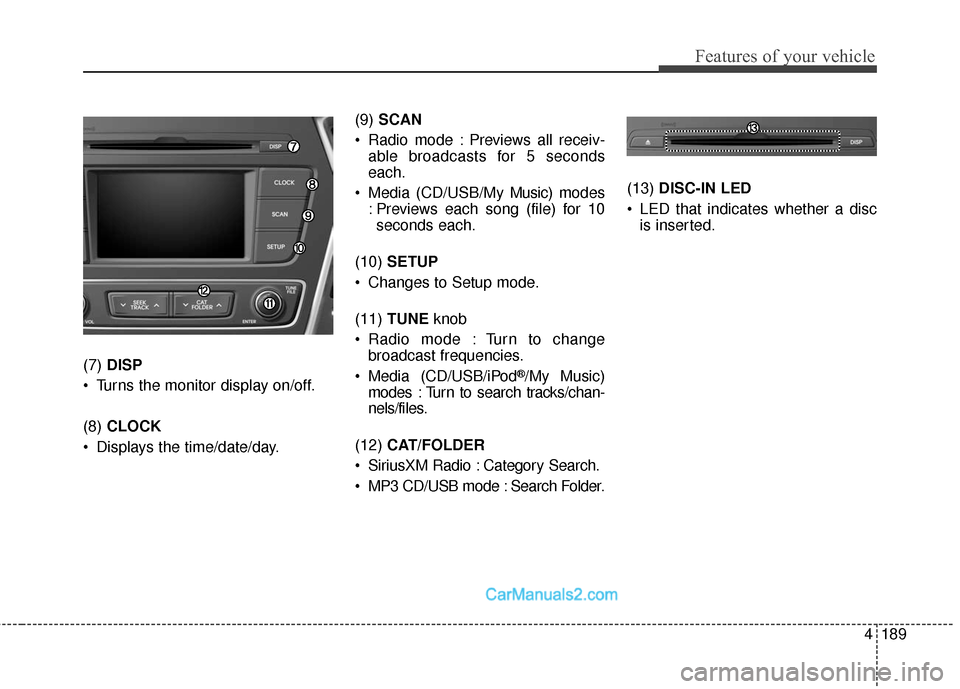
(7) DISP
Turns the monitor display on/off.
(8) CLOCK
Displays the time/date/day. (9)
SCAN
Radio mode : Previews all receiv- able broadcasts for 5 seconds
each.
Media (CD/USB/My Music) m odes
: Previews each song (file) for 10 seconds each.
(10) SETUP
Changes to Setup mode.
(11) TUNE knob
Radio mode : Turn to change broadcast frequencies.
Media (CD/USB/iPod®/My Music)
modes : Turn to search tracks/chan-
nels/files.
(12) CAT/FOLDER
SiriusXM Radio : Category Search.
MP3 CD/USB mode : Search Folder. (13)
DISC-IN LED
LED that indicates whether a disc is inserted.
Page 288 of 614
4191
Features of your vehicle
✽
✽NOTICE - Using the USB
Devices
• Connect the USB device after turning on the engine. The USB
device may become damaged if it
is already connected when the
ignition is turned on. The USB
device may not operate properly if
the car ignition is turned on or off
with the USB device connected.
• Be careful for static electricity when connecting/disconnecting
USB devices.
• Encoded MP3 Players will not be recognized when connected as an
external device.
• When connecting an external USB device, the vehicle's audio system
may not recognize the USB
depending on what firmware is
used by USB device or what files
are on the USB.
• Only products formatted with byte/sectors under 64Kbyte will be
recognized.
• This device recognizes USB devices formatted in FAT 12/16/32
file formats. This device does not
recognize files in NTFS file for-
mat. (Continued)(Continued)
• Some USB devices may not be sup-
ported due to compatibility issues.
• Avoid contact between the USB connector and bodily parts or for-
eign objects.
• Repeated connecting/disconnect- ing of USB devices within short
periods of time may result in prod-
uct malfunction.
• A strange noise may occur when disconnecting the USB.
• Make sure to connect/disconnect external USB devices with the
audio power turned off.
• The amount of time required to recognize the USB device may dif-
fer depending on the type, size or
file formats stored on the USB.
Such differences in time are not
indications of malfunctions.
• The vehicle audio system only sup- ports USB devices designed to
play music files.
• USB images and videos are not supported. (Continued)(Continued)
• Do not use the USB I/F to charge
batteries or USB accessories that
generate heat. Doing so may lead
to worsened performance or dam-
age to the audio system.
• The audio system may not recog- nize the USB device if separately
purchased USB hubs and exten-
sion cables are being used.
Connect the USB device directly
with the USB port of the vehicle.
• When using mass storage USB devices with separate logical
drives, only files saved to the root
drive can be played.
• Files may not properly operate if application programs are installed
on the USBs.
• The audio system may not operate normally if MP3 Players, cellular
phones, digital cameras, or other
electronic devices (USB devices
not recognized as portable disk
drives) are connected with the
audio system. (Continued)
Page 289 of 614
Features of your vehicle
192
4
(Continued)
• Charging through the USB may
not work for some mobile devices.
• The device may not support nor- mal operation when using a typi-
cal USB memory device (minia-
ture, keychain, etc.). For best
results, use a typical USB device
that has a metal case.
• The device may not support nor- mal operation when using formats
such as HDD Type, CF, or SD
Memory.
• The device will not support files locked by DRM (Digital Rights
Management.)
• USB memory sticks used by con- necting an Adaptor (SD Type or
CF Type) may not be properly rec-
ognized.
• The device may not operate prop- erly when using USB HDDs or
USBs subject to connection fail-
ures caused by vehicle vibrations.
(e.g. i-stick type) (Continued)(Continued)
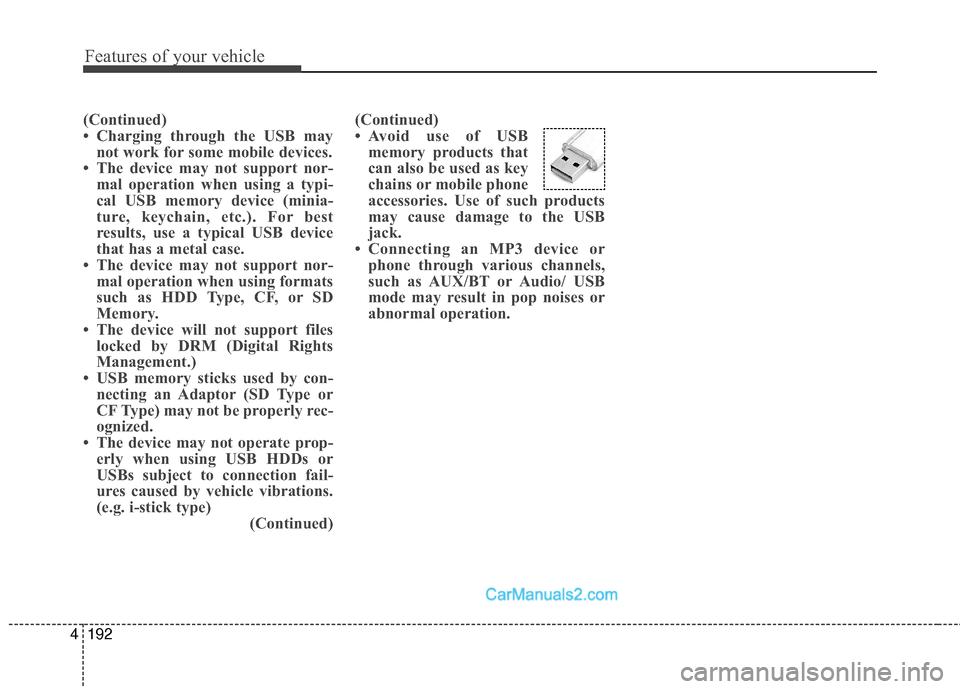
• Avoid use of USB
memory products that
can also be used as key
chains or mobile phone
accessories. Use of such products
may cause damage to the USB
jack.
• Connecting an MP3 device or phone through various channels,
such as AUX/BT or Audio/ USB
mode may result in pop noises or
abnormal operation.