Page 181 of 614
Features of your vehicle
84
4
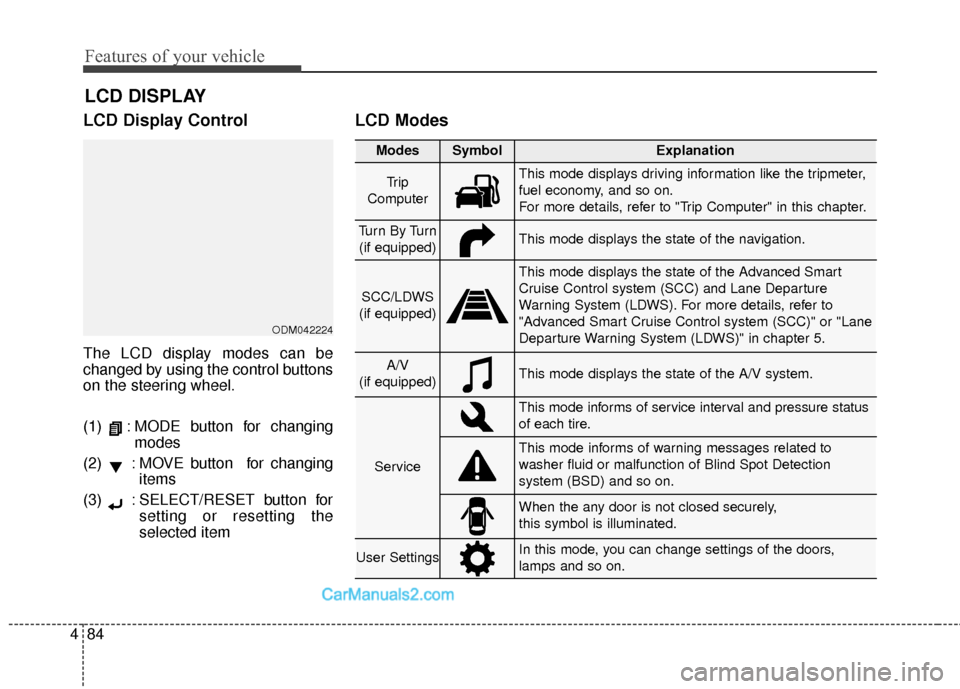
LCD Display Control
The LCD display modes can be
changed by using the control buttons
on the steering wheel.
(1) : MODE button for changing
modes
(2) : MOVE button for changing items
(3) : SELECT/RESET button for setting or resetting the
selected item
LCD Modes
LCD DISPLAY
Modes SymbolExplanation
Tr i p
ComputerThis mode displays driving information like the tripmeter,
fuel economy, and so on.
For more details, refer to "Trip Computer" in this chapter.
Tu r n B y Tu r n (if equipped)This mode displays the state of the navigation.
SCC/LDWS
(if equipped)
This mode displays the state of the Advanced Smart
Cruise Control system (SCC) and Lane Departure
Warning System (LDWS). For more details, refer to
"Advanced Smart Cruise Control system (SCC)" or "Lane
Departure Warning System (LDWS)" in chapter 5.
A/V
(if equipped)This mode displays the state of the A/V system.
Service
This mode informs of service interval and pressure status
of each tire.
This mode informs of warning messages related to
washer fluid or malfunction of Blind Spot Detection
system (BSD) and so on.
When the any door is not closed securely,
this symbol is illuminated.
User SettingsIn this mode, you can change settings of the doors,
lamps and so on.
ODM042224
Page 266 of 614
4169
Features of your vehicle
Center console storage
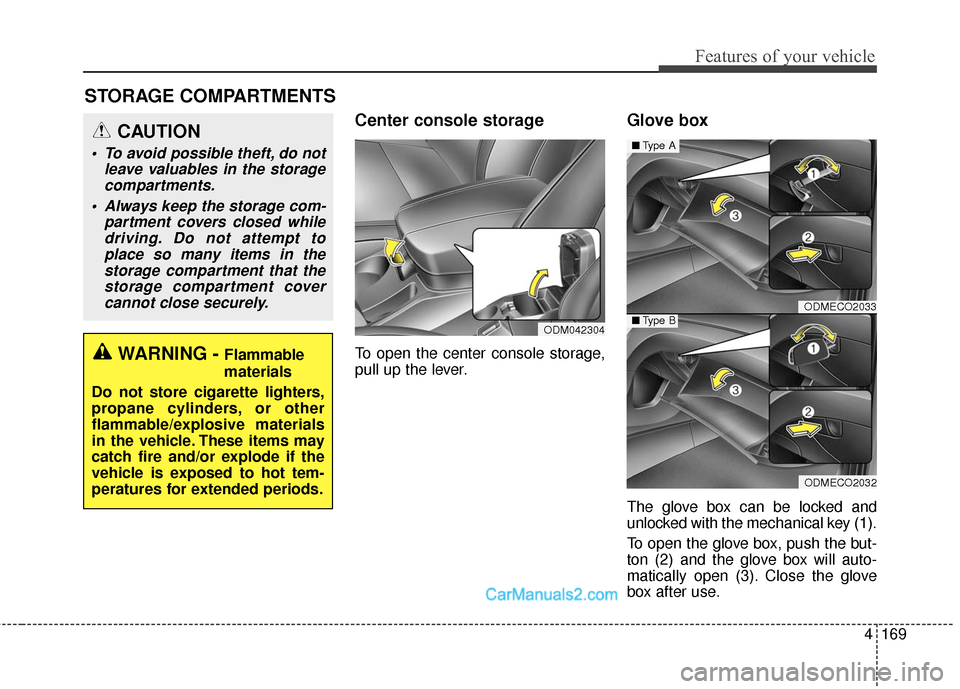
To open the center console storage,
pull up the lever.
Glove box
The glove box can be locked and
unlocked with the mechanical key (1).
To open the glove box, push the but-
ton (2) and the glove box will auto-
matically open (3). Close the glove
box after use.
STORAGE COMPARTMENTS
WARNING - Flammable
materials
Do not store cigarette lighters,
propane cylinders, or other
flammable/explosive materials
in the vehicle. These items may
catch fire and/or explode if the
vehicle is exposed to hot tem-
peratures for extended periods.
CAUTION
To avoid possible theft, do not leave valuables in the storagecompartments.
Always keep the storage com- partment covers closed whiledriving. Do not attempt toplace so many items in thestorage compartment that thestorage compartment covercannot close securely.
ODM042304
ODMECO2033
ODMECO2032
■ Type A
■Type B
Page 269 of 614
Features of your vehicle
172
4
INTERIOR FEATURES
Cup holder
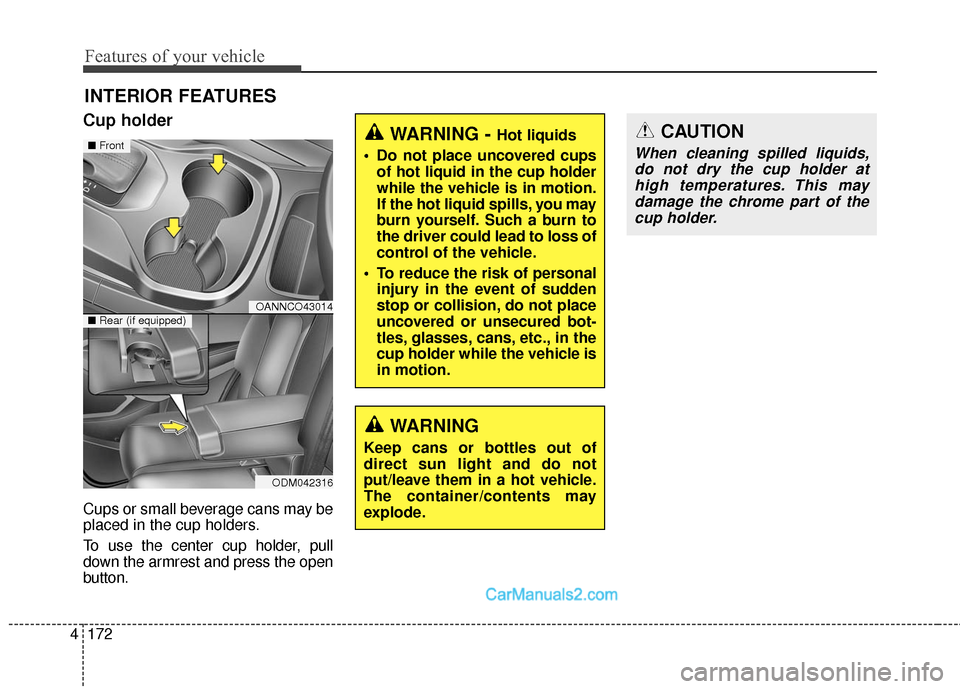
Cups or small beverage cans may be
placed in the cup holders.
To use the center cup holder, pull
down the armrest and press the open
button.
WARNING - Hot liquids
Do not place uncovered cups of hot liquid in the cup holder
while the vehicle is in motion.
If the hot liquid spills, you may
burn yourself. Such a burn to
the driver could lead to loss of
control of the vehicle.
To reduce the risk of personal injury in the event of sudden
stop or collision, do not place
uncovered or unsecured bot-
tles, glasses, cans, etc., in the
cup holder while the vehicle is
in motion.
WARNING
Keep cans or bottles out of
direct sun light and do not
put/leave them in a hot vehicle.
The container/contents may
explode.
OANNCO43014
ODM042316
■ Front
■Rear (if equipped)
CAUTION
When cleaning spilled liquids,
do not dry the cup holder athigh temperatures. This maydamage the chrome part of thecup holder.
Page 273 of 614
Features of your vehicle
176
4
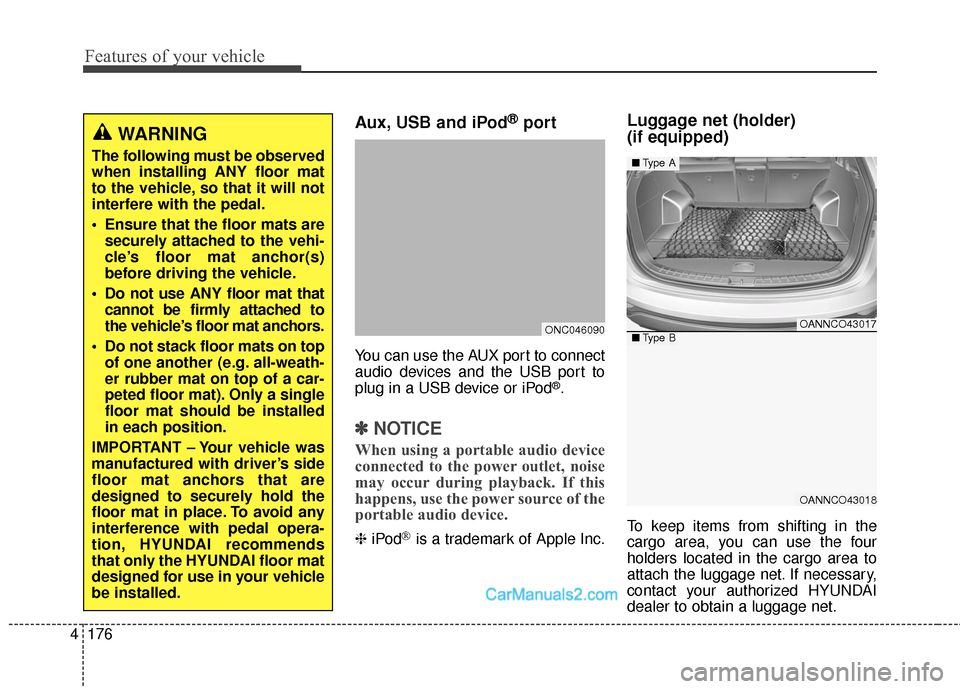
Aux, USB and iPod®port
You can use the AUX port to connect
audio devices and the USB port to
plug in a USB device or iPod
®.
✽ ✽
NOTICE
When using a portable audio device
connected to the power outlet, noise
may occur during playback. If this
happens, use the power source of the
portable audio device.
❈ iPod®is a trademark of Apple Inc.
Luggage net (holder)
(if equipped)
To keep items from shifting in the
cargo area, you can use the four
holders located in the cargo area to
attach the luggage net. If necessary,
contact your authorized HYUNDAI
dealer to obtain a luggage net.
WARNING
The following must be observed
when installing ANY floor mat
to the vehicle, so that it will not
interfere with the pedal.
Ensure that the floor mats are
securely attached to the vehi-
cle’s floor mat anchor(s)
before driving the vehicle.
Do not use ANY floor mat that cannot be firmly attached to
the vehicle’s floor mat anchors.
Do not stack floor mats on top of one another (e.g. all-weath-
er rubber mat on top of a car-
peted floor mat). Only a single
floor mat should be installed
in each position.
IMPORTANT – Your vehicle was
manufactured with driver’s side
floor mat anchors that are
designed to securely hold the
floor mat in place. To avoid any
interference with pedal opera-
tion, HYUNDAI recommends
that only the HYUNDAI floor mat
designed for use in your vehicle
be installed.
ONC046090OANNCO43017
OANNCO43018
■ Type A
■Type B
Page 274 of 614
4177
Features of your vehicle
✽
✽NOTICE
Vehicles equipped with a luggage
rail system may use the shackles to
hook the luggage net.
Cargo security screen
(if equipped)
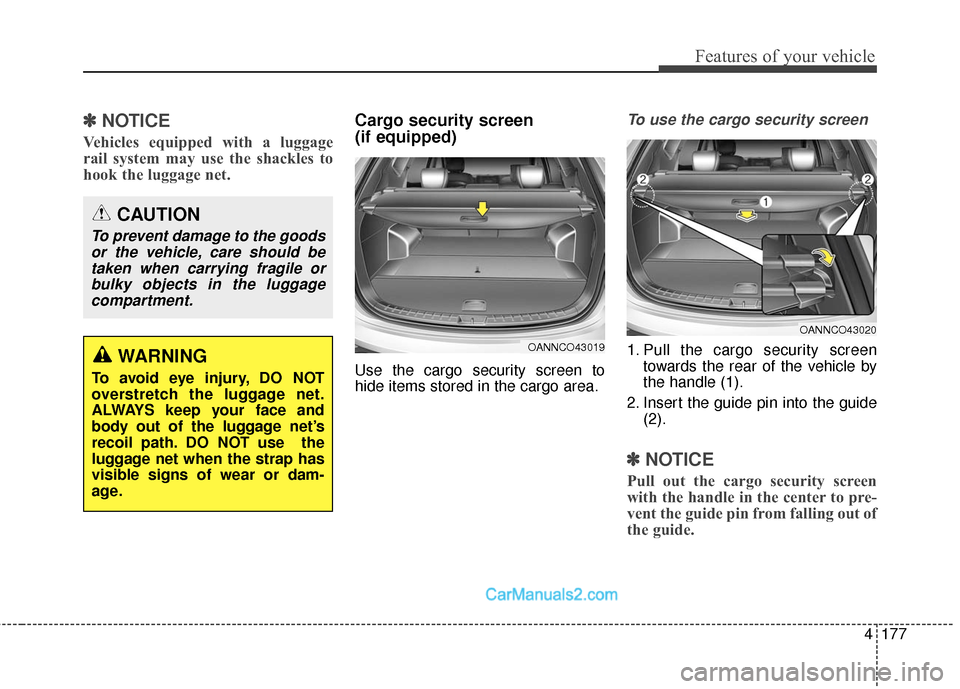
Use the cargo security screen to
hide items stored in the cargo area.
To use the cargo security screen
1. Pull the cargo security screen
towards the rear of the vehicle by
the handle (1).
2. Insert the guide pin into the guide (2).
✽ ✽NOTICE
Pull out the cargo security screen
with the handle in the center to pre-
vent the guide pin from falling out of
the guide.
WARNING
To avoid eye injury, DO NOT
overstretch the luggage net.
ALWAYS keep your face and
body out of the luggage net’s
recoil path. DO NOT use the
luggage net when the strap has
visible signs of wear or dam-
age.
CAUTION
To prevent damage to the goods
or the vehicle, care should betaken when carrying fragile orbulky objects in the luggagecompartment.
OANNCO43019
OANNCO43020
Page 275 of 614
Features of your vehicle
178
4
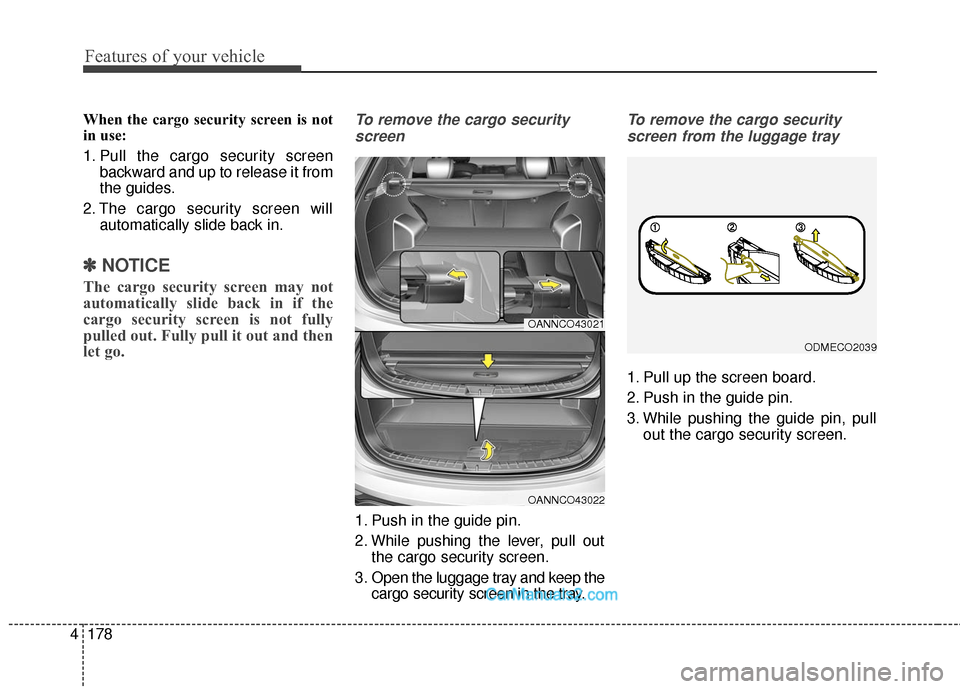
When the cargo security screen is not
in use:
1. Pull the cargo security screen
backward and up to release it from
the guides.
2. The cargo security screen will automatically slide back in.
✽ ✽NOTICE
The cargo security screen may not
automatically slide back in if the
cargo security screen is not fully
pulled out. Fully pull it out and then
let go.
To remove the cargo security
screen
1. Push in the guide pin.
2. While pushing the lever, pull out the cargo security screen.
3. Open the luggage tray and keep the cargo security screen in the tray.
To remove the cargo security
screen from the luggage tray
1. Pull up the screen board.
2. Push in the guide pin.
3. While pushing the guide pin, pull out the cargo security screen.
OANNCO43021
OANNCO43022
ODMECO2039
Page 276 of 614
4179
Features of your vehicle
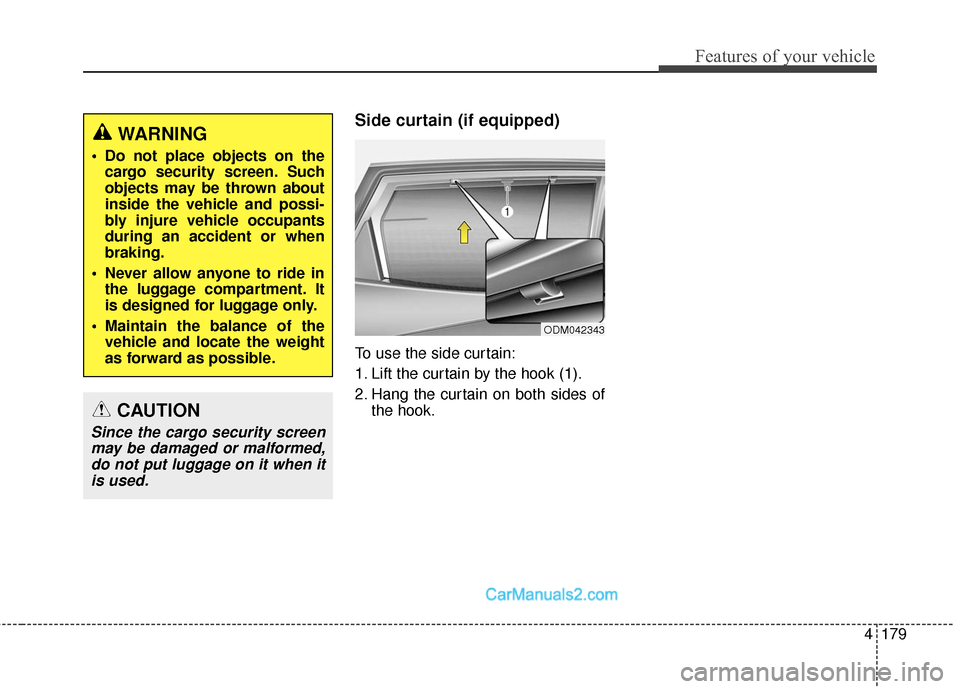
Side curtain (if equipped)
To use the side curtain:
1. Lift the curtain by the hook (1).
2. Hang the curtain on both sides ofthe hook.
WARNING
Do not place objects on thecargo security screen. Such
objects may be thrown about
inside the vehicle and possi-
bly injure vehicle occupants
during an accident or when
braking.
Never allow anyone to ride in the luggage compartment. It
is designed for luggage only.
Maintain the balance of the vehicle and locate the weight
as forward as possible.
CAUTION
Since the cargo security screenmay be damaged or malformed,do not put luggage on it when itis used.
ODM042343
Page 278 of 614
4181
Features of your vehicle
WARNING
The following specification isthe maximum weight that can
be loaded onto the roof rack.
Distribute the load as evenly
as possible onto the roof rack
and secure the load firmly.
Loading cargo or luggage in
excess of the specified weight
limit on the roof rack may
damage your vehicle.
The vehicle center of gravity will be higher when items are
loaded onto the roof rack.
Avoid sudden starts, braking,
sharp turns, abrupt maneu-
vers or high speeds that may
result in loss of vehicle con-
trol or rollover resulting in an
accident.
(Continued)
ROOF 100 kg (220 lbs.)
RACK EVENLY DISTRIBUTED
(Continued)
Always drive slowly and turncorners carefully when carry-
ing items on the roof rack.
Severe wind updrafts, caused
by passing vehicles or natural
causes, can cause sudden
upward pressure on items
loaded on the roof rack. This
is especially true when carry-
ing large, flat items such as
wood panels or mattresses.
This could cause the items to
fall off the roof rack and cause
damage to your vehicle or
others around you.
To prevent damage or loss of cargo while driving, check fre-
quently before or while driv-
ing to make sure the items on
the roof rack are securely fas-
tened.