2017 HYUNDAI IX20 ignition
[x] Cancel search: ignitionPage 175 of 456

497
Features of your vehicle
OFF mode
Push the OFF button to turn off the air cli-
mate control system. However you can
still operate the mode and air intake but-
tons as long as the ignition switch is inthe ON position.
Air conditioning (if equipped)
HYUNDAI Air Conditioning Systems are
filled with R-134a or R-1234yf refrigerant.
1. Start the engine. Push the air condi-tioning button.
2. Set the mode to the position.
3. Set the air intake control to the outside air or recirculated air position.
4. Adjust the fan speed control and tem- perature control to maintain maximum
comfort.
✽✽ NOTICE
Your vehicle is filled with R-134a or R-
1234yf according to the regulation in
your country at the time of production.
You can find out which air conditioning
refrigerant is applied to your vehicle on
the label located inside of the hood.
Refer to chapter 8 for the location of the
air conditioning refrigerant label. ✽✽
NOTICE
When using the air conditioning sys- tem, monitor the temperature gauge
closely while driving up hills or in
heavy traffic when outside tempera-
tures are high. Air conditioning sys-
tem operation may cause engine over-
heating. Continue to use the blower
fan but turn the air conditioning sys-
tem off if the temperature gauge indi-
cates engine overheating.
When opening the windows in humid weather air conditioning may create
water droplets inside the vehicle.
Since excessive water droplets may
cause damage to electrical equipment,
air conditioning should only be used
with the windows closed.
Air conditioning system operation tips
If the vehicle has been parked in direct sunlight during hot weather, open the
windows for a short time to let the hot
air inside the vehicle escape.
To help reduce moisture inside of the windows on rainy or humid days,
decrease the humidity inside the vehi-
cle by operating the air conditioningsystem.
OJC043074
CAUTION
The refrigerant system should
only be serviced by trained andcertified technicians to insure
proper and safe operation.
The refrigerant system should be serviced in a well-ventilated place.
The air conditioning evaporator (cooling coil) shall never berepaired or replaced with one
removed from a used or salvaged vehicle and new replacement MAC
evaporators shall be certified (andlabeled) as meeting SAE Standard
J2842.
procarmanuals.com
Page 182 of 456
Features of your vehicle
104
4
INTERIOR FEATURES
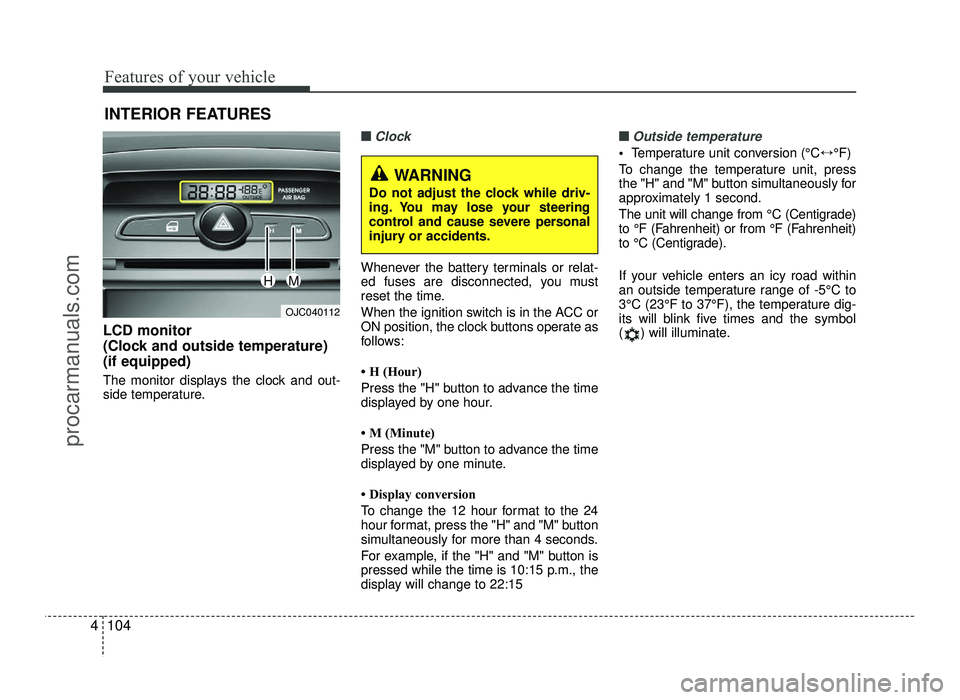
LCD monitor
(Clock and outside temperature)(if equipped)
The monitor displays the clock and out-
side temperature.
■■Clock
Whenever the battery terminals or relat-
ed fuses are disconnected, you must
reset the time.
When the ignition switch is in the ACC or
ON position, the clock buttons operate as
follows:
H (Hour)
Press the "H" button to advance the time
displayed by one hour.
M (Minute)
Press the "M" button to advance the time
displayed by one minute.
Display conversion
To change the 12 hour format to the 24
hour format, press the "H" and "M" button
simultaneously for more than 4 seconds.
For example, if the "H" and "M" button is
pressed while the time is 10:15 p.m., the
display will change to 22:15
■■Outside temperature
Temperature unit conversion (°C ↔°F)
To change the temperature unit, press
the "H" and "M" button simultaneously for
approximately 1 second.
The unit will change from °C (Centigrade)
to °F (Fahrenheit) or from °F (Fahrenheit)
to °C (Centigrade).
If your vehicle enters an icy road within
an outside temperature range of -5°C to
3°C (23°F to 37°F), the temperature dig-
its will blink five times and the symbol
( ) will illuminate.
OJC040112
WARNING
Do not adjust the clock while driv-
ing. You may lose your steering
control and cause severe personal
injury or accidents.
HM
procarmanuals.com
Page 195 of 456
4117
Features of your vehicle
WARNING
Do not stare at the screen while driving. Staring at the screen for
prolonged periods of time couldlead to traffic accidents.
Do not disassemble, assemble, or modify the audio system. Suchacts could result in accidents,
fire, or electric shock.
Using the phone while driving may lead to a lack of attention oftraffic conditions and increase
the likelihood of accidents. Use
the phone feature after parking
the vehicle.
Heed caution not to spill water or introduce foreign objects into the
device. Such acts could lead to
smoke, fire, or product malfunc-tion.
(Continued)(Continued)
Driving while distracted canresult in a loss of vehicle control
that may lead to an accident,
severe personal injury, and death.
The driver’s primary responsibili-
ty is in the safe and legal opera-
tion of a vehicle, and use of any
handheld devices, other equip-
ment, or vehicle systems which
take the driver’s eyes, attention
and focus away from the safe
operation of a vehicle or which
are not permissible by law should
never be used during operation
of the vehicle.(Continued)
Please refrain from use if thescreen is blank or no sound can
be heard as these signs may indi-
cate product malfunction.
Continued use in such conditions could lead to accidents(fires,
electric shock) or product mal-functions.
Do not touch the antenna during thunder or lightening as such
acts may lead to lightning
induced electric shock.
Do not stop or park in parking- restricted areas to operate the
product. Such acts could lead totraffic accidents.
Use the system with the vehicle ignition turned on. Prolonged usewith the ignition turned off could
result in battery discharge.
(Continued)
procarmanuals.com
Page 196 of 456
Features of your vehicle
118
4
(Continued)
Turn on the car ignition before using this device. Do not operate
the audio system for long periods of time with the ignition turned off
as such operations may lead tobattery discharge.
Do not subject the device to severe shock or impact. Directpressure onto the front side of
the monitor may cause damage tothe LCD or touch screen.
When cleaning the device, make sure to turn off the device anduse a dry and smooth cloth.
Never use tough materials, chem-ical cloths, or solvents (alcohol,
benzene, thinners, etc.) as such materials may damage the devicepanel or cause color/quality dete-
rioration
(Continued)(Continued) Do not place beverages close to the audio system. Spilling bever-
ages may lead to system mal-function.
In case of product malfunction, please contact your place of pur-chase or After Service center.
Placing the audio system within an electromagnetic environmentmay result in noise interference.
Prevent caustic solutions such as perfume and cosmetic oil fromcontacting the dashboard because
they may cause damage or discol-oration.CAUTION
Operating the device while driv-
ing could lead to accidents due toa lack of attention to external sur-
roundings. First park the vehiclebefore operating the device.
Adjust the volume to levels that allow the driver to hear soundsfrom outside of the vehicle.
Driving in a state where externalsounds cannot be heard may leadto accidents.
Pay attention to the volume set- ting when turning the device on.A sudden output of extreme vol-
ume upon turning the device oncould lead to hearing impairment.
(Adjust the volume to a suitable levels before turning off the
device.)
(Continued)
procarmanuals.com
Page 201 of 456

4123
Features of your vehicle
(Continued)
When a Bluetooth®
Wireless
Technology mobile phone is con-
nected, a ( ) icon will appear at
the top of the scr een. If a ( ) icon is
not displayed, this indicates that a
Bluetooth ®
Wireless Technology
enabled device has not been con-
nected. You must connect the device
before use. For more information on
Bluetooth ®
Wireless Technology mobile
phones, refer to the “Phone Setup”
section.
Pairing and connecting a Bluetooth®
Wireless Technology enabled mobile
phone will work only when the
Bluetooth®Wireless Technology optionwithin your mobile phone has been
turned on. (Methods of turning on
the Bluetooth ®
Wireless Technology
enabled feature may differ depend-
ing on the mobile phone.)
In some mobile phones, starting the ignition while talking through
Bluetooth®Wireless Technology enabledhandsfree call will result in the call
becoming disconnected. (Switch the
call back to your mobile phone
when starting the ignition.) (Continued)
(Continued)
Some features may not be supported in
some Bluetooth®Wireless Technologymobile phone and devices.
Bluetooth®Wireless Technology enabledoperation may be unstable depending
on the communication state.
Placing the audio system within an electromagnetic environment may
result in noise interference.
procarmanuals.com
Page 223 of 456
4145
Features of your vehicle
PHONE (if equipped)
Before using the
Bluetooth®Wireless
Technologyphone features
In order to use
Bluetooth®Wireless
Technology phone, you must first pair and connect the
Bluetooth®Wireless
Technology mobile phone.
If the mobile phone is not paired or con- nected, it is not possible to enter Phone
mode. Once a phone is paired or con-nected, the guidance screen will be dis-
played.
If Priority is set upon vehicle ignition (IGN/ACC ON), the
Bluetooth®Wireless
Technology phone will be automatically
connected. Even if you are outside, the
Bluetooth®Wireless Technology phone
will be automatically connected once
you are in the vicinity of the vehicle. If
you do not want automatic
Bluetooth®
Wireless Technology phone connection,set the Bluetooth® Wireless Technology
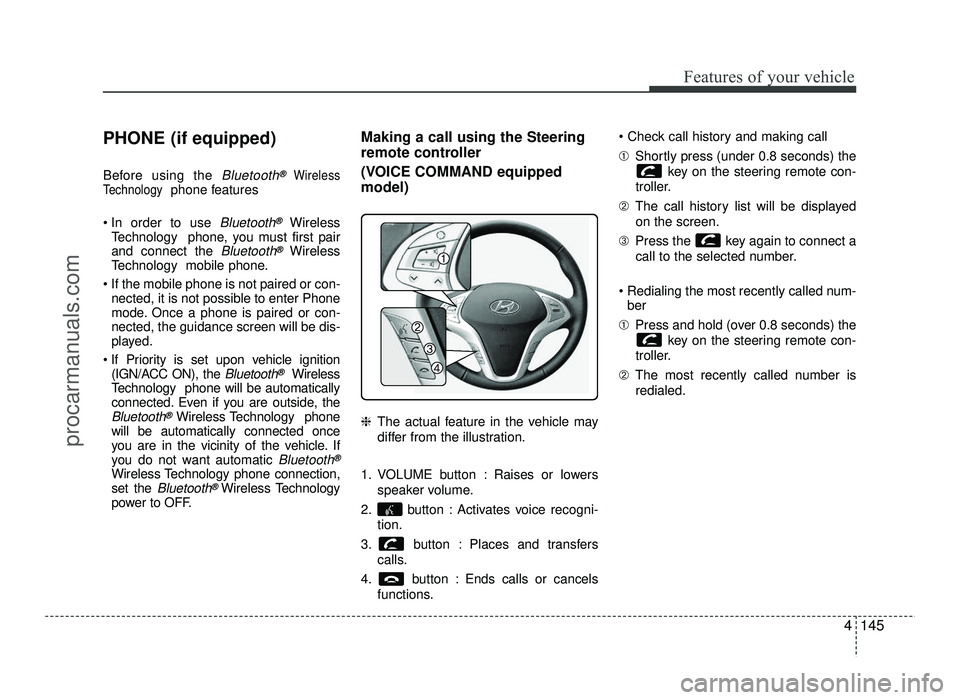
power to OFF. Making a call using the Steering
remote controller
(VOICE COMMAND equipped model) ❈
The actual feature in the vehicle may
differ from the illustration.
1. VOLUME button : Raises or lowers speaker volume.
2. button : Activates voice recogni- tion.
3. button : Places and transfers calls.
4. button : Ends calls or cancels functions. ➀
Shortly press (under 0.8 seconds) the
key on the steering remote con-
troller.
➁ The call history list will be displayed
on the screen.
➂ Press the key again to connect a
call to the selected number.
Redialing the most recently called num- ber
➀ Press and hold (over 0.8 seconds) the
key on the steering remote con-
troller.
➁ The most recently called number is
redialed.
procarmanuals.com
Page 234 of 456
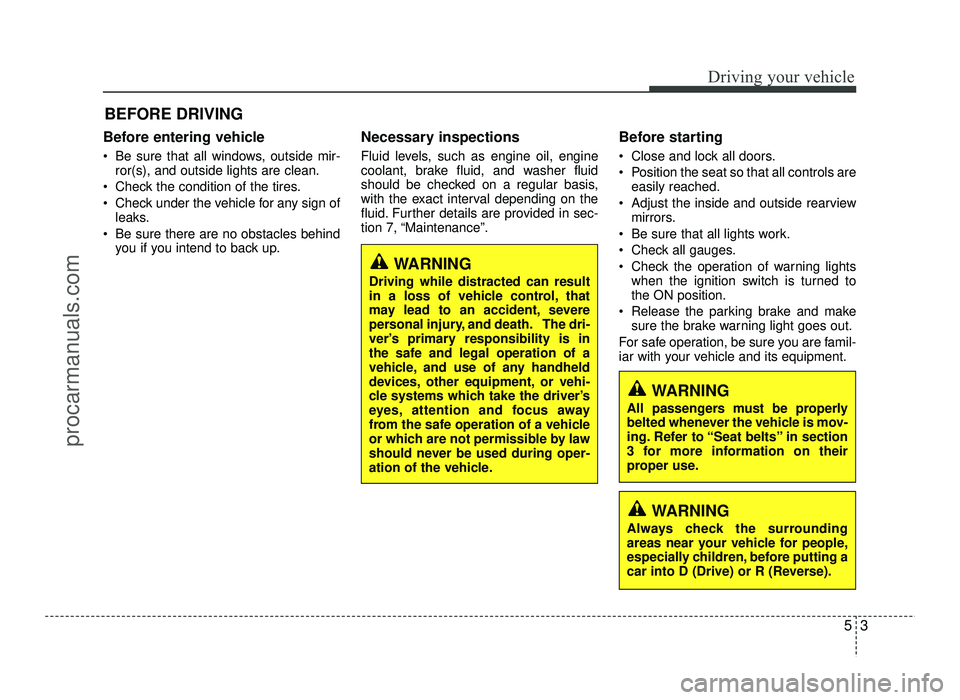
Before entering vehicle
• Be sure that all windows, outside mir-ror(s), and outside lights are clean.
Check the condition of the tires.
Check under the vehicle for any sign of leaks.
Be sure there are no obstacles behind you if you intend to back up. Necessary inspections
Fluid levels, such as engine oil, engine
coolant, brake fluid, and washer fluid
should be checked on a regular basis,
with the exact interval depending on the
fluid. Further details are provided in sec-
tion 7, “Maintenance”.
Before starting
Close and lock all doors.
Position the seat so that all controls are
easily reached.
Adjust the inside and outside rearview mirrors.
Be sure that all lights work.
Check all gauges.
Check the operation of warning lights when the ignition switch is turned to the ON position.
Release the parking brake and make sure the brake warning light goes out.
For safe operation, be sure you are famil-
iar with your vehicle and its equipment.
53
Driving your vehicle
BEFORE DRIVING
WARNING
All passengers must be properly
belted whenever the vehicle is mov-
ing. Refer to “Seat belts” in section
3 for more information on their
proper use.
WARNING
Always check the surrounding
areas near your vehicle for people,
especially children, before putting a
car into D (Drive) or R (Reverse).
WARNING
Driving while distracted can result
in a loss of vehicle control, that
may lead to an accident, severe
personal injury, and death. The dri-
ver’s primary responsibility is in
the safe and legal operation of a
vehicle, and use of any handheld
devices, other equipment, or vehi-
cle systems which take the driver’s
eyes, attention and focus away
from the safe operation of a vehicle
or which are not permissible by law
should never be used during oper-
ation of the vehicle.
procarmanuals.com
Page 236 of 456
55
Driving your vehicle
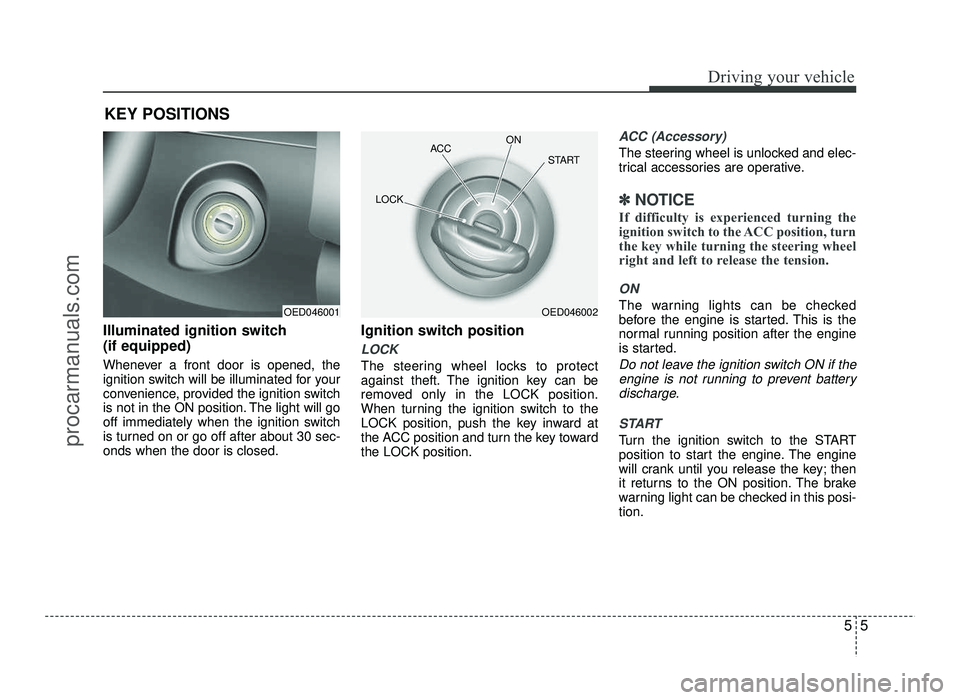
Illuminated ignition switch (if equipped)
Whenever a front door is opened, the
ignition switch will be illuminated for your
convenience, provided the ignition switch
is not in the ON position. The light will go
off immediately when the ignition switch
is turned on or go off after about 30 sec-onds when the door is closed.Ignition switch position
LOCK
The steering wheel locks to protect
against theft. The ignition key can be
removed only in the LOCK position.
When turning the ignition switch to the
LOCK position, push the key inward at
the ACC position and turn the key towardthe LOCK position.
ACC (Accessory)
The steering wheel is unlocked and elec-
trical accessories are operative.
✽✽
NOTICE
If difficulty is experienced turning the
ignition switch to the ACC position, turn
the key while turning the steering wheel
right and left to release the tension.
ON
The warning lights can be checked
before the engine is started. This is the
normal running position after the engine
is started.
Do not leave the ignition switch ON if the engine is not running to prevent battery
discharge.
START
Turn the ignition switch to the START
position to start the engine. The engine
will crank until you release the key; then
it returns to the ON position. The brake
warning light can be checked in this posi-tion.
KEY POSITIONS
OED046001OED046002
ACC
ON
START
LOCK
procarmanuals.com