2017 HYUNDAI IX20 ignition
[x] Cancel search: ignitionPage 110 of 456
Features of your vehicle
32
4
✽✽
NOTICE
After washing the vehicle or after a rain,
be sure to wipe off the water on the sun-
roof before operating the sunroof.
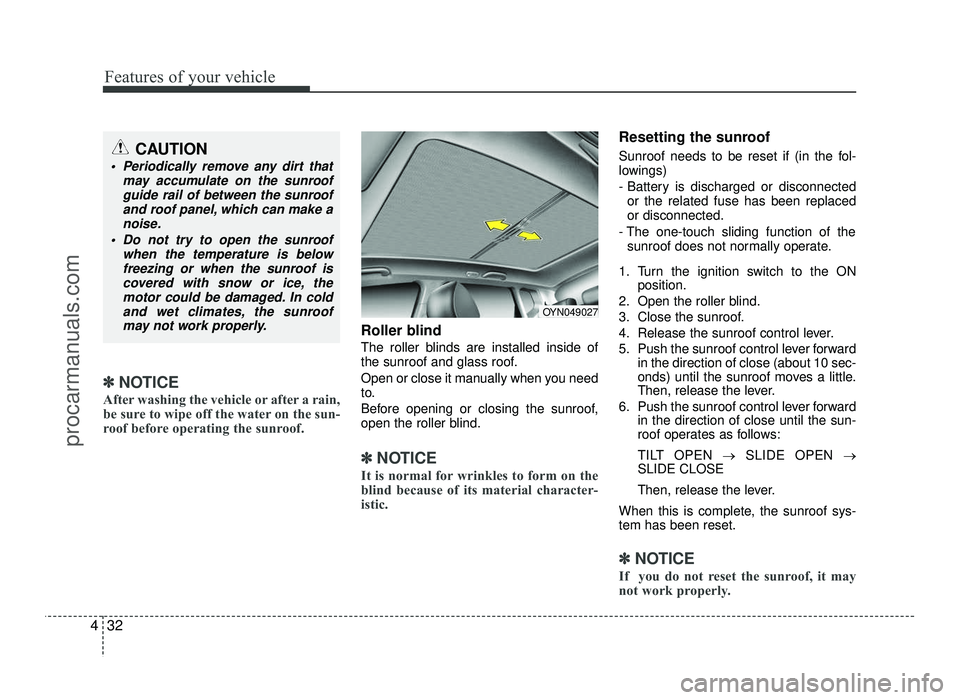
Roller blind
The roller blinds are installed inside of
the sunroof and glass roof.
Open or close it manually when you need
to.
Before opening or closing the sunroof,
open the roller blind.
✽✽ NOTICE
It is normal for wrinkles to form on the
blind because of its material character-
istic.
Resetting the sunroof
Sunroof needs to be reset if (in the fol-
lowings)
- Battery is discharged or disconnected or the related fuse has been replaced or disconnected.
- The one-touch sliding function of the sunroof does not normally operate.
1. Turn the ignition switch to the ON position.
2. Open the roller blind.
3. Close the sunroof.
4. Release the sunroof control lever.
5. Push the sunroof control lever forward in the direction of close (about 10 sec-
onds) until the sunroof moves a little.
Then, release the lever.
6. Push the sunroof control lever forward in the direction of close until the sun-
roof operates as follows:
TILT OPEN →SLIDE OPEN →
SLIDE CLOSE
Then, release the lever.
When this is complete, the sunroof sys- tem has been reset.
✽✽ NOTICE
If you do not reset the sunroof, it may
not work properly.
OYN049027
CAUTION
Periodically remove any dirt that may accumulate on the sunroofguide rail of between the sunroof
and roof panel, which can make anoise.
Do not try to open the sunroof when the temperature is belowfreezing or when the sunroof is
covered with snow or ice, themotor could be damaged. In coldand wet climates, the sunroof
may not work properly.
procarmanuals.com
Page 111 of 456
433
Features of your vehicle
Electric power steering (EPS)
Power steering uses the motor to assist
you in steering the vehicle. If the engine is
off or if the power steering system
becomes inoperative, the vehicle may still
be steered, but it will require increased
steering effort.
The motor driven power steering is con-
trolled by the power steering control unit
which senses the steering wheel torque
and vehicle speed to command the motor.
The steering effort becomes heavier as
the vehicle’s speed increases and
becomes lighter as the vehicle’s speed
decreases for better control of the steeringwheel.
Should you notice any change in the effort
required to steering during normal vehicle
operation, we recommend that the system
be checked by an authorized HYUNDAI
dealer.
✽✽NOTICE
The following symptoms may occur dur-
ing normal vehicle operation:
The EPS warning light does not illu- minate.
(Continued)(Continued)
The steering effort is high immediate-
ly after turning the ignition switch on.
This happens as the EPS system per-
forms the diagnostics. When the diag-
nostics is completed, the steering
effort will return to its normal condi-
tion.
A click noise may be heard from the EPS relay after the ignition switch is
turned to the ON or LOCK position.
Motor noise may be heard when the vehicle is at a stop or at a low driving
speed.
If the Electric Power Steering System does not operate normally, the warn-
ing light will illuminate on the instru-
ment cluster. The steering wheel may
become difficult to control or operate
abnormally. We recommend that the
system be checked by an authorized
HYUNDAI dealer.
The steering effort increases if the
steering wheel is rotated continuously
when the vehicle is not in motion.
However, after a few minutes, it will
return to its normal conditions.
When you operate the steering wheel in low temperature, abnormal noise
could occur. If temperature rises, the
noise will disappear. This is a normal
condition.
Tilt steering
Tilt steering allows you to adjust the
steering wheel before you drive. You can
also raise it to give your legs more room
when you exit and enter the vehicle.
The steering wheel should be positioned
so that it is comfortable for you to drive,
while permitting you to see the instru-
ment panel warning lights and gauges.
STEERING WHEEL
WARNING
Never adjust the angle of the steering wheel while driving. You
may lose steering control and
cause severe personal injury,death or accidents.
After adjusting, push the steering wheel both up and down to be
certain it is locked in position.
procarmanuals.com
Page 112 of 456
Features of your vehicle
34
4
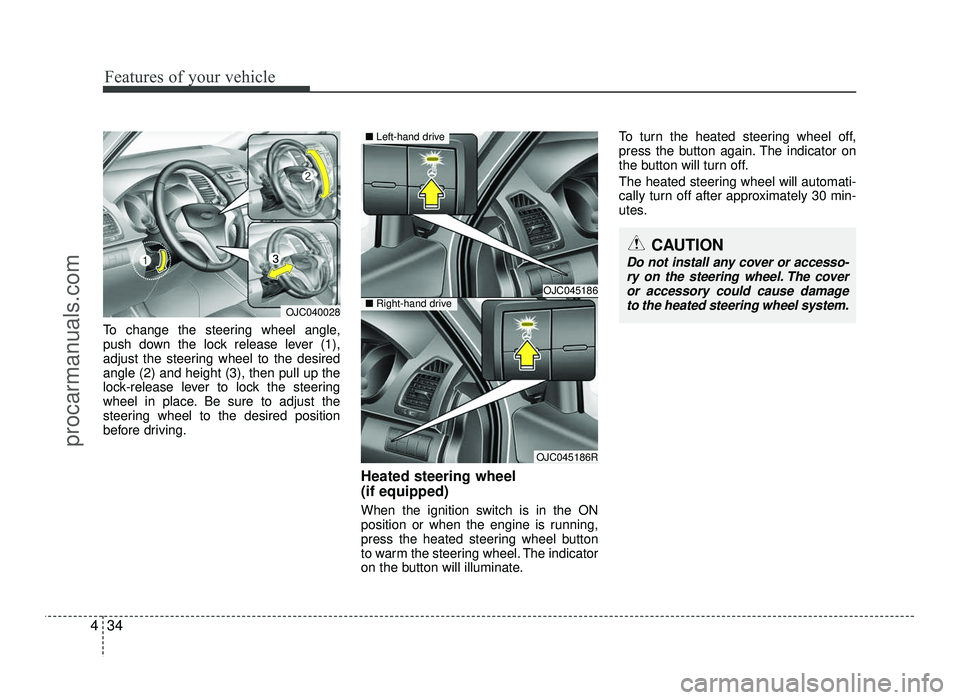
To change the steering wheel angle,
push down the lock release lever (1),
adjust the steering wheel to the desiredangle (2) and height (3), then pull up the
lock-release lever to lock the steering
wheel in place. Be sure to adjust the
steering wheel to the desired position
before driving.
Heated steering wheel (if equipped)
When the ignition switch is in the ON
position or when the engine is running,
press the heated steering wheel button
to warm the steering wheel. The indicator
on the button will illuminate.To turn the heated steering wheel off,
press the button again. The indicator on
the button will turn off.
The heated steering wheel will automati-
cally turn off after approximately 30 min-
utes.
OJC040028
OJC045186
OJC045186R
■
Left-hand drive
■Right-hand drive
CAUTION
Do not install any cover or accesso-
ry on the steering wheel. The cover or accessory could cause damage
to the heated steering wheel system.
procarmanuals.com
Page 115 of 456

437
Features of your vehicle
To operate the electric rearview mirror:
The mirror defaults to the ON positionwhenever the ignition switch is turned on.
Press the ON/OFF button (1) to turn the automatic dimming function off.
The mirror indicator light will turn off.
Press the ON/OFF button (1) to turn the automatic dimming function on.
The mirror indicator light will illuminate. Outside rearview mirror Be sure to adjust the mirror angles
before driving.
Your vehicle is equipped with both left-
hand and right-hand outside rearview
mirrors. The mirrors can be adjusted
remotely with the remote switch (if
equipped). The mirror heads can be fold-
ed back to prevent damage during an
automatic car wash or when passing
through a narrow street.
WARNING -
Rearview mir-
rors
The right outside rearview mirror is convex. In some countries, the
left outside rearview mirror is also
convex. Objects seen in the mir-
ror are closer than they appear.
Use your interior rearview mirror or direct observation to determine
the actual distance of following
vehicles when changing lanes.
OYN049030
OYN049031
■Type A
■ Type B
IndicatorSensor
Indicator
SensorRearview display
CAUTION
Do not scrape ice off the mirror
face; this may damage the surfaceof the glass. If ice should restrict
movement of the mirror, do not force the mirror for adjustment. Toremove ice, use a deicer spray.
CAUTION
If the mirror is jammed with ice, do
not adjust the mirror by force. Use an approved spray de-icer (not radi-
ator antifreeze) to release the frozen mechanism or move thevehicle to a warm place and allow
the ice to melt.
WARNING
Do not adjust or fold the outside
rearview mirrors while the vehicle
is moving. This could result in loss
of control, and an accident which
could cause death, serious injury
or property damage.
procarmanuals.com
Page 117 of 456
439
Features of your vehicle
Folding the outside rearview mirror
Manual type
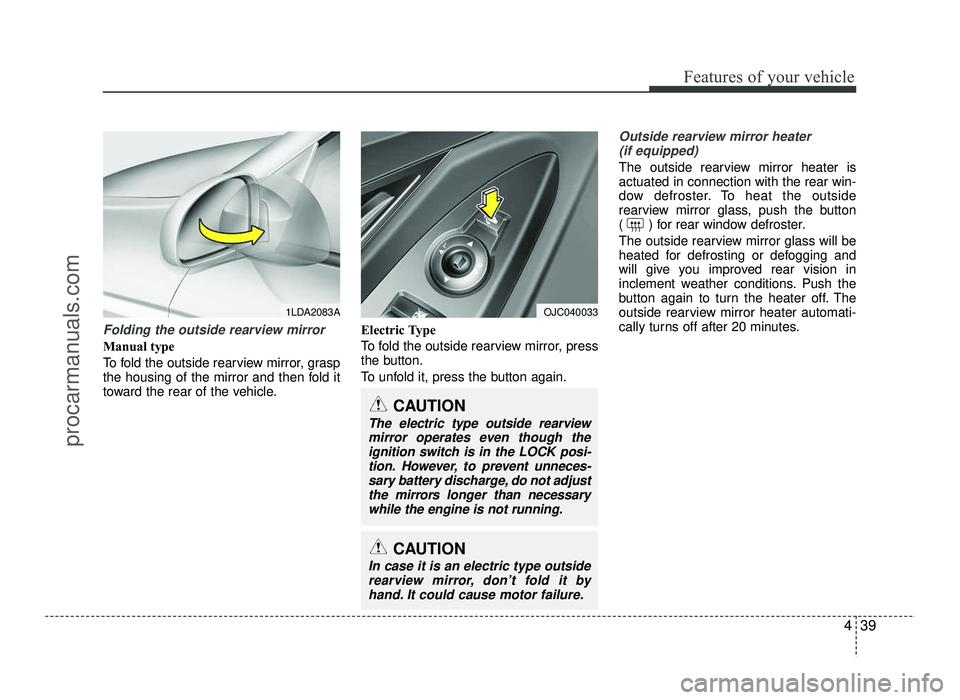
To fold the outside rearview mirror, grasp
the housing of the mirror and then fold it
toward the rear of the vehicle.Electric Type
To fold the outside rearview mirror, press
the button.
To unfold it, press the button again.
Outside rearview mirror heater
(if equipped)
The outside rearview mirror heater is actuated in connection with the rear win-
dow defroster. To heat the outside
rearview mirror glass, push the button
( ) for rear window defroster.
The outside rearview mirror glass will be
heated for defrosting or defogging and
will give you improved rear vision in
inclement weather conditions. Push the
button again to turn the heater off. The
outside rearview mirror heater automati-
cally turns off after 20 minutes.
1LDA2083A
CAUTION
In case it is an electric type outside
rearview mirror, don’t fold it byhand. It could cause motor failure.
CAUTION
The electric type outside rearviewmirror operates even though theignition switch is in the LOCK posi-
tion. However, to prevent unneces- sary battery discharge, do not adjust
the mirrors longer than necessary while the engine is not running.
OJC040033
procarmanuals.com
Page 120 of 456

Features of your vehicle
42
4
Tachometer
The tachometer indicates the approxi-
mate number of engine revolutions per
minute (rpm). Use the tachometer to select the correct
shift points and to prevent lugging and/or
over-revving the engine. The tachometer pointer may move slight-
ly when the ignition switch is in ON posi-
tion with the engine OFF. This movement
is normal and will not affect the accuracy
of the tachometer once the engine is run-ning.
Engine temperature gauge
This gauge shows the temperature of the
engine coolant when the ignition switch
is ON. The gauge is supplemented by a
Engine coolant temperature warninglight, which illuminates when the engine
is overheating.
Do not continue driving with an overheat-
ed engine. If your vehicle overheats, refer
to “If the engine overheats” in section 6.
CAUTION
Do not operate the engine within
the tachometer's RED ZONE.
This may cause severe engine dam-age.
OJC040050
■
Type A
■Type B
OJC040046
OJC040047
■GasolineGasoline
- Type A - Type B
■
Diesel Diesel
- Type A - Type B
procarmanuals.com
Page 123 of 456
445
Features of your vehicle
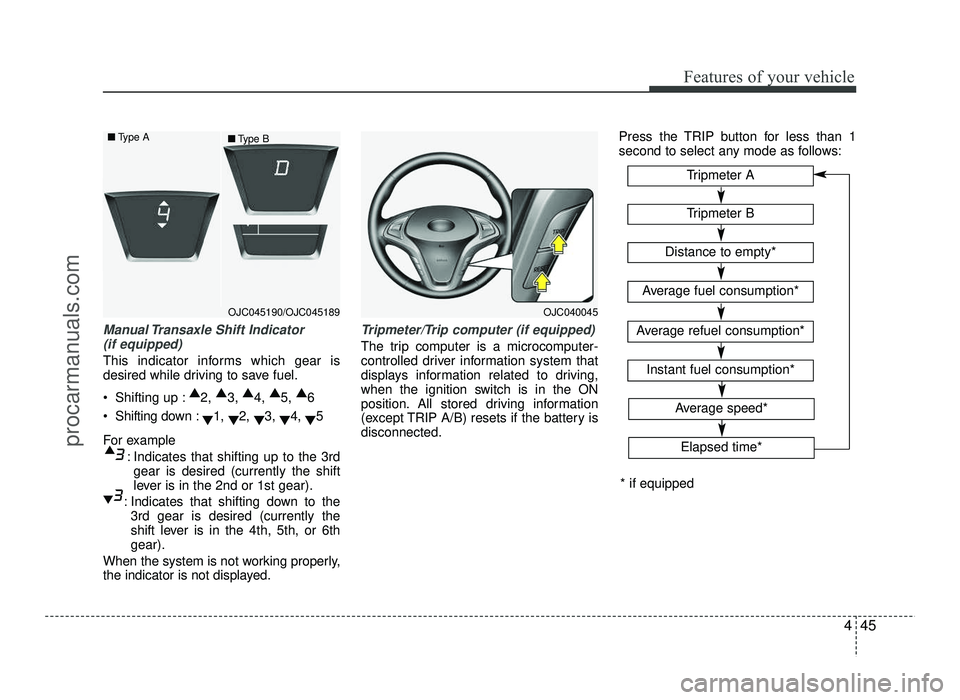
Manual Transaxle Shift Indicator (if equipped)
This indicator informs which gear is
desired while driving to save fuel.
Shifting up : ▲
2, ▲
3, ▲
4, ▲
5, ▲
6
Shifting down : ▼1,
▼2,
▼3,
▼4,
▼5
For example : Indicates that shifting up to the 3rdgear is desired (currently the shift
lever is in the 2nd or 1st gear).
: Indicates that shifting down to the 3rd gear is desired (currently the
shift lever is in the 4th, 5th, or 6thgear).
When the system is not working properly,
the indicator is not displayed.
Tripmeter/Trip computer (if equipped)
The trip computer is a microcomputer-
controlled driver information system that
displays information related to driving,
when the ignition switch is in the ON
position. All stored driving information
(except TRIP A/B) resets if the battery isdisconnected. Press the TRIP button for less than 1
second to select any mode as follows:
OJC040045
Tripmeter B
Instant fuel consumption*
Tripmeter A
Distance to empty*
Average fuel consumption*
Average refuel consumption*
* if equipped
Elapsed time*
Average speed*
OJC045190/OJC045189
■
Type A
■Type B
procarmanuals.com
Page 126 of 456
Features of your vehicle
48
4
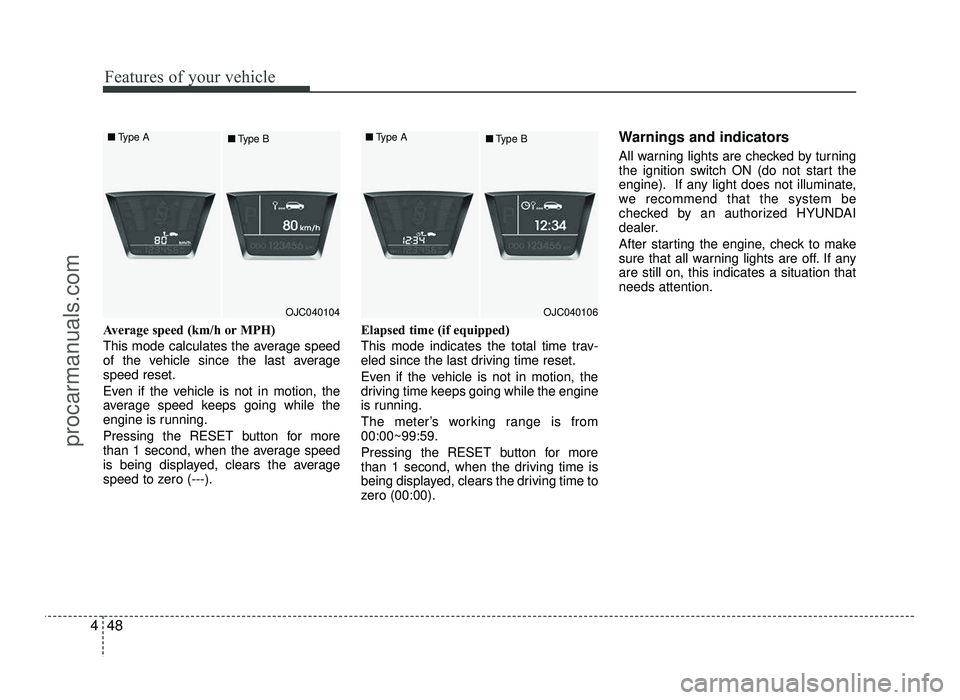
Average speed (km/h or MPH)
This mode calculates the average speed
of the vehicle since the last averagespeed reset.
Even if the vehicle is not in motion, the
average speed keeps going while the
engine is running.
Pressing the RESET button for more
than 1 second, when the average speed
is being displayed, clears the average
speed to zero (---). Elapsed time (if equipped)
This mode indicates the total time trav-
eled since the last driving time reset.
Even if the vehicle is not in motion, the
driving time keeps going while the engine
is running.
The meter’s working range is from 00:00~99:59.
Pressing the RESET button for more
than 1 second, when the driving time is
being displayed, clears the driving time to
zero (00:00). Warnings and indicators
All warning lights are checked by turning
the ignition switch ON (do not start the
engine). If any light does not illuminate,
we recommend that the system be
checked by an authorized HYUNDAI
dealer.
After starting the engine, check to make
sure that all warning lights are off. If anyare still on, this indicates a situation thatneeds attention.
OJC040104
■
Type A
■Type BOJC040106
■
Type A
■Type B
procarmanuals.com