2017 HYUNDAI IX20 ECU
[x] Cancel search: ECUPage 185 of 456
4107
Features of your vehicle
Sunvisor
Use the sunvisor to shield direct light
through the front or side windows.
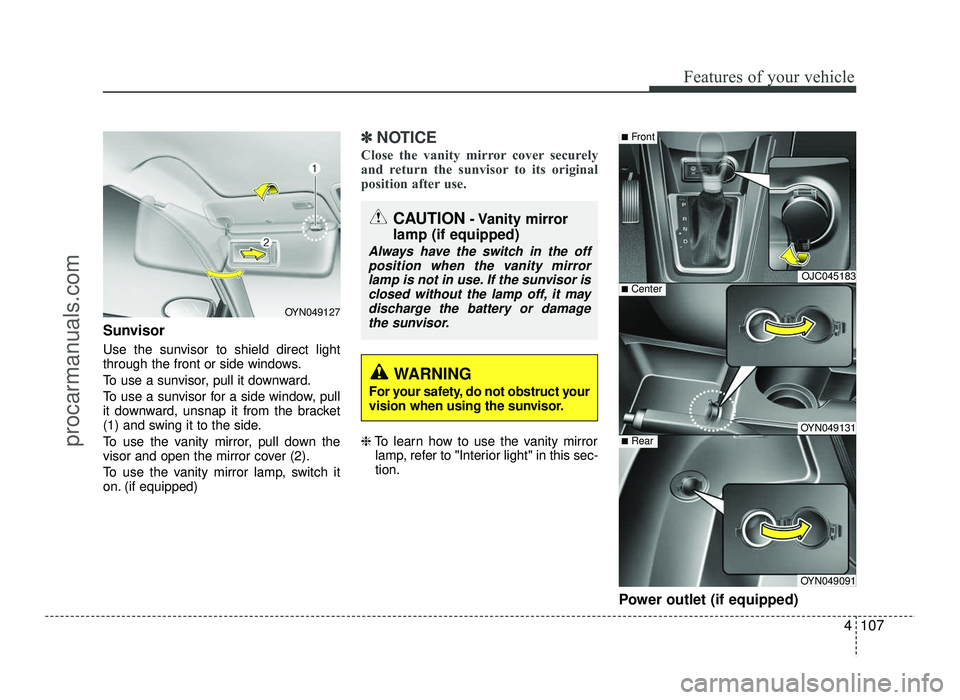
To use a sunvisor, pull it downward.
To use a sunvisor for a side window, pull
it downward, unsnap it from the bracket
(1) and swing it to the side.
To use the vanity mirror, pull down the
visor and open the mirror cover (2).
To use the vanity mirror lamp, switch it
on. (if equipped)
✽✽NOTICE
Close the vanity mirror cover securely
and return the sunvisor to its original
position after use.
❈ To learn how to use the vanity mirror
lamp, refer to "Interior light" in this sec- tion.
Power outlet (if equipped)
CAUTION- Vanity mirror
lamp (if equipped)
Always have the switch in the off position when the vanity mirror lamp is not in use. If the sunvisor is
closed without the lamp off, it may discharge the battery or damagethe sunvisor.
OJC045183
OYN049131
OYN049091
■ Center
■Front
■Rear
OYN049127
WARNING
For your safety, do not obstruct your
vision when using the sunvisor.
procarmanuals.com
Page 187 of 456
4109
Features of your vehicle
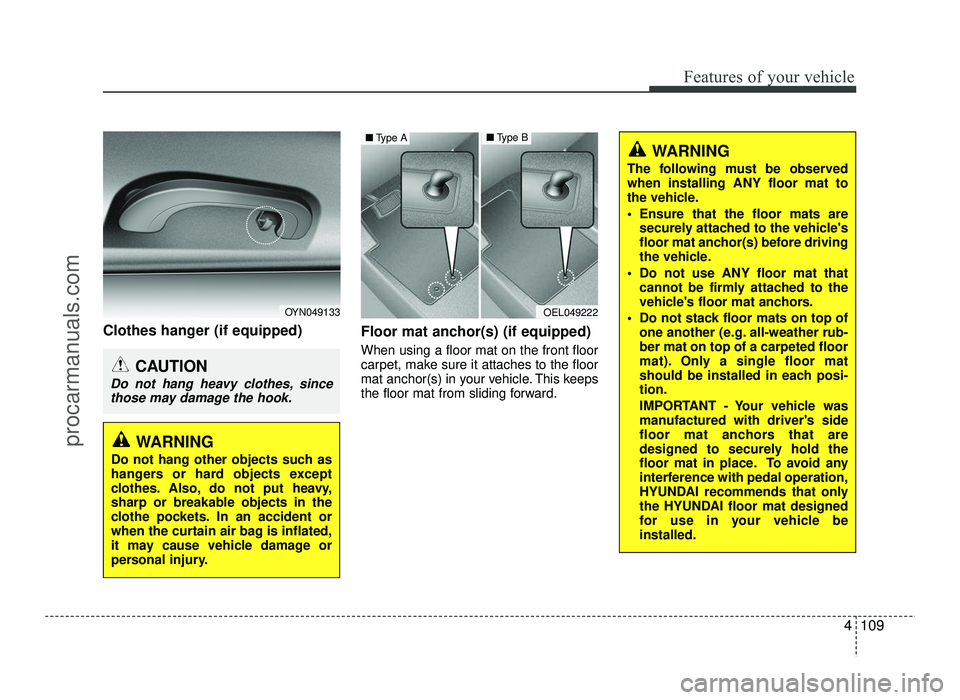
Clothes hanger (if equipped)Floor mat anchor(s) (if equipped)
When using a floor mat on the front floor
carpet, make sure it attaches to the floor
mat anchor(s) in your vehicle. This keeps
the floor mat from sliding forward.
WARNING
The following must be observed when installing ANY floor mat to
the vehicle.
Ensure that the floor mats are securely attached to the vehicle's
floor mat anchor(s) before driving
the vehicle.
Do not use ANY floor mat that cannot be firmly attached to the
vehicle's floor mat anchors.
Do not stack floor mats on top of one another (e.g. all-weather rub-ber mat on top of a carpeted floor
mat). Only a single floor mat
should be installed in each posi-tion.
IMPORTANT - Your vehicle was
manufactured with driver's side
floor mat anchors that are
designed to securely hold the
floor mat in place. To avoid any
interference with pedal operation,
HYUNDAI recommends that only
the HYUNDAI floor mat designed
for use in your vehicle beinstalled.
OEL049222
■Type A■ Type B
OYN049133
CAUTION
Do not hang heavy clothes, since
those may damage the hook.
WARNING
Do not hang other objects such as
hangers or hard objects except
clothes. Also, do not put heavy,
sharp or breakable objects in the
clothe pockets. In an accident or
when the curtain air bag is inflated,
it may cause vehicle damage or
personal injury.
procarmanuals.com
Page 204 of 456
Features of your vehicle
126
4
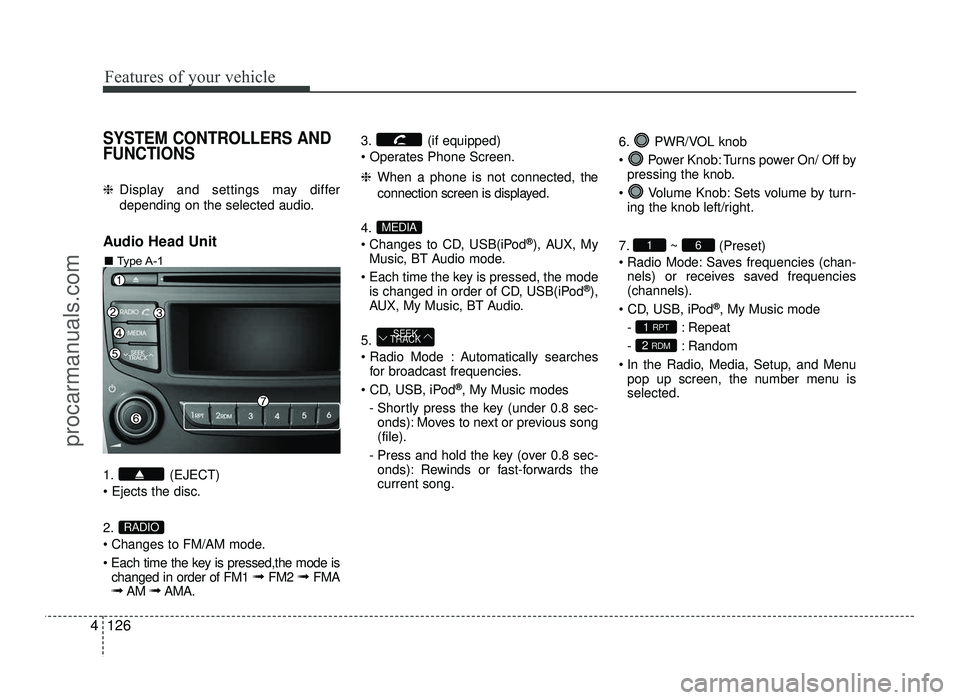
SYSTEM CONTROLLERS AND FUNCTIONS
❈ Display and settings may differ
depending on the selected audio.
Audio Head Unit
1. (EJECT) 2.
Changes to FM/AM mode.
Each time the key is pressed,the mode is changed in order of FM1 ➟ FM2 ➟ FMA
➟ AM ➟AMA. 3. (if equipped)
❈
When a phone is not connected, the
connection screen is displayed.
4.
Changes to CD, USB(iPod ®
), AUX, My
Music, BT Audio mode.
Each time the key is pressed, the mode is changed in order of CD, USB(iPod ®
),
AUX, My Music, BT Audio.
5.
Automatically searches for broadcast frequencies.
®
, My Music modes
- Shortly press the key (under 0.8 sec- onds): Moves to next or previous song (file).
- Press and hold the key (over 0.8 sec- onds): Rewinds or fast-forwards thecurrent song. 6. PWR/VOL knob
Power Knob: Turns power On/ Off by
pressing the knob.
Volume Knob: Sets volume by turn- ing the knob left/right.
7. ~ (Preset)
Radio Mode: Saves frequencies (chan- nels) or receives saved frequencies (channels).
®
, My Music mode
- : Repeat
- : Random
In the Radio, Media, Setup, and Menu pop up screen, the number menu is selected.
2 RDM
1 RPT
61
SEEK
TRACK
MEDIA
RADIO
■ Type A-1
procarmanuals.com
Page 206 of 456
Features of your vehicle
128
4
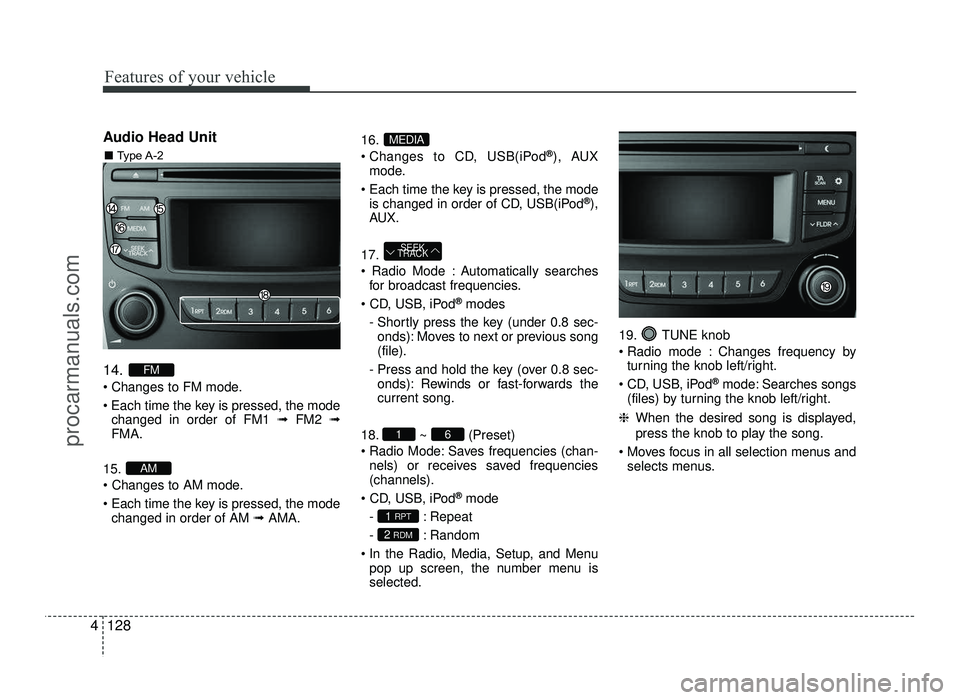
Audio Head Unit 14.
Changes to FM mode.
Each time the key is pressed, the mode
changed in order of FM1 ➟FM2 ➟
FMA.
15.
Each time the key is pressed, the mode changed in order of AM ➟AMA. 16.
Changes to CD, USB(iPod
®
), AUX
mode.
Each time the key is pressed, the mode is changed in order of CD, USB(iPod ®
),
AU X.
17.
Automatically searches for broadcast frequencies.
®
modes
- Shortly press the key (under 0.8 sec- onds): Moves to next or previous song (file).
- Press and hold the key (over 0.8 sec- onds): Rewinds or fast-forwards thecurrent song.
18. ~ (Preset)
Radio Mode: Saves frequencies (chan- nels) or receives saved frequencies(channels).
®
mode
- : Repeat
- : Random
In the Radio, Media, Setup, and Menu pop up screen, the number menu is selected. 19. TUNE knob
Radio mode : Changes frequency by
turning the knob left/right.
CD, USB, iPod ®
mode: Searches songs
(files) by turning the knob left/right.
❈ When the desired song is displayed,
press the knob to play the song.
Moves focus in all selection menus and selects menus.
2 RDM
1 RPT
61
SEEK
TRACK
MEDIA
AM
FM
■ Type A-2
procarmanuals.com
Page 256 of 456
525
Driving your vehicle
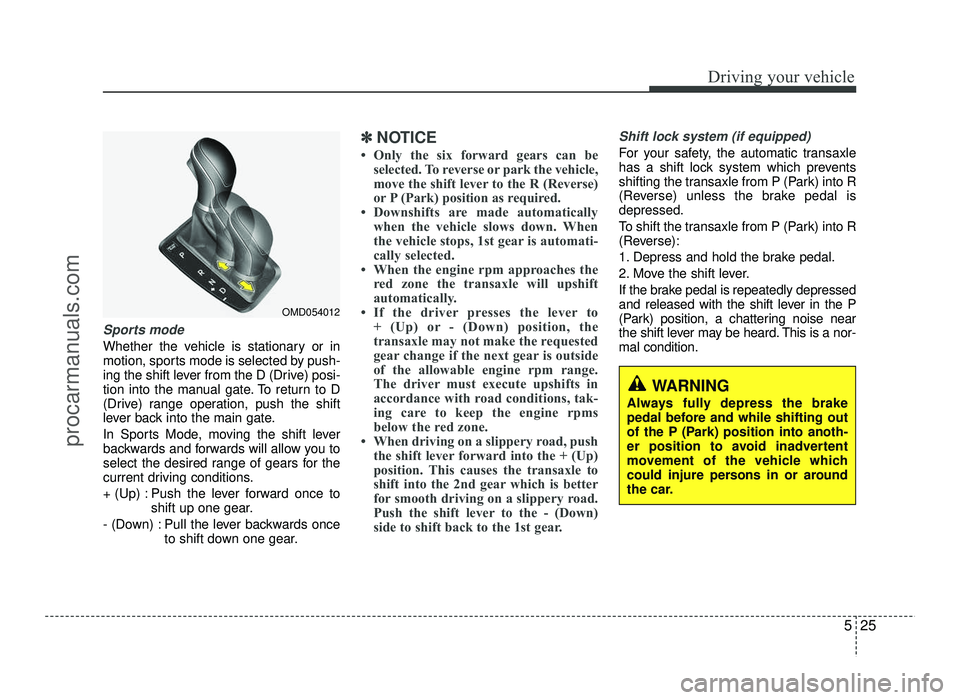
Sports mode
Whether the vehicle is stationary or in
motion, sports mode is selected by push-
ing the shift lever from the D (Drive) posi-
tion into the manual gate. To return to D
(Drive) range operation, push the shift
lever back into the main gate.
In Sports Mode, moving the shift lever
backwards and forwards will allow you to
select the desired range of gears for the
current driving conditions.
+ (Up) : Push the lever forward once toshift up one gear.
- (Down) : Pull the lever backwards once to shift down one gear.
✽✽NOTICE
Only the six forward gears can be selected. To reverse or park the vehicle,
move the shift lever to the R (Reverse)
or P (Park) position as required.
Downshifts are made automatically when the vehicle slows down. When
the vehicle stops, 1st gear is automati-
cally selected.
When the engine rpm approaches the red zone the transaxle will upshift
automatically.
If the driver presses the lever to + (Up) or - (Down) position, the
transaxle may not make the requested
gear change if the next gear is outside
of the allowable engine rpm range.
The driver must execute upshifts in
accordance with road conditions, tak-
ing care to keep the engine rpms
below the red zone.
When driving on a slippery road, push the shift lever forward into the + (Up)
position. This causes the transaxle to
shift into the 2nd gear which is better
for smooth driving on a slippery road.
Push the shift lever to the - (Down)
side to shift back to the 1st gear.Shift lock system (if equipped)
For your safety, the automatic transaxle
has a shift lock system which prevents
shifting the transaxle from P (Park) into R
(Reverse) unless the brake pedal isdepressed.
To shift the transaxle from P (Park) into R
(Reverse):
1. Depress and hold the brake pedal.
2. Move the shift lever.
If the brake pedal is repeatedly depressed
and released with the shift lever in the P
(Park) position, a chattering noise near
the shift lever may be heard. This is a nor-mal condition.
OMD054012
WARNING
Always fully depress the brake
pedal before and while shifting out
of the P (Park) position into anoth-
er position to avoid inadvertent
movement of the vehicle which
could injure persons in or around
the car.
procarmanuals.com
Page 261 of 456
Driving your vehicle
30
5
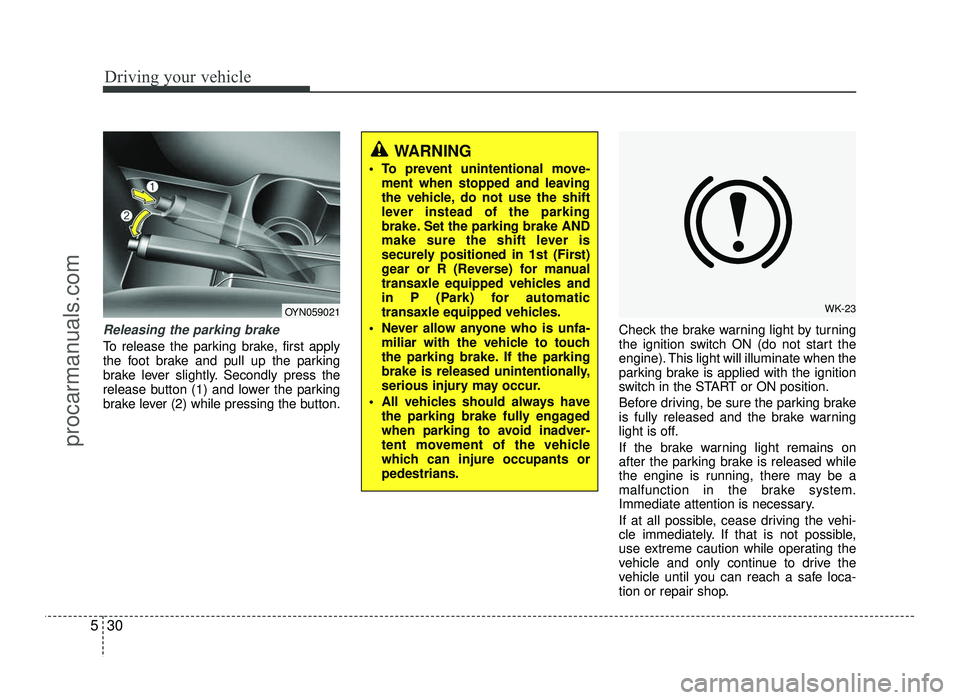
Releasing the parking brake
To release the parking brake, first apply
the foot brake and pull up the parking
brake lever slightly. Secondly press the
release button (1) and lower the parking
brake lever (2) while pressing the button. Check the brake warning light by turning
the ignition switch ON (do not start the
engine). This light will illuminate when the
parking brake is applied with the ignition
switch in the START or ON position.
Before driving, be sure the parking brake
is fully released and the brake warning
light is off.
If the brake warning light remains on
after the parking brake is released while
the engine is running, there may be a
malfunction in the brake system.
Immediate attention is necessary.
If at all possible, cease driving the vehi-
cle immediately. If that is not possible,
use extreme caution while operating the
vehicle and only continue to drive the
vehicle until you can reach a safe loca-
tion or repair shop.
WARNING
To prevent unintentional move- ment when stopped and leaving
the vehicle, do not use the shift
lever instead of the parking
brake. Set the parking brake AND
make sure the shift lever is
securely positioned in 1st (First)
gear or R (Reverse) for manual
transaxle equipped vehicles and
in P (Park) for automatic
transaxle equipped vehicles.
Never allow anyone who is unfa- miliar with the vehicle to touch
the parking brake. If the parking
brake is released unintentionally,
serious injury may occur.
All vehicles should always have the parking brake fully engaged
when parking to avoid inadver-
tent movement of the vehicle
which can injure occupants orpedestrians.
WK-23OYN059021
procarmanuals.com
Page 290 of 456
559
Driving your vehicle
Safety chains
You should always attach chains
between your vehicle and your trailer.
Cross the safety chains under the tongue
of the trailer so that the tongue will not
drop to the road if it becomes separatedfrom the hitch.
Instructions about safety chains may be
provided by the hitch manufacturer or by
the trailer manufacturer. Follow the man-
ufacturer’s recommendation for attaching
safety chains. Always leave just enough
slack so you can turn with your trailer.
And, never allow safety chains drag on
the ground.Trailer brakes
If your trailer is equipped with a braking
system, make sure it conforms to your
country’s regulations and that it is prop-
erly installed and operating correctly.
If your trailer weighs more than the max-
imum trailer weight without trailer brakes
loaded, then it needs its own brakes and
they must be adequate. Be sure to read
and follow the instructions for the trailer
brakes so you’ll be able to install, adjust
and maintain them properly.
Don’t tap into your vehicle's brake sys-
tem. Driving with a trailer
Towing a trailer requires a certain
amount of experience. Before setting out
for the open road, you must get to know
your trailer. Acquaint yourself with the
feel of handling and braking with the
added weight of the trailer. And always
keep in mind that the vehicle you are
driving is now a good deal longer and not
nearly so responsive as your vehicle is
by itself.
Before you start, check the trailer hitch
and platform, safety chains, electrical
connector(s), lights, tires and mirror
adjustment. If the trailer has electric
brakes, start your vehicle and trailer mov-
ing and then apply the trailer brake con-
troller by hand to be sure the brakes are
working. This lets you check your electri-
cal connection at the same time.
During your trip, check occasionally to be
sure that the load is secure, and that the
lights and trailer brakes are still working.
WARNING
- Trailer brakes
Do not use a trailer with its own
brakes unless you are absolutely
certain that you have properly set
up the brake system. This is not a
task for amateurs. Use an experi-
enced, competent trailer shop for
this work.
procarmanuals.com
Page 300 of 456
What to do in an emergency
4
6
IF THE ENGINE WILL NOT START
If engine doesn't turn over or
turns over slowly
1. If your vehicle has an automatic transaxle, be sure the shift lever is in N
(Neutral) or P (Park) and the emer-
gency brake is set.
2. Check the battery connections to be sure they are clean and tight.
3. Turn on the interior light. If the light dims or goes out when you operate the
starter, the battery is discharged.
4. Check the starter connections to be sure they are securely tightened.
5. Do not push or pull the vehicle to start it. See instructions for "Jump starting". If engine turns over normally but
does not start
1. Check the fuel level.
2. With the ignition switch in the LOCK
position, check all connectors at the
ignition coils and spark plugs.
Reconnect any that may be discon-
nected or loose.
3. Check the fuel line in the engine com- partment.
4. If the engine still does not start, we recommend that you call an author-
ized HYUNDAI dealer.
WARNING
If the engine will not start, do not
push or pull the vehicle to start it.This could result in a collision or
cause other damage. In addition,
push or pull starting may cause the
catalytic converter to be over-
loaded and create a fire hazard.
procarmanuals.com