2017 Hyundai Ioniq Hybrid light
[x] Cancel search: lightPage 90 of 553

2-60
SRS warning light
The SRS (Supplement Restraint
System) air bag warning light on the
instrument panel displays the air bag
symbol depicted in the illustration. The
system checks the air bag electrical
system for malfunctions. The light indi-
cates that there is a potential problem
with your air bag system.During a moderate to severe frontal
collision, sensors will detect the vehi-
cle’s rapid deceleration. If the rate of
deceleration is high enough, the con-
trol unit will inflate the front air bags,
at the time and with the force needed.
The front air bags help protect the driv-
er and front passenger by respondingto frontal impacts in which seat belts
alone cannot provide adequate
restraint. When needed, the side air
bags help provide protection in the
event of a side impact or rollover by
supporting the side upper body area.
Air bags are activated (able to inflate
if necessary) only when the ignition
switch is in the ON position.
Air bags inflate in the event of certain frontal or side collisions to help pro-
tect the occupants from serious
physical injury.
There is no single speed at which the air bags will inflate. Generally, air bagsare designed to inflate based upon
the severity of a collision and its direc-
tion. These two factors determinewhether the sensors produce an elec-
tronic deployment/inflation signal.
Safety system of your vehicle
If your SRS malfunctions, the
air bag may not inflate properlyduring an accident increasing
the risk of serious injury ordeath.
If any of the following condi-
tions occur, your SRS is mal-functioning:
The light does not turn on for
approximately six seconds
when the ignition switch is inthe ON position.
The light stays on after illumi-
nating for approximately sixseconds.
The light comes on while the
vehicle is in motion.
The light blinks when the engine is running.
We recommend that an author-
ized HYUNDAI dealer inspect the
SRS as soon as possible if any
of these conditions occur.
WARNING
Page 100 of 553
2-70
Safety system of your vehicle
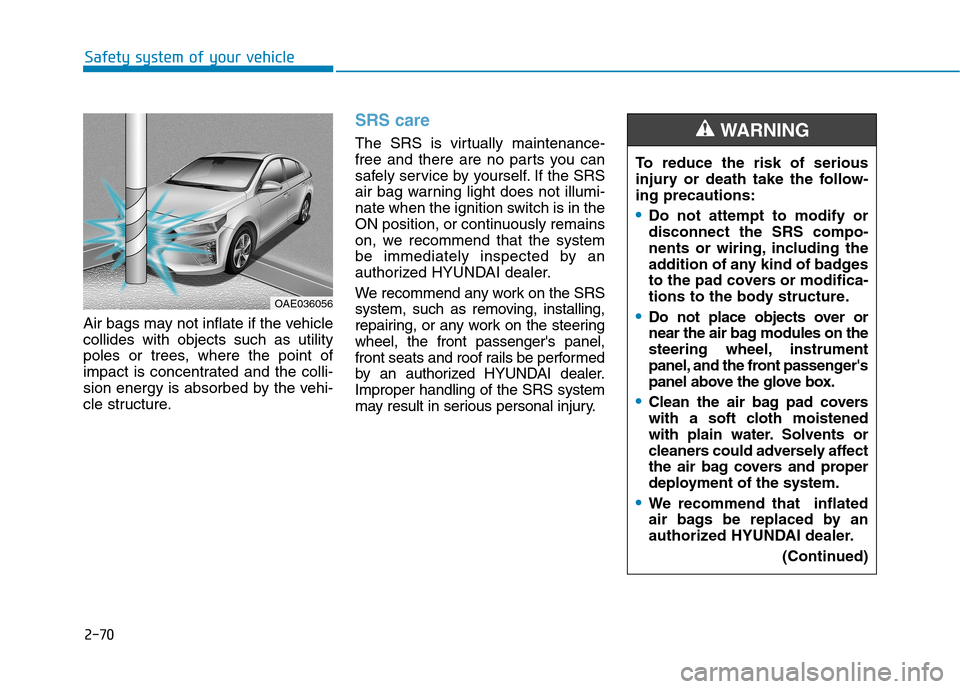
Air bags may not inflate if the vehicle collides with objects such as utility
poles or trees, where the point of
impact is concentrated and the colli-
sion energy is absorbed by the vehi-
cle structure.
SRS care
The SRS is virtually maintenance-
free and there are no parts you can
safely service by yourself. If the SRS
air bag warning light does not illumi-
nate when the ignition switch is in the
ON position, or continuously remains
on, we recommend that the system
be immediately inspected by an
authorized HYUNDAI dealer.
We recommend any work on the SRS
system, such as removing, installing,
repairing, or any work on the steeringwheel, the front passenger's panel,
front seats and roof rails be performed
by an authorized HYUNDAI dealer.Improper handling of the SRS system
may result in serious personal injury.
OAE036056To reduce the risk of serious
injury or death take the follow-ing precautions:
Do not attempt to modify or disconnect the SRS compo-
nents or wiring, including the
addition of any kind of badges
to the pad covers or modifica-
tions to the body structure.
Do not place objects over or
near the air bag modules on the
steering wheel, instrument
panel, and the front passenger's
panel above the glove box.
Clean the air bag pad covers
with a soft cloth moistened
with plain water. Solvents or
cleaners could adversely affect
the air bag covers and proper
deployment of the system.
We recommend that inflated
air bags be replaced by an
authorized HYUNDAI dealer.
(Continued)
WARNING
Page 103 of 553

Convenient features of your vehicle
Accessing your vehicle .........................................3-4Remote key .......................................................................3-4
Smart key ...........................................................................3-7
Immobilizer system ........................................................3-11
Door locks .............................................................3-12 Operating door locks from outside the vehicle .....3-12
Operating door locks from inside the vehicle ........3-14
Auto door lock/unlock features ................................3-16
Child-protector rear door locks ..................................3-16
Theft-alarm system.............................................3-17
Driver position memory system ........................3-18 Storing memory positions .............................................3-18
Easy access function ....................................................3-19
Steering wheel......................................................3-20 Electric power steering (EPS) ......................................3-20
Tilt steering / Telescope steering...............................3-21
Heated steering wheel ...................................................3-21
Horn ....................................................................................3-22
Mirrors ...................................................................3-22 Inside rearview mirror....................................................3-22
Outside rearview mirror ..............................................3-24 Windows ................................................................3-27
Power windows ..............................................................3-27
Sunroof..................................................................3-33 Sunroof opening and closing .......................................3-33
Sliding the sunroof .........................................................3-33
Tilting the sunroof ..........................................................3-34
Sunshade ...........................................................................3-35
Resetting the sunroof ....................................................3-35
Exterior features .................................................3-36 Hood ...................................................................................3-36
Tailgate...............................................................................3-38
Fuel filler door .................................................................3-39
Instrument cluster................................................3-42 Instrument cluster control ............................................3-43
Gauges and meters .........................................................3-44
Warning and indicator lights ........................................3-50
LCD display messages ..................................................3-62
LCD display ..........................................................3-71 LCD display control.........................................................3-71
LCD modes (for cluster type A) ..................................3-72
LCD modes (for cluster type B)...................................3-79
Trip computer .......................................................3-86
3
Page 104 of 553
Light .......................................................................3-91Exterior lights ..................................................................3-91
Welcome system ............................................................3-97
Interior lights ....................................................................3-98
Wipers and washers ..........................................3-101 Windshield wipers ........................................................3-101
Windshield washers ....................................................3-103
Driver assist system ..........................................3-104 Rear view camera ........................................................3-104
Rear parking assist system ........................................3-105
Parking assist system .................................................3-108
Defroster .............................................................3-111 Rear window defroster ...............................................3-111
Automatic climate control system ...................3-112 Automatic heating and air conditioning ..................3-113
Manual heating and air conditioning .......................3-114
System operation ..........................................................3-121
System maintenance ....................................................3-124 Windshield defrosting and defogging ............3-126
Automatic climate control system ............................3-126
Defogging logic ............................................................3-127
Auto defogging system ..............................................3-128
Climate control additional features.................3-129 Clean air .........................................................................3-129
Sunroof inside air recirculation ...............................3-129
Storage compartment ........................................3-130 Center console storage ...............................................3-130
Glove box ........................................................................3-130
Sunglass holder ............................................................3-131
Multi box ........................................................................3-131
3
Page 105 of 553
Convenient features of your vehicle
3
Interior features ..............................................3-132Ashtray ...........................................................................3-132
Cup holder.......................................................................3-132
Sunvisor ...........................................................................3-133
Power outlet .................................................................3-134
USB charger ...................................................................3-135
Wireless cellular phone charging system ..............3-135
Cigarette lighter ...........................................................3-137
Clock .................................................................................3-137
Clothes hanger .............................................................3-138
Floor mat anchor(s) ....................................................3-138
Luggage net (holder) ...................................................3-139
3
Page 106 of 553

3-4
Convenient features of your vehicle
Remote key
Your HYUNDAI uses a remote key,
which you can use to lock or unlock
a door (and tailgate) and even start
the engine.
1. Door Lock
2. Door Unlock
3. Tailgate Unlock
Locking
To lock :
1. Close all doors, engine hood andtailgate.
2. Press the Door Lock button (1) on the remote key.
3. The doors will lock. The hazard warning lights will blink. Also, the
outside rearview mirror will fold, if
the outside rearview mirror folding
switch is in the AUTO position (ifequipped).
4. Make sure the doors are locked by checking the position of the door
lock button inside the vehicle.
Unlocking
To unlock:
1. Press the Door Unlock button (2)on the remote key.
2. The doors will unlock. The hazard warning lights will blink two times.
Also, the outside rearview mirror
will unfold, if the outside rearview
mirror folding switch is in the
AUTO position (if equipped).
Information
After unlocking the doors, the doors
will lock automatically after 30 sec-
onds unless a door is opened.
i
AA CCCCEE SSSSIINN GG YY OO UURR VV EEHH IICC LLEE
Do not leave the keys in your
vehicle with unsupervised chil-
dren. Unattended children
could place the key in the igni-
tion switch and may operate
power windows or other con-
trols, or even make the vehicle
move, which could result in
serious injury or death.
WARNING
OHG040006L
Page 107 of 553
3-5
Convenient features of your vehicle
Tailgate unlocking
To unlock:
1. Press the Tailgate Unlock button(3) on the remote key for more than one second.
2. The hazard warning lights will blink two times. Once the tailgateis opened and then closed, the
tailgate will lock automatically.
Information
After unlocking the tailgate, the tail- gate will lock automatically.
The word "HOLD" is written on the button to inform you that you must
press and hold the button for more
than one second.
Start-up
For detailed information refer to “Key
Ignition Switch” in chapter 5.
To prevent damaging the remote
key:
• Keep the remote key away fromwater or any liquid and fire. If the
inside of the remote key getsdamp (due to drinks or mois-
ture), or is heated, internal cir-
cuit may malfunction, excluding
the car from the warranty.
Avoid dropping or throwing the remote key.
Protect the remote key from extreme temperatures.
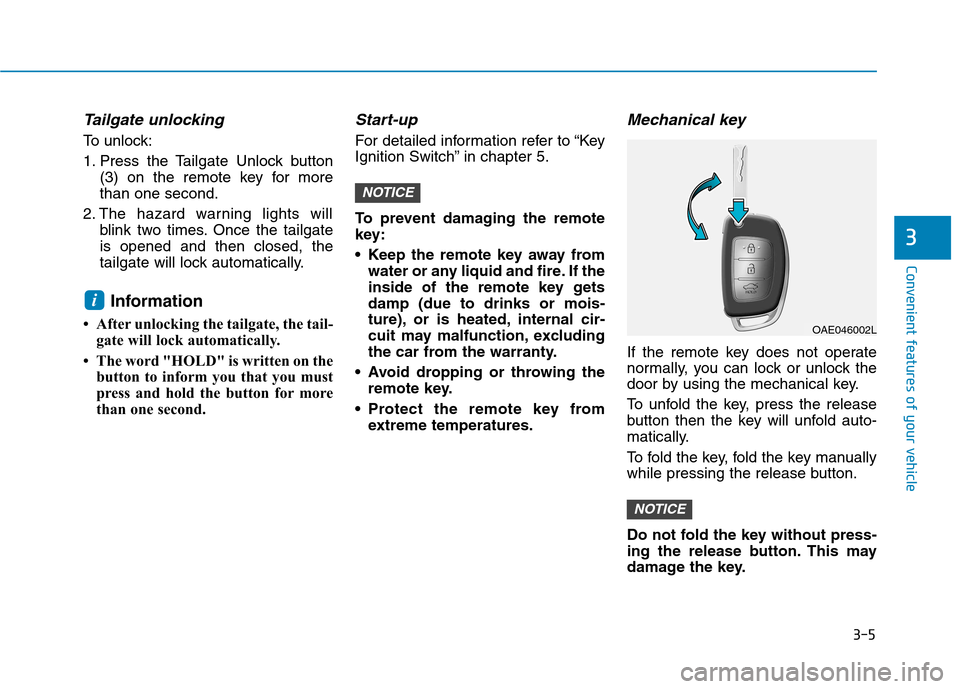
Mechanical key
If the remote key does not operate
normally, you can lock or unlock the
door by using the mechanical key.
To unfold the key, press the release
button then the key will unfold auto-
matically.
To fold the key, fold the key manually
while pressing the release button.
Do not fold the key without press-
ing the release button. This may
damage the key.
NOTICE
NOTICE
i
3
OAE046002L
Page 109 of 553

3-7
Convenient features of your vehicle
If you suspect your remote key might
have sustained some damage, or
you feel your remote key is not work-
ing correctly, it is recommended that
you contact an authorized HYUNDAI
dealer.Information An inappropriately disposedbattery can be harmful to the
environment and human
health. Dispose the battery
according to your local law(s)
and regulation.Smart key
Your HYUNDAI uses a Smart Key,
which you can use to lock or unlock
a door (and tailgate) and even start
the engine.
1. Door Lock
2. Door Unlock
3. Tailgate Unlock
Locking
To lock :
1. Close all doors, engine hood and tailgate.
2. Either press the door handle but- ton or press the Door Lock button
(1) on the smart key.
3. The hazard warning lights will blink. Also, the outside rearview
mirror will fold, if the outside
rearview mirror folding switch is in
the AUTO position (if equipped).
4. Make sure the doors are locked by checking the position of the door
lock button inside the vehicle.
i3
OBA043222INOAE046001