2017 Hyundai Ioniq Hybrid instrument cluster
[x] Cancel search: instrument clusterPage 178 of 553
3-76
Convenient features of your vehicle
User settings mode
In this mode, you can change the
setting of the instrument cluster,
doors, lamps, etc.
1. Driving Assist
2. Door
3. Lights
4. Sound
5. Convenience
6. Service Interval
7. Other Features
8. Reset
The information provided differs
according to the items applied to your
vehicle.
1. Driving Assist
Lane Keeping Assist System
- Lane Departure/Standard LKA/Active LKA
To adjust the sensitivity of the Lane
Keeping Assist System.
For more information, refer to the
"Lane Keeping Assist System" in
chapter 5.
- Response (Slow/Normal/Fast)
To adjust the sensitivity of the
Smart Cruise Control system.
For more information, refer to the
"Smart Cruise Control" in chapter 5.
- Autonomous Emergency Braking To activate or deactivate the AEB system.
- Late/Normal/Early To adjust the initial warning alert
time for Autonomous Emergency
Braking system.
For more information, refer to
"Autonomous Emergency Braking
(AEB)" in chapter 5.
- Rear Cross Traffic Alert
To activate or deactivate the Rear
Cross Traffic Alert system.
- Blind Spot Detection Sound To activate or deactivate the BlindSpot Detection sound.
For more information, refer to “Blind
Spot Detection" in chapter 5. 2. Door
- Disable: The auto door lock opera-
tion will be canceled.
- Enable on Speed: All doors will be automatically locked when the vehi-
cle speed exceeds 15km/h (9.3mph).
- Enable on Shift: All doors will be automatically locked if the automat-
ic transmission shift lever is shifted
from the P (Park) position to the R
(Reverse), N (Neutral), or D (Drive)position.
- Disable: The auto door unlock oper- ation will be canceled.
- Vehicle Off: All doors will be auto- matically unlocked when the
Engine Start/Stop button is set to
the OFF position. (if equipped with
smart key)
- On Key Out: All doors will be auto- matically unlocked when the igni-
tion key is removed from the igni-
tion switch. (if equipped with remote
key)
Page 184 of 553

3-82
Convenient features of your vehicle
Warning mode
If one of followings occurs, warning
messages will be displayed in the
information mode for several seconds.
- Lower washer fluid ((if equipped)
- Exterior lamp malfunction
- Blind Spot Detection (BSD) mal-function (if equipped)
- Autonomous Emergency Braking (AEB) malfunction
- Smart cruise control malfunction
- Tire Pressure Monitoring System (TPMS) malfunction (if equipped)
User settings mode
In this mode, you can change the
setting of the instrument cluster,
doors, lamps, etc.
1. Driving Assist
2. Door
3. Lights
4. Sound
5. Convenience
6. Service Interval
7. Other Features
8. Reset
The information provided differs
according to the items applied to your
vehicle. 1. Driving Assist
- Lane Departure/Standard LKA/Active
LKA
To adjust the sensitivity of the Lane
Keeping Assist System.
For more information, refer to the
"Lane Keeping Assist System" in
chapter 5.
- Slow/Normal/Fast To adjust the sensitivity of the
Smart Cruise Control system.
For more information, refer to the
"Smart Cruise Control" in chapter5.
To activate or deactivate the Autonomous
Emergency Braking (AEB).
For more information, refer to
"Autonomous Emergency Braking
(AEB)" in chapter 5.
Page 238 of 553

3-136
Convenient features of your vehicle
The wireless charging process starts
when you put a Qi-enabled cellularphone on the wireless charging unit.
1. Remove other items, including thesmart key, from the wireless charg-
ing unit. If not, the wireless charg-
ing process may be interrupted.
2. The indicator illuminates in orange during the charging process. The
indicator color changes to green,when the charging process iscompleted.
3. You can turn ON or OFF the wire- less charging function in the user
settings mode on the instrument
cluster. (For further information,
refer to the “LCD Modes” in this
chapter.)
Slightly change the cellular phoneposition, when the cellular phone is
not being charged. Make sure that
the indicator illuminates in orange.
The indicator color may not change
to green in accordance with the cel-
lular phone type, even though the
charging process is completed. The
indicator blinks in orange for 10 sec-onds when there is a malfunctionwith the wireless charging system. In this case, temporarily stop the
charging process, and re-attempt to
wirelessly charge your cellular phoneagain.
The system warns you with a mes-
sage on the LCD display when you do
not take out the cellular phone fromthe wireless charging unit with thefront door open and the Engine
Start/Stop button in the OFF position.
The wireless cellular phone
charging system may not sup-
port certain cellular phones,
which are not verified for the Qi
specification ( ).
Locate your cell phone well in the middle of the wireless cellular
phone charging system. Even
when your cell phone locates
slightly to one side, the charging
speed may decrease.
The wireless charging process may temporarily stop, when a
smart key function operates (i.e.
starting the engine, opening the
doors, closing the doors). For certain cell phones, the indi-
cator color may not change to
green, even when the wireless
charging process is properlycompleted.
The wireless charging process may temporarily stop, when tempera-
ture abnormally increases inside
the wireless cellular phone charg-
ing system. The wireless charging
process restarts, when tempera-
ture falls to a proper level.
The wireless charging process may temporarily stop when there
is any metallic item, such as a
coin, between the wireless cellu-
lar phone charging system and a
cellular phone.
NOTICE
Page 304 of 553
5-20
Driving your vehicle
R (Reverse)
Use this position to drive the vehicle
backward.
Always come to a complete stop
before shifting into or out of R
(Reverse); you may damage the
transmission if you shift into R
(Reverse) while the vehicle is inmotion.
N (Neutral)
The wheels and transmission are not engaged.
D (Drive)
This is the normal driving position.
The transmission will automatically
shift through a 6-gear sequence, pro-
viding the best fuel economy and
power.
For extra power when passing anoth-
er vehicle or driving uphill, depress
the accelerator fully. The transmis-
sion will automatically downshift to
the next lower gear (or gears, as
appropriate).
If you drive the vehicle with the shift
lever in D (Drive), the vehicle will
automatically change to ECO mode.
The indicator will illuminate on
the instrument cluster.
When driving in ECO mode, the vehi-
cle improves fuel efficiency for eco-
friendly driving.
S (Sport)
If you drive the vehicle with the shift
lever in S (Sport), the vehicle will
automatically change to SPORT
mode. The indicator will illumi-
nate on the instrument cluster.
When driving in SPORT mode, the
vehicle provides sporty but firm rid-ing.Information
In SPORT mode, the fuel efficiency
may decrease.
i
NOTICE
Page 344 of 553

5-60
LKAS operation
To activate the LKAS:
With the ignition switch in the ON
position, press the LKAS button
located on the instrument panel on
the lower left hand side of the driver.The indicator in the cluster display
will initially illuminate white. This indi-
cates the LKAS is in the READY but
NOT ENABLED state.
Driving your vehicle
(Continued)
Do not place any accessories
near the rearview mirror.
Do not tint the windshield glass.
The operation of the LKAS
may be affected by several
factors including environmen-
tal conditions that affect theability of the camera to detect
the lanes in front of you. It isthe responsibility of the driver
to pay careful attention to the
roadway and to maintain the
vehicle in its intended lane atall times.
Always have your hands on the steering wheel while the
LKAS system is activated. If
you continue to drive with
your hands off the steering
wheel after the "Keep handson steering wheel" warning
message appears, the system
will will stop controlling thesteering wheel.
Always be cautious when using the system.
■
Type A
OAE056049L■Type B
OAE056050L
Page 351 of 553
5-67
Driving your vehicle
5
Speed Limit Control operation
You can set the speed limit when you
do not want to drive over a specificspeed.
If you drive over the preset speed
limit, the warning system operates
(set speed limit will blink and chime
will sound) until the vehicle speed
returns within the speed limit.Information
While speed limit control is in opera-
tion, the cruise control system cannot
be activated.
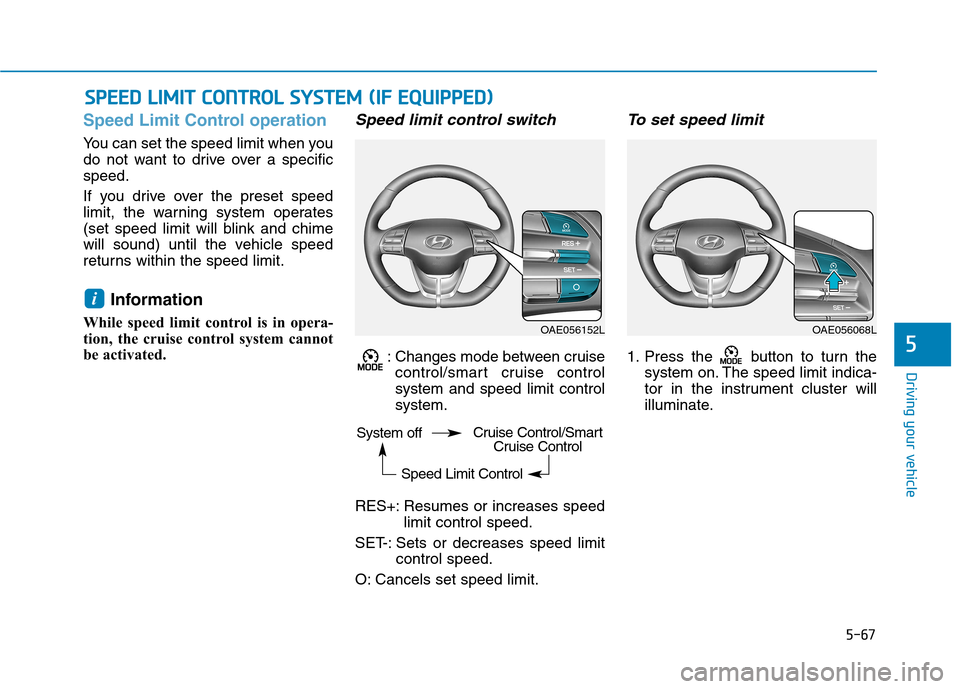
Speed limit control switch
: Changes mode between cruise control/smart cruise controlsystem and speed limit controlsystem.
RES+: Resumes or increases speed limit control speed.
SET-: Sets or decreases speed limit control speed.
O: Cancels set speed limit.
To set speed limit
1. Press the button to turn the system on. The speed limit indica-
tor in the instrument cluster will
illuminate.
i
SSPP EEEEDD LL IIMM IITT CC OO NNTTRR OO LL SS YY SSTT EEMM (( IIFF EE QQ UUIIPP PPEEDD ))
OAE056152LOAE056068L
System off
Speed Limit ControlCruise Control/SmartCruise Control
Page 352 of 553
5-68
Driving your vehicle
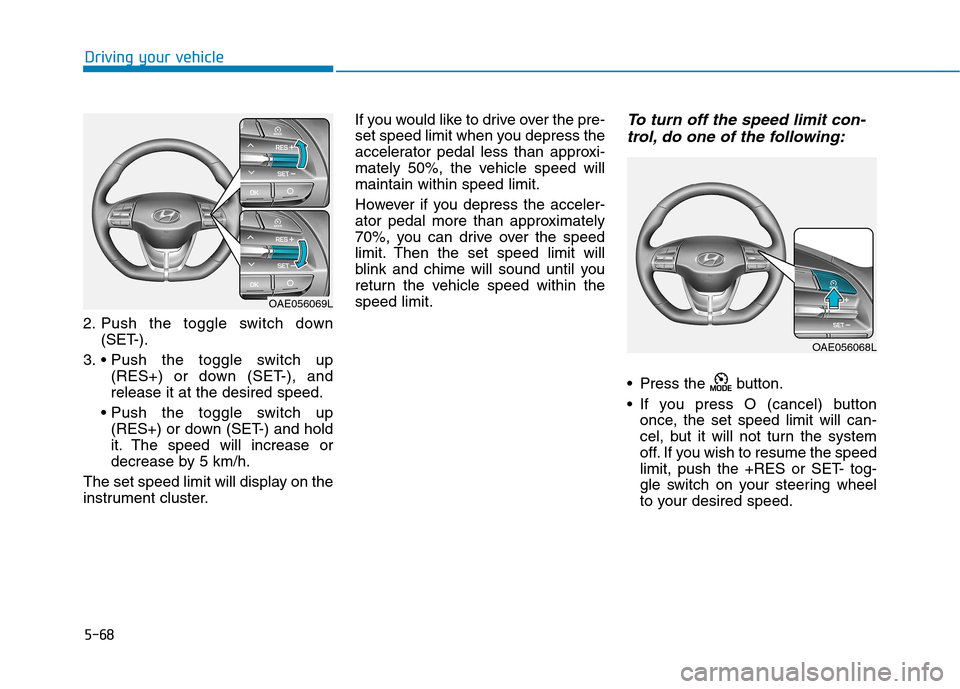
2. Push the toggle switch down(SET-).
3. (RES+) or down (SET-), and release it at the desired speed.
(RES+) or down (SET-) and hold
it. The speed will increase or
decrease by 5 km/h.
The set speed limit will display on the
instrument cluster. If you would like to drive over the pre-
set speed limit when you depress the
accelerator pedal less than approxi-
mately 50%, the vehicle speed willmaintain within speed limit.
However if you depress the acceler-
ator pedal more than approximately
70%, you can drive over the speed
limit. Then the set speed limit will
blink and chime will sound until you
return the vehicle speed within thespeed limit.
To turn off the speed limit con-
trol, do one of the following:
Press the button.
If you press O (cancel) button once, the set speed limit will can-
cel, but it will not turn the system
off. If you wish to resume the speed
limit, push the +RES or SET- tog-
gle switch on your steering wheel
to your desired speed.
OAE056069L
OAE056068L
Page 353 of 553
5-69
Driving your vehicle
5
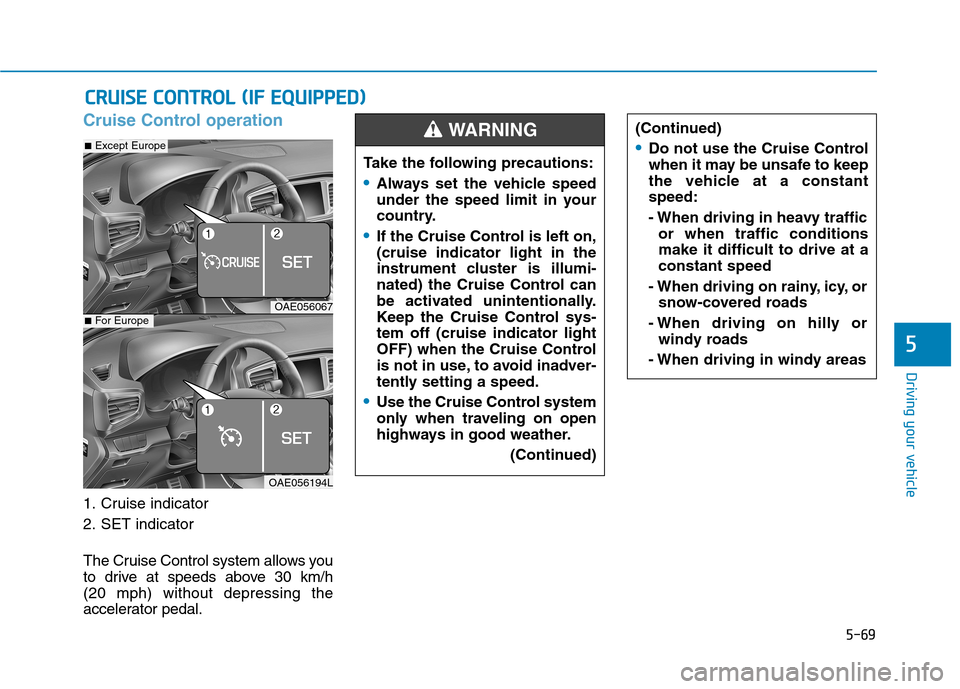
Cruise Control operation
1. Cruise indicator
2. SET indicator
The Cruise Control system allows you
to drive at speeds above 30 km/h (20 mph) without depressing the
accelerator pedal.
CCRR UU IISS EE CC OO NNTTRR OO LL (( IIFF EE QQ UUIIPP PP EEDD ))
Take the following precautions:
Always set the vehicle speed
under the speed limit in your
country.
If the Cruise Control is left on, (cruise indicator light in the
instrument cluster is illumi-
nated) the Cruise Control can
be activated unintentionally.
Keep the Cruise Control sys-tem off (cruise indicator light
OFF) when the Cruise Control
is not in use, to avoid inadver-
tently setting a speed.
Use the Cruise Control system
only when traveling on open
highways in good weather.
(Continued)
(Continued)
Do not use the Cruise Control
when it may be unsafe to keep
the vehicle at a constantspeed:
- When driving in heavy trafficor when traffic conditions make it difficult to drive at aconstant speed
- When driving on rainy, icy, or snow-covered roads
- When driving on hilly or windy roads
- When driving in windy areas
WARNING
OAE056067
OAE056194L
■ Except Europe
■For Europe