2017 Hyundai Ioniq Electric automatically turned off
[x] Cancel search: automatically turned offPage 40 of 582
H33
Information
Charging connector AUTO/LOCK
mode
The charging connector is locked in
the inlet at a different period accord-
ing to which mode is selected.
LOCK mode : The connector locks when the charging connector is
plugged into the charging inlet.
AUTO mode : The connector locks when charging starts.
For more details, refer to “Charging
Connector AUTO/ LOCK Mode” in
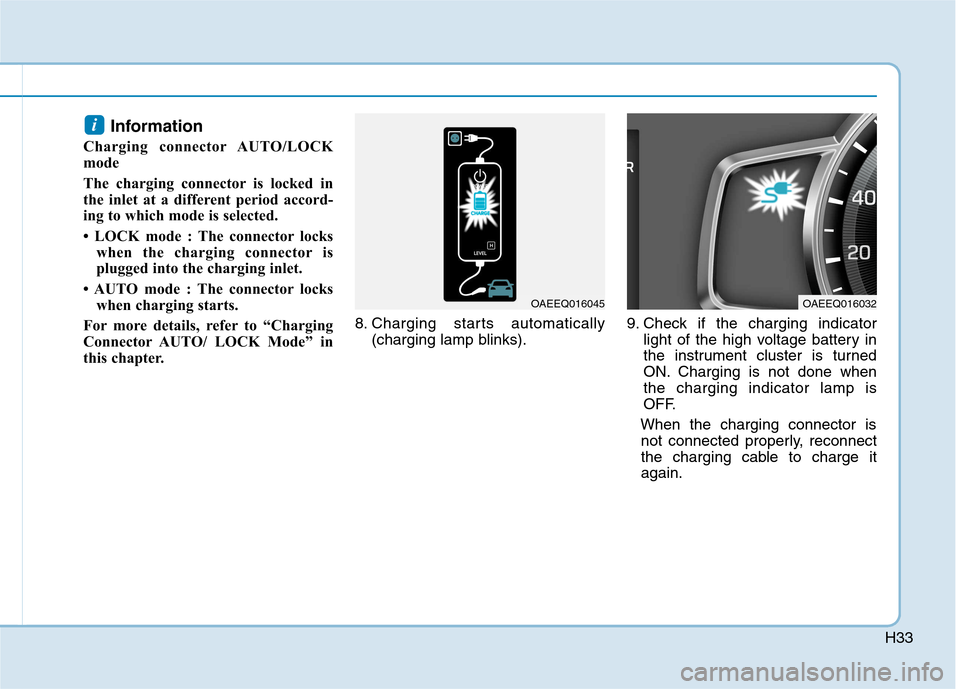
this chapter. 8. Charging starts automatically
(charging lamp blinks). 9. Check if the charging indicator
light of the high voltage battery in
the instrument cluster is turned
ON. Charging is not done whenthe charging indicator lamp is
OFF.
When the charging connector is not connected properly, reconnect
the charging cable to charge itagain.i
OAEEQ016045OAEEQ016032
Page 48 of 582
H41
Normal Charge
Actual charger image and charg-
ing method may vary in accor-
dance with the charger manufac-
turer.
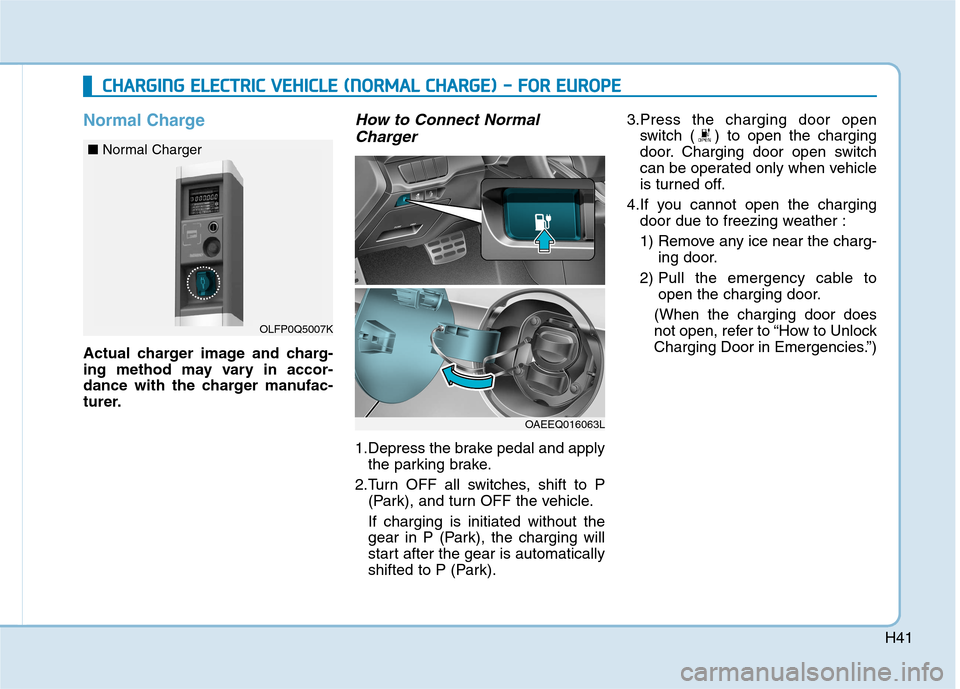
How to Connect NormalCharger
1.Depress the brake pedal and apply the parking brake.
2.Turn OFF all switches, shift to P (Park), and turn OFF the vehicle. If charging is initiated without the
gear in P (Park), the charging will
start after the gear is automatically
shifted to P (Park). 3.Press the charging door open
switch ( ) to open the charging
door. Charging door open switch
can be operated only when vehicle
is turned off.
4.If you cannot open the charging door due to freezing weather :
1) Remove any ice near the charg- ing door.
2) Pull the emergency cable to open the charging door.
(When the charging door does
not open, refer to “How to Unlock
Charging Door in Emergencies.”)
CC HH AARRGG IINN GG EE LLEE CCTT RR IICC VV EEHH IICC LLEE (( NN OO RRMM AALL CC HH AARRGG EE)) -- FF OO RR EE UU RROO PPEE
OLFP0Q5007K
■
Normal Charger
OAEEQ016063L
Page 60 of 582
H53
3.Depress the brake pedal and applythe parking brake.
4.Turn OFF all switches, shift to P (Park), and turn OFF the vehicle. If charging is initiated without the
gear in P (Park), the charging will
start after the gear is automatically
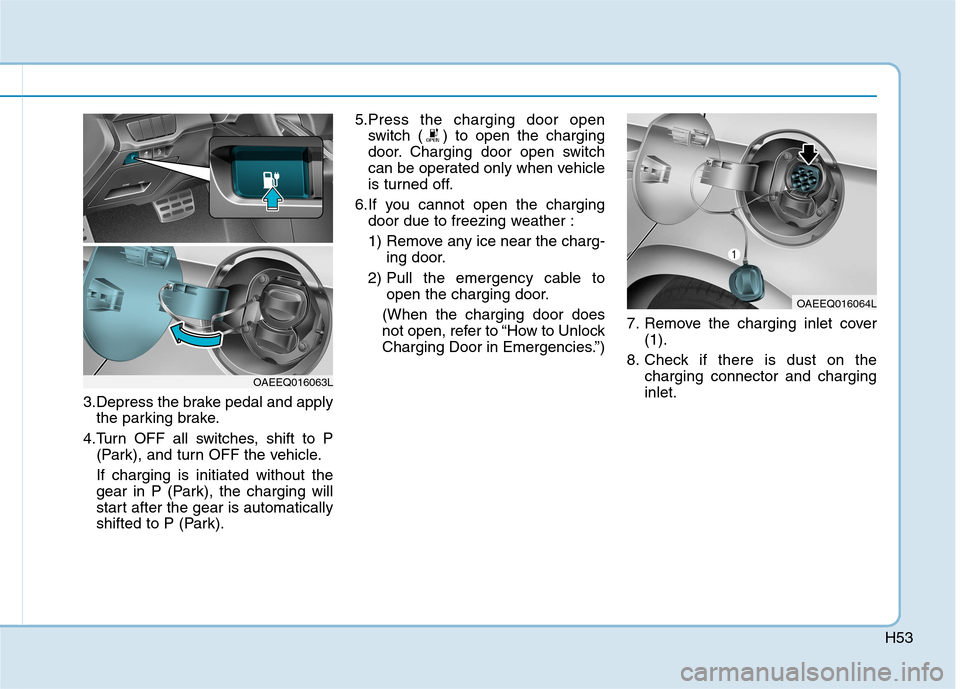
shifted to P (Park). 5.Press the charging door open
switch ( ) to open the charging
door. Charging door open switch
can be operated only when vehicle
is turned off.
6.If you cannot open the charging door due to freezing weather :
1) Remove any ice near the charg- ing door.
2) Pull the emergency cable to open the charging door.
(When the charging door does
not open, refer to “How to Unlock
Charging Door in Emergencies.”) 7. Remove the charging inlet cover
(1).
8. Check if there is dust on the charging connector and charginginlet.
OAEEQ016064L
OAEEQ016063L
Page 183 of 582
3-14
Convenient features of your vehicle
Recalling memory positions
1. Shift to P (Park) while the POWER
button is in the ON position.
2. Press the desired memory button (1 or 2). The system will beep
once, then the driver’s seat posi-
tion, outside rearview mirror and
instrument panel illumination willautomatically adjust to the storedposition (if equipped).
3. "Driver 1(or 2) settings is applied" will appear on the LCD display. Information
While recalling the "1" memory position, pressing the SET or 1 but-
ton temporarily stops the adjust-
ment of the recalled memory posi-
tion. Pressing the 2 button recalls
the "2" memory position.
While recalling the "2" memory position, pressing the SET or 2 but-
ton temporarily stops the adjust-
ment of the recalled memory posi-
tion. Pressing the 1 button recalls
the "1" memory position.
While recalling the stored positions, pressing one of the control buttons
for the driver's seat, outside
rearview mirror, or instrument
panel illumination will cause the
movement of that component to stop
and move in the direction that the
control button is pressed.
Easy access function (if equipped)
The system will move the driver's
seat automatically as follows:
The gear is in P (Park)
- It will move the driver’s seat rear-ward when the POWER button is in
the OFF position and the driver’sdoor is opened.
- It will move the driver’s seat forward when the vehicle is turned ON or
the driver’s door is closed with the
smart key with you.
You can activate or deactivate theEasy Access Function from the User
Settings Mode on the LCD display.
For more details, refer to "LCD
Display" in this chapter.
i
Page 186 of 582
3-17
Convenient features of your vehicle
3
Information
The heated steering wheel will turn off
automatically approximately 30 min-
utes after the heated steering wheel is
turned on.
When the vehicle is turned off during
the heated steering wheel is on, the
timer function of heated steering
wheel will be reset.
To reuse heated steering wheel, press
button again.
Do not install any cover or acces-
sory on the steering wheel. This
cover or accessory could cause
damage to the heated steeringwheel system.Horn
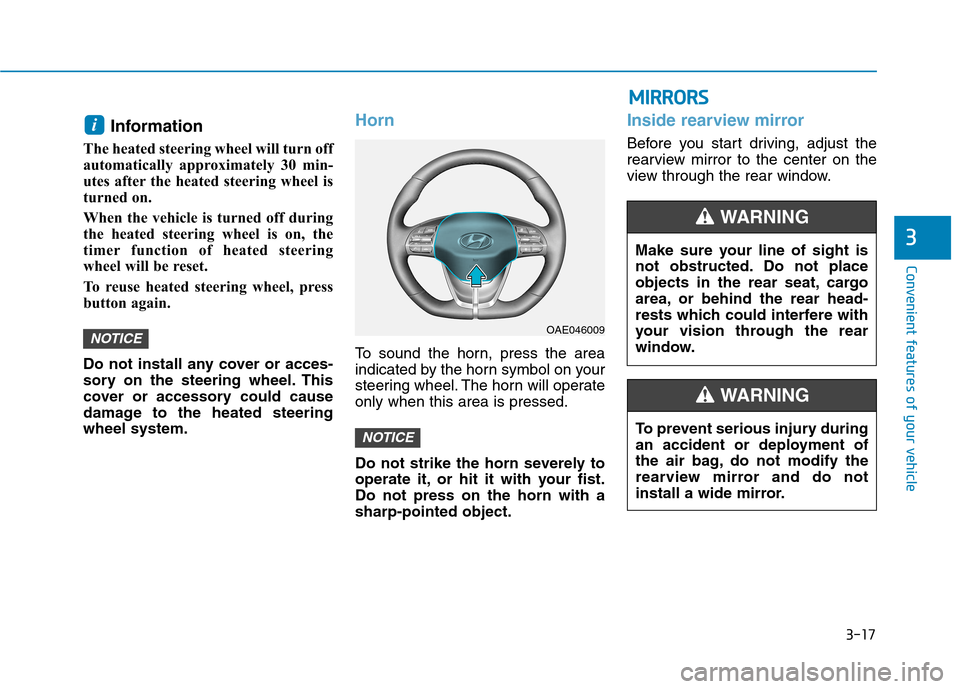
To sound the horn, press the area
indicated by the horn symbol on your
steering wheel. The horn will operateonly when this area is pressed.
Do not strike the horn severely to
operate it, or hit it with your fist.Do not press on the horn with asharp-pointed object.
Inside rearview mirror
Before you start driving, adjust the
rearview mirror to the center on the
view through the rear window.
NOTICE
NOTICE
i
OAE046009
MM IIRR RR OO RRSS
Make sure your line of sight is
not obstructed. Do not place
objects in the rear seat, cargo
area, or behind the rear head-
rests which could interfere with
your vision through the rear
window.
WARNING
To prevent serious injury during
an accident or deployment of
the air bag, do not modify the
rearview mirror and do not
install a wide mirror.
WARNING
Page 241 of 582
3-72
Convenient features of your vehicle
If the service interval is activated and the time and distance is adjusted,
messages are displayed in the fol-
lowing situations each time the vehi-
cle is turned on.
- Service in: Displayed to inform the driver theremaining mileage and days to
service.
- Service required
: Displayed when the mileage anddays to service has been reachedor passed.
If any of the following conditions
occur, the mileage and number of days
to service may be incorrect.
- The battery cable is disconnected.
- The fuse switch is turned off.
- The battery is discharged. 7. Other Features
Battery Saver+
To activate or deactivate the Aux.
Battery Saver+ function.
When activated, the high voltage bat-
tery is used to keep the 12V batterycharged.
For more information, refer to
“Aux. Battery Saver+” in the
Electric Vehicle Guide.
- Off: The average fuel economy will
not reset automatically whenever refueling.
- After Ignition: The average fuel economy will reset automatically
whenever it has passed 4 hours
after turning OFF the vehicle.
- After Recharging : The average fuel economy will reset automaticallywhen recharging.
For more information, refer to
"Trip Computer" in this chapter.
To select the fuel economy unit.(km/kWh, kWh/100km, mi/kWh)
To select the temperature unit.
(°C,°F)
To select the tire pressure unit.
(psi, kPa, bar)
To select language.
8. Reset
You can reset the menus in the User
Settings Mode. All menus in the User
Settings Mode are initialized, except
language and service interval.
Page 245 of 582
3-76
Convenient features of your vehicle
Driving Info display
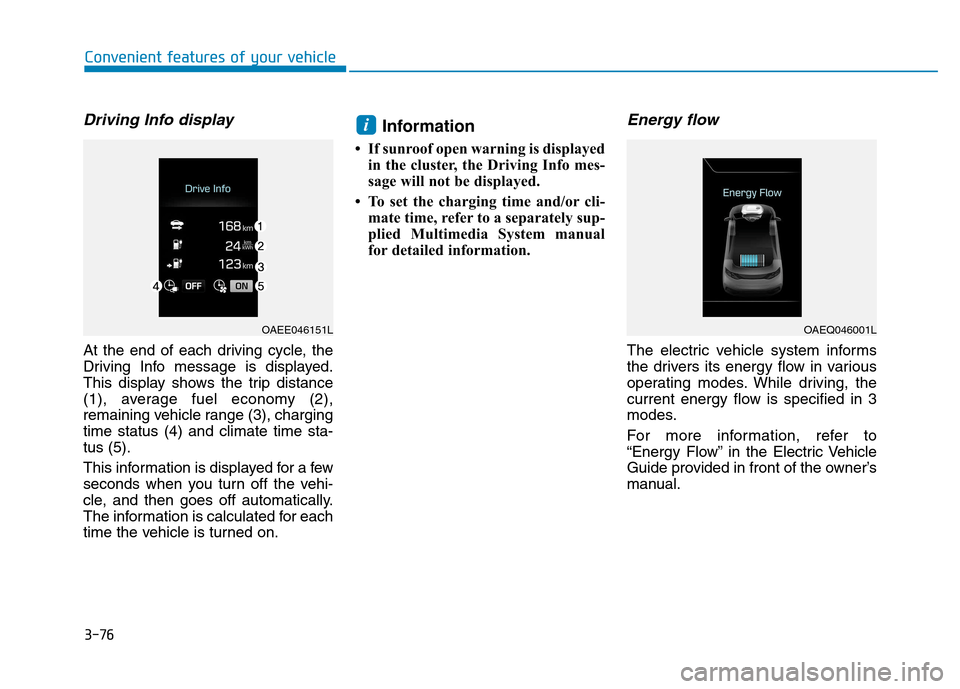
At the end of each driving cycle, the
Driving Info message is displayed.
This display shows the trip distance
(1), average fuel economy (2),
remaining vehicle range (3), chargingtime status (4) and climate time sta-tus (5).
This information is displayed for a few
seconds when you turn off the vehi-
cle, and then goes off automatically.
The information is calculated for each
time the vehicle is turned on.Information
If sunroof open warning is displayed in the cluster, the Driving Info mes-
sage will not be displayed.
To set the charging time and/or cli- mate time, refer to a separately sup-
plied Multimedia System manual
for detailed information.
Energy flow
The electric vehicle system informs
the drivers its energy flow in various
operating modes. While driving, the
current energy flow is specified in 3
modes.
For more information, refer to
“Energy Flow” in the Electric Vehicle
Guide provided in front of the owner’s
manual.
i
OAEE046151LOAEQ046001L
Page 250 of 582
3-81
Convenient features of your vehicle
3
Battery saver function
The purpose of this feature is to pre-
vent the battery from being dis-
charged. The system automatically
turns off the position lamp when the
driver turns the vehicle off and opens
the driver-side door.
With this feature , the position lamps
will turn off automatically if the driver
parks on the side of road at night.
If necessary, to keep the lamps on
when the vehicle is turned off, perform
the following:
1) Open the driver-side door.
2) Turn the position lamps OFF and
ON again using the light switch on
the steering column.
Headlamp delay function
(if equipped)
If you place the POWER button to
the ACC or OFF position with theheadlamps ON, the headlamps(and/or position lamps) remain on for
about 5 minutes. However, with the
vehicle off if the driver’s door isopened and closed, the headlamps(and/or position lam ps) are turned off
after 15 seconds. The headlamps (and/or position
lamps) can be turned off by pressing
the lock button on the smart key
twice or turning the light switch to the
OFF or AUTO position. However, if
you turn the light switch to the AUTO
position when it is dark outside, the
headlamps will not be turned off.
You can activate or deactivate the
Headlamp Delay function from theUser Settings Mode on the LCD dis-
play. For more details, refer to
"LCD Display" in this chapter. If the driver gets out of the vehicle
through other doors (except dri-
ver's door), the battery saver func-tion does not operate and the
headlamp delay function does not
turn off automatically. Therefore, It
causes the battery to be dis-
charged. In this case, make sure to
turn off the lamp before getting out
of the vehicle.
Daytime running light (DRL)
The Daytime Running Lights (DRL)
can make it easier for others to see
the front of your vehicle during the
day, especially after dawn and beforesunset.
The DRL system will turn the dedi- cated lamp OFF when:
1. The headlights are in the ON posi-
tion.
2. The vehicle is turned off.
NOTICE