Page 296 of 582
3-127
Convenient features of your vehicle
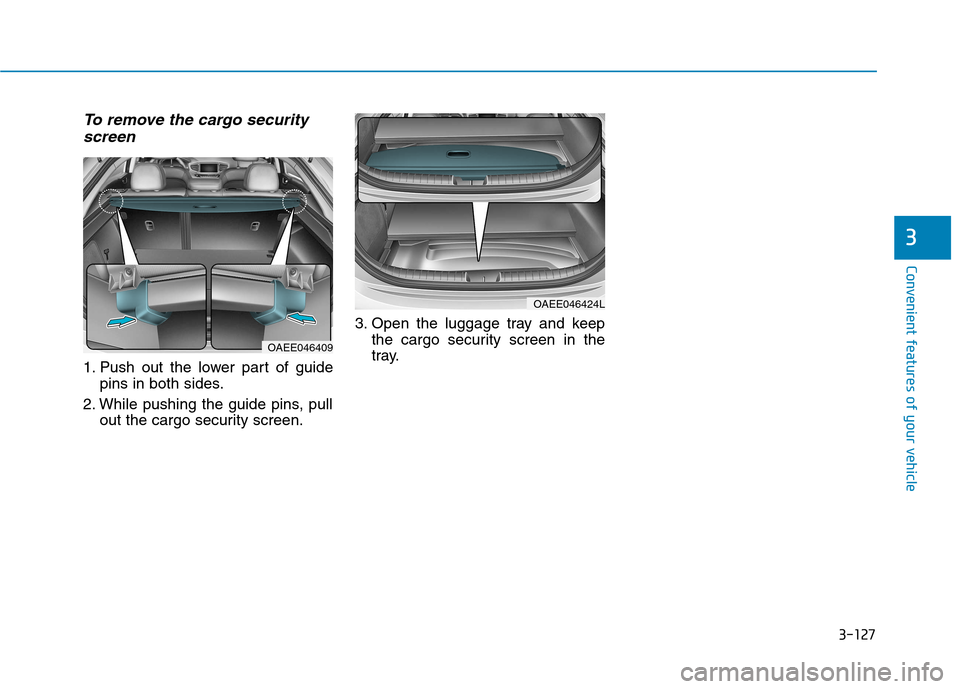
To remove the cargo securityscreen
1. Push out the lower part of guide pins in both sides.
2. While pushing the guide pins, pull out the cargo security screen. 3. Open the luggage tray and keep
the cargo security screen in the
tray.
3
OAEE046409
OAEE046424L
Page 323 of 582
4-27
Multimedia System
4
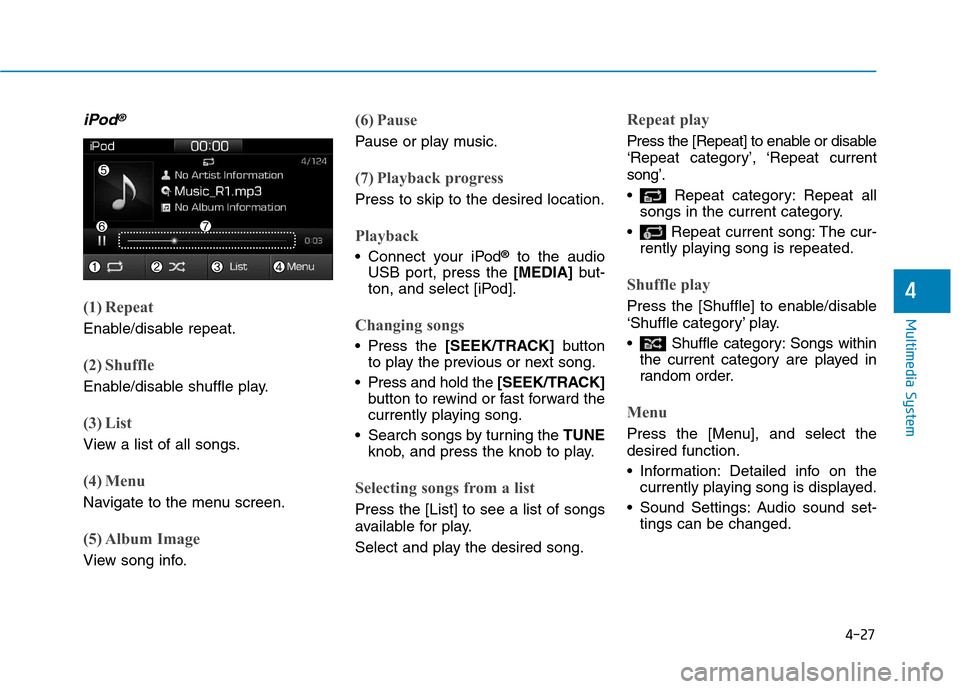
iPod®
(1) Repeat
Enable/disable repeat.
(2) Shuffle
Enable/disable shuffle play.
(3) List
View a list of all songs.
(4) Menu
Navigate to the menu screen.
(5) Album Image
View song info.
(6) Pause
Pause or play music.
(7) Playback progress
Press to skip to the desired location.
Playback
Connect your iPod®
to the audio
USB port, press the [MEDIA]but-
ton, and select [iPod].
Changing songs
Press the [SEEK/TRACK] button
to play the previous or next song.
Press and hold the [SEEK/TRACK]
button to rewind or fast forward the
currently playing song.
Search songs by turning the TUNE
knob, and press the knob to play.
Selecting songs from a list
Press the [List] to see a list of songs
available for play.
Select and play the desired song.
Repeat play
Press the [Repeat] to enable or disable
‘Repeat category’, ‘Repeat currentsong’.
Repeat category: Repeat all songs in the current category.
Repeat current song: The cur- rently playing song is repeated.
Shuffle play
Press the [Shuffle] to enable/disable
‘Shuffle category’ play.
Shuffle category: Songs withinthe current category are played in
random order.
Menu
Press the [Menu], and select the desired function.
Information: Detailed info on thecurrently playing song is displayed.
Sound Settings: Audio sound set- tings can be changed.
Page 342 of 582
5-3
Driving your vehicle
5
Before entering the vehicle
• Be sure all windows, outside mir-ror(s), and outside lights are clean
and unobstructed.
Remove frost, snow, or ice.
Visually check the tires for uneven wear and damage.
Check under the vehicle for any sign of leaks.
Be sure there are no obstacles behind you if you intend to back up.
Before starting
Make sure the hood, the tailgate,and the doors are securely closed
and locked.
Adjust the position of the seat and steering wheel.
Adjust the inside and outside rearview mirrors.
Verify all the lights work.
Fasten your seatbelt. Check that all passengers have fastened their
seatbelts.
Check the gauges and indicators in the instrument panel and the mes-
sages on the instrument display
when the POWER button is in theON position.
Check that any items you are car- rying are stored properly or fas-
tened down securely.
BBEEFFOO RREE DD RRIIVV IINN GG
To reduce the risk of SERIOUS
INJURY or DEATH, take the fol-
lowing precautions:
•ALWAYS wear your seat belt.
All passengers must be prop-
erly belted whenever the vehi-
cle is moving. For more infor-
mation, refer to "Seat Belts" in
chapter 2.
Always drive defensively.
Assume other drivers or pedes-
trians may be careless andmake mistakes.
Stay focused on the task of
driving. Driver distraction cancause accidents.
Leave plenty of space between
you and the vehicle in front of
you.
WARNING
Page 362 of 582
5-23
Driving your vehicle
5
A click sound may be heardwhile operating or releasing the
EPB, but these conditions arenormal and indicate that the
EPB is functioning properly.
When leaving your keys with a parking lot attendant or valet,
make sure to inform him/her
how to operate the EPB.
The EPB may malfunction if you drive with the EPB applied.
When you automatically release EPB by depressing the accelera-
tor pedal, depress it slowly.
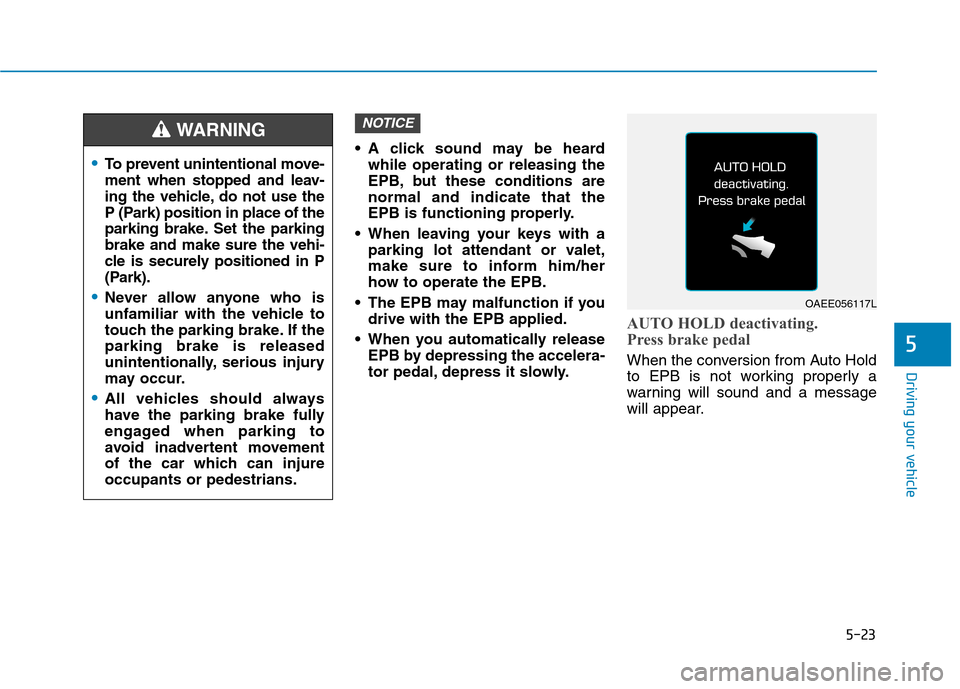
AUTO HOLD deactivating.
Press brake pedal
When the conversion from Auto Hold
to EPB is not working properly a
warning will sound and a message
will appear.
NOTICE
To prevent unintentional move-
ment when stopped and leav-
ing the vehicle, do not use the
P (Park) position in place of the
parking brake. Set the parkingbrake and make sure the vehi-
cle is securely positioned in P
(Park).
Never allow anyone who is
unfamiliar with the vehicle to
touch the parking brake. If theparking brake is released
unintentionally, serious injury
may occur.
All vehicles should always
have the parking brake fully
engaged when parking to
avoid inadvertent movement
of the car which can injureoccupants or pedestrians.
WARNING
OAEE056117L
Page 394 of 582
5-55
Driving your vehicle
5
The AEB is only a supplemen-
tal system for the driver's con-
venience. The driver shouldhold the responsibility to con-
trol the vehicle operation. Do
not solely depend on the AEB
system. Rather, maintain a
safe braking distance, and, if
necessary, depress the brakepedal to reduce the drivingspeed.
In certain instances and
under certain driving condi-
tions, the AEB system may
activate prematurely. This ini-
tial warning message appears
on the LCD display with a
warning chime.
Also, in certain instances the
front radar sensor or camera
recognition system may not
detect the vehicle or pedestri-
an ahead. The AEB system
may not activate and the
warning message will not be
displayed.(Continued)
(Continued)
If there is a malfunction with the
AEB system, the autonomous
emergency braking is not
applied even though the brak-ing system is operating normal-
ly.
If the vehicle in front stops
suddenly, you may have less
control of the brake system.
Therefore, always keep a safe
distance between your vehicle
and the vehicle in front of you.
The AEB system may activate during braking and the vehi-
cle may stop suddenly shift-
ing loose objects toward the
passengers. Always keeploose objects secured.
The AEB system may not acti-
vate if the driver applies the
brake pedal to avoid a colli-sion.(Continued)
(Continued)
The AEB system operates
only to detect vehicles or
pedestrians in front of the
vehicle. The AEB system does not
operate when the vehicle is in
reverse. The AEB system is not designed to detect other
objects on the road such asanimals. The AEB system does not
detect cross traffic vehicles
that are approaching. The AEB system cannot
detect the driver approaching
the side view of a parked vehi-
cle (for example on a deadend street.)
In these cases, you must
maintain a safe braking dis-
tance, and if necessary,depress the brake pedal toreduce the driving speed in
order to maintain a safe dis-
tance.
WARNING
Page 460 of 582
6-19
What to do in an emergency
6
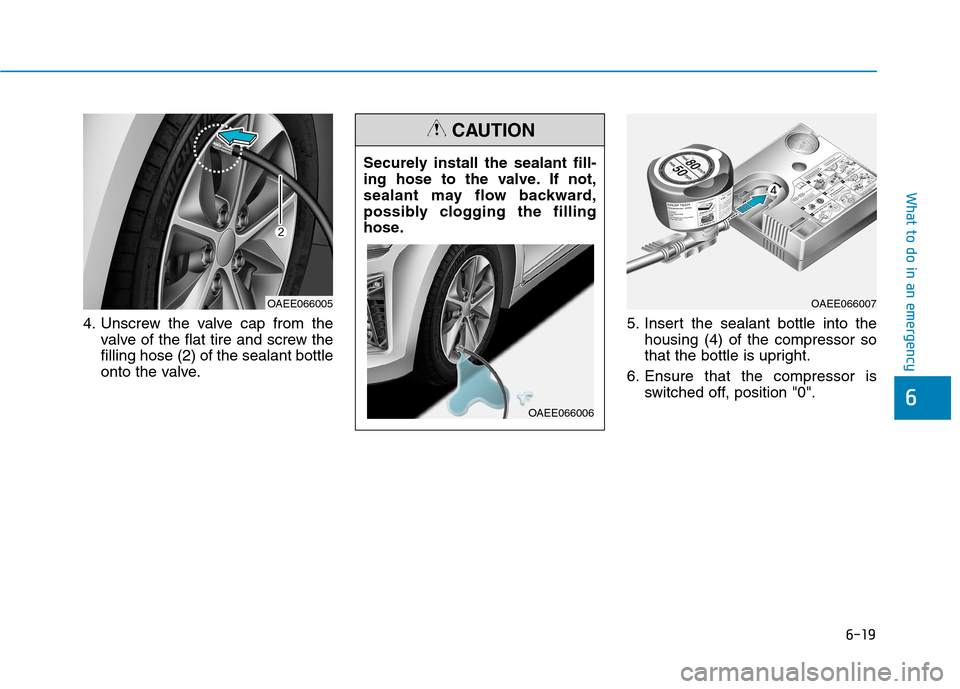
4. Unscrew the valve cap from thevalve of the flat tire and screw the filling hose (2) of the sealant bottle
onto the valve. 5. Insert the sealant bottle into the
housing (4) of the compressor so
that the bottle is upright.
6. Ensure that the compressor is switched off, position "0".
Securely install the sealant fill-
ing hose to the valve. If not,
sealant may flow backward,
possibly clogging the filling
hose.
CAUTION
OAEE066006
OAEE066005OAEE066007
Page 464 of 582
6-23
What to do in an emergency
6
When towing your vehicle in an emergency without wheel dollies:
1. While depressing the brake pedalshift to the N (Neutral) position
and turn the vehicle off. The
POWER button will be in the ACCposition.
2. Release the parking brake.
Failure to shift to N (Neutral) may
cause internal damage to the vehi-
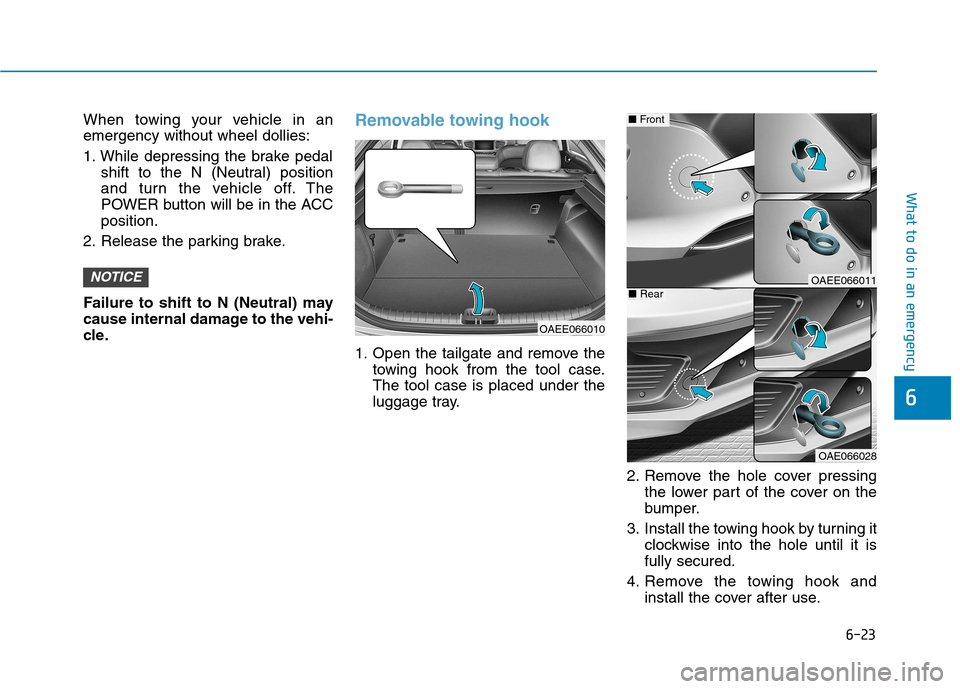
cle.Removable towing hook
1. Open the tailgate and remove the towing hook from the tool case. The tool case is placed under the
luggage tray.
2. Remove the hole cover pressingthe lower part of the cover on the
bumper.
3. Install the towing hook by turning it clockwise into the hole until it isfully secured.
4. Remove the towing hook and install the cover after use.
NOTICE
OAEE066010
OAEE066011
OAE066028
■Front
■Rear
Page 465 of 582
6-24
What to do in an emergency
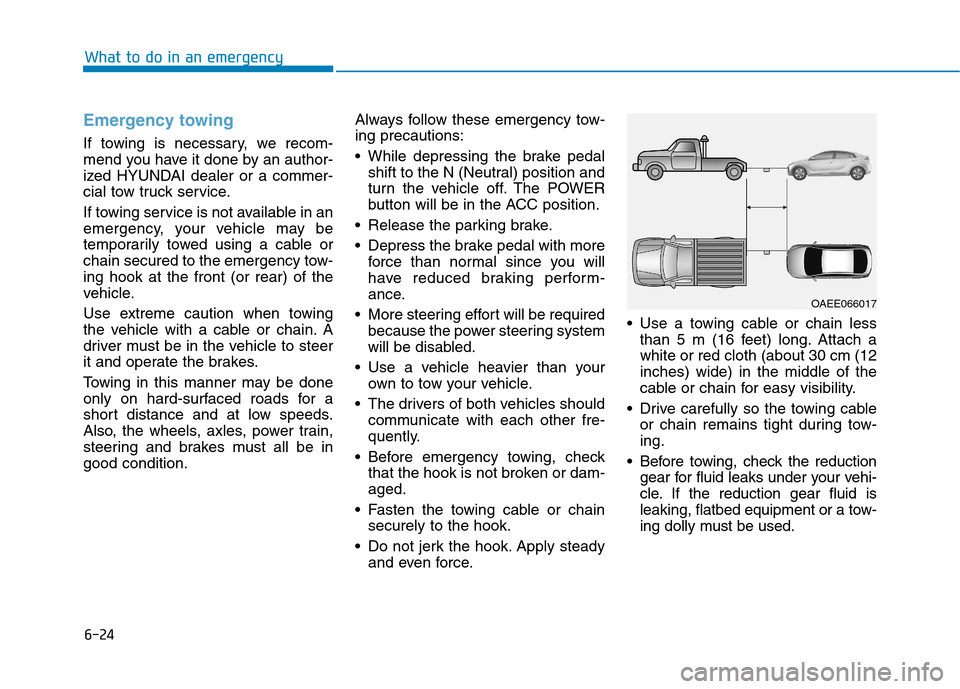
Emergency towing
If towing is necessary, we recom-
mend you have it done by an author-
ized HYUNDAI dealer or a commer-
cial tow truck service.
If towing service is not available in an
emergency, your vehicle may be
temporarily towed using a cable or
chain secured to the emergency tow-ing hook at the front (or rear) of the
vehicle.
Use extreme caution when towing
the vehicle with a cable or chain. A
driver must be in the vehicle to steer
it and operate the brakes.
Towing in this manner may be done
only on hard-surfaced roads for a
short distance and at low speeds.
Also, the wheels, axles, power train,
steering and brakes must all be ingood condition.Always follow these emergency tow-ing precautions:
While depressing the brake pedal
shift to the N (Neutral) position and
turn the vehicle off. The POWER
button will be in the ACC position.
Release the parking brake.
Depress the brake pedal with more force than normal since you will
have reduced braking perform-
ance.
More steering effort will be required because the power steering system
will be disabled.
Use a vehicle heavier than your own to tow your vehicle.
The drivers of both vehicles should communicate with each other fre-
quently.
Before emergency towing, check that the hook is not broken or dam-aged.
Fasten the towing cable or chain securely to the hook.
Do not jerk the hook. Apply steady and even force. Use a towing cable or chain less
than 5 m (16 feet) long. Attach awhite or red cloth (about 30 cm (12inches) wide) in the middle of the
cable or chain for easy visibility.
Drive carefully so the towing cable or chain remains tight during tow-ing.
Before towing, check the reduction gear for fluid leaks under your vehi-
cle. If the reduction gear fluid is
leaking, flatbed equipment or a tow-
ing dolly must be used.
OAEE066017