Page 235 of 582
3-66
Convenient features of your vehicle
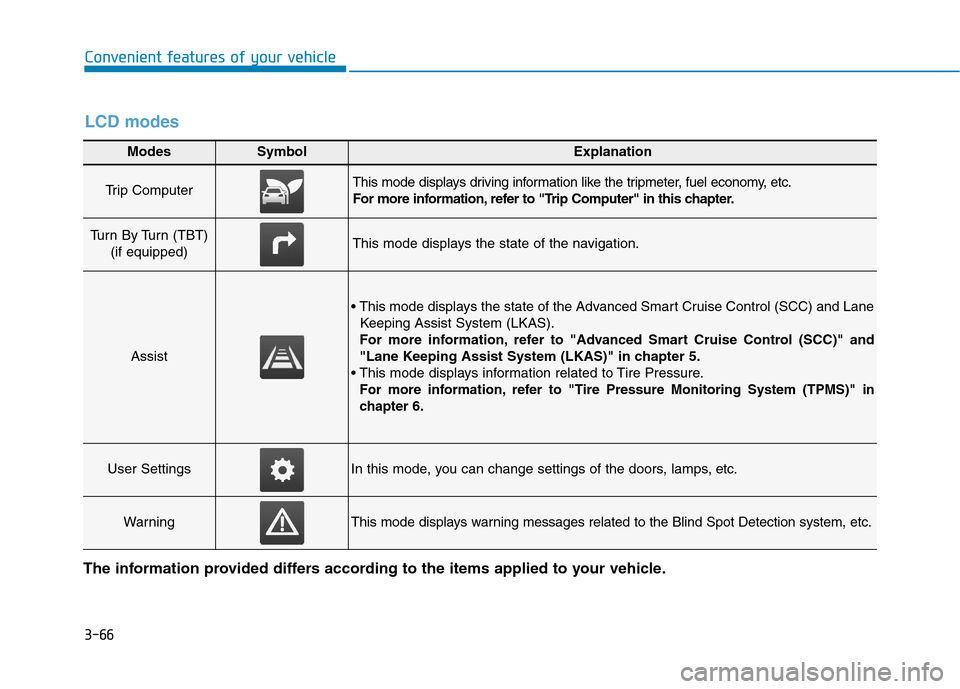
Modes SymbolExplanation
Trip Computer This mode displays driving information like the tripmeter, fuel economy, etc.
For more information, refer to "Trip Computer" in this chapter.
Turn By Turn (TBT) (if equipped)This mode displays the state of the navigation.
Assist
Keeping Assist System (LKAS).
For more information, refer to "Advanced Smart Cruise Control (SCC)" and
"Lane Keeping Assist System (LKAS)" in chapter 5.
For more information, refer to "Tire Pressure Monitoring System (TPMS)"in
chapter 6.
User SettingsIn this mode, you can change settings of the doors, lamps, etc.
WarningThis mode displays warning messages related to the Blind Spot Detection system, etc.
The information provided differs according to the items applied to your vehicle.
LCD modes
Page 236 of 582
3-67
Convenient features of your vehicle
3
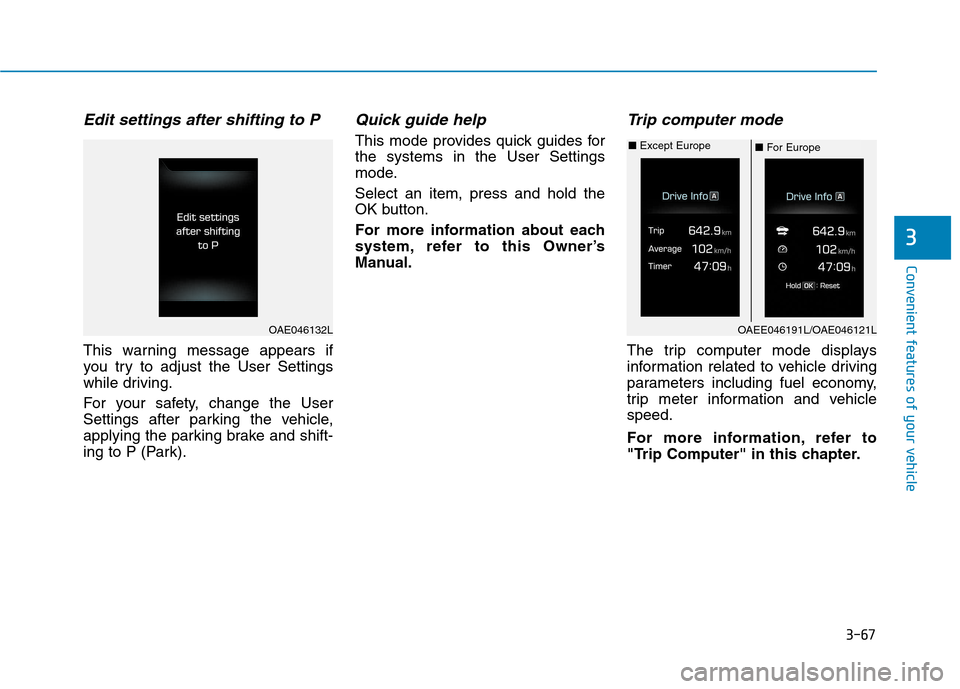
Edit settings after shifting to P
This warning message appears if
you try to adjust the User Settings
while driving.
For your safety, change the User
Settings after parking the vehicle,
applying the parking brake and shift-
ing to P (Park).
Quick guide help
This mode provides quick guides forthe systems in the User Settings
mode. Select an item, press and hold the
OK button.
For more information about each
system, refer to this Owner’s
Manual.
Trip computer mode
The trip computer mode displays
information related to vehicle driving
parameters including fuel economy,
trip meter information and vehiclespeed.
For more information, refer to
"Trip Computer" in this chapter.
OAE046132LOAEE046191L/OAE046121L
■For Europe
■
Except Europe
Page 238 of 582
3-69
Convenient features of your vehicle
3
Warning mode
If one of followings occurs, warning
messages will be displayed in the
information mode for several seconds.
- Lower washer fluid ((if equipped)
- Blind Spot Detection (BSD) mal-function (if equipped)
- Autonomous Emergency Braking (AEB) malfunction
- Advanced smart cruise control malfunction
- Tire Pressure Monitoring System (TPMS) malfunction (if equipped)
User settings mode
In this mode, you can change the
setting of the instrument cluster,
doors, lamps, etc.
1. Driving Assist
2. Door
3. Lights
4. Sound
5. Convenience
6. Service Interval
7. Other Features
8. Reset
The information provided differs
according to the items applied to your
vehicle. 1. Driving Assist
- Lane Departure Warning/Standard
LKA/Active LKA
To adjust the sensitivity of the Lane
Keeping Assist System.
For more information, refer to the
"Lane Keeping Assist System" in
chapter 5.
- Slow/Normal/Fast To adjust the sensitivity of the
Smart Cruise Control system.
For more information, refer to the
"Smart Cruise Control" in chapter5.
To activate or deactivate the Autonomous
Emergency Braking (AEB).
For more information, refer to
"Autonomous Emergency Braking
(AEB)" in chapter 5.
Page 241 of 582
3-72
Convenient features of your vehicle
If the service interval is activated and the time and distance is adjusted,
messages are displayed in the fol-
lowing situations each time the vehi-
cle is turned on.
- Service in: Displayed to inform the driver theremaining mileage and days to
service.
- Service required
: Displayed when the mileage anddays to service has been reachedor passed.
If any of the following conditions
occur, the mileage and number of days
to service may be incorrect.
- The battery cable is disconnected.
- The fuse switch is turned off.
- The battery is discharged. 7. Other Features
Battery Saver+
To activate or deactivate the Aux.
Battery Saver+ function.
When activated, the high voltage bat-
tery is used to keep the 12V batterycharged.
For more information, refer to
“Aux. Battery Saver+” in the
Electric Vehicle Guide.
- Off: The average fuel economy will
not reset automatically whenever refueling.
- After Ignition: The average fuel economy will reset automatically
whenever it has passed 4 hours
after turning OFF the vehicle.
- After Recharging : The average fuel economy will reset automaticallywhen recharging.
For more information, refer to
"Trip Computer" in this chapter.
To select the fuel economy unit.(km/kWh, kWh/100km, mi/kWh)
To select the temperature unit.
(°C,°F)
To select the tire pressure unit.
(psi, kPa, bar)
To select language.
8. Reset
You can reset the menus in the User
Settings Mode. All menus in the User
Settings Mode are initialized, except
language and service interval.
Page 243 of 582
3-74
Convenient features of your vehicle
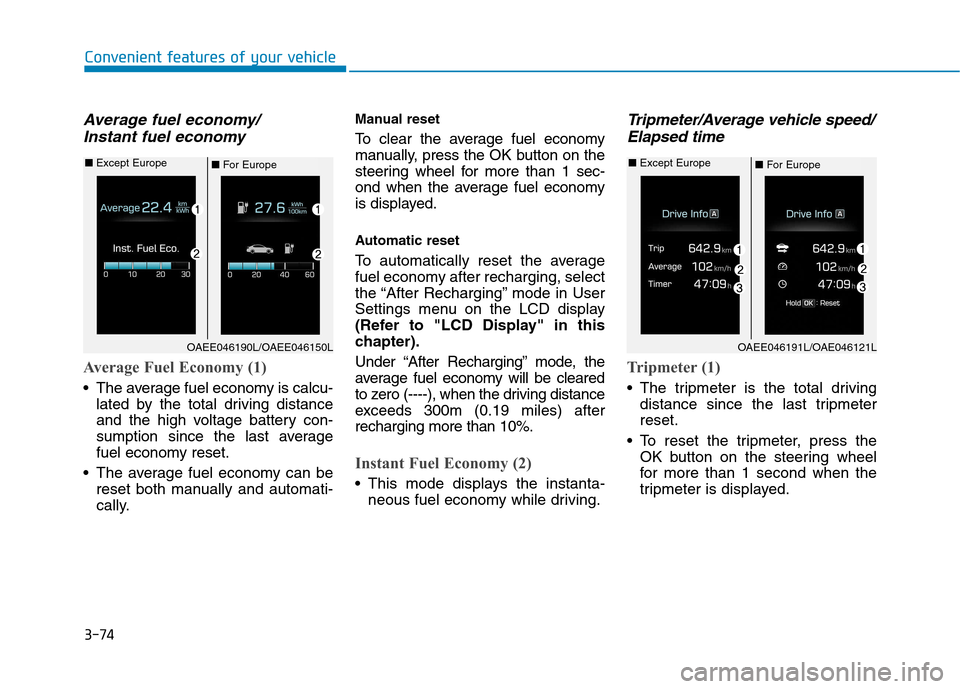
Average fuel economy/Instant fuel economy
Average Fuel Economy (1)
The average fuel economy is calcu- lated by the total driving distance
and the high voltage battery con-
sumption since the last average
fuel economy reset.
The average fuel economy can be reset both manually and automati-
cally. Manual reset
To clear the average fuel economy
manually, press the OK button on the
steering wheel for more than 1 sec-
ond when the average fuel economy
is displayed.
Automatic reset
To automatically reset the average
fuel economy after recharging, select
the “After Recharging” mode in User
Settings menu on the LCD display
(Refer to "LCD Display" in this
chapter).
Under “After Recharging” mode, the
average fuel economy will be cleared
to zero (----), when the driving distance
exceeds 300m (0.19 miles) afterrecharging more than 10%.
Instant Fuel Economy (2)
This mode displays the instanta-
neous fuel economy while driving.
Tripmeter/Average vehicle speed/
Elapsed time
Tripmeter (1)
The tripmeter is the total driving distance since the last tripmeter reset.
To reset the tripmeter, press the OK button on the steering wheel
for more than 1 second when the
tripmeter is displayed.
OAEE046190L/OAEE046150L
■For Europe
■
Except Europe
OAEE046191L/OAE046121L
■ For Europe
■
Except Europe
Page 244 of 582
3-75
Convenient features of your vehicle
3
Average Vehicle Speed (2)
The average vehicle speed is cal-culated by the total driving dis-
tance and driving time since the
last average vehicle speed reset.
To reset the average vehicle speed, press the OK button on the steering
wheel for more than 1 second when
the average vehicle speed is dis-
played.
Information
The average vehicle speed is not dis- played if the driving distance is less
than 300 meters (0.19 miles) or the
driving time is less than 10 seconds,
after resetting the vehicle speed.
The average vehicle speed will con- tinue to be calculated and will start
to decrease if the vehicle is stopped
while the vehicle is in the ready
( ) mode.
Elapsed Time (3)
The elapsed time is the total driv-ing time since the last elapsed time reset.
To reset the elapsed time, press the OK button on the steering
wheel for more than 1 secondwhen the elapsed time is dis-
played.
Information
The elapsed time will continue to be
counted while the vehicle is in the
ready ( ) mode.
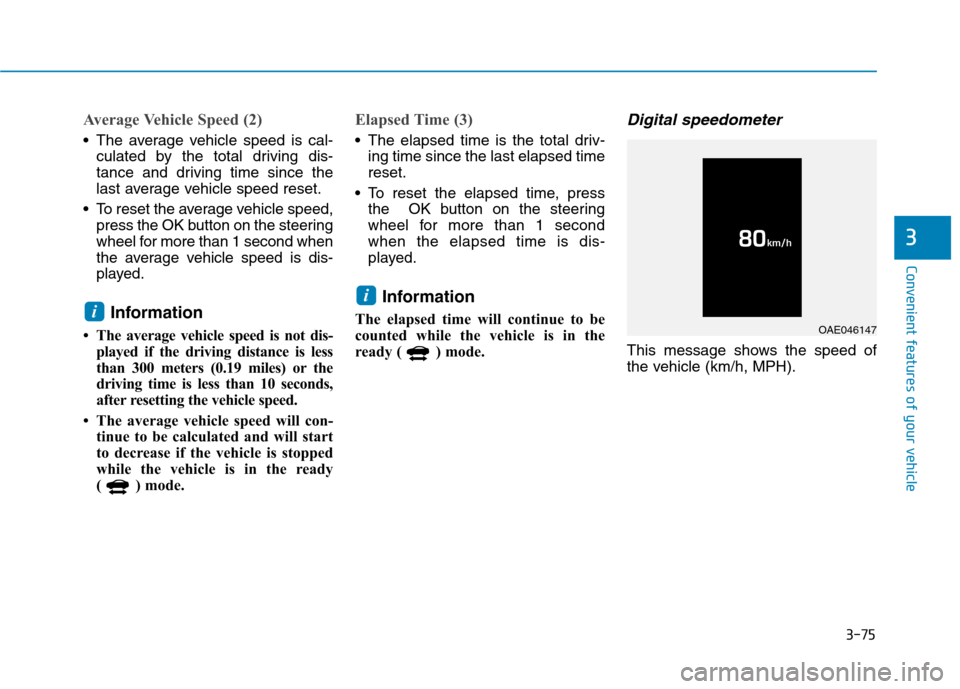
Digital speedometer
This message shows the speed of
the vehicle (km/h, MPH).
i
i
OAE046147
Page 245 of 582
3-76
Convenient features of your vehicle
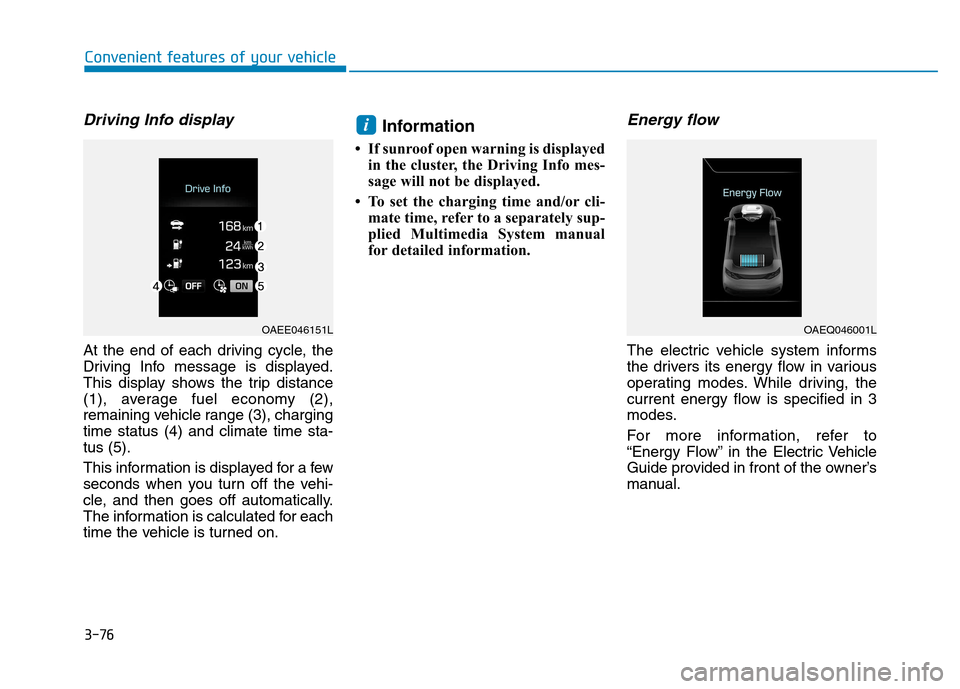
Driving Info display
At the end of each driving cycle, the
Driving Info message is displayed.
This display shows the trip distance
(1), average fuel economy (2),
remaining vehicle range (3), chargingtime status (4) and climate time sta-tus (5).
This information is displayed for a few
seconds when you turn off the vehi-
cle, and then goes off automatically.
The information is calculated for each
time the vehicle is turned on.Information
If sunroof open warning is displayed in the cluster, the Driving Info mes-
sage will not be displayed.
To set the charging time and/or cli- mate time, refer to a separately sup-
plied Multimedia System manual
for detailed information.
Energy flow
The electric vehicle system informs
the drivers its energy flow in various
operating modes. While driving, the
current energy flow is specified in 3
modes.
For more information, refer to
“Energy Flow” in the Electric Vehicle
Guide provided in front of the owner’s
manual.
i
OAEE046151LOAEQ046001L
Page 250 of 582
3-81
Convenient features of your vehicle
3
Battery saver function
The purpose of this feature is to pre-
vent the battery from being dis-
charged. The system automatically
turns off the position lamp when the
driver turns the vehicle off and opens
the driver-side door.
With this feature , the position lamps
will turn off automatically if the driver
parks on the side of road at night.
If necessary, to keep the lamps on
when the vehicle is turned off, perform
the following:
1) Open the driver-side door.
2) Turn the position lamps OFF and
ON again using the light switch on
the steering column.
Headlamp delay function
(if equipped)
If you place the POWER button to
the ACC or OFF position with theheadlamps ON, the headlamps(and/or position lamps) remain on for
about 5 minutes. However, with the
vehicle off if the driver’s door isopened and closed, the headlamps(and/or position lam ps) are turned off
after 15 seconds. The headlamps (and/or position
lamps) can be turned off by pressing
the lock button on the smart key
twice or turning the light switch to the
OFF or AUTO position. However, if
you turn the light switch to the AUTO
position when it is dark outside, the
headlamps will not be turned off.
You can activate or deactivate the
Headlamp Delay function from theUser Settings Mode on the LCD dis-
play. For more details, refer to
"LCD Display" in this chapter. If the driver gets out of the vehicle
through other doors (except dri-
ver's door), the battery saver func-tion does not operate and the
headlamp delay function does not
turn off automatically. Therefore, It
causes the battery to be dis-
charged. In this case, make sure to
turn off the lamp before getting out
of the vehicle.
Daytime running light (DRL)
The Daytime Running Lights (DRL)
can make it easier for others to see
the front of your vehicle during the
day, especially after dawn and beforesunset.
The DRL system will turn the dedi- cated lamp OFF when:
1. The headlights are in the ON posi-
tion.
2. The vehicle is turned off.
NOTICE