Page 308 of 582
4-12
Multimedia System
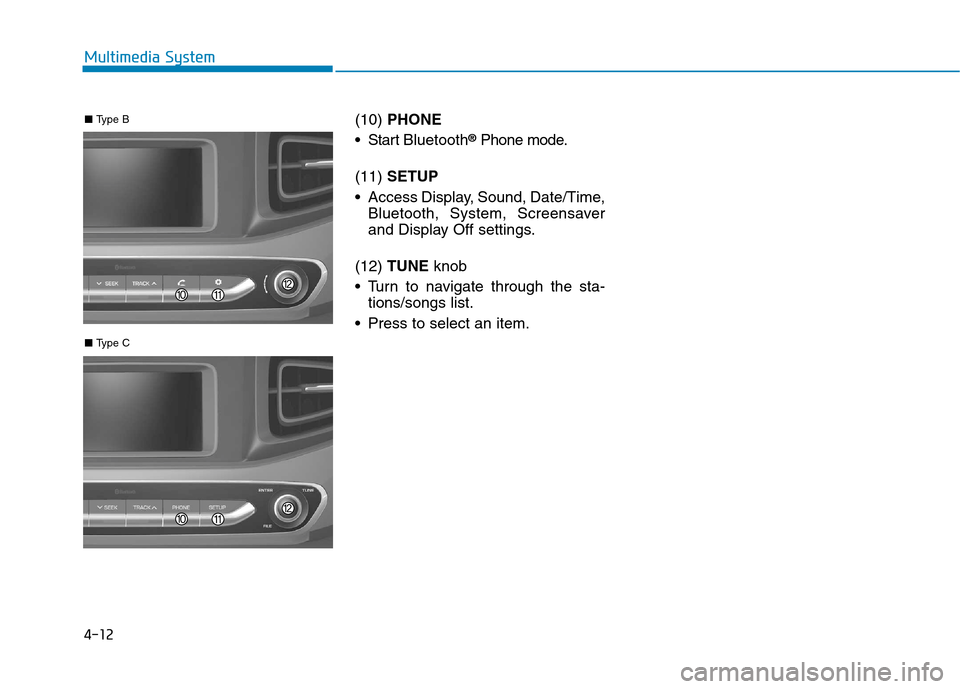
(10) PHONE
Start Bluetooth ®
Phone mode.
(11) SETUP
Access Display, Sound, Date/Time, Bluetooth, System, Screensaver
and Display Off settings.
(12) TUNE knob
Turn to navigate through the sta- tions/songs list.
Press to select an item.
■ Type C
■ Type B
Page 309 of 582
4-13
Multimedia System
4
Multimedia System
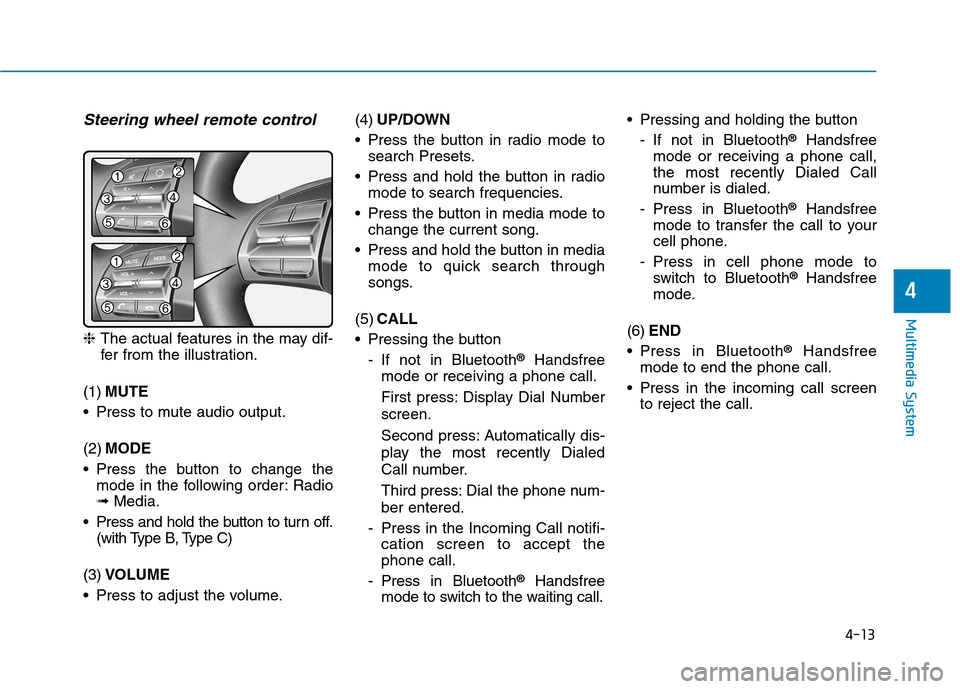
Steering wheel remote control
❈The actual features in the may dif-
fer from the illustration.
(1) MUTE
Press to mute audio output. (2) MODE
Press the button to change the mode in the following order: Radio ➟ Media.
Press and hold the button to turn off. (with Type B, Type C)
(3) VOLUME
Press to adjust the volume. (4)
UP/DOWN
Press the button in radio mode to search Presets.
Press and hold the button in radio mode to search frequencies.
Press the button in media mode to change the current song.
Press and hold the button in media mode to quick search through
songs.
(5) CALL
Pressing the button
- If not in Bluetooth ®
Handsfree
mode or receiving a phone call.
First press: Display Dial Number screen.
Second press: Automatically dis-
play the most recently Dialed
Call number.
Third press: Dial the phone num- ber entered.
- Press in the Incoming Call notifi- cation screen to accept the phone call.
- Press in Bluetooth ®
Handsfree
mode to switch to the waiting call. Pressing and holding the button
- If not in Bluetooth ®
Handsfree
mode or receiving a phone call,the most recently Dialed Call
number is dialed.
- Press in Bluetooth ®
Handsfree
mode to transfer the call to your
cell phone.
- Press in cell phone mode to switch to Bluetooth ®
Handsfree
mode.
(6) END
Press in Bluetooth ®
Handsfree
mode to end the phone call.
Press in the incoming call screen to reject the call.
Page 312 of 582
4-16
Multimedia System
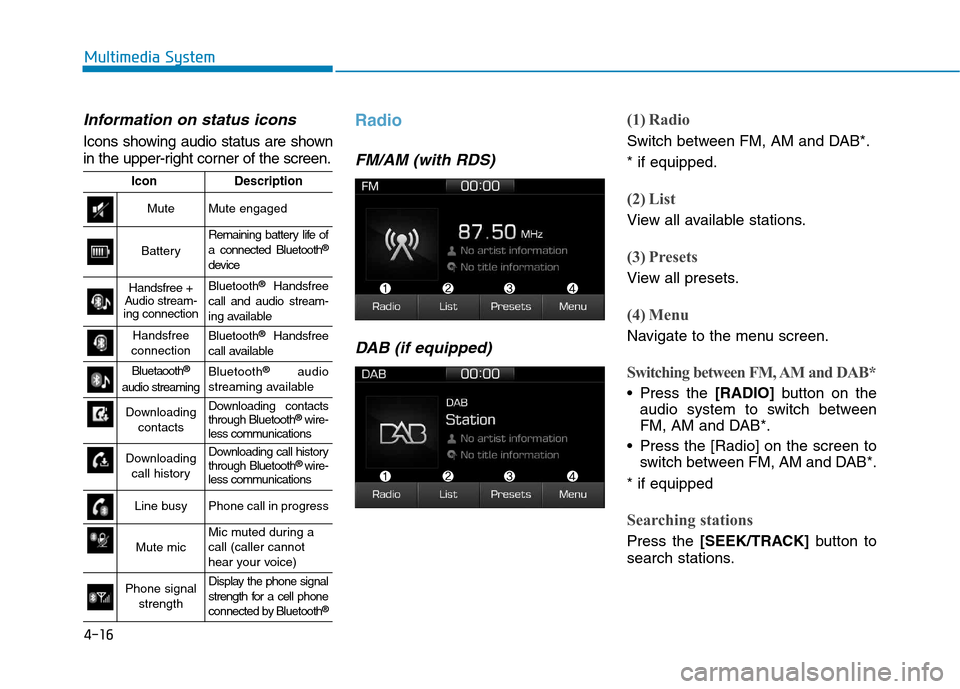
Information on status icons
Icons showing audio status are shown
in the upper-right corner of the screen.
Radio
FM/AM (with RDS)DAB (if equipped)
(1) Radio
Switch between FM, AM and DAB*. * if equipped.
(2) List
View all available stations.
(3) Presets
View all presets.
(4) Menu
Navigate to the menu screen.
Switching between FM, AM and DAB*
Press the [RADIO]button on the
audio system to switch between
FM, AM and DAB*.
Press the [Radio] on the screen to switch between FM, AM and DAB*.
* if equipped
Searching stations
Press the [SEEK/TRACK] button to
search stations.
IconDescription
MuteMute engaged
Battery
Remaining battery life of a connected Bluetooth ®
device
Handsfree +
Audio stream-
ing connectionBluetooth ®
Handsfree
call and audio stream-
ing available
Handsfree
connectionBluetooth ®
Handsfree
call available
Bluetaooth ®
audio streamingBluetooth ®
audio
streaming available
Downloading contactsDownloading contacts through Bluetooth ®
wire-
less communications
Downloading
call historyDownloading call history through Bluetooth ®
wire-
less communications
Line busyPhone call in progress
Mute micMic muted during a call (caller cannot
hear your voice)
Phone signal
strengthDisplay the phone signal
strength for a cell phone
connected by Bluetooth ®
Page 322 of 582
4-26
Multimedia System
Information
- Using the iPod®
Devices
To use the audio system’s iPod ®
con-
trol function, use the dedicated
cable provided with your iPod ®
.
Connecting the iPod ®
to the vehicle
during play may result in a loud
noise that lasts about one to two sec-
onds. Connect the iPod ®
to the vehi-
cle after stopping or pausing play.
Connect the iPod ®
with the vehicle in
the ACC ON state to begin charging.
When connecting the iPod ®
cable,
be sure to fully push the cable into
the port.
When EQ effects are enabled simul- taneously on external devices, such
as iPod ®
s and the audio system, the
EQ effects may overlap, causing
sound quality deterioration or dis-
tortion. Deactivate the EQ function
for all external devices, if possible.
Noise may occur when your iPod ®
or the AUX port is connected.
Disconnect and store separately
when not in use.
(Continued)(Continued)
There may be noise if the audio sys-
tem is used with an iPod ®
or AUX
external device connected to the
power jack. In these cases, discon-
nect the iPod ®
or external device
from the power jack.
Play may be interrupted, or device malfunctions may occur depending
on the characteristics of your
iPod ®
/iPhone ®
.
Play may fail if your iPhone ®
is con-
nected through both Bluetooth ®
and
USB. In this case, select Dock con-
nector or Bluetooth ®
on your
iPhone ®
to change the sound output
settings.
If your software version does not support the communication proto-
col or your iPod ®
is not recognized
due to device failure, anomalies or
defects, iPod ®
mode cannot be used.
iPod ®
nano (5th generation) devices
may not be recognized if the battery
is low. Charge sufficiently before use.
(Continued)(Continued)
The search and song play order in
the iPod ®
device may be different
from the search order in the audio
system.
If the iPod ®
has failed due to an
internal defect, please reset the
iPod ®
(consult your iPod ®
manual).
Depending on the software version, the iPod ®
may fail to sync with the
system. If the media is removed or
disconnected before recognition, the
previous mode may not be restored
(iPad ®
cannot be charged).
Cables other than the 1-meter cable provided with iPod ®
/iPhone ®
prod-
ucts may not be recognized.
When other music apps are used on your iPod ®
, the system sync func-
tion may fail due to malfunction of
the iPod ®
application.i
Page 324 of 582
4-28
Multimedia System
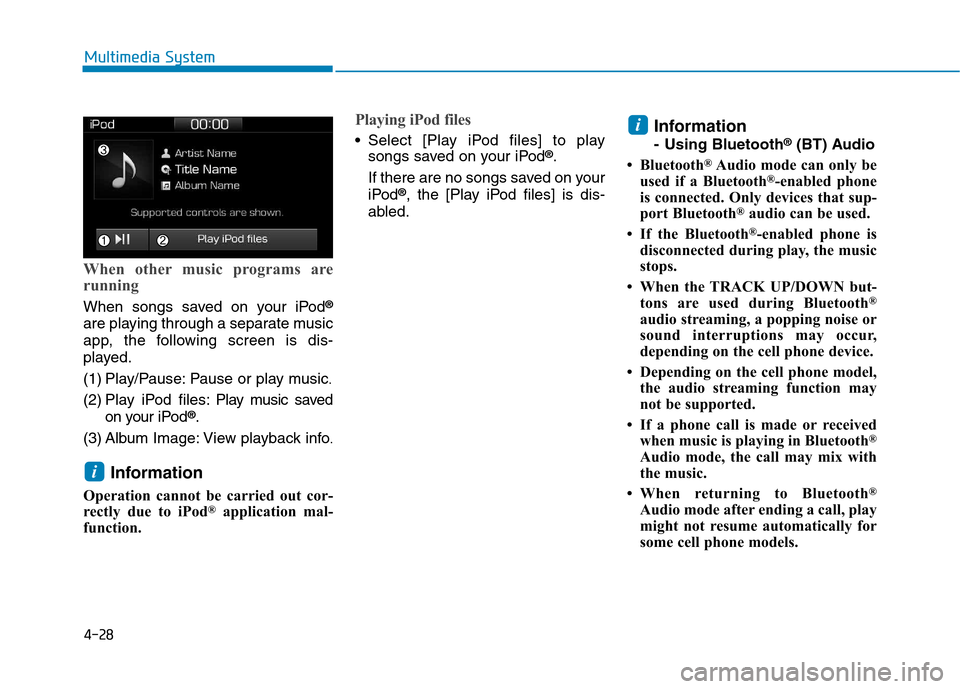
When other music programs are
running
When songs saved on your iPod®
are playing through a separate music
app, the following screen is dis-
played.
(1) Play/Pause: Pause or play music .
(2) Play iPod files: Play m usic saved
on your iPod ®
.
(3) Album Image: View playback info .
Information
Operation cannot be carried out cor-
rectly due to iPod ®
application mal-
function.
Playing iPod files
Select [Play iPod files] to play songs saved on your iPod ®
.
If there are no songs saved on your
iPod ®
, the [Play iPod files] is dis-
abled. Information
- Using Bluetooth
®
(BT) Audio
Bluetooth ®
Audio mode can only be
used if a Bluetooth ®
-enabled phone
is connected. Only devices that sup-
port Bluetooth ®
audio can be used.
If the Bluetooth ®
-enabled phone is
disconnected during play, the music
stops.
When the TRACK UP/DOWN but- tons are used during Bluetooth ®
audio streaming, a popping noise or
sound interruptions may occur,
depending on the cell phone device.
Depending on the cell phone model, the audio streaming function may
not be supported.
If a phone call is made or received when music is playing in Bluetooth ®
Audio mode, the call may mix with
the music.
When returning to Bluetooth ®
Audio mode after ending a call, play
might not resume automatically for
some cell phone models.i
i
Page 325 of 582
4-29
Multimedia System
4
Bluetooth®Wireless Technology
Handsfree is a feature that
enables drivers to practice safe
driving. Connecting the caraudio system with a
Bluetooth®
Wireless Technology phone
allows the user to conveniently
make calls, receive calls, and
manage the phone book. Beforeusing the
Bluetooth®Wireless
Technology, carefully read the
contents of this user’s manual.
Excessive use or operations while driving may lead to negli-
gent driving practices and bethe cause of accidents.
Do not operate the device exces- sively while driving.
Viewing the screen for pro- longed periods of time is dan-
gerous and may lead to acci-dents.
When driving, view the screen only for short periods of time.
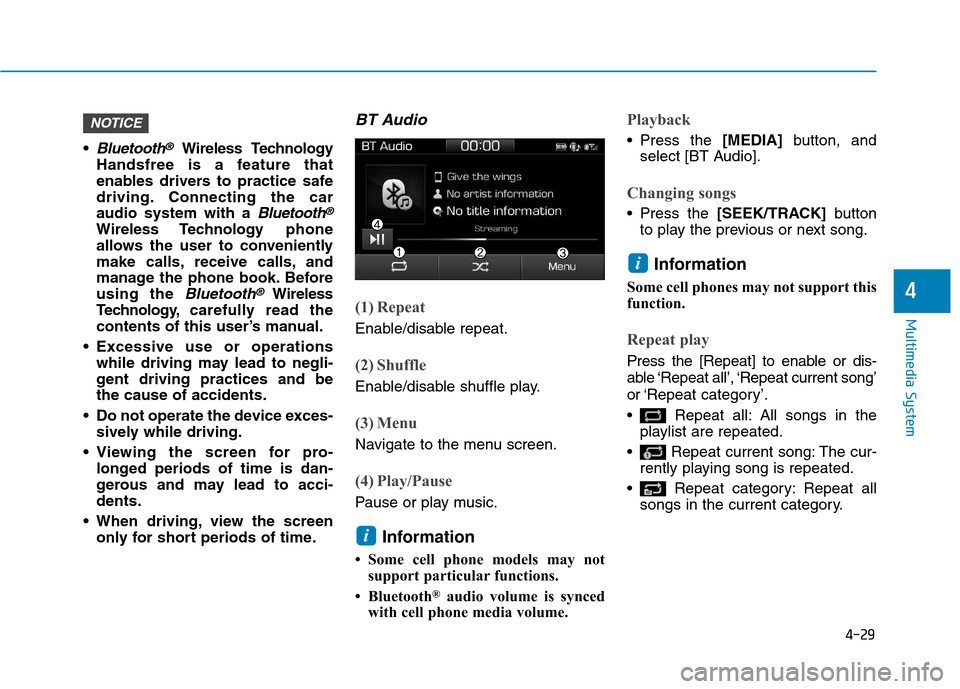
BT Audio
(1) Repeat
Enable/disable repeat.
(2) Shuffle
Enable/disable shuffle play.
(3) Menu
Navigate to the menu screen.
(4) Play/Pause
Pause or play music.
Information
Some cell phone models may not support particular functions.
Bluetooth ®
audio volume is synced
with cell phone media volume.
Playback
Press the [MEDIA]button, and
select [BT Audio].
Changing songs
Press the [SEEK/TRACK] button
to play the previous or next song.
Information
Some cell phones may not support this
function.
Repeat play
Press the [Repeat] to enable or dis-
able ‘Repeat all’, ‘Repeat current song’
or ‘Repeat category’.
Repeat all: All songs in the playlist are repeated.
Repeat current song: The cur- rently playing song is repeated.
Repeat category: Repeat all songs in the current category.
i
i
NOTICE
Page 326 of 582
![Hyundai Ioniq Electric 2017 Owners Manual 4-30
Multimedia System
Information
The repeat play function is engaged,
depending on the operation of the con-
nected Bluetooth device.
Shuffle play
Press the [Shuffle] to enable/disable
‘Shuffle](/manual-img/35/14909/w960_14909-325.png "Hyundai Ioniq Electric 2017 Owners Manual 4-30
Multimedia System
Information
The repeat play function is engaged,
depending on the operation of the con-
nected Bluetooth device.
Shuffle play
Press the [Shuffle] to enable/disable
‘Shuffle")
4-30
Multimedia System
Information
The repeat play function is engaged,
depending on the operation of the con-
nected Bluetooth device.
Shuffle play
Press the [Shuffle] to enable/disable
‘Shuffle’, ‘Shuffle category’ play.
Shuffle: Songs are played in random order.
Shuffle category: Songs within the current category are played in
random order.
Information
The shuffle function is engaged,
depending on the operation of the con-
nected Bluetooth device.
Menu
Press the [Menu], and select the desired function.
Connections: The currently connected Bluetooth ®
device can be changed.
Information: Detailed information on the currently playing song is displayed.
Sound Settings: Audio sound set- tings can be changed.
AUX
Running AUX
Press the [MEDIA]button, and
select [AUX].
Connect the external device con- nection jack to the AUX terminal to
run AUX.
(1) Sound Settings: Audio sound set- tings can be changed.
My Music
(1) Repeat
Enable/disable repeat.
(2) Shuffle
Enable/disable shuffle play.
(3) List
View a list of all songs.
(4) Menu
Navigate to the menu screen.
(5) Album Image
View song info.
i
i
Page 328 of 582
![Hyundai Ioniq Electric 2017 Owners Manual 4-32
Multimedia System
(4) Delete: Delete the selected file(s).
- Select the file to delete, then press the [Delete] to delete it.
- Delete is canceled if phone calls are received or made during
dele](/manual-img/35/14909/w960_14909-327.png "Hyundai Ioniq Electric 2017 Owners Manual 4-32
Multimedia System
(4) Delete: Delete the selected file(s).
- Select the file to delete, then press the [Delete] to delete it.
- Delete is canceled if phone calls are received or made during
dele")
4-32
Multimedia System
(4) Delete: Delete the selected file(s).
- Select the file to delete, then press the [Delete] to delete it.
- Delete is canceled if phone calls are received or made during
delete.
Add to playlist: Frequently played songs can be paired in a [Playlist].
- Songs can be played from the[Playlist].
Information: Detailed info on the currently playing song is displayed.
Sound Settings: Audio sound set- tings can be changed.
Delete from playlist
When a song in the playlist is play-
ing, press the [Menu] and select
[Delete from playlist].
Select the song to delete, then press [Delete].
Phone
Information
- Using the
Bluetooth®
Wireless Technology Cellular Phone
Bluetooth ®
is a near-field wireless
networking technology that uses the
2.4 GHz frequency to connect vari-
ous devices within a certain distance
wirelessly.
The technology is used in PCs, peripherals, Bluetooth ®
phones,
tablet PCs, household appliances
and automobiles. Devices support-
ing Bluetooth ®
can exchange data at
high speeds without physical cable
connections.
Bluetooth ®
Handsfree devices enable
convenient access to phone functions
through cell phones equipped with
Bluetooth ®
.
Some Bluetooth ®
devices may not
be supported by the Bluetooth ®
Handsfree function.
(Continued)(Continued)
When Bluetooth
®
is connected and
calls are attempted through a con-
nected cell phone from outside the
vehicle, the call is connected
through the Bluetooth ®
Handsfree
function of the vehicle.
Please be sure to disconnect the Bluetooth ®
Handsfree function through
your Bluetooth ®
device or the audio
screen.
i