2017 HYUNDAI I30 CAN
[x] Cancel search: CANPage 264 of 659
![HYUNDAI I30 2017 Owners Manual 4-32
Multimedia System
Add to Playlist: Frequently played songs can be paired in a [Playlist].
- Songs can be played from the[Playlist].
Information: Detailed info on the currently playing song is d](/manual-img/35/56150/w960_56150-263.png "HYUNDAI I30 2017 Owners Manual 4-32
Multimedia System
Add to Playlist: Frequently played songs can be paired in a [Playlist].
- Songs can be played from the[Playlist].
Information: Detailed info on the currently playing song is d")
4-32
Multimedia System
Add to Playlist: Frequently played songs can be paired in a [Playlist].
- Songs can be played from the[Playlist].
Information: Detailed info on the currently playing song is displayed.
Sound Settings: Audio sound set- tings can be changed.
Delete from playlist
When a song in the playlist is play-
ing, press the [MENU]button and
select [Delete from playlist].
Select the song to delete, then select
[Delete].
Phone (if equipped)
Information
- Using Bluetooth®(BT) Phone
• Bluetooth
®is a near-field wireless
networking technology that uses the
2.4 GHz frequency to connect vari-
ous devices within a certain distance
wirelessly.
• The technology is used in PCs, peripherals, Bluetooth
®phones,
tablet PCs, household appliances
and automobiles. Devices support-
ing Bluetooth
®can exchange data at
high speeds without physical cable
connections.
• Bluetooth
®Handsfree devices
enable convenient access to phone
functions through cell phones
equipped with Bluetooth
®.
• Some Bluetooth
®devices may not be
supported by the Bluetooth®
Handsfree function.
(Continued)(Continued)
• When Bluetooth
®is connected and
calls are attempted through a con-
nected cell phone from outside the
vehicle, the call is connected
through the Bluetooth
®Handsfree
function of the vehicle.
• Please be sure to disconnect the Bluetooth
®Handsfree function
through your Bluetooth®device or
the audio screen.
• The Bluetooth
®Handsfree function
helps drivers to drive safely. By con-
necting a Bluetooth
®-enabled phone
to the vehicle’s audio system, phone
calls can be made and received
through the audio system and con-
tacts can be managed. Consult the
user manual before use.
• Excessive manipulation of controls while driving, making it difficult to
pay attention to the road ahead, can
lead to accidents. Do not operate the
device excessively while driving.
• Looking at the screen for a pro- longed time increases the risk of
accidents. Keep time spent looking
at the screen to a minimum.
i
Page 265 of 659

4-33
Multimedia System
4
Precautions when connecting
Bluetooth®devices
The vehicle supports the followingBluetooth®functions. Some
Bluetooth®devices may not sup-
port some functions.
1) Bluetooth
®Handsfree phone
calls
2) Operations during a call (Private, Switch, Mic Vol. con-
trols)
3) Download call history saved to the Bluetooth
®device
4) Download contacts saved to the Bluetooth
®device
5) Automatic contacts/call history download when Bluetooth
®is
connected
6) Automatic Bluetooth
®device
connection when the vehicle is
started
7) Bluetooth
®audio streaming
playback
Before connecting the audio sys- tem to your device, make sure your
device supports Bluetooth
®. Even if your device supports
Bluetooth
®, a Bluetooth®connec-
tion cannot be established if the
device’s Bluetooth
®function is
switched off. Search and connect
with the Bluetooth
®function
enabled.
Pair or connect Bluetooth
®devices
to the audio system with the vehi-
cle at a standstill.
If a Bluetooth
®connection is lost
due to abnormal conditions while a
Bluetooth
®device is connected
(communication range exceeded,
device power OFF, communication
errors, etc.), the disconnected
Bluetooth
®device is searched for
and automatically reconnected.
If you want to disable the Bluetooth
®device auto-connect
function, turn the Bluetooth®func-
tion OFF on your device. Consult
the user manuals for individual
devices to see whether Bluetooth
®
is supported.
Handsfree call quality and volume may vary depending on the type of
Bluetooth
®device. Some Bluetooth
®devices are sub-
ject to intermittent Bluetooth®con-
nection failures. In this case, use
the following method.
1) Turn the Bluetooth
®function off
on your Bluetooth®device ➟
Turn it on and try again.
2) Delete the paired device from both the audio system and
Bluetooth
®device, then pair
again.
3) Power down your Bluetooth
®
device ➟Turn it on and try
again.
4) Completely remove the battery from your Bluetooth
®device;
reinsert it, reboot, and attempt
connection.
5) Restart the vehicle and reat- tempt connection.
Page 266 of 659

4-34
Multimedia System
Pairing a Bluetooth®device
Information on pairing Bluetooth®
devices
Pairing refers to the process ofpairing Bluetooth®cell phones or
devices with the system prior to
connection. This is a necessary
procedure for Bluetooth
®connec-
tion and usage.
Up to five devices can be paired.
Pairing Bluetooth
®device is not
allowed while vehicle is moving.
Pairing the first Bluetooth®device
Press the [PHONE]button on the
audio system or the [CALL]button
on the steering wheel remote control
➟ Search for the vehicle from the
Bluetooth
®device, and pair ➟Enter
the passkey on the Bluetooth®
device or approve passkey ➟
Bluetooth®pairing completed.
1. When the [PHONE]button on the
audio or the [CALL]button on the
steering wheel remote control is
pressed, the following screen is
displayed. Devices can now be
paired. (1) Vehicle name: Searched name in
Bluetooth
®device.
Information
The vehicle name in the image above
is an example. Refer to your device for
the actual name of your device.
2. Search for available Bluetooth
®
devices in the Bluetooth®menu of
your Bluetooth®device (cell
phone, etc.).
3. Confirm that the vehicle name in your Bluetooth
®device matches
the vehicle name shown on the
audio screen, then select it. 4-1. For devices that require passkey
entry, a passkey entry screen is
shown on your Bluetooth
®
device.
- Enter the passkey ‘0000’, in your Bluetooth
®device.
4-2. For devices that require passkey confirmation, the following
screen is shown on the audio
system. A 6-digit passkey input
screen is shown in the
Bluetooth
®device.
- After confirming that the 6-digit passkey on the audio screen
and the Bluetooth
®device are
identical, select [OK] in your
Bluetooth
®device.
i
Page 267 of 659
![HYUNDAI I30 2017 Owners Manual 4-35
Multimedia System
4
Information
The 6-digit passkey in the image
above is an example. Refer to your
vehicle for the actual passkey.
Pairing a second Bluetooth®device
Press the [SETUP/CLOCK] butt](/manual-img/35/56150/w960_56150-266.png "HYUNDAI I30 2017 Owners Manual 4-35
Multimedia System
4
Information
The 6-digit passkey in the image
above is an example. Refer to your
vehicle for the actual passkey.
Pairing a second Bluetooth®device
Press the [SETUP/CLOCK] butt")
4-35
Multimedia System
4
Information
The 6-digit passkey in the image
above is an example. Refer to your
vehicle for the actual passkey.
Pairing a second Bluetooth®device
Press the [SETUP/CLOCK] button
on the audio system ➟Select
[Bluetooth] ➟Select [Connections]
➟ Select [Add new device].
- The pairing procedure from this point is identical to [Pairing the first
Bluetooth device].
Information
• Bluetooth®standby mode lasts for
three minutes. If a device is not
paired within three minutes, pairing
is canceled. Start over from the
beginning.
• For most Bluetooth
®devices, a con-
nection is established automatically
after pairing. Some devices, howev-
er, require separate confirmation
when connecting after pairing. Be
sure to check your Bluetooth
®
device after pairing to confirm that
it has connected.
Connecting Bluetooth®devices
If there are no connected devices
Press the [PHONE]button on the
audio system or the [CALL]button in
the steering wheel remote control ➟
List of paired Bluetooth
®devices ➟
Select the desired Bluetooth®device
from the list ➟Connect Bluetooth®.
ii
Page 268 of 659
![HYUNDAI I30 2017 Owners Manual 4-36
Multimedia System
If there are connected devices
Press the[PHONE]button on the
audio system ➟Select [Settings] ➟
Select [Connections] ➟Select
Bluetooth
®device to connect ➟Select
[Co](/manual-img/35/56150/w960_56150-267.png "HYUNDAI I30 2017 Owners Manual 4-36
Multimedia System
If there are connected devices
Press the[PHONE]button on the
audio system ➟Select [Settings] ➟
Select [Connections] ➟Select
Bluetooth
®device to connect ➟Select
[Co")
4-36
Multimedia System
If there are connected devices
Press the[PHONE]button on the
audio system ➟Select [Settings] ➟
Select [Connections] ➟Select
Bluetooth
®device to connect ➟Select
[Connect] ➟Connect Bluetooth®.
Information
• Only one Bluetooth®device can be
connected at a time.
• When a Bluetooth
®device is con-
nected, other devices cannot be
paired.
Accepting/rejecting phone calls
Receiving phone calls with
Bluetooth®connected.
(1) Caller name: If the caller number is in your contacts, the correspon-
ding name is displayed.
(2) Incoming phone number: Incoming phone number is displayed.
(3) Accept: Accept call.
(4) Reject: Reject call.
Information
• When the incoming call screen is displayed, audio mode and the set-
tings screen cannot be shown. Only
call volume control is supported.
• Some Bluetooth
®devices may not
support the call reject function.
• Some Bluetooth
®devices may not
support the phone number display
function.
i
i
Page 270 of 659
Information
• Up to 20 favourites can be pairedfor each paired Bluetooth®device.
• Favourites can be accessed when the Bluetooth
®device they were paired
from is connected.
• The audio system does not down- load favourites from Bluetooth
®
devices. Favourites must be newly
saved before use.
• To add to favourites, contacts must be downloaded first.
• Saved favourites are not updated even if the contacts of the connected
Bluetooth
®device are changed. In
this case, favourites need to be delet-
ed and added again.
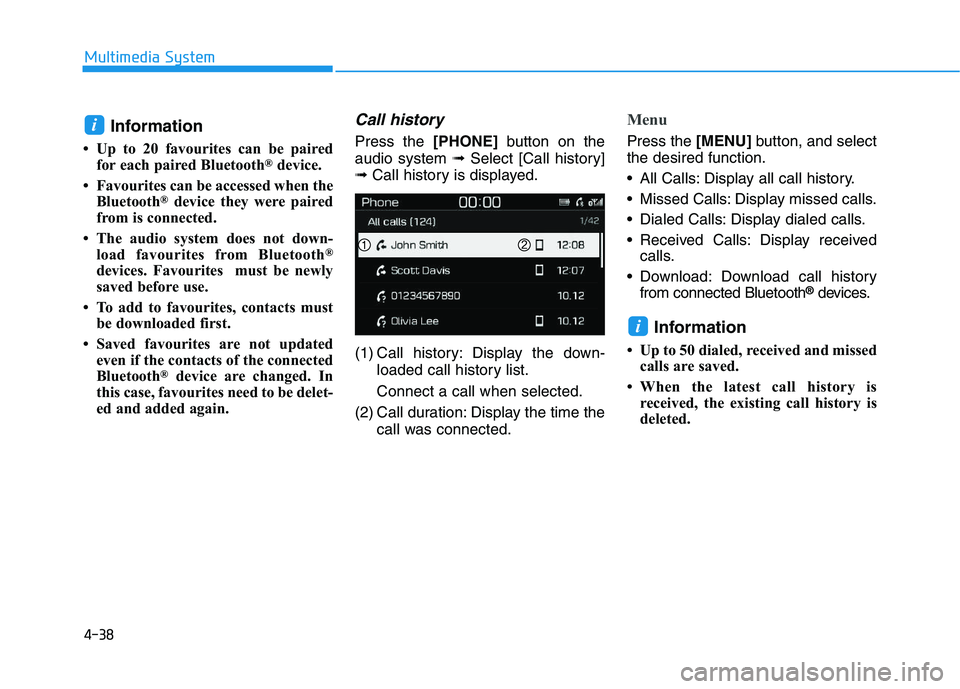
Call history
Press the [PHONE]button on the
audio system ➟Select [Call history]
➟ Call history is displayed.
(1) Call history: Display the down- loaded call history list.
Connect a call when selected.
(2) Call duration: Display the time the call was connected.
Menu
Press the [MENU]button, and select
the desired function.
All Calls: Display all call history.
Missed Calls: Display missed calls.
Dialed Calls: Display dialed calls.
Received Calls: Display received calls.
Download: Download call history from connected Bluetooth
®devices.
Information
• Up to 50 dialed, received and missedcalls are saved.
• When the latest call history is received, the existing call history is
deleted.
i
i
4-38
Multimedia System
Page 271 of 659
![HYUNDAI I30 2017 Owners Manual Contacts
Press the[PHONE]button on the
audio system ➟Select [Contacts] ➟
Select letter (ABC) ➟Contacts dis-
played.
(1) Contacts: Display downloaded contacts.
If one phone number is saved, th](/manual-img/35/56150/w960_56150-270.png "HYUNDAI I30 2017 Owners Manual Contacts
Press the[PHONE]button on the
audio system ➟Select [Contacts] ➟
Select letter (ABC) ➟Contacts dis-
played.
(1) Contacts: Display downloaded contacts.
If one phone number is saved, th")
Contacts
Press the[PHONE]button on the
audio system ➟Select [Contacts] ➟
Select letter (ABC) ➟Contacts dis-
played.
(1) Contacts: Display downloaded contacts.
If one phone number is saved, the
number will be dialed when
selected.
If two or more phone numbers are
saved, a list of saved numbers will
be displayed when selected.
Menu
Press the [MENU]button, and select
the desired function.
Download: Download contacts from connected Bluetooth
®devices.
Information
• Up to 2,000 contacts can be saved.
• In some cases, additional confirma-tion from your Bluetooth
®device is
necessary when downloading con-
tacts. If downloading of contacts
unsuccessful, consult your
Bluetooth
®device’s settings or the
audio screen to approve the down-
load.
• Contacts without phone numbers are not displayed.
Settings
Press the [PHONE]button on the
audio ➟Select [Settings].
- For phone settings, refer to Setup page.
i
4-39
Multimedia System
4
Page 272 of 659
![HYUNDAI I30 2017 Owners Manual 4-40
Multimedia System
Setup
Access Display, Sound, Date/Time,
Bluetooth*, System and Display Off
settings.
Press the[SETUP/CLOCK] button
on the audio system.
* if equipped
Display
Press the [SETUP/C](/manual-img/35/56150/w960_56150-271.png "HYUNDAI I30 2017 Owners Manual 4-40
Multimedia System
Setup
Access Display, Sound, Date/Time,
Bluetooth*, System and Display Off
settings.
Press the[SETUP/CLOCK] button
on the audio system.
* if equipped
Display
Press the [SETUP/C")
4-40
Multimedia System
Setup
Access Display, Sound, Date/Time,
Bluetooth*, System and Display Off
settings.
Press the[SETUP/CLOCK] button
on the audio system.
* if equipped
Display
Press the [SETUP/CLOCK] button
on the audio system ➟Select
[Display].
Dimming mode: Audio screen brightness can be adjusted to the
time of day.
Brightness: The brightness of the audio screen can be changed.
Screensaver: Set the information displayed when the audio system
is switched off or the screen is
turned off.
Sound
Press the [SETUP/CLOCK] button
on the audio system ➟Select
[Sound].
Position: Sound balance and pan- ning can be adjusted.
Equaliser: Sound tone color can be adjusted.
Rear parking sensors prioritised: Automatically lower audio volume
while reversing.
Speed dependent volume control: Automatically adjust volume based
on vehicle speed.
Date/Time
Press the [SETUP/CLOCK] button
on the audio system ➟Select
[Date/Time].
Set time: Set the time displayed on the audio screen.
Time format: Choose betw een 12-
hour and 24-hour time formats.
Set date: Set the date displayed on the audio screen.
Bluetooth (if equipped)
Press the [SETUP/CLOCK] button
➟ Select [Bluetooth].
Connections: Control pairing, dele- tion, connection and disconnection
of Bluetooth
®devices.
Auto connection priority: Set the connection priority of Bluetooth
®
devices when the vehicle is started.
Update contacts: Contacts can be
downloaded from connected
Bluetooth
®devices.
Bluetooth voice guidance: Play or mute voice prompts for Bluetooth
®
device pairing, connection and
errors.