2017 HYUNDAI I10 wheel
[x] Cancel search: wheelPage 60 of 343

Safety system of your vehicle
44 3
SRS care
The SRS is virtually maintenance-free
and there are no parts you can safely
service by yourself. If the SRS air bag
warning light does not illuminate when
the ignition switch is in the ON position,
or continuously remains on, we recom-
mend that the system be immediately
inspected by an authorized HYUNDAI
dealer.
We recommend any work on the SRS
system, such as removing, installing,
repairing, or any work on the steering
wheel, the front passenger's panel, front
seats and roof rails be performed by an
authorized HYUNDAI dealer. Improper
handling of the SRS system may result in
serious personal injury.WARNING
To reduce the risk of serious injury
or death, take the following precau-
tions:
• Do not attempt to modify or dis-
connect the SRS components or
wiring, including the addition of
any kind of badges to the pad
covers or modifications to the
body structure.
• Do not place objects over or near
the air bag modules on the steer-
ing wheel, instrument panel, or
the front passenger's panel
above the glove box.
• Clean the air bag pad covers with
a soft cloth moistened with plain
water. Solvents or cleaners could
adversely affect the air bag cov-
ers and proper deployment of the
system.
• We recommend that inflated air
bags be replaced by an author-
ized HYUNDAI dealer.
(Continued)
(Continued)
• If components of the air bag sys-
tem must be discarded, or if the
vehicle must be scrapped, certain
safety precautions must be
observed. Consult an authorized
HYUNDAI dealer for the neces-
sary information. Failure to follow
these precautions could increase
the risk of personal injury.
Page 62 of 343

Features of your vehicle
KEYS . . . . . . . . . . . . . . . . . . . . . . . . . . . . . . . . . . . . . 4-3
• Record your key number . . . . . . . . . . . . . . . . . . . . . . . 4-3
• Key operations . . . . . . . . . . . . . . . . . . . . . . . . . . . . . . . . 4-3
• Immobilizer system . . . . . . . . . . . . . . . . . . . . . . . . . . . . 4-4
REMOTE KEYLESS ENTRY . . . . . . . . . . . . . . . . 4-7
• Remote keyless entry system operations . . . . . . . . . . . 4-7
• Battery replacement . . . . . . . . . . . . . . . . . . . . . . . . . . . 4-9
SMART KEY . . . . . . . . . . . . . . . . . . . . . . . . . . . . . 4-11
• Smart key function . . . . . . . . . . . . . . . . . . . . . . . . . . . 4-11
• Door lock/unlock in an emergency situation . . . . . . 4-13
THEFT-ALARM SYSTEM . . . . . . . . . . . . . . . . . . 4-14
• Armed stage . . . . . . . . . . . . . . . . . . . . . . . . . . . . . . . . . 4-14
• Theft-alarm stage . . . . . . . . . . . . . . . . . . . . . . . . . . . . 4-15
• Disarmed stage. . . . . . . . . . . . . . . . . . . . . . . . . . . . . . . 4-15
DOOR LOCKS . . . . . . . . . . . . . . . . . . . . . . . . . . . 4-16
• From outside the vehicle . . . . . . . . . . . . . . . . . . . . . . 4-16
• From inside the vehicle . . . . . . . . . . . . . . . . . . . . . . . . 4-17
• Impact sensing door unlock system . . . . . . . . . . . . . . 4-20
• Speed sensing door lock system . . . . . . . . . . . . . . . . . 4-20
• Child-protector rear door lock . . . . . . . . . . . . . . . . . 4-20
TRUNK . . . . . . . . . . . . . . . . . . . . . . . . . . . . . . . . . . 4-21
• Opening the trunk . . . . . . . . . . . . . . . . . . . . . . . . . . . . 4-21
• Closing the trunk . . . . . . . . . . . . . . . . . . . . . . . . . . . . . 4-22
TAILGATE . . . . . . . . . . . . . . . . . . . . . . . . . . . . . . . 4-23
• Opening the tailgate . . . . . . . . . . . . . . . . . . . . . . . . . . 4-23
• Closing the tailgate . . . . . . . . . . . . . . . . . . . . . . . . . . . 4-23
WINDOWS . . . . . . . . . . . . . . . . . . . . . . . . . . . . . . 4-24
• Power windows . . . . . . . . . . . . . . . . . . . . . . . . . . . . . . 4-26
• Manual windows . . . . . . . . . . . . . . . . . . . . . . . . . . . . . 4-29
HOOD . . . . . . . . . . . . . . . . . . . . . . . . . . . . . . . . . . . 4-30
• Opening the hood . . . . . . . . . . . . . . . . . . . . . . . . . . . . 4-30
• Closing the hood . . . . . . . . . . . . . . . . . . . . . . . . . . . . . 4-31
FUEL FILLER LID . . . . . . . . . . . . . . . . . . . . . . . 4-32
• Opening the fuel filler lid . . . . . . . . . . . . . . . . . . . . . . 4-32
• Closing the fuel filler lid . . . . . . . . . . . . . . . . . . . . . . . 4-33
STEERING WHEEL . . . . . . . . . . . . . . . . . . . . . . . 4-35
• Electric power steering . . . . . . . . . . . . . . . . . . . . . . . . 4-35
• Horn . . . . . . . . . . . . . . . . . . . . . . . . . . . . . . . . . . . . . . . 4-36
MIRRORS . . . . . . . . . . . . . . . . . . . . . . . . . . . . . . . 4-37
• Inside rearview mirror . . . . . . . . . . . . . . . . . . . . . . . . 4-37
• Outside rearview mirror . . . . . . . . . . . . . . . . . . . . . . 4-37
INSTRUMENT CLUSTER . . . . . . . . . . . . . . . . . . 4-41
• Gauges . . . . . . . . . . . . . . . . . . . . . . . . . . . . . . . . . . . . . 4-42
• Warnings and indicators. . . . . . . . . . . . . . . . . . . . . . . 4-48
HAZARD WARNING FLASHER . . . . . . . . . . . . 4-58
4
Page 96 of 343
435
Features of your vehicle
Electric power steering (EPS)
(if equipped)
Power steering uses the motor to assist
you in steering the vehicle. If the engine
is off or if the power steering system
becomes inoperative, the vehicle may
still be steered, but it will require
increased steering effort.
Should you notice any change in the
effort required to steer during normal
vehicle operation, we recommend that
the system be checked by an authorized
HYUNDAI dealer.
✽NOTICE
The following symptoms may occur dur-
ing normal vehicle operation:
• The EPS warning light does not illu-
minate.
• The steering effort is high immediate-
ly after turning the ignition switch on.
This happens as the system performs
the EPS system diagnostics. When the
diagnostics is completed, the steering
wheel will return to its normal condi-
tion.
• A click noise may be heard from the
EPS relay after the ignition switch is
turned to the ON or LOCK/OFF posi-
tion.
• Motor noise may be heard when the
vehicle is at a stop or at a low driving
speed.
• The steering effort can suddenly
increase, if the operation of the EPS
system is stopped to prevent serious
accidents when it detects malfunction
of the EPS system by self-diagnosis.
• The steering effort increases if the
steering wheel is rotated continuously
when the vehicle is not in motion.
However, after a few minutes, it will
return to its normal conditions.
Tilt steering (if equipped)
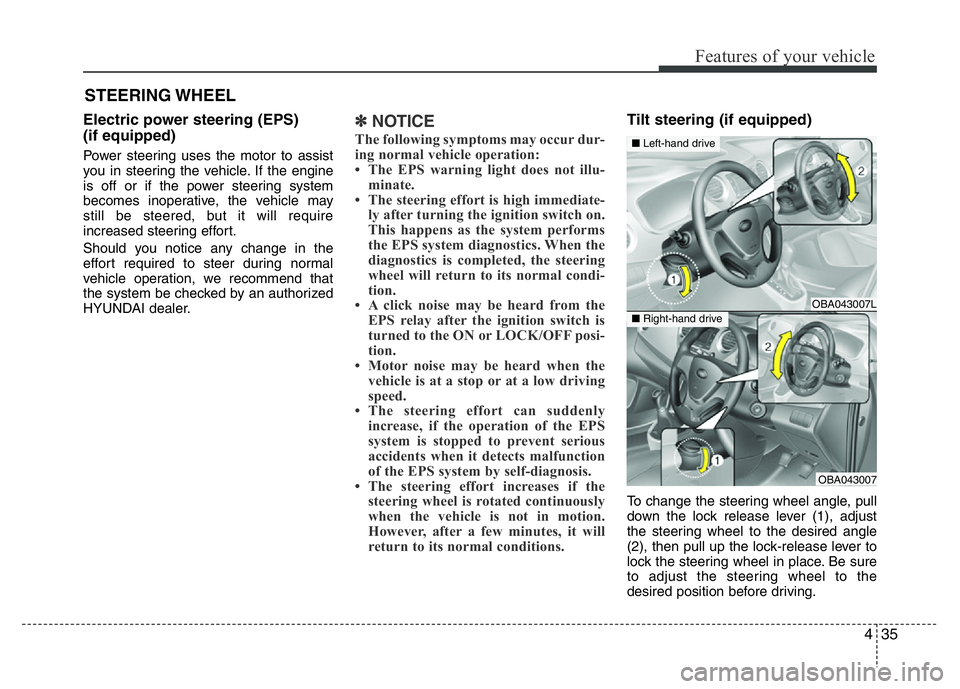
To change the steering wheel angle, pull
down the lock release lever (1), adjust
the steering wheel to the desired angle
(2), then pull up the lock-release lever to
lock the steering wheel in place. Be sure
to adjust the steering wheel to the
desired position before driving.
STEERING WHEEL
OBA043007L
OBA043007
■Left-hand drive
■Right-hand drive
Page 97 of 343

Features of your vehicle
36 4
Horn
To sound the horn, press the area indi-
cated by the horn symbol on your steer-
ing wheel (see illustration). The horn will
operate only when this area is pressed.
CAUTION
Do not strike the horn severely to
operate it, or hit it with your fist. Do
not press on the horn with a sharp-
pointed object.
OBA043022L
WARNING
• Never adjust the steering wheel
while driving. You may lose steer-
ing control and cause severe per-
sonal injury, death or accidents.
• After adjusting, push the steering
wheel both up and down to be
certain it is locked in position.
Page 113 of 343

Features of your vehicle
52 4
Your vehicle is equipped with dual-diago-
nal braking systems. This means you still
have braking on two wheels even if one of
the dual systems should fail. With only one
of the dual systems working, more than
normal pedal travel and greater pedal
pressure are required to stop the vehicle.
Also, the vehicle will not stop in as short a
distance with only a portion of the brake
system working. If the brakes fail while you
are driving, shift to a lower gear for addi-
tional engine braking and stop the vehicle
as soon as it is safe to do so.
To check bulb operation, check whether
the parking brake and brake fluid warning
light illuminates when the ignition switch
is in the ON position.Front fog light indicator
(if equipped)
This indicator illuminates when the front
fog lights are ON.
Rear fog light indicator
(If equipped)
This indicator illuminates when the rear
fog lights are ON.
Shift pattern indicator
(if equipped)
The indicator displays which automatic
transaxle shift lever is selected.
WARNING
Driving the vehicle with a warning
light on is dangerous. If the brake
warning light remains on, we recom-
mend that the system be checked by
an authorized HYUNDAI dealer.
Page 135 of 343

Features of your vehicle
74 4
The outlet vents can be opened or closed
separately using the thumbwheel.
Also, you can adjust the direction of air
delivery from these vents using the vent
control lever as shown.Temperature control
The temperature control knob allows you
to control the temperature of the air flow-
ing from the ventilation system. To
change the air temperature in the pas-
senger compartment, turn the knob to
the right for warm air or left for cooler air.
Air intake control
This is used to select outside (fresh) air
position or recirculated air position.
To change the air intake control position,
push the control button.
OBA043155
OBA043156L
OBA043156
■Left-hand drive
■Right-hand driveOBA043227IN
■Rear
Page 150 of 343

489
Features of your vehicle
Audio remote control
(if equipped)
The steering wheel audio remote control
button is installed to promote safe driving.
VOL (+, -) (1)
• Press the button (+) to increase volume.
• Press the button (-) to decrease volume.
MUTE (2)
• Press the MUTE button to cancel
sound.
• Press the MUTE button again to acti-
vate sound.
MODE (3)
Press the MODE button to select Radio
or CD (compact disc).
SEEK ( / ) (4)
The SEEK button has different functions
base on the system mode. For the follow-
ing functions the button should be
pressed for 0.8 second or more.RADIO mode
It will function as the AUTO SEEK select
button.
CDP mode
It will function as the FF/REW button.
If the SEEK button is pressed for less
than 0.8 second, it will work as follows in
each mode.
RADIO mode
It will function as the PRESET STATION
select buttons.
CDP mode
It will function as the TRACK UP/DOWN
button.
Detailed information for audio control
buttons is described in the following
pages in this chapter.
CAUTION
Do not operate the audio remote
control buttons simultaneously.
OBA043228IN
Page 190 of 343

PHONE (if equipped)
Before using the Bluetooth®Wireless
Technologyphone features
• In order to use
Bluetooth®Wireless
Technology
phone, you must first pair
and connect the
Bluetooth®Wireless
Technology
mobile phone.
• If the mobile phone is not paired or con-
nected, it is not possible to enter Phone
mode. Once a phone is paired or con-
nected, the guidance screen will be dis-
played.
• If Priority is set upon vehicle ignition
(IGN/ACC ON), the
Bluetooth®Wireless
Technology
phone will be automatically
connected. Even if you are outside, the
Bluetooth®Wireless Technologyphone will
be automatically connected once you are
in the vicinity of the vehicle. If you do not
want automatic
Bluetooth®Wireless
Technology
phone connection, set the
Bluetooth®Wireless Technologypower to
OFF.
Making a call using the Steering
wheel remote controller
1. VOLUME button : Raises or lowers
speaker volume.
2. MUTE button : Mute the microphone
during a call.
3. button : Places and transfers calls.
4. button : Ends calls or cancels func-
tions.• Check call history and making call
➀Shortly press (under 0.8 seconds) the
key on the steering remote con-
troller.
➁The call history list will be displayed on
the screen.
➂Press the key again to connect a
call to the selected number.
• Redialing the most recently called num-
ber
➀Press and hold (over 0.8 seconds) the
key on the steering remote con-
troller.
➁The most recently called number is
redialed.
Features of your vehicle
129 4