2017 HYUNDAI ELANTRA SE trunk
[x] Cancel search: trunkPage 13 of 586

F13F13
Accessing your vehicle .........................................3-4
Remote Key........................................................................\
.3-4
Smart Key ........................................................................\
....3-8
Immobilizer System .........................................................3-12
Door Locks ............................................................3-14
Outside the Vehicle.........................................................3-14
Inside the Vehicle ............................................................3-15
Auto Door Lock/Unlock Features ...............................3-17
Child-Protector Rear Door locks ................................3-18
Theft-alarm System ............................................3-19
Driver Position Memory System ........................3-20
Storing Positions into Memory ..................................3-20
Easy Access Function ....................................................3-21
Steering Wheel .....................................................3-22
Electric Power Steering (EPS) .....................................3-22
Tilt Steering / Telescope Steering ..............................3-23
Horn ........................................................................\
............3-23
Mirrors ...................................................................3-24
Inside Rearview Mirror ..................................................3-24
Side View Mirrors ...........................................................3-40
Reverse Parking Aid Function......................................3-42
Windows ................................................................3-43
Power Windows ...............................................................3-44
Sunroof..................................................................3-47
Sunroof Opening and Closing ......................................3-47
Sliding the Sunroof .........................................................3-47
Tilting the Sunroof .........................................................3-48
Sunshade ........................................................................\
...3-49
Resetting the Sunroof ...................................................3-49
Exterior Features .................................................3-51
Hood ........................................................................\
...........3-51
Trunk ........................................................................\
..........3-52
Smart Trunk ......................................................................3-\
55
Fuel Filler Door ................................................................3-58
Instrument Cluster ...............................................3-61
Instrument Cluster Control............................................3-63
Gauges ........................................................................\
.......3-63
Warning and Indicator lights ........................................3-69
LCD Display Messages ..................................................3-80
LCD Display (For supervision cluster) ..............3-88
LCD Display Control ........................................................3-88
LCD Modes ........................................................................\
3-89
User Settings Mode ........................................................3-93
3Convenient features of your vehicle
Page 22 of 586

1-3
Your vehicle at a glance
1
1. Door lock ..............................................3-14
2. Trunk ......................................................3-52
3. Fuel filler door ......................................3-584. Side view mirror ....................................3-40
5. Antenna ..................................................4-2
6. Rear combination lamp ........................7-82
OAD015002N
■
■
Rear view
The actual shape may differ from the illustration.
Page 23 of 586

1-4
Your vehicle at a glance
I
IN
N T
TE
ER
R I
IO
O R
R
O
O V
VE
ER
R V
V I
IE
E W
W
1. Door lock/unlock button ........................3-15
2. Side view mirror control switch ..............3-41
3. Central door lock switch ........................3-16
4. Power window switches ........................3-43
5. Power window lock switch......................3-46
6. Fuel filler door release lever ..................3-58
7. Instrument panel illumination control
switch ....................................................3-63
8. Blind spot detection(BSD) system button* ....................................................5-41
9. Lane keeping assist system (LKAS) button * ..................................................5-61
10. ESC (Electronic Stability Control) OFF button ..........................................5-33
11. Trunk lid release lever ..........................3-53
12. Fuse panel ..........................................7-61
13. Steering wheel ....................................3-22
14. Steering wheel tilt/telescope lever ......3-23
15. Seat........................................................2-4
16. Hood release lever ..............................3-51
17. Brake pedal ..........................................5-27
18. Accelerator pedal
* : if equipped
OAD015003N
The actual shape may differ from the illustration.
Page 38 of 586
2-13
Safety system of your vehicle
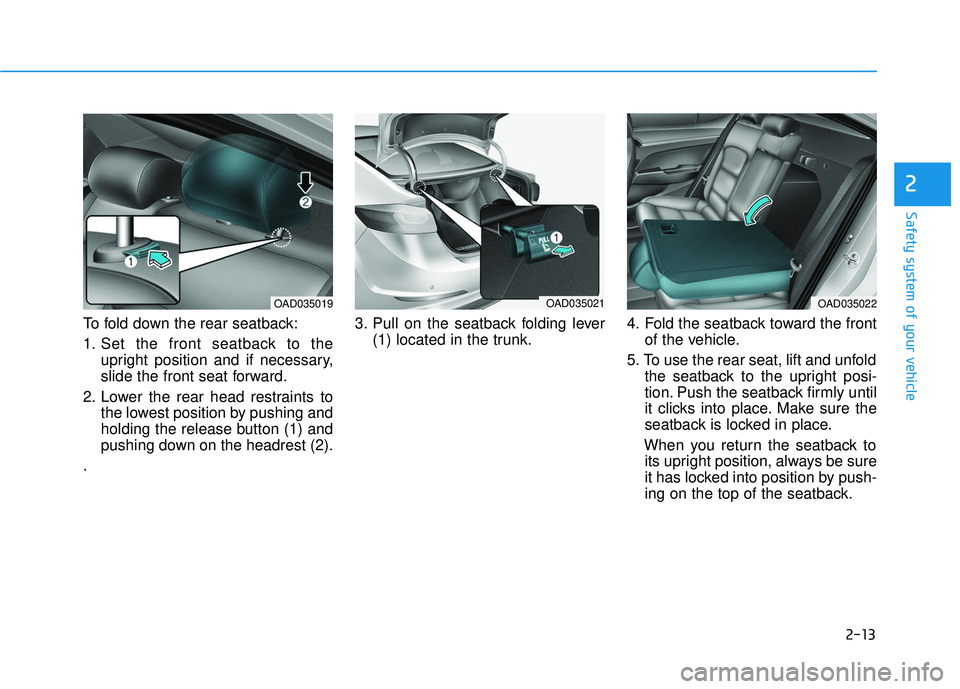
To fold down the rear seatback:
1. Set the front seatback to theupright position and if necessary,
slide the front seat forward.
2. Lower the rear head restraints to the lowest position by pushing and
holding the release button (1) and
pushing down on the headrest (2).
. 3. Pull on the seatback folding lever
(1) located in the trunk. 4. Fold the seatback toward the front
of the vehicle.
5. To use the rear seat, lift and unfold the seatback to the upright posi-
tion. Push the seatback firmly until
it clicks into place. Make sure the
seatback is locked in place.
When you return the seatback to its upright position, always be sure
it has locked into position by push-
ing on the top of the seatback.
2
OAD035019OAD035021OAD035022
Page 95 of 586

Convenient features of your vehicle
Accessing your vehicle .........................................3-4
Remote Key........................................................................\
.3-4
Smart Key ........................................................................\
....3-8
Immobilizer System .........................................................3-12
Door Locks ............................................................3-14
Outside the Vehicle.........................................................3-14
Inside the Vehicle ............................................................3-15
Auto Door Lock/Unlock Features ...............................3-17
Child-Protector Rear Door locks ................................3-18
Theft-alarm System ............................................3-19
Driver Position Memory System ........................3-20
Storing Positions into Memory ..................................3-20
Easy Access Function ....................................................3-21
Steering Wheel .....................................................3-22
Electric Power Steering (EPS) .....................................3-22
Tilt Steering / Telescope Steering ..............................3-23
Horn ........................................................................\
............3-23
Mirrors ...................................................................3-24
Inside Rearview Mirror ..................................................3-24
Side View Mirrors ...........................................................3-40
Reverse Parking Aid Function......................................3-42
Windows ................................................................3-43
Power Windows ...............................................................3-44
Sunroof..................................................................3-47
Sunroof Opening and Closing ......................................3-47
Sliding the Sunroof .........................................................3-47
Tilting the Sunroof .........................................................3-48
Sunshade ........................................................................\
...3-49
Resetting the Sunroof ...................................................3-49
Exterior Features .................................................3-51
Hood ........................................................................\
...........3-51
Trunk ........................................................................\
..........3-52
Smart Trunk ......................................................................3-\
55
Fuel Filler Door ................................................................3-58
Instrument Cluster ...............................................3-61
Instrument Cluster Control............................................3-63
Gauges ........................................................................\
.......3-63
Warning and Indicator lights ........................................3-69
LCD Display Messages ..................................................3-80
LCD Display (For supervision cluster) ..............3-88
LCD Display Control ........................................................3-88
LCD Modes ........................................................................\
3-89
User Settings Mode ........................................................3-93
3
Page 98 of 586
3-4
Convenient features of your vehicle
Remote Key (if equipped)
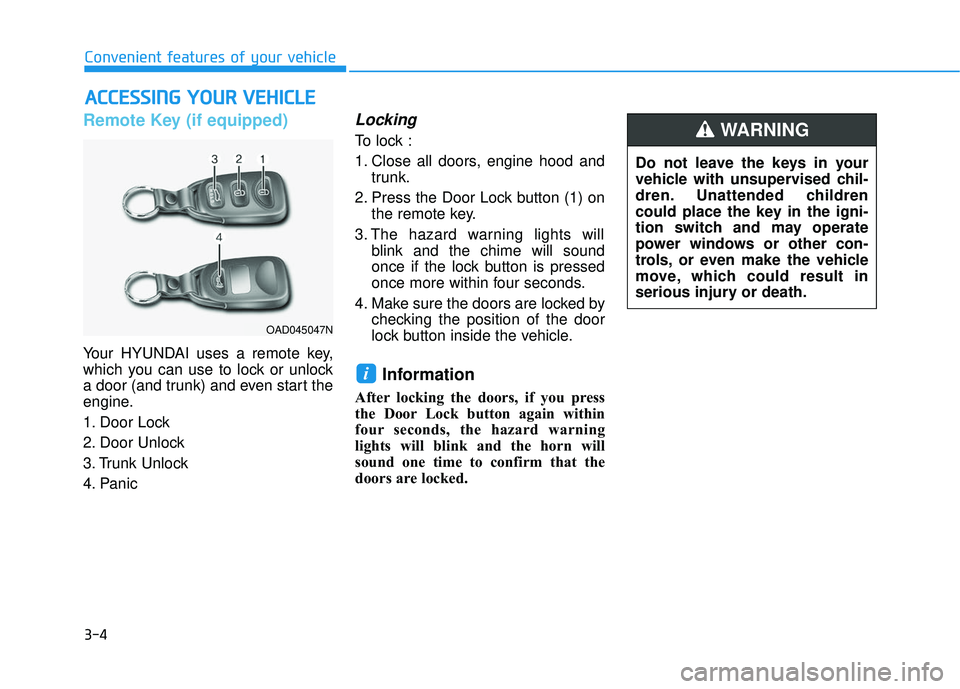
Your HYUNDAI uses a remote key,
which you can use to lock or unlock
a door (and trunk) and even start the
engine.
1. Door Lock
2. Door Unlock
3. Trunk Unlock
4. Panic
Locking
To lock :
1. Close all doors, engine hood andtrunk.
2. Press the Door Lock button (1) on the remote key.
3. The hazard warning lights will blink and the chime will sound
once if the lock button is pressed
once more within four seconds.
4. Make sure the doors are locked by checking the position of the door
lock button inside the vehicle.
Information
After locking the doors, if you press
the Door Lock button again within
four seconds, the hazard warning
lights will blink and the horn will
sound one time to confirm that the
doors are locked.
i
A AC
CC
CE
E S
SS
SI
IN
N G
G
Y
Y O
O U
UR
R
V
V E
EH
H I
IC
C L
LE
E
OAD045047N
Do not leave the keys in your
vehicle with unsupervised chil-
dren. Unattended children
could place the key in the igni-
tion switch and may operate
power windows or other con-
trols, or even make the vehicle
move, which could result in
serious injury or death.
WARNING
Page 99 of 586
3-5
Convenient features of your vehicle
Unlocking
To unlock:
1. Press the Door Unlock button (2)on the remote key.
2. The driver’s door will unlock. The hazard warning lights will blink two
times.
Two press unlock setting: If you press the Door Unlock but-
ton again within four seconds,
then all the doors will unlock.
Two press unlock setting can be changed according to owner's
preference. Press and hold both
Door Lock and Door Unlock but-
tons at the same time until hazard
warning lights blink. Now all doors
will unlock when Door Unlock but-
ton is pressed one time. To
change the setting back, repeat
this procedure.
Information
After unlocking the doors, the doors
will lock automatically after 30 sec-
onds unless a door is opened.
Trunk unlocking
To unlock:
1. Press and hold the Trunk Unlock button (3) on the remote key for
more than one second.
2. The hazard warning lights will blink two times.
Once the trunk is opened and then
closed, the trunk will lock automati-
cally.
Information
• After unlocking the trunk, the trunk will lock automatically.
• The word "HOLD" is written on the button to inform you that you must
press and hold the button for more
than one second.
Panic button (if equipped)
Press and hold the Panic button (4)
for more than one second. The horn
sounds and hazard warning lights
flash for about 30 seconds.
To cancel the panic mode, press any
button on the remote key.
Start-up
For more information, refer to the
"Key Ignition Switch" section in chap-
ter 5.
To prevent damaging the remote
key:
• Keep the remote key away fromwater or any liquid and fire. If the
inside of the remote key gets
damp (due to drinks or mois-
ture), or is heated, internal cir-
cuit may malfunction, excluding
the car from the warranty.
Avoid dropping or throwing the remote key.
Protect the remote key from extreme temperatures.
NOTICE
i
i
3
Page 102 of 586
3-8
Convenient features of your vehicle
Smart Key (if equipped)
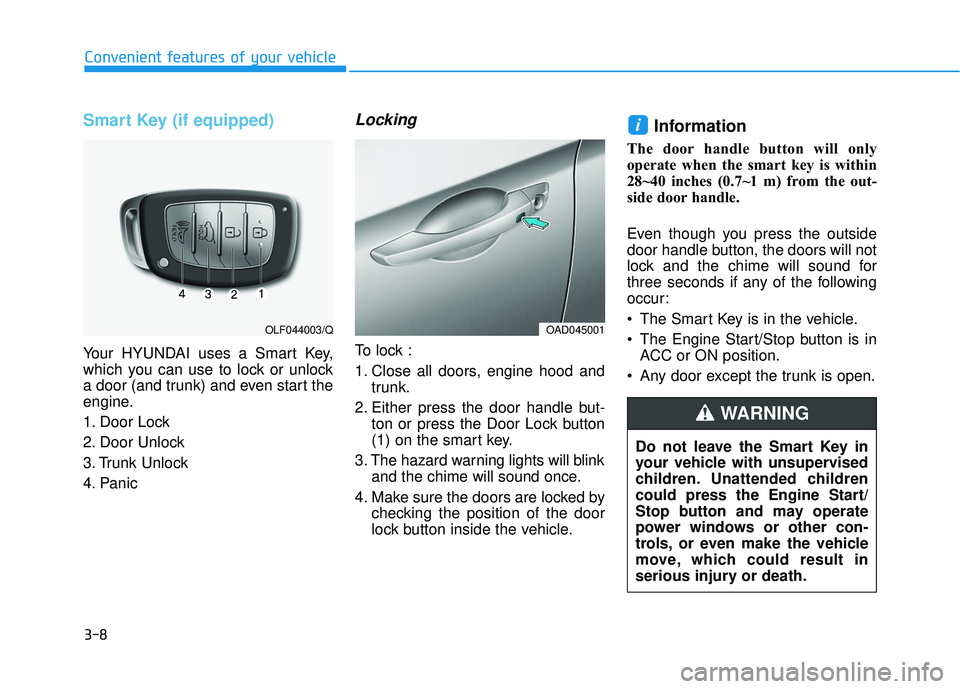
Your HYUNDAI uses a Smart Key,
which you can use to lock or unlock
a door (and trunk) and even start the
engine.
1. Door Lock
2. Door Unlock
3. Trunk Unlock
4. Panic
Locking
To lock :
1. Close all doors, engine hood andtrunk.
2. Either press the door handle but- ton or press the Door Lock button
(1) on the smart key.
3. The hazard warning lights will blink and the chime will sound once.
4. Make sure the doors are locked by checking the position of the door
lock button inside the vehicle.
Information
The door handle button will only
operate when the smart key is within
28~40 inches (0.7~1 m) from the out-
side door handle.
Even though you press the outside
door handle button, the doors will not
lock and the chime will sound for
three seconds if any of the following
occur:
The Smart Key is in the vehicle.
The Engine Start/Stop button is inACC or ON position.
Any door except the trunk is open.
i
OAD045001OLF044003/Q
Do not leave the Smart Key in
your vehicle with unsupervised
children. Unattended children
could press the Engine Start/
Stop button and may operate
power windows or other con-
trols, or even make the vehicle
move, which could result in
serious injury or death.
WARNING