2017 HYUNDAI ELANTRA SE run flat
[x] Cancel search: run flatPage 77 of 586

2-52
Safety system of your vehicle
10. Side pressure sensors
11. Driver's knee air bag module
12. Emergency Fastening Device System
13. Occupant classification system
The SRSCM (Supplemental
Restraint System Control Module)
continually monitors all SRS compo-
nents while the Engine Start/Stop
button is in the ON position to deter-
mine if a crash impact is severe
enough to require air bag deploy-
ment or pre-tensioner seat belt
deployment.
SRS warning light
The SRS (Supplement Restraint
System) air bag warning light on the
instrument panel displays the air bag
symbol depicted in the illustration.
The system checks the air bag elec-
trical system for malfunctions. The
light indicates that there is a potential
malfunction with your air bag system,
which could include your side and
curtain air bags used for rollover pro-
tection.
If your SRS malfunctions, the air
bag may not inflate properly dur-
ing an accident increasing the
risk of serious injury or death.
If any of the following condi-
tions occur, your SRS is mal-
functioning:
The light does not turn on for
approximately six seconds
when the ignition switch is in
the ON position.
The light stays on after illumi-
nating for approximately six
seconds.
The light comes on while the
vehicle is in motion.
The light blinks when the
engine is running.
Have an authorized HYUNDAI
dealer inspect the SRS as soon
as possible if any of these con-
ditions occur.
WARNING
Page 368 of 586
5-48
Driving your vehicle
Limitations of the System
The driver must be cautious in the
below situations, because the sys-
tem may not detect other vehicles or
objects in certain circumstances.
- The vehicle drives on a curved roador through a tollgate.
- The sensor is polluted with rain, snow, mud, etc.
- The rear bumper where the sensor is located is covered with a foreign
object such as a bumper sticker, a
bumper guard, a bike stand, etc.
- The rear bumper is damaged, or the sensor is out of the original
default position.
- The vehicle height gets lower or higher due to heavy loading in a
trunk, abnormal tire pressure, etc.
- The vehicle drives in inclement weather such as heavy rain or
snow.
- There is a fixed object near the vehicle, such as a guardrail.
- A big vehicle is near such as a bus or truck. - A motorcycle or bicycle is near.
- A flat trailer is near.
- If the vehicle has started at the
same time as the vehicle next to
you and has accelerated.
- When the other vehicle passes at a very fast speed.
- While changing lanes.
- While going down or up a steep road where the height of the lane is
different.
- When the other vehicle approaches very close.
- When a trailer or carrier is installed.
- When the temperature of the rear bumper is high.
- When the sensors are blocked by the other vehicles, walls or parking-
lot pillars.
- When the detected vehicle also moves back, as your vehicle drives
back.
- If there are small objects in the detecting area such as a shopping
cart or a baby carriage.
- If there is a low height vehicle such as a sports car. - When other vehicles are close to
your vehicle.
- When the vehicle in the next lane moves two lanes away from you
OR when the vehicle two lanes
away moves to the next lane from
you.
- When driving through a narrow road with many trees or bushes.
Information
This device complies with Part 15 of
the FCC rules.
Operation is subject to the following
two conditions:
1. This device may not cause harmful interference, and
2. This device must accept any inter- ference received, including interfer-
ence that may cause undesired
operation.
i
Page 436 of 586
6-11
What to do in an emergency
6
If any of the below happens, have
the system checked by an author-
ized HYUNDAI dealer.
1. The Low Tire Pressure TPMSMalfunction Indicator does not
illuminate for 3 seconds when
the ignition switch is placed to
the ON position or engine is
running.
2. The TPMS Malfunction Indicator remains illuminated after blink-
ing for approximately 1 minute.
3. The Low Tire Pressure LCD dis- play remains illuminated
Low Tire Pressure
Telltale
Low Tire Pressure LCD
Display with Position Indicator
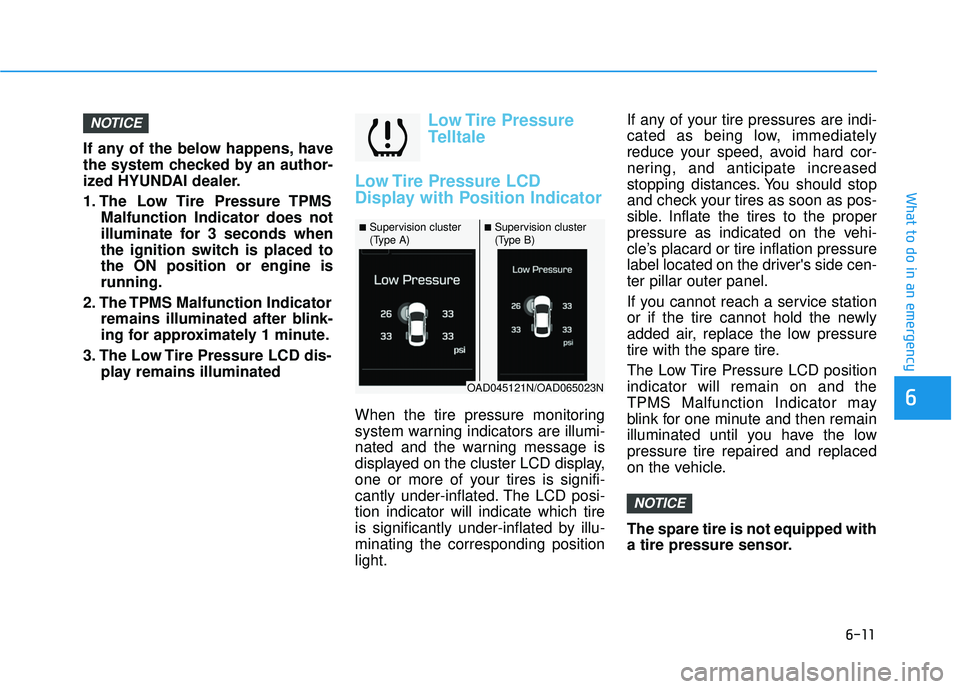
When the tire pressure monitoring
system warning indicators are illumi-
nated and the warning message is
displayed on the cluster LCD display,
one or more of your tires is signifi-
cantly under-inflated. The LCD posi-
tion indicator will indicate which tire
is significantly under-inflated by illu-
minating the corresponding position
light. If any of your tire pressures are indi-
cated as being low, immediately
reduce your speed, avoid hard cor-
nering, and anticipate increased
stopping distances. You should stop
and check your tires as soon as pos-
sible. Inflate the tires to the proper
pressure as indicated on the vehi-
cle’s placard or tire inflation pressure
label located on the driver's side cen-
ter pillar outer panel.
If you cannot reach a service station
or if the tire cannot hold the newly
added air, replace the low pressure
tire with the spare tire.
The Low Tire Pressure LCD position
indicator will remain on and the
TPMS Malfunction Indicator may
blink for one minute and then remain
illuminated until you have the low
pressure tire repaired and replaced
on the vehicle.
The spare tire is not equipped with
a tire pressure sensor.
NOTICE
NOTICE
■Supervision cluster
(Type A)■Supervision cluster
(Type B)
OAD045121N/OAD065023N
Page 449 of 586
6-24
The Tire Mobility Kit is not designed
or intended as a permanent tire
repair method and is to be used for
one tire only.
This instruction shows you step by
step how to temporarily seal the
puncture simply and reliably.
Read the section "Notes on the safe
use of the Tire Mobility Kit".Notes on the safe use of theTire Mobility Kit
Park your car at the side of the
road so that you can work with the
Tire Mobility Kit away from moving
traffic.
To be sure your vehicle will not move, even when you’re on fairly
level ground, always set your park-
ing brake.
Only use the Tire Mobility Kit for sealing/inflation passenger car
tires. Only punctured areas located
within the tread region of the tire
can be sealed using the tire mobil-
ity kit.
Do not use on motorcycles, bicy- cles or any other type of tires.
When the tire and wheel are dam- aged, do not use Tire Mobility Kit
for your safety.
Use of the Tire Mobility Kit may not be effective for tire damage larger
than approximately 0.24 inch (6
mm).
Please contact the nearest
HYUNDAI dealership if the tire
cannot be made roadworthy with
the Tire Mobility Kit. Do not use the Tire Mobility Kit, if a
flat tire or an under-inflated tire is
further severely damaged by being
continuously driven.
Do not remove any foreign objects such as nails or screws that have
penetrated the tire.
Provided the car is outdoors, leave the engine running. Otherwise
operating the compressor may
eventually drain the car battery.
Never leave the Tire Mobility Kit unattended while it is being used.
Do not leave the compressor run- ning for more than 10 minutes at a
time or it may overheat.
Do not use the Tire Mobility Kit if the ambient temperature is below
-22°F (-30°C).
What to do in an emergency
Page 453 of 586
6-28
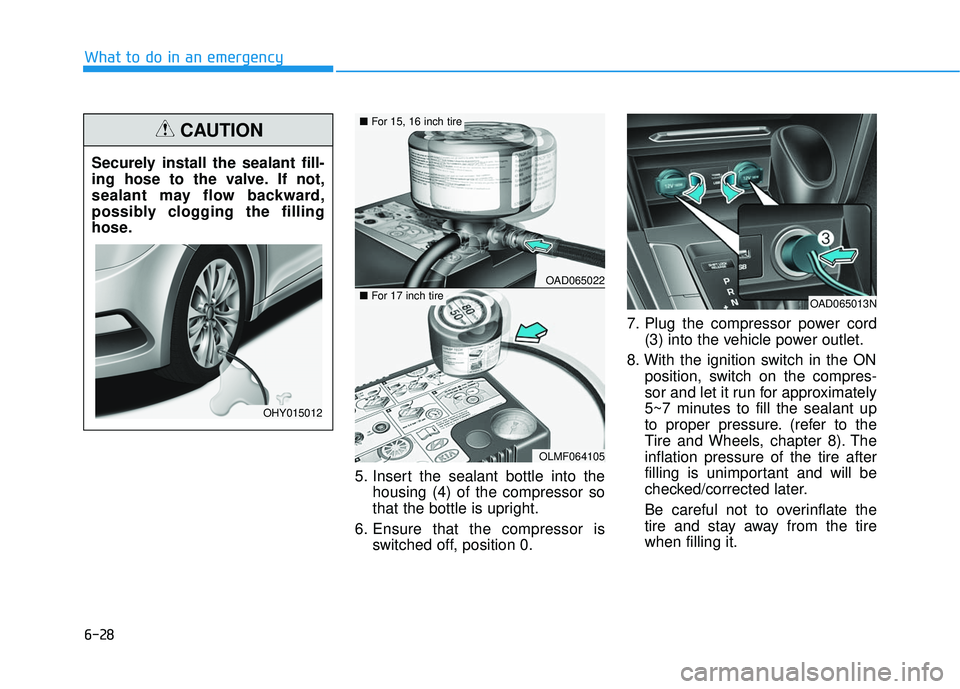
What to do in an emergency5. Insert the sealant bottle into thehousing (4) of the compressor so
that the bottle is upright.
6. Ensure that the compressor is switched off, position 0. 7. Plug the compressor power cord
(3) into the vehicle power outlet.
8. With the ignition switch in the ON position, switch on the compres-
sor and let it run for approximately
5~7 minutes to fill the sealant up
to proper pressure. (refer to the
Tire and Wheels, chapter 8). The
inflation pressure of the tire after
filling is unimportant and will be
checked/corrected later.
Be careful not to overinflate the
tire and stay away from the tire
when filling it.
Securely install the sealant fill-
ing hose to the valve. If not,
sealant may flow backward,
possibly clogging the filling
hose.
CAUTION
OHY015012
OAD065022
OLMF064105
■
For 15, 16 inch tire
■For 17 inch tireOAD065013N
Page 455 of 586
6-30
What to do in an emergency
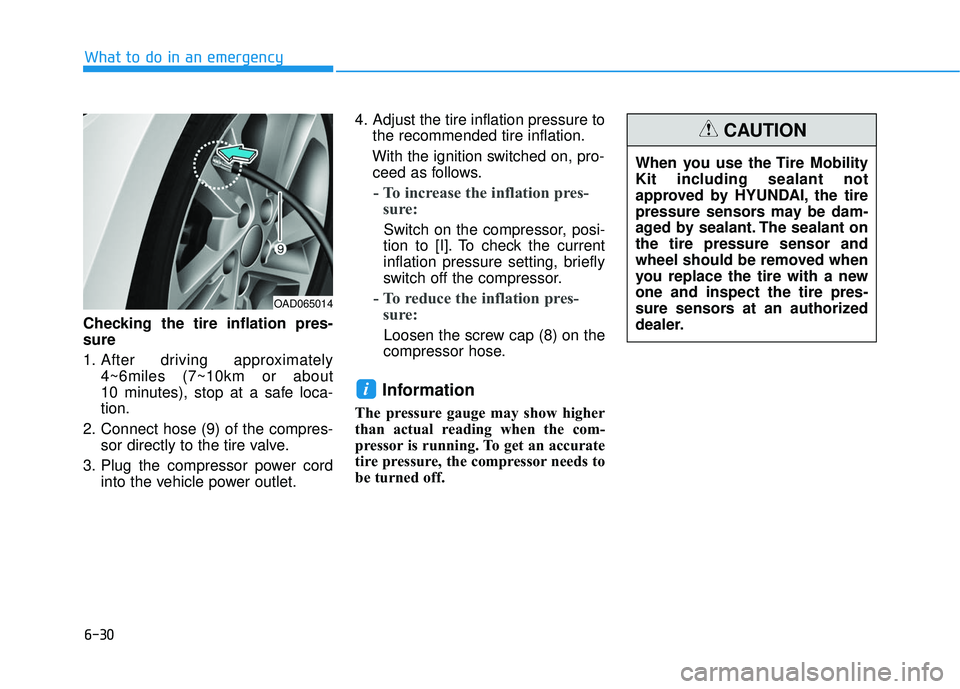
Checking the tire inflation pres-
sure
1. After driving approximately 4~6miles (7~10km or about
10 minutes), stop at a safe loca-
tion.
2. Connect hose (9) of the compres- sor directly to the tire valve.
3. Plug the compressor power cord into the vehicle power outlet. 4. Adjust the tire inflation pressure to
the recommended tire inflation.
With the ignition switched on, pro- ceed as follows.
- To increase the inflation pres- sure:
Switch on the compressor, posi-
tion to [I]. To check the current
inflation pressure setting, briefly
switch off the compressor.
- To reduce the inflation pres- sure:
Loosen the screw cap (8) on the
compressor hose.
Information
The pressure gauge may show higher
than actual reading when the com-
pressor is running. To get an accurate
tire pressure, the compressor needs to
be turned off.
i
OAD065014
When you use the Tire Mobility
Kit including sealant not
approved by HYUNDAI, the tire
pressure sensors may be dam-
aged by sealant. The sealant on
the tire pressure sensor and
wheel should be removed when
you replace the tire with a new
one and inspect the tire pres-
sure sensors at an authorized
dealer.
CAUTION
Page 585 of 586
I-12
Tires and wheels .............................................................7-44All season tires ...........................................................7-57
Checking tire inflation pressure .................................7-46
Compact spare tire replacement .................................7-49
Low aspect ratio tires .................................................7-58
Radial-ply tires ...........................................................7-58
Recommended cold tire inflation pressures ...............7-45
Snow tires ...................................................................5-57
Summer tires ..............................................................7-57
Tire care ......................................................................7-\
44
Tire maintenance ........................................................7-50
Tire replacement .........................................................7-48
Tire rotation ................................................................7-47
Tire sidewall labeling .................................................7-50
Tire terminology and definitions ................................7-54
Tire traction ................................................................7-49
Wheel alignment and tire balance ..............................7-48
Wheel replacement .....................................................7-49
Towing ........................................................................\
....6-32
Trailer towing................................................................5-105
Transmission shift indicator............................................3-67
Trip computer Conventional cluster...................................................3-98
Supervision cluster ...................................................3-102
Trunk ........................................................................\
.......3-52 Emergency trunk safety release .................................3-54
Smart trunk .................................................................3-55 Trunk room lamp ..........................................................3-116
Turn signals ...................................................................3-112
USB charger ..................................................................3-156
User settings mode..........................................................3-93
Vanity mirror lamp ........................................................3-117
Vehicle break-in process ...................................................F-9
Vehicle certification label ...............................................8-10
Vehicle data collection and event data recorders ...........F-10
Vehicle identification number (VIN) ..............................8-10
Vehicle load limit ..........................................................5-100
Tire loading information label..................................5-101
Vehicle modifications .......................................................F-9
Vehicle stability management (VSM).............................5-36
Volume and weight ...........................................................8-6
Index
U
V