Page 313 of 586
4-61
Multimedia System
4
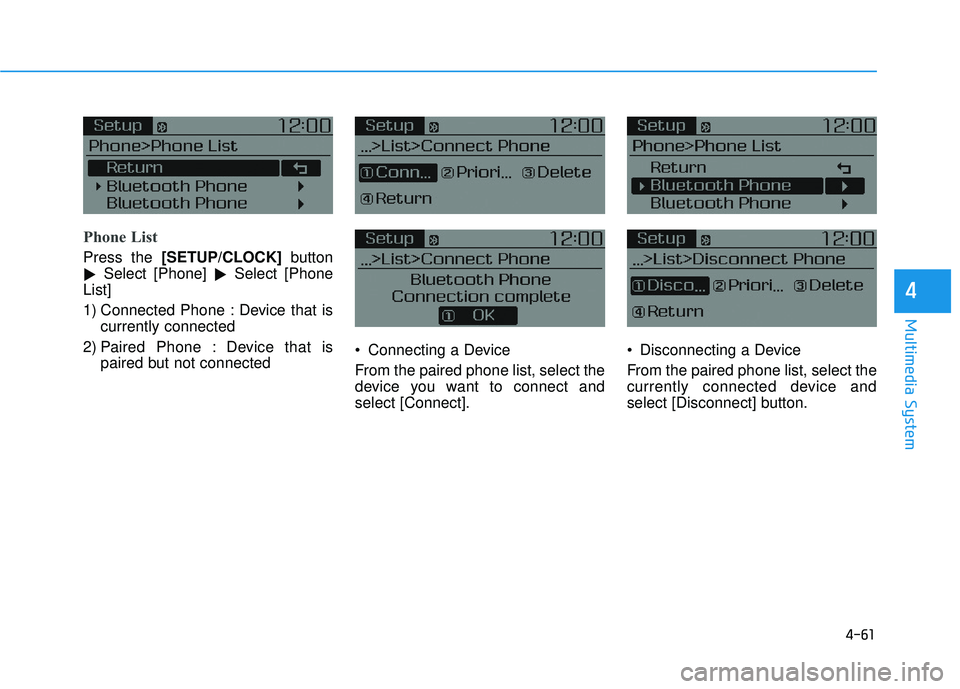
Phone List
Press the [SETUP/CLOCK] button
� Select [Phone]
�Select [Phone
List]
1) Connected Phone : Device that is currently connected
2) Paired Phone : Device that is paired but not connected Connecting a Device
From the paired phone list, select the
device you want to connect and
select [Connect]. Disconnecting a Device
From the paired phone list, select the
currently connected device and
select [Disconnect] button.
Page 315 of 586
![HYUNDAI ELANTRA SE 2017 Owners Manual 4-63
Multimedia System
4
Pairing a New Device
Press the [SETUP/CLOCK] button
� Select [Phone]
�Select [Pair
Phone]
Bluetooth®Wireless Technology
devices can be paired with the audio
system.
For more](/manual-img/35/56090/w960_56090-314.png "HYUNDAI ELANTRA SE 2017 Owners Manual 4-63
Multimedia System
4
Pairing a New Device
Press the [SETUP/CLOCK] button
� Select [Phone]
�Select [Pair
Phone]
Bluetooth®Wireless Technology
devices can be paired with the audio
system.
For more")
4-63
Multimedia System
4
Pairing a New Device
Press the [SETUP/CLOCK] button
� Select [Phone]
�Select [Pair
Phone]
Bluetooth®Wireless Technology
devices can be paired with the audio
system.
For more information, refer to the
“Pairing through Phone Setup” sec-
tion within
Bluetooth®Wireless
Technology.
Viewing Paired Phone List
Press the [SETUP/CLOCK] button
� Select [Phone]
�Select [Phone
List]
This feature is used to view mobile
phones that have been paired with
the audio system. Upon selecting a
paired phone, the setup menu is dis-
played.
For more information, refer to the
“Setting
Bluetooth®Wireless Technology
Connection” section within
Bluetooth®
Wireless Technology. 1) Connect/Disconnect Phone :
Connect/Disconnects currently
selected phone
2) Change Priority : Sets currently selected phone to highest connec-
tion priority
3) Delete : Deletes the currently selected phone
4) Return : Moves to the previous screen
To learn more about whether your mobile phone supports contact
downloads, refer to your mobile
phone user’s manual.
The contacts for only the connect- ed phone can be downloaded
Page 316 of 586
![HYUNDAI ELANTRA SE 2017 Owners Manual 4-64
Multimedia System
Downloading Contacts
Press the [SETUP/CLOCK] button
� Select [Phone]
�Select [Contacts
Download]
As the contacts are downloaded
from the mobile phone, a download
progress bar is](/manual-img/35/56090/w960_56090-315.png "HYUNDAI ELANTRA SE 2017 Owners Manual 4-64
Multimedia System
Downloading Contacts
Press the [SETUP/CLOCK] button
� Select [Phone]
�Select [Contacts
Download]
As the contacts are downloaded
from the mobile phone, a download
progress bar is")
4-64
Multimedia System
Downloading Contacts
Press the [SETUP/CLOCK] button
� Select [Phone]
�Select [Contacts
Download]
As the contacts are downloaded
from the mobile phone, a download
progress bar is displayed.
Upon downloading phone con- tacts, the previous corresponding
data is deleted.
This feature may not be supported in some mobile phones.
Voice Recognition may not operate while contacts are being down-
loaded.
Outgoing Volume
Press the [SETUP/CLOCK] button
� Select [Phone]
�Select
[Outgoing Volume]
Use
TUNEknob to adjust the outgo-
ing volume level.
While on a call, the volume can be
changed by using the [SEEK
TRACK] button.
Turning Bluetooth System Off
Press the [SETUP/CLOCK] button
� Select [Phone]
�Select
[Bluetooth System Off]
Once
Bluetooth®Wireless Technology
is turned off,
Bluetooth®Wireless
Technology related features will not
be supported within the audio sys-
tem.
To turn
Bluetooth®Wireless
Technology back on, go to
[SETUP/CLOCK] �[Phone] and
select “Yes”.
Page 317 of 586
4-65
Multimedia System
4
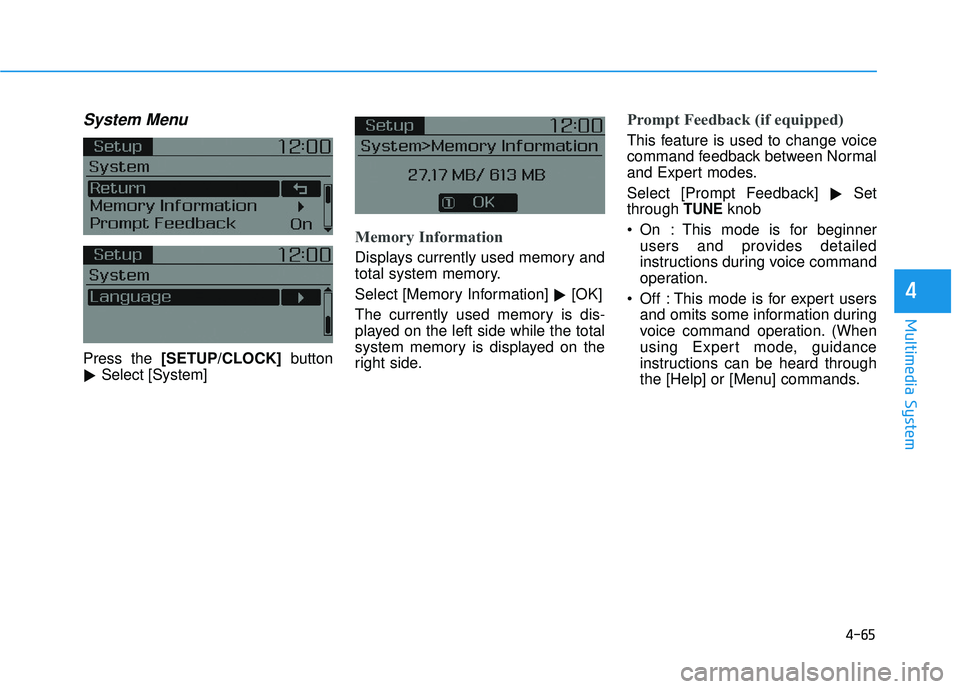
System Menu
Press the [SETUP/CLOCK] button
� Select [System]
Memory Information
Displays currently used memory and
total system memory.
Select [Memory Information]
�[OK]
The currently used memory is dis-
played on the left side while the total
system memory is displayed on the
right side.
Prompt Feedback (if equipped)
This feature is used to change voice
command feedback between Normal
and Expert modes.
Select [Prompt Feedback] �Set
through
TUNEknob
On : This mode is for beginner users and provides detailed
instructions during voice command
operation.
Off : This mode is for expert users and omits some information during
voice command operation. (When
using Expert mode, guidance
instructions can be heard through
the [Help] or [Menu] commands.
Page 503 of 586
7-43
7
Maintenance
By jump starting
After a jump start from a good bat-
tery, drive the vehicle for 20-30 min-
utes before it is shutoff. The vehicle
may not restart if you shut it off
before the battery had a chance to
adequately recharge. See "Jump
Starting" in chapter 6 for more infor-
mation on jump starting procedures.
Information
An inappropriately disposedbattery can be harmful to
the environment and human
health.
Dispose the battery according to your
local law(s) or regulation.
Reset features
Some items need to be reset after
the battery has been discharged or
the battery has been disconnected.
See chapter 3 for:
Power Windows
Trip Computer
Climate Control System
Clock
Audio System
Sunroof
i
(Continued)
Watch the battery during
charging, and stop or reduce
the charging rate if the battery
cells begin boiling violently.
The negative battery cable
must be removed first and
installed last when the battery
is disconnected. Disconnect
the battery charger in the fol-
lowing order:
(1) Turn off the battery charg- er main switch.
(2) Unhook the negative
clamp from the negative
battery terminal.
(3) Unhook the positive clamp from the positive battery
terminal.
Always use a genuine
HYUNDAI approved battery
when you replace the battery.
Page 522 of 586
7-62
Maintenance
In an emergency, if you do not have
a spare fuse, use a fuse of the same
rating from a circuit you may not
need for operating the vehicle, such
as the cigarette lighter fuse.
If the headlamps or other electrical
components do not work and the
fuses are OK, check the fuse panel
in the engine compartment. If a fuse
is blown, it must be replaced with the
same rating.
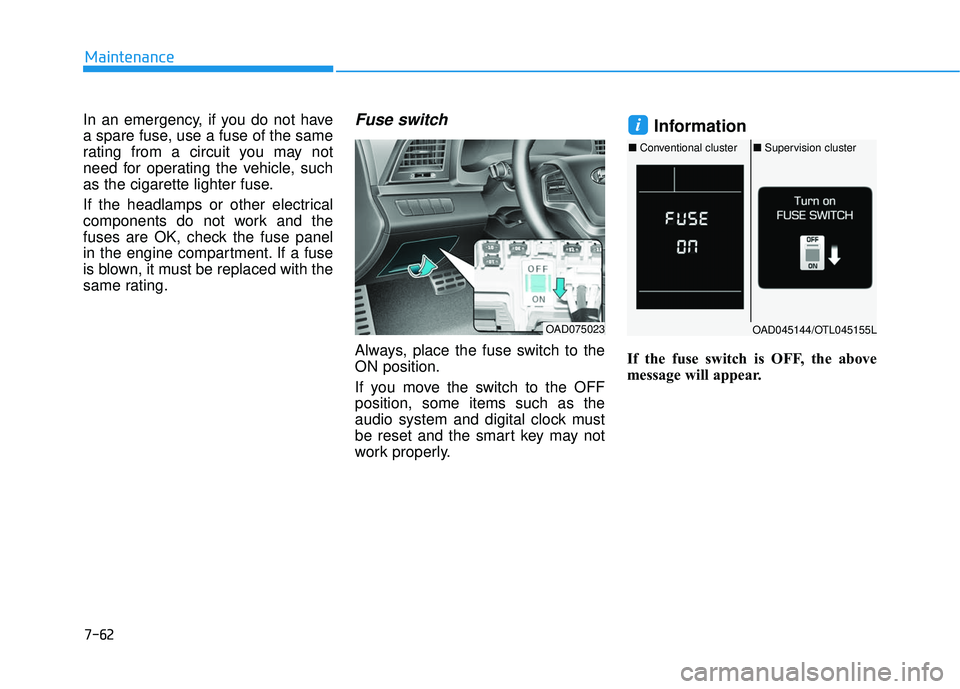
Fuse switch
Always, place the fuse switch to the
ON position.
If you move the switch to the OFF
position, some items such as the
audio system and digital clock must
be reset and the smart key may not
work properly.
Information
If the fuse switch is OFF, the above
message will appear.
i
OAD075023OAD045144/OTL045155L
■ Conventional cluster ■Supervision cluster
Page 544 of 586
7-84
Maintenance
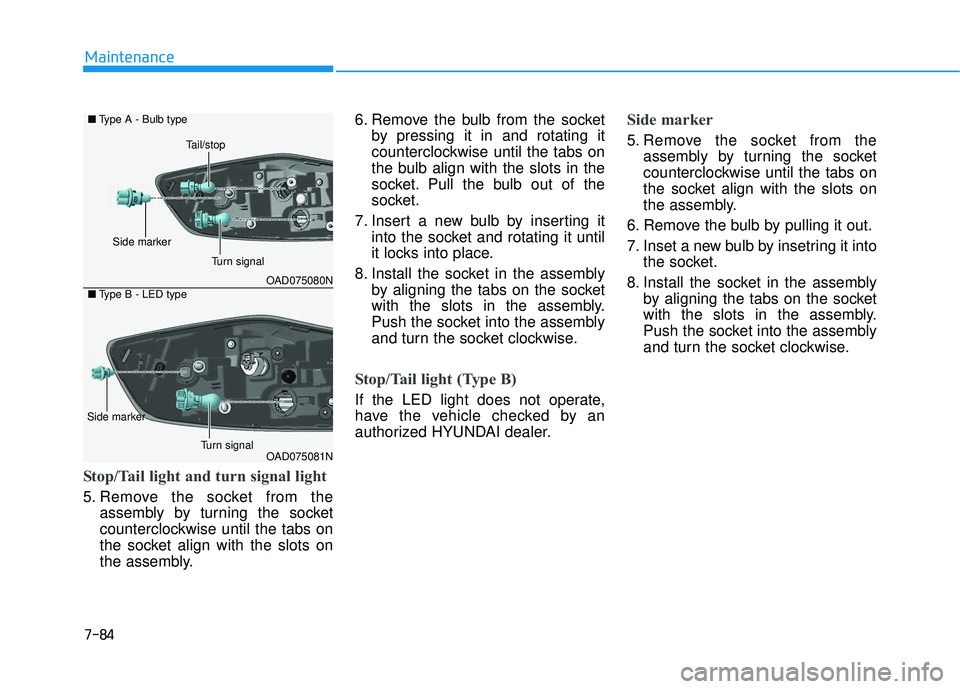
Stop/Tail light and turn signal light
5. Remove the socket from theassembly by turning the socket
counterclockwise until the tabs on
the socket align with the slots on
the assembly. 6. Remove the bulb from the socket
by pressing it in and rotating it
counterclockwise until the tabs on
the bulb align with the slots in the
socket. Pull the bulb out of the
socket.
7. Insert a new bulb by inserting it into the socket and rotating it until
it locks into place.
8. Install the socket in the assembly by aligning the tabs on the socket
with the slots in the assembly.
Push the socket into the assembly
and turn the socket clockwise.
Stop/Tail light (Type B)
If the LED light does not operate,
have the vehicle checked by an
authorized HYUNDAI dealer.
Side marker
5. Remove the socket from theassembly by turning the socket
counterclockwise until the tabs on
the socket align with the slots on
the assembly.
6. Remove the bulb by pulling it out.
7. Inset a new bulb by insetring it into the socket.
8. Install the socket in the assembly by aligning the tabs on the socket
with the slots in the assembly.
Push the socket into the assembly
and turn the socket clockwise.
OAD075080N
OAD075081N
■
Type A - Bulb type
■ Type B - LED type
Turn signal
Side marker
Tail/stop
Side marker
Turn signal