Page 252 of 637

3-157
Convenient features of your vehicle
3
• Keep your drinks sealed while
driving to prevent spilling your
drink. If liquid spills, it may get
into the vehicle's electrical/elec-
tronic system and damage elec-
trical/electronic parts.
• When cleaning spilled liquids, do
not dry the cup holder at high
temperature. This may damage
the cup holder.
Sunvisor
To use a sunvisor, pull it downward.
To use a sunvisor for a side window,
pull it downward, unsnap it from the
bracket (1) and swing it to the side (2).
To use the vanity mirror, pull down the
sunvisor and slide the mirror cover (3).
Adjust the sunvisor forward or back-
ward (4) as needed (if equipped). Use
the ticket holder (5) to hold tickets.
Information
Close the vanity mirror cover securely
and return the sunvisor to its original
position after use.
Do not put several tickets in the
ticket holder at one time. This
could cause damage to the ticket
holder.
NOTICE
i
NOTICE
Keep cans or bottles out of
direct sun light and do not put
them in a hot vehicle. It may
explode.
WARNING
OAD045418L
For your safety, do not block your
view when using the sunvisor.
WARNING
Page 256 of 637
3-161
Convenient features of your vehicle
3
Floor mat anchor(s)
(if equipped)
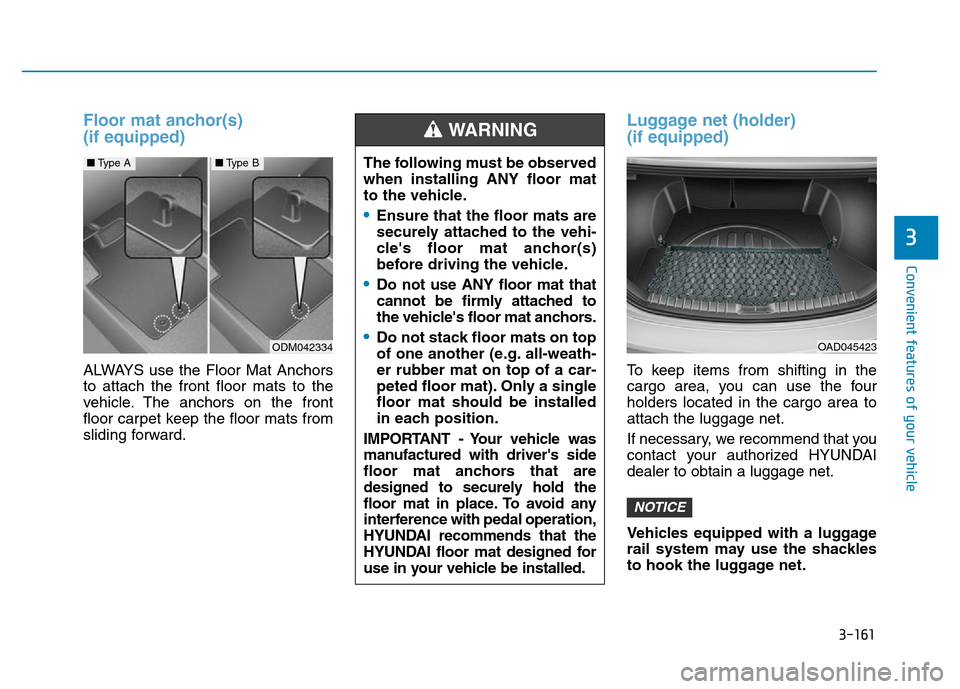
ALWAYS use the Floor Mat Anchors
to attach the front floor mats to the
vehicle. The anchors on the front
floor carpet keep the floor mats from
sliding forward.
Luggage net (holder)
(if equipped)
To keep items from shifting in the
cargo area, you can use the four
holders located in the cargo area to
attach the luggage net.
If necessary, we recommend that you
contact your authorized HYUNDAI
dealer to obtain a luggage net.
Vehicles equipped with a luggage
rail system may use the shackles
to hook the luggage net.
NOTICE
The following must be observed
when installing ANY floor mat
to the vehicle.
•Ensure that the floor mats are
securely attached to the vehi-
cle's floor mat anchor(s)
before driving the vehicle.
•Do not use ANY floor mat that
cannot be firmly attached to
the vehicle's floor mat anchors.
•Do not stack floor mats on top
of one another (e.g. all-weath-
er rubber mat on top of a car-
peted floor mat). Only a single
floor mat should be installed
in each position.
IMPORTANT - Your vehicle was
manufactured with driver's side
floor mat anchors that are
designed to securely hold the
floor mat in place. To avoid any
interference with pedal operation,
HYUNDAI recommends that the
HYUNDAI floor mat designed for
use in your vehicle be installed.
WARNING
ODM042334
■Type A■Type B
OAD045423
Page 299 of 637
![Hyundai Elantra 2017 Owners Manual 4-42
Multimedia System
Clock Display when Power is OFF
Select [Clock Disp.(Pwr Off)] �Set
[On/Off]
• [On] :Displays time/date on screen
• [Off] : Turn off.
Automatic RDS Time (With RDS)
This optio](/manual-img/35/14543/w960_14543-298.png "Hyundai Elantra 2017 Owners Manual 4-42
Multimedia System
Clock Display when Power is OFF
Select [Clock Disp.(Pwr Off)] �Set
[On/Off]
• [On] :Displays time/date on screen
• [Off] : Turn off.
Automatic RDS Time (With RDS)
This optio")
4-42
Multimedia System
Clock Display when Power is OFF
Select [Clock Disp.(Pwr Off)] �Set
[On/Off]
• [On] :Displays time/date on screen
• [Off] : Turn off.
Automatic RDS Time (With RDS)
This option is used to automatically
set the time by synchronizing with
RDS.
Select [Automatic RDS Time] �Set
[On/Off]
• [On] : Turn on Automatic Time
• [Off] : Turn off.
Information
Because some local radio stations do
not support an automatic RDS time
function, some RDS Transmitters may
not provide correct time.
If incorrect time is displayed, set it
manually following the Step “Clock
Settings” in previous page.
With the Phone Button
(if equipped)
Press the [SETUP/CLOCK] button �
Select [Phone]To pair a
Bluetooth®Wireless
Technology enabled mobile
phone, authentication and con-
nection processes are first
required. As a result, you cannot
pair your mobile phone while driv-
ing the vehicle. First park your
vehicle before use.
Pair Phone
Select [Pair Phone]
➀Search for device names as dis-
played on your mobile phone and
connect.
❈SSP : Secure Simple Pairing
Non SSP supported device :
➁After a few moments, a screen is
displayed where the passkey is
entered.
NOTICE
i
Page 306 of 637
![Hyundai Elantra 2017 Owners Manual 4-49
Multimedia System
4
With the Phone Button
(if equipped)
Press the [SETUP/CLOCK] button�
Select [Phone]To pair a
Bluetooth®Wireless
Technology enabled mobile
phone, authentication and con-
necti](/manual-img/35/14543/w960_14543-305.png "Hyundai Elantra 2017 Owners Manual 4-49
Multimedia System
4
With the Phone Button
(if equipped)
Press the [SETUP/CLOCK] button�
Select [Phone]To pair a
Bluetooth®Wireless
Technology enabled mobile
phone, authentication and con-
necti")
4-49
Multimedia System
4
With the Phone Button
(if equipped)
Press the [SETUP/CLOCK] button�
Select [Phone]To pair a
Bluetooth®Wireless
Technology enabled mobile
phone, authentication and con-
nection processes are first
required. As a result, you cannot
pair your mobile phone while driv-
ing the vehicle. First park your
vehicle before use.
Pair Phone
Select [Pair Phone]
➀Search for device names as dis-
played on your mobile phone and
connect.
❈SSP : Secure Simple Pairing
Non SSP supported device :
➁After a few moments, a screen is
displayed where the passkey is
entered.Enter the passkey “0000” to pair your
Bluetooth®Wireless Technology
device with the car audio system.
SSP supported device :
➁After a few moments, a screen is
displayed 6 digits passkey.
Check the passkey on your
Bluetooth®Wireless Technology
device and confirm.
The device name and passkey will
be displayed on the screen for up to
3 minutes. If pairing is not completed
within the 3 minutes, the mobile
phone pairing process will automati-
cally be canceled.
➂Pairing completion is displayed.
In some mobile phones, pairing will
automatically be followed by connec-
tion.
It is possible to pair up to five
Bluetooth®Wireless Technology
enabled mobile phones.
NOTICE
Page 348 of 637

4-91
Multimedia System
4
• Device : Name of device as shown
when searching from your
Bluetooth®Wireless Technology
device
• Passkey : Passkey used to pair the
device
➂From your
Bluetooth®Wireless
Technology device (i.e. Mobile
Phone), search and select your
car audio system.
❈SSP : Secure Simple Pairing
Non SSP supported device :
➃After a few moments, a screen is
displayed where the passkey is
entered.
Enter the passkey “0000” to pair
your
Bluetooth®Wireless Technology
device with the car audio system.SSP supported device :
➃After a few moments, a screen is dis-
played 6 digits passkey.
Check the passkey on your
Bluetooth®Wireless Technology
device and confirm.
➄Once pairing is complete, the fol-
lowing screen is displayed.
Some phones (i.e., iPhone
®, Android
and Blackberry phones) may offer an
option to allow acceptance of all
future Bluetooth
®connection requests
by default.” and “Visit http://www.
Hyundai.com/#/bluetooth for addition-
al information on pairing your
Bluetooth
®-enabled mobile phone,
and to view a phone compatibility list.
Information
If Bluetooth®Wireless Technology
devices are paired but none are cur-
rently connected, pressing the
[PHONE]button or the [CALL]but-
ton on the steering wheel controls dis-
plays the following screen. Press the
[Pair] button to pair a new device or
press the [Connect] to connect a previ-
ously paired device.
i
Page 354 of 637
![Hyundai Elantra 2017 Owners Manual 4-97
Multimedia System
4
Bluetooth®Wireless Technology
(Type B-5, Type B-6)
When No Devices have been
Paired
➀Press the [PHONE]button or the
[CALL] button on the steering
wheel controls. The follo](/manual-img/35/14543/w960_14543-353.png "Hyundai Elantra 2017 Owners Manual 4-97
Multimedia System
4
Bluetooth®Wireless Technology
(Type B-5, Type B-6)
When No Devices have been
Paired
➀Press the [PHONE]button or the
[CALL] button on the steering
wheel controls. The follo")
4-97
Multimedia System
4
Bluetooth®Wireless Technology
(Type B-5, Type B-6)
When No Devices have been
Paired
➀Press the [PHONE]button or the
[CALL] button on the steering
wheel controls. The following
screen is displayed.
➁Press the
[OK] button to enter the
Pair Phone screen.• Car Name : Name of device as
shown when searching from your
Bluetooth®Wireless Technology
device
• Passkey : Passkey used to pair the
device
➂From your
Bluetooth®Wireless
Technology device (i.e. Mobile
Phone), search and select your
car audio system.
❈SSP : Secure Simple Pairing
Non SSP supported device :
➃After a few moments, a screen is
displayed where the passkey is
entered.
Enter the passkey “0000” to pair
your
Bluetooth®Wireless Technology
device with the car audio system.SSP supported device :
➃After a few moments, a screen is dis-
played 6 digits passkey.
Check the passkey on your
Bluetooth®Wireless Technology
device and confirm.
➄Once pairing is complete, the fol-
lowing screen is displayed.
Some phones (i.e., iPhone
®, Android
and Blackberry phones) may offer an
option to allow acceptance of all
future Bluetooth
®connection requests
by default." and "Visit http://www.
Hyundai.com/#/bluetooth for addi-
tional information on pairing your
Bluetooth
®-enabled mobile phone,
and to view a phone compatibility list.
Page 390 of 637

5-4
Driving your vehicle
Before entering the vehicle
• Be sure all windows, outside mir-
ror(s), and outside lights are clean
and unobstructed.
• Remove frost, snow, or ice.
• Visually check the tires for uneven
wear and damage.
• Check under the vehicle for any
sign of leaks.
• Be sure there are no obstacles
behind you if you intend to back up.
Before starting
• Make sure the hood, the trunk, and
the doors are securely closed and
locked.
• Adjust the position of the seat and
steering wheel.
• Adjust the inside and outside
rearview mirrors.
• Verify all the lights work.
• Fasten your seatbelt. Check that all
passengers have fastened their
seatbelts.
• Check the gauges and indicators in
the instrument panel and the mes-
sages on the instrument display
when the ignition switch is in the
ON position.
• Check that any items you are car-
rying are stored properly or fas-
tened down securely.
BEFORE DRIVING
To reduce the risk of SERIOUS
INJURY or DEATH, take the fol-
lowing precautions:
•ALWAYS wear your seat belt.
All passengers must be prop-
erly belted whenever the vehi-
cle is moving. For more infor-
mation, refer to "Seat Belts" in
chapter 2.
•Always drive defensively.
Assume other drivers or pedes-
trians may be careless and
make mistakes.
•Stay focused on the task of
driving. Driver distraction can
cause accidents.
•Leave plenty of space between
you and the vehicle in front of
you.
WARNING
Page 413 of 637
5-27
Driving your vehicle
5
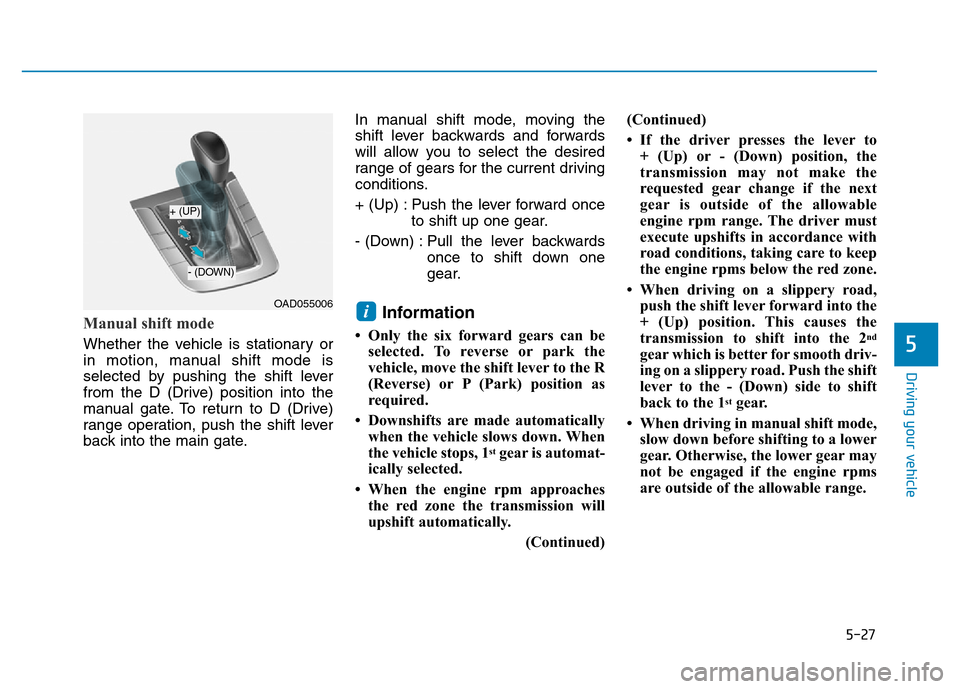
Manual shift mode
Whether the vehicle is stationary or
in motion, manual shift mode is
selected by pushing the shift lever
from the D (Drive) position into the
manual gate. To return to D (Drive)
range operation, push the shift lever
back into the main gate.In manual shift mode, moving the
shift lever backwards and forwards
will allow you to select the desired
range of gears for the current driving
conditions.
+ (Up) : Push the lever forward once
to shift up one gear.
- (Down) : Pull the lever backwards
once to shift down one
gear.
Information
• Only the six forward gears can be
selected. To reverse or park the
vehicle, move the shift lever to the R
(Reverse) or P (Park) position as
required.
• Downshifts are made automatically
when the vehicle slows down. When
the vehicle stops, 1
stgear is automat-
ically selected.
• When the engine rpm approaches
the red zone the transmission will
upshift automatically.
(Continued)(Continued)
• If the driver presses the lever to
+ (Up) or - (Down) position, the
transmission may not make the
requested gear change if the next
gear is outside of the allowable
engine rpm range. The driver must
execute upshifts in accordance with
road conditions, taking care to keep
the engine rpms below the red zone.
• When driving on a slippery road,
push the shift lever forward into the
+ (Up) position. This causes the
transmission to shift into the 2
nd
gear which is better for smooth driv-
ing on a slippery road. Push the shift
lever to the - (Down) side to shift
back to the 1
stgear.
• When driving in manual shift mode,
slow down before shifting to a lower
gear. Otherwise, the lower gear may
not be engaged if the engine rpms
are outside of the allowable range.
iOAD055006
+ (UP)
- (DOWN)