Page 320 of 637
4-63
Multimedia System
4
Information
- Using the Discs
• This device has been manufactured
to be compatible with software
bearing the following logo marks.
• Do not clean discs with chemical
solutions, such as record sprays,
antistatic sprays, antistatic liquids,
benzene, or thinners.
• After using a disc, put the disc back
in its original case to prevent disc
scratches.
• Hold discs by their edges or within
the center hole to prevent damages
to disc surfaces.
• Do not introduce foreign substances
into the disc insert/eject slot.
Introducing foreign substances
could damage the device interior.
• Do not insert two discs simultane-
ously.
• When using CD-R/CD-RW discs,
differences in disc reading and play-
ing times may occur depending on
the disc manufacturer, production
method and the recording method
as used by the user.
(Continued)(Continued)
• Clean fingerprints and dust off the
disc surface (coated side) with a soft
cloth.
• The use of CD-R/CD-RW discs
attached with labels may result in
disc slot jams or difficulties in disc
removal. Such discs may also result
in noise while playing.
• Some CD-R/CD-RW discs may not
properly operate depending on the
disc manufacturer, production
method and the record method as
used by the user. If problems persist,
trying using a different CD as con-
tinued use may result in malfunc-
tions.
• The performance of this product
may differ depending on the CDRW
Drive Software.
• Copy-protected CDs such as Stype
CDs may not function in the device.
DATA discs cannot be played.
(However, such discs may still oper-
ate but will do so abnormally.)
(Continued)(Continued)
• Do not use abnormally shaped discs
(8cm, heart-shaped, octagonshaped)
as such discs could lead to malfunc-
tions.
• If the disc is straddled on the disc
slot without removal for 10 seconds,
the disc will automatically be re-
inserted into the disc player.
• Only genuine audio CDs are sup-
ported. Other discs may result in
recognition failure (e.g. copy CDR,
CDs with labels)
i
Page 352 of 637
4-95
Multimedia System
4
Information
• When an incoming call pop-up is
displayed, most Audio and SETUP
mode features are disabled. Only
the call volume will operate.
• The telephone number may not be
properly displayed in some mobile
phones.
• When a call is answered with the
mobile phone, the call mode will
automatically revert to Private
mode.
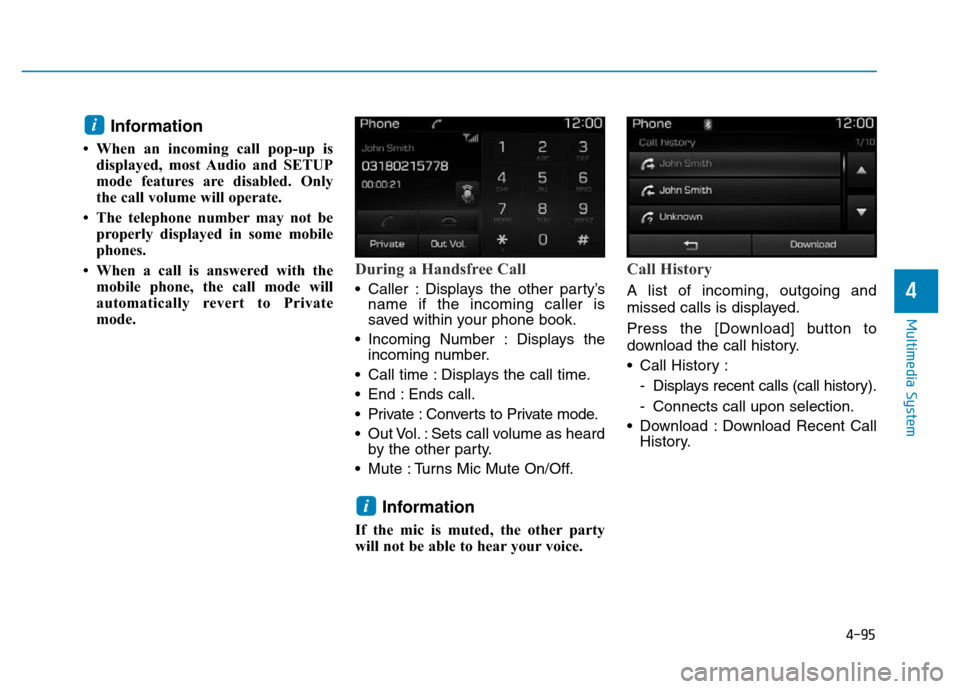
During a Handsfree Call
• Caller : Displays the other party’s
name if the incoming caller is
saved within your phone book.
• Incoming Number : Displays the
incoming number.
• Call time : Displays the call time.
• End : Ends call.
• Private : Converts to Private mode.
• Out Vol. : Sets call volume as heard
by the other party.
• Mute : Turns Mic Mute On/Off.
Information
If the mic is muted, the other party
will not be able to hear your voice.
Call History
A list of incoming, outgoing and
missed calls is displayed.
Press the [Download] button to
download the call history.
• Call History :
- Displays recent calls (call history).
- Connects call upon selection.
• Download : Download Recent Call
History.
i
i
Page 358 of 637
4-101
Multimedia System
4
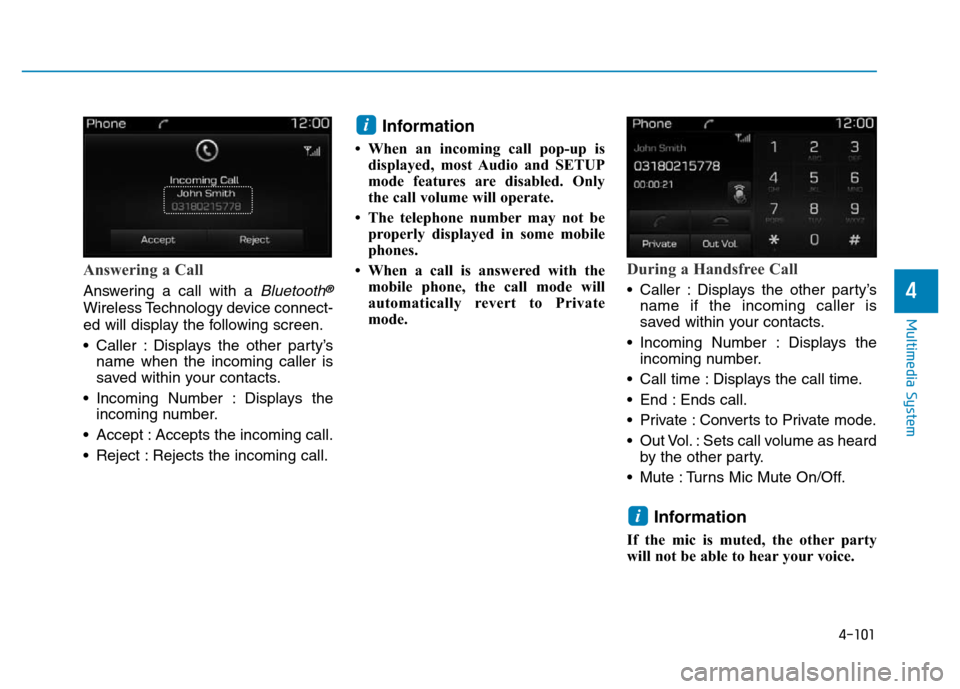
Answering a Call
Answering a call with a Bluetooth®
Wireless Technology device connect-
ed will display the following screen.
• Caller : Displays the other party’s
name when the incoming caller is
saved within your contacts.
• Incoming Number : Displays the
incoming number.
• Accept : Accepts the incoming call.
• Reject : Rejects the incoming call.
Information
• When an incoming call pop-up is
displayed, most Audio and SETUP
mode features are disabled. Only
the call volume will operate.
• The telephone number may not be
properly displayed in some mobile
phones.
• When a call is answered with the
mobile phone, the call mode will
automatically revert to Private
mode.
During a Handsfree Call
• Caller : Displays the other party’s
name if the incoming caller is
saved within your contacts.
• Incoming Number : Displays the
incoming number.
• Call time : Displays the call time.
• End : Ends call.
• Private : Converts to Private mode.
• Out Vol. : Sets call volume as heard
by the other party.
• Mute : Turns Mic Mute On/Off.
Information
If the mic is muted, the other party
will not be able to hear your voice.
i
i
Page 447 of 637

5-61
Driving your vehicle
5
When the ECO mode is activated:
• The acceleration response may be
slightly reduced as the accelerator
pedal is depressed moderately.
• The air conditioner performance
may be limited.
• The shift pattern of the automatic
transmission may change.
• The engine noise may get louder.
The above situations are normal
conditions when the ECO mode is
activated to improve fuel efficiency.Limitation of the ECO mode oper-
ation:
If the following conditions occur while
the ECO mode is operating, the sys-
tem operation is limited even though
there is no change in the ECO indi-
cator.
• When the coolant temperature is
low:
The system will be limited until
engine performance becomes nor-
mal.
• When driving up a hill:
The system will be limited to gain
power when driving uphill because
engine torque is restricted.
• When driving the vehicle with the
automatic transmission or the dual
clutch transmission gear shift lever
in manual shift mode:
The system will be limited accord-
ing to the shift location.
• When the accelerator pedal is
deeply depressed for a few sec-
onds:
The system will be limited, judging
that the driver wants to speed up.SPORT mode
SPORT mode manages
the driving dynamics by
automatically adjusting the
steering effort, the engine
and transmission control logic for
enhanced driver performance.
• When SPORT mode is selected by
pressing the DRIVE MODE button,
the SPORT indicator (orange
color) will illuminate.
• Whenever the engine is restarted,
the Drive Mode will revert back to
NORMAL mode. If SPORT mode is
desired, re-select SPORT mode
from the DRIVE MODE button.
• When SPORT mode is activated:
- The engine rpm will tend to
remain raised over a certain
length of time even after releas-
ing the accelerator
- Upshifts are delayed when accel-
erating
Information
In SPORT mode, the fuel efficiency
may decrease.
i
Page 545 of 637
7-34
Maintenance
Checking the engine oil and
filter
We recommend that the engine oil
and filter be replaced by an author-
ized HYUNDAI dealer.Used engine oil may cause irri-
tation or cancer of the skin if
left in contact with the skin for
prolonged periods of time. Used
engine oil contains chemicals
that have caused cancer in lab-
oratory animals. Always protect
your skin by washing your
hands thoroughly with soap
and warm water as soon as pos-
sible after handling used oil.
WARNING
Page 582 of 637
7-71
7
Maintenance
Fuse NameSymbolFuse ratingCircuit Protected
SPARE210ASpare
CLUSTER10AInstrument Cluster
A/BAG IND7.5AInstrument Cluster, A/C Control Module
MDPS17.5AMDPS Unit
MODULE77.5AFront Seat Warmer Control Module, Front Air Ventilation Seat Control Module,
Rear Seat Warmer Control Module, Sunroof Motor, Electro Chromic Mirror
A/CON17.5AE/R Junction Block (RLY.12, RLY.1B, RLY.13B), Ionizer, A/C Control Module
HTD STRG15ABCM
WIPER125AWiper Motor, PCM Block (Front Wiper (Low) Relay)
HTD MIRR10ADriver Power Outside Mirror, Passenger Power Outside Mirror, A/C Control Module,
ECM/PCM
DR LOCK20ADoor Lock Relay, Door Unlock Relay
MULTI MEDIA15ADC-DC Converter, Audio, A/V & Navigation Head Unit, MTH E-Call Module
MODULE17.5ADriver/Passenger Smart Key Outside Handle, Driver Door Module, Passenger Door Module
Driver’s side fuse panel
Page 587 of 637
Maintenance
7-76
SymbolRelay NO.Relay NameType
R LY. 1 BPTC HEATER #2 RelayMICRO
R LY. 2COOLING FAN2 RelayMICRO
R LY. 3PDM #3 (IG1) RelayMICRO
R LY. 4START #1 RelayMICRO
R LY. 5 ASUB FUEL PUMP RelayMICRO
R LY. 5 BFUEL HEATER Relay (D4FB)MICRO
R LY. 6PDM #4 (IG2) RelayMICRO
R LY. 7B/ALARM HORN RelayMICRO
R LY. 8PDM #2 (ACC) RelayMICRO
R LY. 9COOLING FAN1 RelayMINI
R LY. 1 0REAR HEATED RelayMINI
R LY. 1 1 AA/C RelayMICRO
R LY. 1 1 BPTC HEATER #1 Relay
(D4FB)MICRO
SymbolRelay NO.Relay NameType
R LY. 1 2BLOWER RelayMICRO
R LY. 1 3 AH/LAMP HI RelayMICRO
R LY. 1 3 BPTC HEATER #3 Relay
(D4FB)MICRO
R LY. 1 4POWER OUTLET Relay
(D4FB)MICRO
Page 589 of 637
Maintenance
7-78
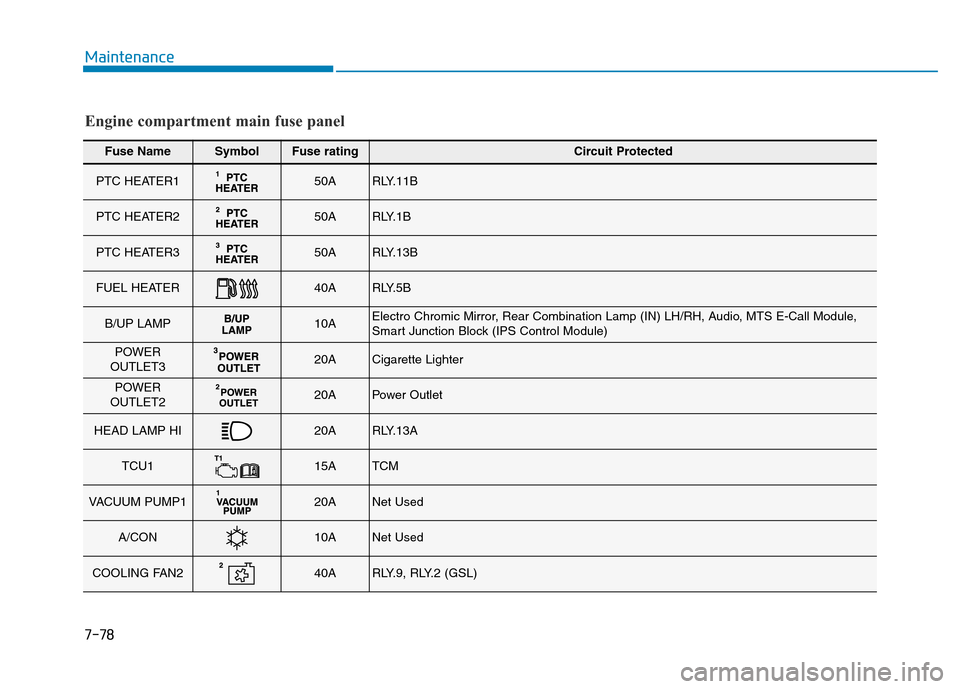
Fuse NameSymbolFuse ratingCircuit Protected
PTC HEATER150ARLY.11B
PTC HEATER250ARLY.1B
PTC HEATER350ARLY.13B
FUEL HEATER40ARLY.5B
B/UP LAMP10AElectro Chromic Mirror, Rear Combination Lamp (IN) LH/RH, Audio, MTS E-Call Module,
Smart Junction Block (IPS Control Module)
POWER
OUTLET320ACigarette Lighter
POWER
OUTLET220APower Outlet
HEAD LAMP HI20ARLY.13A
TCU115ATCM
VACUUM PUMP120ANet Used
A/CON10ANet Used
COOLING FAN240ARLY.9, RLY.2 (GSL)
Engine compartment main fuse panel