2017 Hyundai Elantra engine
[x] Cancel search: enginePage 240 of 637

3-145
Convenient features of your vehicle
3
Information
• When using the air conditioning sys-
tem, monitor the temperature gauge
closely while driving up hills or in
heavy traffic when outside tempera-
tures are high. Air conditioning sys-
tem operation may cause engine
overheating. Continue to use the
blower fan but turn the air condi-
tioning system off if the temperature
gauge indicates engine overheating.
• When opening the windows in
humid weather air conditioning
may create water droplets inside the
vehicle. Since excessive water
droplets may cause damage to elec-
trical equipment, air conditioning
should only be used with the win-
dows closed.
Air conditioning system operation
tips
• If the vehicle has been parked in
direct sunlight during hot weather,
open the windows for a short time
to let the hot air inside the vehicle
escape.
• Use air conditioning to reduce
humidity and moisture inside the
vehicle on rainy or humid days.
• During air conditioning system
operation, you may occasionally
notice a slight change in engine
speed as the air conditioning com-
pressor cycles. This is a normal
system operation characteristic.
• Use the air conditioning system
every month only for a few minutes
to ensure maximum system per-
formance.
• When using the air conditioning
system, you may notice clear water
dripping (or even puddling) on the
ground under the passenger side
of the vehicle. This is a normal sys-
tem operation characteristic.• Operating the air conditioning sys-
tem in the recirculated air position
provides maximum cooling, how-
ever, continual operation in this
mode may cause the air inside the
vehicle to become stale.
• During cooling operation, you may
occasionally notice a misty air flow
because of rapid cooling and
humid air intake. This is a normal
system operation characteristic.
i
Page 253 of 637

3-158
Convenient features of your vehicle
Power outlet (if equipped)
The power outlet is designed to pro-
vide power for mobile telephones or
other devices designed to operate
with vehicle electrical systems. The
devices should draw less than 180
W(Watt) with the engine running.To prevent damage to the Power
Outlets :
• Use the power outlet only when
the engine is running and
remove the accessory plug after
use. Using the accessory plug
for prolonged periods of time
with the engine off could cause
the battery to discharge.
• Only use 12V electric acces-
sories which are less than 180
W(Watt) in electric capacity.
• Adjust the air-conditioner or
heater to the lowest operating
level when using the power out-
let.
• Close the cover when not in use.
(Continued)(Continued)
• Some electronic devices can
cause electronic interference
when plugged into a vehicle’s
power outlet. These devices may
cause excessive audio static
and malfunctions in other elec-
tronic systems or devices used
in your vehicle.
• Push the plug in as far as it will
go. If good contact is not made,
the plug may overheat and the
fuse may open.
• Plug in battery equipped electri-
cal/electronic devices with
reverse current protection. The
current from the battery may
flow into the vehicle's electri-
cal/electronic system and cause
system malfunction.
NOTICE
OAD045419
Avoid electrical shocks. Do not
place your fingers or foreign
objects (pin, etc.) into a power
outlet or touch the power outlet
with a wet hand.
WARNING
Page 263 of 637
4-6
Multimedia System
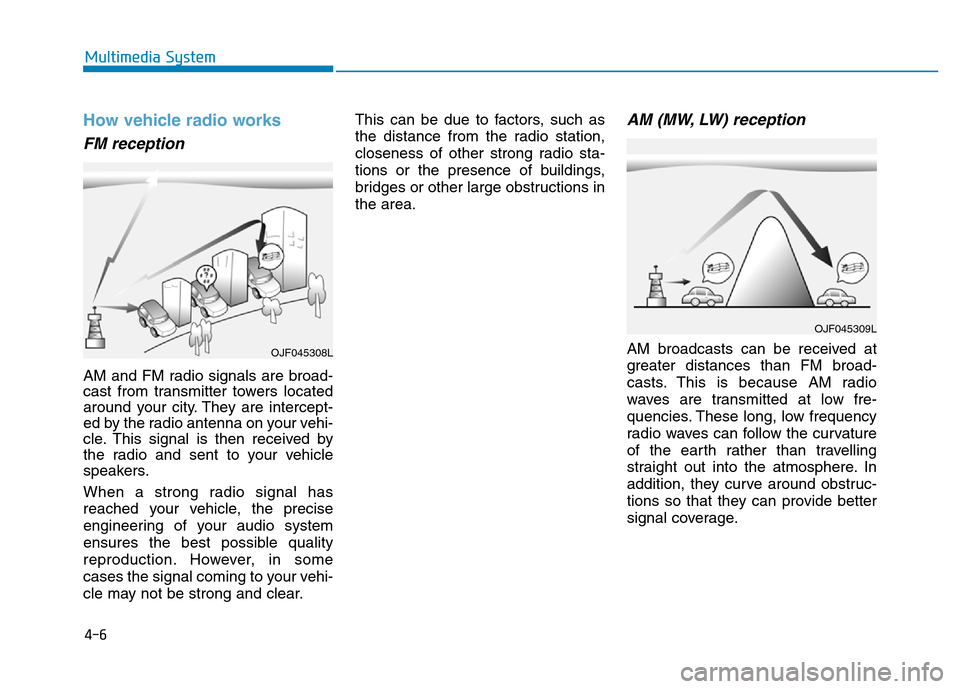
How vehicle radio works
FM reception
AM and FM radio signals are broad-
cast from transmitter towers located
around your city. They are intercept-
ed by the radio antenna on your vehi-
cle. This signal is then received by
the radio and sent to your vehicle
speakers.
When a strong radio signal has
reached your vehicle, the precise
engineering of your audio system
ensures the best possible quality
reproduction. However, in some
cases the signal coming to your vehi-
cle may not be strong and clear.This can be due to factors, such as
the distance from the radio station,
closeness of other strong radio sta-
tions or the presence of buildings,
bridges or other large obstructions in
the area.
AM (MW, LW) reception
AM broadcasts can be received at
greater distances than FM broad-
casts. This is because AM radio
waves are transmitted at low fre-
quencies. These long, low frequency
radio waves can follow the curvature
of the earth rather than travelling
straight out into the atmosphere. In
addition, they curve around obstruc-
tions so that they can provide better
signal coverage.
OJF045309L
OJF045308L
Page 280 of 637

4-23
Multimedia System
4
Information
- Using the USB Device
• To use an external USB device,
make sure the device is not connect-
ed when starting up the vehicle.
Connect the device after starting up.
• If you start the engine when the
USB device is connected, it may
damage the USB device. (USB flash-
drives are very sensitive to electric
shock.)
• If the engine is started up or turned
off while the external USB device is
connected, the external USB device
may not work.
• The System may not play inauthen-
tic MP3 or WMA files.
1) It can only play MP3 files with the
compression rate between 8Kbps ~
320Kbps.
2) It can only play WMA music files
with the compression rate between
8Kbps ~ 320Kbps.
• Take precautions for static electrici-
ty when connecting or disconnecting
the external USB device.
(Continued)(Continued)
• An encrypted MP3 PLAYER is not
recognizable.
• Depending on the condition of the
external USB device, the connected
external USB device can be unrec-
ognizable.
• When the formatted byte/sector set-
ting of External USB device is not
either 512BYTE or 2048BYTE, then
the device will not be recognized.
• Use only a USB device formatted to
FAT 12/16/32.
• USB devices without USB I/F
authentication may not be recogniz-
able.
• Make sure the USB connection ter-
minal does not come in contact with
the human body or other objects.
• If you repeatedly connect or discon-
nect the USB device in a short peri-
od of time, it may break the device.
• You may hear a strange noise when
connecting or disconnecting a USB
device.
(Continued)(Continued)
• If you disconnect the external USB
device during playback in USB
mode, the external USB device can
be damaged or may malfunction.
Therefore, disconnect the external
USB device when the audio is
turned off or in another mode. (e.g,
Radio, CD)
• Depending on the type and capacity
of the external USB device or the
type of the files stored in the device,
there is a difference in the time
taken for recognition of the device.
• Do not use the USB device for pur-
poses other than playing music files.
• Playing videos through the USB is
not supported.
(Continued)
i
Page 323 of 637

4-66
Multimedia System
Information
- Usingthe USB Device
• Connect the USB device after turn-
ing on the engine. The USB device
may become damaged if it is already
connected when the ignition is
turned on. The USB device may not
operate properly if the car ignition
is turned on or off with the USB
device connected.
• Heed caution to static electricity
when connecting/disconnecting USB
devices.
• Encoded MP3 Players will not be
recognized when connected as an
external device.
• When connecting an external USB
device, the device may not properly
recognize the USB is in some states.
• Only products formatted with
byte/sectors under 64Kbyte will be
recognized.
• This device recognizes USB devices
formatted in FAT 12/16/32 file for-
mats. This device does not recognize
files in NTFS file format.
(Continued)(Continued)
• Some USB devices may not be sup-
ported due to compatibility issues.
• Avoid contact between the USB con-
nector with bodily parts or foreign
objects.
• Repeated connecting/disconnecting
of USB devices within short periods
of time may result in product mal-
function.
• A strange noise may occur when dis-
connecting the USB.
• Make sure to connect/disconnect
external USB devices with the audio
power turned off.
• The amount of time required to rec-
ognize the USB device may differ
depending on the type, size or file
formats stored in the USB. Such dif-
ferences in time are not indications
of malfunctions.
• The device only supports USB
devices used to play music files.
• USB images and videos are not sup-
ported.
(Continued)(Continued)
• Do not use the USB I/F to charge
batteries or USB accessories that
generate heat. Such acts may lead to
worsened performance or damage
to the device.
• The device may not recognize the
USB device if separately purchased
USB hubs and extension cables are
being used. Connect the USB direct-
ly with the multimedia terminal of
the vehicle.
• When using mass storage USB
devices with separate logical drives,
only files saved to the root drive can
be played.
• Files may not properly operate if
application programs are installed
to the USBs.
• The device may not operate normal-
ly if MP3 Players, cellular phones,
digital cameras, or other electronic
devices (USB devices not recognized
as portable disk drives) are connect-
ed with the device.
(Continued)
i
Page 387 of 637

Driving your vehicle
Before driving.........................................................5-4
Before entering the vehicle ...........................................5-4
Before starting...................................................................5-4
Ignition switch ........................................................5-5
Key ignition switch ............................................................5-6
Engine Start/Stop button ..............................................5-11
Manual transmission............................................5-20
Manual transmission operation ...................................5-20
Good driving practices ...................................................5-22
Automatic transmission .......................................5-24
Automatic transmission operation ..............................5-24
Parking ...............................................................................5-29
Good driving practices ...................................................5-29
Dual clutch transmission .....................................5-31
Dual clutch transmission operation ............................5-31
Parking ...............................................................................5-39
Good driving practices ...................................................5-39
Braking system.....................................................5-41
Power brakes ...................................................................5-41
Disc brakes wear indicator ...........................................5-42
Rear drum brakes ...........................................................5-42
Parking brake ...................................................................5-42
Anti-lock Brake System (ABS) ....................................5-45
Electronic Stability Control (ESC)................................5-47
Vehicle Stability Management (VSM).........................5-50Hill-start Assist Control (HAC) .....................................5-52
Emergency Stop Signal (ESS) ......................................5-52
Good braking practices..................................................5-53
ISG (Idle Stop and Go) system ...........................5-54
To activate the ISG system ...........................................5-54
To deactivate the ISG system ......................................5-57
ISG system malfunction .................................................5-57
The battery sensor deactivation .................................5-59
Drive mode integrated control system .............5-60
Blind Spot Detection system (BSD) ..................5-62
BSD (Blind Spot Detection) /
LCA (Lane Change Assist) .............................................5-63
RCTA (Rear Cross Traffic Alert) ..................................5-66
Limitations of the system .............................................5-69
Cruise control .......................................................5-71
Cruise Control operation ...............................................5-71
Special driving conditions ...................................5-78
Hazardous driving conditions.......................................5-78
Rocking the vehicle ........................................................5-78
Smooth cornering ...........................................................5-79
Driving at night ................................................................5-79
Driving in the rain ...........................................................5-79
Driving in flooded areas ................................................5-80
Highway driving ...............................................................5-80
5
Page 389 of 637

5-3
Driving your vehicle
5
Carbon monoxide (CO) gas is toxic. Breathing CO can cause unconsciousness and death.
Engine exhaust contains carbon monoxide which cannot be seen or smelled.
Do not inhale engine exhaust.
If at any time you smell engine exhaust inside the vehicle, open the windows immediately. Exposure to CO can cause
unconsciousness and death by asphyxiation.
Be sure the exhaust system does not leak.
The exhaust system should be checked whenever the vehicle is raised to change the oil or for any other purpose. If
you hear a change in the sound of the exhaust or if you drive over something that strikes the underneath side of the
vehicle, we recommend that the exhaust system be checked as soon as possible by an authorized HYUNDAI dealer.
Do not run the engine in an enclosed area.
Letting the engine idle in your garage, even with the garage door open, is a hazardous practice. Run the engine only
long enough to start the engine and to move the vehicle out of the garage.
Avoid idling the engine for prolonged periods with people inside the vehicle.
If it is necessary to idle the engine for a prolonged period with people inside the vehicle, be sure to do so only in an
open area with the air intake set at "Fresh" and fan control set to high so fresh air is drawn into the interior.
Keep the air intakes clear.
To assure proper operation of the ventilation system, keep the ventilation air intakes located in front of the windshield
clear of snow, ice, leaves, or other obstructions.
If you must drive with the trunk open:
Close all windows.
Open instrument panel air vents.
Set the air intake control at "Fresh", the air flow control at "Floor" or "Face", and the fan control set to high.
WARNING
Page 392 of 637

5-6
Driving your vehicle
Key ignition switch
Whenever the front door is opened,
the ignition switch will illuminate, pro-
vided the ignition switch is not in the
ON position. The light will go off
immediately when the ignition switch
is turned on or go off after about 30
seconds when the door is closed. (if
equipped)
OYF059016
•NEVER turn the ignition switch
to the LOCK or ACC position
while the vehicle is in motion
except in an emergency. This
will result in the engine turning
off and loss of power assist for
the steering and brake sys-
tems. This may lead to loss of
directional control and braking
function, which could cause
an accident.
(Continued)
WARNING
(Continued)
•Before leaving the driver's
seat, always make sure the
shift lever is in 1
stgear (for
manual transmission vehicle)
or P (Park, for automatic trans-
mission/dual clutch transmis-
sion vehicle) position, apply
the parking brake, and turn
ignition switch to the LOCK
position.
Unexpected vehicle move-
ment may occur if these pre-
cautions are not followed.
OAD055082L