Page 258 of 520

Using MP3 CD Mode
Playing/Pausing MP3 Files
Once an MP3 disc is inserted the
mode will automatically start and
being playing.
While playing, press the TUNE
knob to pause and press again to
play.
✽ ✽NOTICE
• If there are numerous files and
folders within the disc, reading
time could take more than 10 sec-
onds and the list may not be dis-
played or song searches may not
operate. Once loading is complete,
try again.
Changing Files
Press the , keys to
select the previous or next file.
✽ ✽ NOTICE
• Pressing the key after the
file has been playing for 2 seconds
will start the current file from the
beginning.
• Pressing the key before the file has been playing for 1 seconds
will start the previous file.
Selecting from the List
Press the TUNE knob to search
and select for the desired files.
Once you find the desired file, press
the TUNE knob to start playing.
Rewinding / Fast-forwarding Files
While playing, press and hold the
, keys (over 0.8 sec-
onds) to rewind or fast-forward the
current file.
Scan
Press the key to play the first
10 seconds of each file.
Searching Folders
Select the folder by using the
, keys and press the
TUNE knob to select.
The first file within the selected fold-
er will begin playing.FOLDERFOLDER
SCAN
TRACKSEEK
TRACK
TRACK
TRACKSEEK
Features of your vehicle
179
4
Page 262 of 520

Using USB Mode
Playing/Pausing USB Files
Once a USB is connected, the mode
will automatically start and begin
playing a USB file.
While playing, press the TUNE
knob to pause and press again to
play.
✽ ✽NOTICE
• Loading may require additional
time if there are many files and
folders within the USB and result
in faulty list display or file search-
ing. Normal operations will
resume once loading is complete.
• The device may not support nor- mal operation when using a USB
memory type besides (Metal
Cover Type) USB Memory.
Changing Files
Press the , keys to
select the previous or next file.
✽ ✽ NOTICE
• Pressing the key after the
file has been playing for 2 seconds
will start the current file from the
beginning.
• Pressing the key before the file has been playing for 1 seconds
will start the previous file.
Selecting from the List
Press the TUNE knob to search
and select desired files.
Once you find the desired file, press
the TUNE knob to start playing.
Rewinding / Fast-forwarding Files
While playing, press and hold the
, keys (over 0.8 sec-
onds) to rewind or fast-forward the
current file.
Scan
Press the key to play the first
10 seconds of each file.SCAN
TRACKSEEK
TRACK
TRACK
TRACKSEEK
Features of your vehicle
183
4
Page 266 of 520

Using iPod Mode
Playing/Pausing iPod Songs
Once an iPod is connected, the
mode will automatically start and
begin playing an iPod song.
While playing, press the TUNE
knob to pause and press again to
play.
✽ ✽NOTICE
• iPods with unsupported communi-
cation protocols may not properly
operate in the audio system.
Changing Songs
Press the , keys to
select the previous or next file.
✽ ✽ NOTICE
• Pressing the key after the
song has been playing for 2 sec-
onds will start the current song
from the beginning.
• Pressing the key before the song has been playing for 1
seconds will start the previous
song.
• Slight time differences may exist depending your iPod product.
Rewinding / Fast-forwarding Songs
While playing, press and hold the
, keys (over 0.8 sec-
onds) to rewind or fast-forward the
current song.
Searching Categories
Use the TUNE knob to search
categories and press the knob to
select.
If you press the key within the
Category Menu, This button is used
to move to the previous category.
✽ ✽ NOTICE
• There are eight categories that can
be searched, including Playlists,
Artists, Albums, Genres, Songs,
Composers, Audiobooks and
Podcasts.
• If the search mode is accessed while playing a song, the most recently
searched category is displayed.
• Search steps upon initial connec- tion may differ depending on the
type of iPod device.
MENU
TRACKSEEK
TRACK
TRACK
TRACKSEEK
Features of your vehicle
187
4
Page 268 of 520
✽
✽NOTICE
• If an external device connector is
connected with the AUX terminal,
then AUX mode will automatically
operate. Once the connector is dis-
connected, the previous mode will
be restored.
• AUX mode can be used only when an external audio player (cam-
corder, car VCR, etc.) has been
connected.
• The AUX volume can be con- trolled separately from other
audio modes.
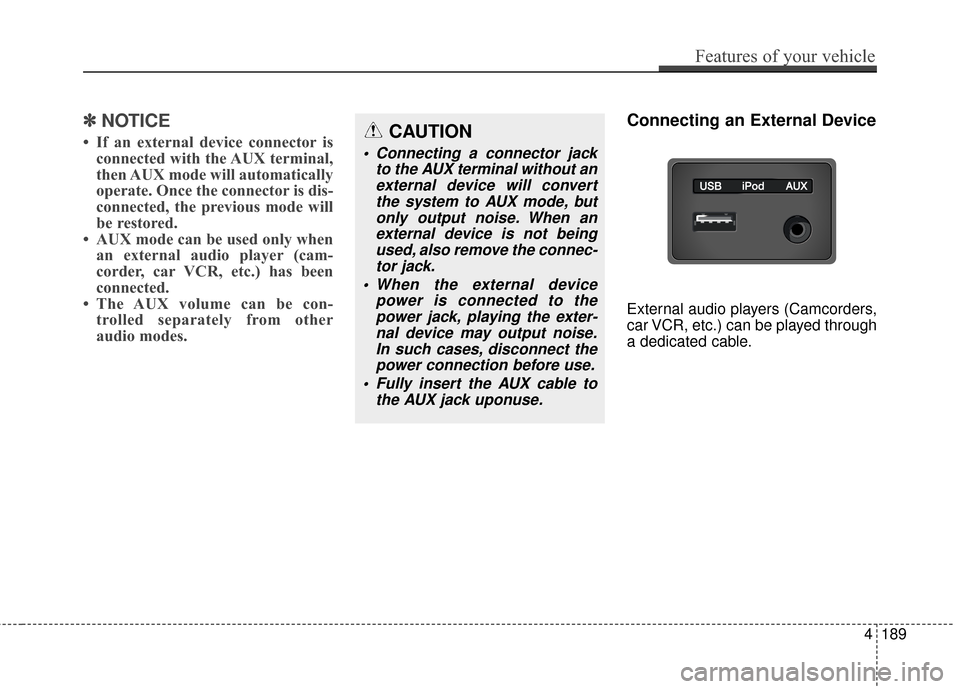
Connecting an External Device
External audio players (Camcorders,
car VCR, etc.) can be played through
a dedicated cable.
Features of your vehicle
189
4
CAUTION
Connecting a connector jack
to the AUX terminal without anexternal device will convertthe system to AUX mode, butonly output noise. When anexternal device is not beingused, also remove the connec-tor jack.
When the external device power is connected to thepower jack, playing the exter-nal device may output noise.In such cases, disconnect thepower connection before use.
Fully insert the AUX cable to the AUX jack uponuse.
Page 273 of 520

Features of your vehicle
194
4
Bluetooth®Wireless
Technology A UDIO MODE
Using Bluetooth®Wireless
Technology Audio Mode
Playing/Pausing Bluetooth®
Wireless TechnologyAudio
Once a Bluetooth®Wireless
Technology device is connected, the
mode will automatically start.
While playing, press the TUNE
knob to pause and press TUNE knob to play.
✽ ✽NOTICE
The play/pause feature may operate
differently depending on the mobile
phone.
Changing Files
Press the , key to
move to the previous or next file.
Setting Connection
If a Bluetooth®Wireless Technology
device has not been connected,
press the key [Phone] but-
ton to display the
Bluetooth®
Wireless Technology connection
screen.
It is possible to use the pair phone,
connect/disconnect and delete fea-
tures from your
Bluetooth®Wireless
Technology phone.
✽ ✽ NOTICE
• If music is not yet playing from
your mobile device after converting
to Bluetooth
®Wireless Technology
Audio mode, pressing the play but-
ton once may start playing the
mode. Check to see that music is
playing from the Bluetooth
®
Wireless Technology device after
converting to Bluetooth®Wireless
Technology Audio Mode.
SETUP
TRACKSEEK
Page 276 of 520

4197
Features of your vehicle
✽
✽NOTICE
•Bluetooth®Wireless Technology
features supported within the
vehicle are as follows. Some fea-
tures may not be supported
depending on your Bluetooth
®
Wireless Technology device.
- Outgoing/Incoming Handsfree
calls
- Operations during a call (Switch to Private, Switch to call waiting,
MIC on/off)
- Downloading Call History
- Downloading Mobile Contacts
- Bluetooth
®Wireless Technology
device auto connection
- Bluetooth Audio Streaming
• Up to five Bluetooth
®Wireless
Technology devices can be paired
to the Car Handsfree system.
• Only one Bluetooth
®Wireless
Technology device can be connect-
ed at a time.
• Other devices cannot be paired while a Bluetooth
®Wireless
Technology device is connected. (Continued)(Continued)
• Only
Bluetooth
®Wireless
Technology Handsfree and
Bluetooth audio related features
are supported.
• Bluetooth related operations are possible only within devices that
support Handsfree or audio fea-
tures, such as a Bluetooth
®
Wireless Technology mobile phone
or a Bluetooth audio device.
• If a connected Bluetooth
®Wireless
Technology device becomes dis-
connected due to being out of com-
munication range, turning the
device OFF, or a Bluetooth
®
Wireless Technology communica-
tion error, corresponding
Bluetooth
®Wireless Technology
devices are automatically searched
and reconnected.
• If the system becomes unstable due to communication errors
between the car Handsfree and the
Bluetooth
®Wireless Technology
device, reset the device by turning
off and back on again. Upon reset-
ting Bluetooth
®Wireless
Technology device, the system will
be restored. (Continued)(Continued)
• After pairing is complete, a con-
tacts download request is sent
once to the mobile phone. Some
mobile phones may require confir-
mation upon receiving a download
request, ensure your mobile phone
accepts the connection. Refer to
your phones user’s manual for
additional information regarding
phone pairing and connections.
Page 279 of 520
Features of your vehicle
200
4
Deleting a Device
Press the key Select
[Phone] Select [Paired Phone List]
From the paired phone list, select the
device you want to delete and select
the button.
✽ ✽
NOTICE
• When deleting the currently con-
nected device, the device will auto-
matically be disconnected to pro-
ceed with the deleting process.
• If a paired Bluetooth
®Wireless
Technology device is deleted, the
device’s call history and contacts
data will also be deleted.
• To re-use a deleted device, you must pair the device again.
Delete
SETUP
Page 280 of 520

4201
Features of your vehicle
USING Bluetooth®Wireless
Technology
Phone Menu Screen
Phone Menus
With a Bluetooth®Wireless
Technology device connected, press
the key to display the Phone
menu screen.
1) Favorite : Up to 20 frequently used contacts saved for easy access
2) Dial Number : Displays the dial screen where numbers can be
dialed to make calls
3) Call History : Device the call histo- ry list screen 4) Contacts : Displays the Contacts
list screen
5) Setup : Displays Phone related settings.
✽ ✽NOTICE
• If you press the [Call History] but-
ton but there is no call history
data, a prompt is displayed which
asks to download call history data.
• If you press the [Contacts] button but there is no contacts data
stored, a prompt is displayed
which asks to download contacts
data.
• This feature may not be supported in some mobile phones. For more
information on download support,
refer to your mobile phone user’s
manual.
Favorites
Press the key Select
[Favorites]
1) Saved favorite contact : Connects
call upon selection
2) To add favorite : Downloaded con- tacts be saved as favorite.
3) Delete All : Delete all stored favorite contacts
✽ ✽NOTICE
• To save Favorite, contacts should
be downloaded.
• Contact saved in Favorites will not be automatically updated if the
contact has been updated in the
phone. To update Favorites, delete
the Favorite and create a new
Favorite.
PHONE
PHONE
![Hyundai Azera 2017 Owners Manual Features of your vehicle
200
4
Deleting a Device
Press the key Select
[Phone] Select [Paired Phone List]
From the paired phone list, select the
device you want to delete and select
the button.
✽ âœ](/manual-img/35/14459/w960_14459-278.png "Hyundai Azera 2017 Owners Manual Features of your vehicle
200
4
Deleting a Device
Press the key Select
[Phone] Select [Paired Phone List]
From the paired phone list, select the
device you want to delete and select
the button.
✽ âœ")