2017 HONDA RIDGELINE mirror
[x] Cancel search: mirrorPage 63 of 85
DRIVING
118 || 119
D
RIVING
n Turning CMBS On or Off
Press and hold the CMBS OFF button. A beep sounds
and a message appears in the MID. The CMBS
indicator appears when the system is off.
CMBS
OFF
button
Important Safety Reminder
CMBS is designed to reduce the severity of an unavoidable collision. It \
does not prevent
collisions nor stop the vehicle automatically. It is still your responsibility to operate the
brake pedal and steering wheel appropriately according to the driving co\
nditions.
Parking Sensor System*
When the system senses an object when you are parking or backing up, ind\
icators
appear on the display and a series of beeps will sound.
Screen indicators
n Turning the System On or Off
Press the parking sensor button to turn the system on
or off. A green indicator light appears on the button
when the system is on.
*if equipped
*if equipped
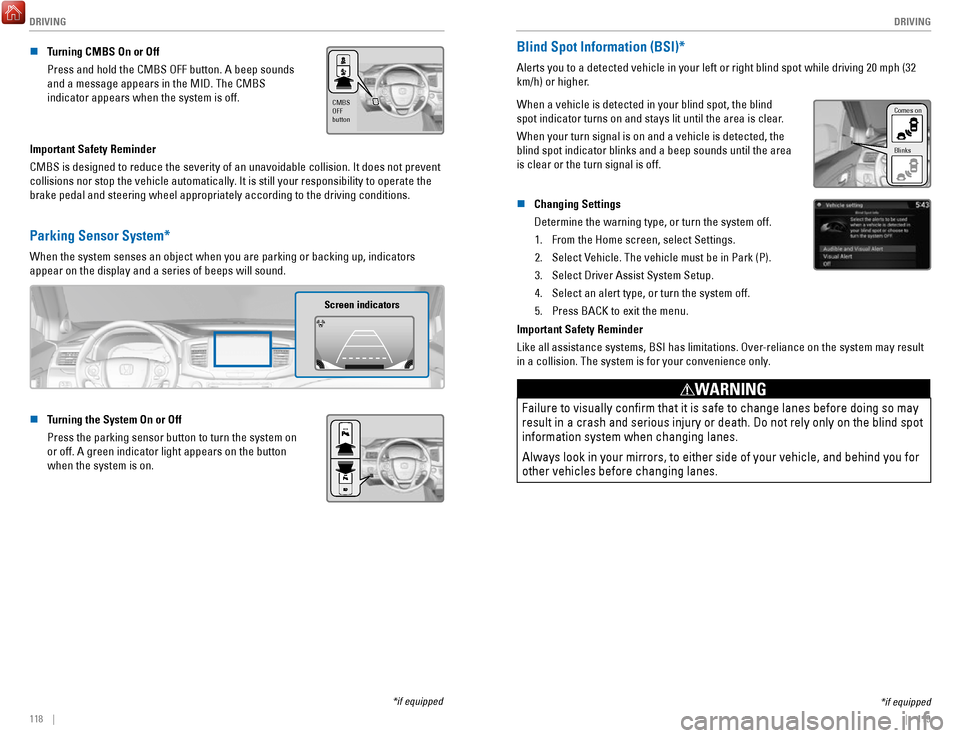
Blind Spot Information (BSI)*
Alerts you to a detected vehicle in your left or right blind spot while \
driving 20 mph (32
km/h) or higher.
When a vehicle is detected in your blind spot, the blind
spot indicator turns on and stays lit until the area is clear.
When your turn signal is on and a vehicle is detected, the
blind spot indicator blinks and a beep sounds until the area
is clear or the turn signal is off.
Comes on
Blinks
n Changing Settings
Determine the warning type, or turn the system off.
1.
From the Home screen, select Settings.
2.
Select Vehicle. The vehicle must be in Park (P).
3.
Select Driver Assist System Setup.
4.
Select an alert type, or turn the system off.
5.
Press BACK to exit the menu.
Important Safety Reminder
Like all assistance systems, BSI has limitations. Over-reliance on the system may result
in a collision. The system is for your convenience only.
Failure to visually confirm that it is safe to change lanes before doi\
ng so may
result in a crash and serious injury or death. Do not rely only on the b\
lind spot
information system when changing lanes.
Always look in your mirrors, to either side of your vehicle, and behind \
you for
other vehicles before changing lanes.
WARNING
Page 64 of 85
 at speeds of 3 mph (5 km")
DRIVING
120 || 121
D
RIVING
*if equipped
Cross Traffic Monitor*
Alerts you if a detected vehicle is approaching from a rear corner when \
your vehicle is
in Reverse (R) at speeds of 3 mph (5 km/h) or lower, which can be helpful when backing
out of parking spaces.
Off icon
An arrow icon appears
on the side of an
approaching vehicle.
The system does not provide alerts for a vehicle that is moving away fro\
m your vehicle,
and it may not detect pedestrians, bicycles, or stationary objects.
n
Turning the System On or Off
1.
From the HOME screen, select Settings.
2.
Select Camera.
3.
Select Cross Traffic Monitor.
4.
Select On or Off.
5.
Press BACK to exit the menu.
You can also select the icon on the lower right corner
of the screen when the monitor is on to
turn it off.
This system cannot detect all approaching vehicles and may not detect an\
approaching vehicle at all.
Failure to visually confirm that it is safe to back up the vehicle bef\
ore
doing so may result in a collision.
Do not solely rely on the system when reversing; always also use your
mirrors, and look behind and to the sides of your vehicle before reversi\
ng.
CAUTION
Multi-View Rear Camera
When you shift into Reverse (R), a real-time image of the area behind \
your vehicle is
shown in the display, along with helpful parking guidelines.
Wide view Normal view Top down view
Press the selector knob (color audio system) or touch icons on the scr\
een
(touchscreen) to toggle between views.
n
Changing Settings
Turn the guidelines on or off.
Models with color audio system 1.
Press the MENU/CLOCK button.
2.
Select Settings.
3.
Select Rear Camera.
4.
Select Camera Guidelines.
5.
Select On or Off.
6.
Press the Back button to exit the menus.
Page 81 of 85

SPECIFICATIONS
154 || 155
S
PECIFICATIONS
SPECIFICATIONS
*if equipped
* *
Vehicle
2: 2WD models
1: AWD models
ModelHonda Ridgeline
Front No. of Passengers: 2
Rear 3
6,019 lbs (2,730 kg)*25,710 lbs (2,590 kg)*1
3,131 lbs (1,420 kg)*13,042 lbs (1,380 kg)*2
3,219 lbs (1,460 kg)*13,042 lbs (1,380 kg)*2
9,987 lbs (4,530 kg)*18,201 lbs (3,720 kg)*2
Air Conditioning:
Weights:
Gross Vehicle
Weight Rating
Gross Axle Weight
Rating (Front)
Gross Axle Weight
Rating (Rear)
Gross Combined Weight
Rating
Refrigerant TypeCharge Quantit yLubricant TypeQuantity
HFO-1234yf (R-1234yf )
20.3 – 22.0 oz (575 – 625 g)
POE RL85HM
7.5 – 8.7 cu-in (123 – 143 cm
3)
Engine and Fuel
Fluids
Displacemen t211.8 cu-in (3,471 cm3)
Spark Plugs NGKDILZKR7B11GUnleaded gasoline, Pump octane
Fuel Type
Washer Tank Capacity
number of 87 or higher
Fuel Tank Capacity 19.5 US gal (73.8 )
U.S.: 1.0 US gal (3.8 )
Canada: 1.4 US gal (5.3 )
Light Bulbs
*
*1: Models with LED low beam headlights
* 2: Models without LED low beam headlights
* 3: Models with LED day time running lights
*
* 4: Models without LED day time running lights
5: Models with moonroof
6: Models without moonroof
Headlights (L
ow Beam) LE
D*155 W*2 (H11)
60W (HB3 )
35 W (H8)
28/8 W (Amber)
LE D
LE D
LE D
*3Daytime Running Lights
60 W (HB3)*4
Headlights (High Beam)
Fog Lights*
Front Turn Signal/Parking Light s*
Parking Lights*
Front Side Marker Lights
LED
LE D
LE D
21 W
21 W
LE D
5 W
Bed Lights LE
D
*13C P*2
Front Map Lights LE
D*55 W*6
In teri or Lights
5 W
1.4 W
LE D
Side Turn Signal Lights (on Door Mirrors)
*
Rear Side Marker Light
s
Brake/Taillights
Back-Up Lights
Rear Turn Signal Lights
High-M ount Brake Ligh t
Rear License Plate Ligh t
LED
3.8 W
LE D
1.4 W
1.4 W
Rear Map Lights
Vanity Mirror Lights
*
Door Pocket Lights*
Beverage Holder Light*
Door Courtesy Light
s*
Door Inner Handle Light s*
Console Compartment Light
Glove Box Light
Engine Oil
Recommende d·
Engine Coolan
t
·
Genuine Honda Motor Oil 0W-20
Change
Capacity API Premium-grade 0W-20 detergent oi
l
5.4 US qt (5.1 )
Change
lter including
5.7 US qt (5.4 )
Specie d
Ratio
Capacity
Honda Long Life Antifreeze/Coolant Type 2
50/50 with distilled wate r
1.88 US gal (7.13 )
(change including the remaining
0.19 US gal (0.72 ) in the reserve tank )
Brake Fluid
Automatic Transmission Fluid
Rear Differential Fluid*
Transfer Case Fluid*
SpeciedHonda Heavy Duty Brake Fluid DOT 3
Specied
CapacityHonda Automatic Transmission ATF DW- 1
Chang e3 .3 US qt (3.1 )
Specied Honda DPSF-II
Capacit yC hange
1.92 US qt (1.82 )
·
Specie d· Honda Hypoid Gear Oil HGO-1
SAE 90 (API grade GL4 or GL5)
Capacit y Hypoid gear oil SAE 75W-85 or
Change
0.45 US qt (0.43 )
Washer Flui d
Tires
RegularSize245/60R18 105 H
Pressure
35 (240 [2.4])
psi (kPa [kgf/cm2])
Spar e
Compact
Size
T165/90R17 105M
Pressure 60 (420 [4.2])
psi (kPa [kgf/cm2])
Wheel SizeRegular18 x 8J17 x 4TCompact Spare
Total5
LED
Footwell Lights*
*if equipped
* *
Vehicle
2: 2WD models
1: AWD models
Model Honda Ridgeline
Front No. of Passengers: 2
Rear 3
6,019 lbs (2,730 kg)
*25,710 lbs (2,590 kg)*1
3,131 lbs (1,420 kg)*1
3,042 lbs (1,380 kg)*2
3,219 lbs (1,460 kg)*1
3,042 lbs (1,380 kg)*2
9,987 lbs (4,530 kg)*1
8,201 lbs (3,720 kg)*2
Air Conditioning: Weights :
Gross Vehicle
Weight Rating
Gross Axle Weight
Rating (Front)
Gross Axle Weight
Rating (Rear)
Gross Combined Weight
Rating
Refrigerant Type
Charge Quantit y
Lubricant Type
Quantity
HFO-1234yf (R-1234yf )
20.3 – 22.0 oz (575 – 625 g)
POE RL85HM
7.5 – 8.7 cu-in (123 – 143 cm
3)
Engine and Fuel
Fluids
Displacemen t211.8 cu-in (3,471 cm3)
Spark Plugs NGK DILZKR7B11G
Unleaded gasoline, Pump octane
Fuel Type
Washer Tank Capacity number of 87
or higher
Fuel Tank Capacity 19.5 US gal (73.8 )
U.S.: 1.0 US gal (3.8 )
Canada: 1.4 US gal (5.3 )
Light Bulbs
*
*1: Models with LED low beam headlights
* 2: Models without LED low beam headlights
* 3: Models with LED day time running lights
*
*
4: Models without LED day time running lights
5: Models with moonroof
6: Models without moonroof
Headlights (L ow Beam) LE
D*1
55 W*2 (H11)60W (HB3 )35 W (H8)28/8 W (Amber)LEDLEDLE D*3Daytime Running Lights
60 W (HB3)*4
Headlights (High Beam)
Fog Lights*
Front Turn Signal/Parking Light s*
Parking Lights*
Front Side Marker Lights
LEDLED
LE D
21 W21 WLED5 W
Bed LightsLE D*1
3C P*2
Front Map Lights LE
D*5
5 W*6
In teri or Lights
5 W
1.4 W
LE D
Side Turn Signal Lights (on Door Mirrors)
*
Rear Side Marker Light
s
Brake/Taillights
Back-Up Lights
Rear Turn Signal Lights
High-M ount Brake Ligh t
Rear License Plate Ligh t
LED
3.8 W
LE D
1.4 W
1.4 W
Rear Map Lights
Vanity Mirror Lights*
Door Pocket Lights*
Beverage Holder Light*
Door Courtesy Light s*
Door Inner Handle Light s*
Console Compartment Light
Glove Box Light
Engine Oil
Recommende d·
Engine Coolan
t
·
Genuine Honda Motor Oil 0W-20
Change
Capacity API Premium-grade 0W-20 detergent oi
l
5.4 US qt (5.1 )
Change
lter including 5.7 US qt (5.4 )
Specie d
Ratio
Capacity Honda Long Life Antifreeze/Coolant Type
2
50/50 with distilled wate r
1.88 US gal (7.13 )
(change including the remaining
0.19 US gal (0.72 ) in the reserve tank )
Brake Fluid
Automatic Transmission Fluid
Rear Differential Fluid
*
Transfer Case Flui d*
SpeciedHonda Heavy Duty Brake Fluid DOT 3
Specied
Capacit yHonda Automatic Transmission ATF DW-
1
Chang e3 .3 US qt (3.1 )
Specied Honda DPSF-II
Capacit yC hange 1.92 US qt (1.82 )
·
Specie d· Honda Hypoid Gear Oil HGO-1
SAE 90 (API grade GL4 or GL5)
Capacit y Hypoid gear oil SAE 75W-85 or
Change 0.45 US qt (0.43 )
Washer Fluid
Tire s
Regular Size
245/60R18 105H
Pressure 35 (240 [2.4])
psi (kPa [kgf/cm2])
Spar e
Compact
Size
T165/90R17 105M
Pressure 60 (420 [4.2])
psi (kPa [kgf/cm
2])
Wheel Size Regular
18 x 8J
17 x 4T
Compact Spar e
Total5LED
Footwell Lights*
Page 85 of 85

INDEX
162 |
Opening the hood ............................................... 140
Service codes ..................................................... 139
Transmission fluid .............................................. 140
Under the hood ................................................... 140
Window washer fluid ......................................... 145
Wiper blades ....................................................... 146
Mirrors Door mirrors
.......................................................... 48
Rearview mirror .................................................... 48
Reverse tilt-down mirrors ................................... 48
Moonroof .................................................................. 37
Multi-Information Display (MID)........................... 30
Multi-View Rear Camera
..................................... 121
Navigation .......................................................... 90–96
Address .................................................................. 92
Destination ............................................................ 92
Home address ....................................................... 92
Legend .................................................................... 95
Place Category ..................................................... 93
Recent places ....................................................... 93
Routing ................................................................... 95
Saved places ......................................................... 94
Steering-wheel controls ..................................... 90
Traffic ..................................................................... 96
Turn-by-turn directions ....................................... 95
Overheating............................................................ 127 Parking sensor.......................................................
118
Power Mode
.......................................................... 106
Power outlets 12-volt
..................................................................... 57
Readiness codes ................................................... 153
Remote engine start ....................................... 31, 105
Road Departure Mitigation (RDM) ..................... 116
Safety Reporting safety defects
..................................... 25
Safety information .................................................. 7
Safety label locations .......................................... 25
Seat belts.............................................................. 9–11 Fastening
............................................................... 11
Lap/Shoulder belts ................................................. 9
Proper use ............................................................... 9
Seat belt inspection ............................................. 10
Shoulder anchor ................................................... 11
Seating ................................................................ 43–47Driver seat
.............................................................
43
Driving Position Memory System ...................... 47
Head restraints ..................................................... 45
Rear seats .............................................................. 46
Specifications ........................................................ 154
Steering wheel Adjusting
................................................................ 47
Tailgate ............................................................... 31, 33
Tires ................................................. 129–133, 147–152
Flat tire ......................................................... 131–133
Low tire pressure ............................................... 147
Tire and loading information label ................... 148
Tire and wheel replacement ............................. 148
Tire chains ........................................................... 149
Tire identification number ................................. 150
Tire information ................................................... 147
Tire labeling ......................................................... 150
Tire Pressure Monitor System (TPMS) ........... 129
Tire quality grading ............................................ 151
Tire service life ................................................... 149
Tire terminology .................................................. 150
Wear indicators .................................................. 147
Winter tires .......................................................... 149
Towing ............................................................. 101–104
Emergency towing ....................................... C6, 128
Load limits ............................................................ 101
Tongue load ......................................................... 102
Trailer weight ...................................................... 101
Truck Bed Audio ...................................................... 79
Turn signals .............................................................. 39
Vehicle Stability Assist (VSA) ............................. 110
Voice command index .......................................... 159
Warranty ................................................................. 158
Window Power windows
.................................................... 36
Wipers................................................................. 41–42 Intermittent wipers
............................................... 41
Rain-sensing wipers ............................................ 42