2017 HONDA RIDGELINE brake
[x] Cancel search: brakePage 60 of 85
*
Helps maintain a constant vehicle speed and a set following interval beh\
ind a vehicle
detected ahead of yours.
Adaptive cruise cont")
DRIVING
112 || 113
D
RIVING
Adaptive Cruise Control (ACC)*
Helps maintain a constant vehicle speed and a set following interval beh\
ind a vehicle
detected ahead of yours.
Adaptive cruise control is not available when Snow, Mud*, or Sand* is selected for
Intelligent Traction Management (see page 109).
MAIN button
RES/+ button
CANCEL button
-/SET button Distance button
n Activating and Setting the Vehicle Speed
1.
Press the MAIN button. The ACC indicator appears
in the MID.
2.
Accelerate to the desired speed (above 25 mph/
40 km/h). Take your foot off the pedal and press the
-/SET button to set the speed.
n Adjusting the Vehicle Speed
Press the RES/+ button to increase speed or the -/SET
button to decrease speed.
Each time you press the button, the vehicle speed is
increased or decreased by about 1 mph (1.6 km/h).
If you keep the button pressed, the vehicle speed
increases or decreases by 5 mph (5 km/h) until you
release it.
n Adjusting the Vehicle Distance
Press the Interval button to change the following
interval. Each time you press the button, the setting
cycles through extra long, long, middle, and short.
n Switching to Standard Cruise Control
Press and hold the Interval button. Cruise Mode appears in the multi-inf\
ormation
display. Press and hold the button again to switch back to ACC.
*if equipped
n During Operation
If a vehicle is detected ahead of you when ACC is
turned on, the system maintains, accelerates, or
decelerates your vehicle’s set speed to keep the
vehicle’s set following interval from the vehicle ahead. ACC indicator
If a vehicle detected ahead of you slows down
abruptly, or if another vehicle cuts in front of you,
a beep sounds and BRAKE appears on the multi-
information display to alert you.Beep
ACC has limited braking capability.
When your vehicle speed drops below 22 mph (35 km/h), ACC will
automatically cancel and no longer will apply your vehicle’s brakes.
Always be prepared to apply the brake pedal when conditions require.
WARNING
n Canceling ACC
Press the CANCEL or MAIN button, or press the brake
pedal. The ACC indicator goes off.
Certain conditions may cause ACC to cancel
automatically. When this happens, the amber ACC
indicator appears on the instrument panel (see page
26).
After cruise control has been canceled, you can still
resume the prior set speed by pressing RES/+ when
your vehicle speed is over 25 mph (40 km/h).
Improper use of ACC can lead to a crash.
Use ACC only when traveling on open highways in good weather.
WARNING
Page 62 of 85
*
Alerts and helps to assist you if the system determines a possibility of\
your vehicle
unintentionally crossing over detected lane")
DRIVING
116 || 117
D
RIVING
Road Departure Mitigation (RDM)*
Alerts and helps to assist you if the system determines a possibility of\
your vehicle
unintentionally crossing over detected lane markings while driving betwe\
en 45–90 mph
(72–145 km/h).
If your vehicle is getting too close to detected lane
markings without a turn signal activated, a message
appears in the MID. Steering wheel torque and vibrations
are applied to help your vehicle stay in the lane.
Braking may also be applied if the lane lines are solid
and continuous.
If the system operates several times without detecting
driver response, the system beeps to alert you.
Steering assistance
Beep
n Turning the System On or Off
Press the RDM button to turn the system on or off.
A green indicator appears on the button when the
system is on.
n Changing Settings
Determine the warning timing.
1.
From the HOME screen, select Settings.
2.
Select Vehicle. The vehicle must be in Park (P).
3.
Select Road Departure Mitigation Setting.
4. Select from the options.
Normal (default): Steering control starts from inside the lane edge.
Wide: Steering control starts from outside the lane edge.
Warning Only:
The system only provides a BRAKE message, but does not apply
steering or braking.
5.
Press BACK to exit the menu
Important Safety Reminder
The RDM system has limitations. Overreliance on it may result in a colli\
sion. It is always
your responsibility to keep your vehicle within the driving lane.
*if equipped
Collision Mitigation Braking System™ (CMBS™)*
Can assist you when there is a possibility of your vehicle colliding wit\
h a vehicle or a
pedestrian detected in front of yours.
The system can give you visual, audible, and tactile alerts
when a potential collision is determined, and reduce your
vehicle speed to help minimize collision severity when a
collision is deemed unavoidable.
When a potential collision with a detected oncoming
vehicle is determined, the system also alerts you with
rapid vibrations on the steering wheel.
Steering vibrations Beep
The system activates when:
•
The speed difference between your vehicle and a vehicle or pedestrian de\
tected in
front of you is about 3 mph (5 km/h) and over with a chance of a colli\
sion.
•
Your vehicle speed is about 62 mph (100 km/h) or less and there is a ch\
ance of a
collision with an oncoming detected vehicle or a pedestrian in front of \
you.
n
Alert Stages
The system has three alert stages for a possible collision. Depending on\
the circumstances or CMBS settings, CMBS may not go through all of the stage\
s before
initiating the last stage.
Stage 1: Visual and audible warning, steering wheel vibrations
Stage 2: Visual and audible warning and light brake application
Stage 3: Visual and audible warning and strong brake application
n
Changing Settings
Determine the warning timing. 1.
From the HOME screen, select Settings.
2.
Select Vehicle. The vehicle must be in Park (P).
3.
Select Forward Collision Warning Distance.
4.
Select Long, Normal, or Short.
5.
Press BACK to exit the menu.
*if equipped
Page 63 of 85
DRIVING
118 || 119
D
RIVING
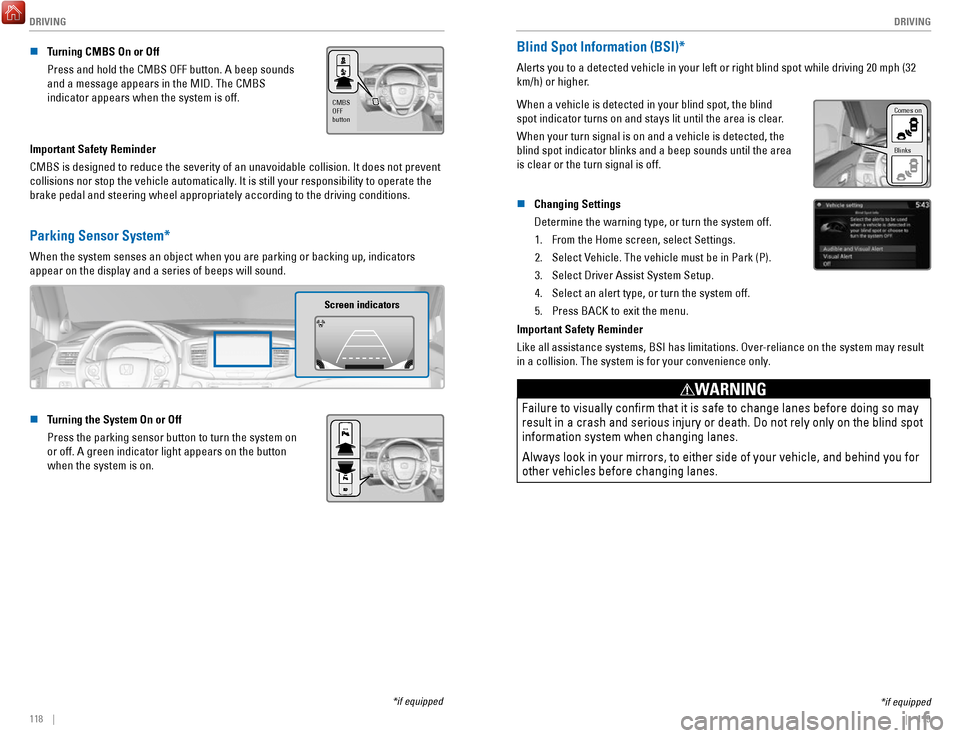
n Turning CMBS On or Off
Press and hold the CMBS OFF button. A beep sounds
and a message appears in the MID. The CMBS
indicator appears when the system is off.
CMBS
OFF
button
Important Safety Reminder
CMBS is designed to reduce the severity of an unavoidable collision. It \
does not prevent
collisions nor stop the vehicle automatically. It is still your responsibility to operate the
brake pedal and steering wheel appropriately according to the driving co\
nditions.
Parking Sensor System*
When the system senses an object when you are parking or backing up, ind\
icators
appear on the display and a series of beeps will sound.
Screen indicators
n Turning the System On or Off
Press the parking sensor button to turn the system on
or off. A green indicator light appears on the button
when the system is on.
*if equipped
*if equipped
Blind Spot Information (BSI)*
Alerts you to a detected vehicle in your left or right blind spot while \
driving 20 mph (32
km/h) or higher.
When a vehicle is detected in your blind spot, the blind
spot indicator turns on and stays lit until the area is clear.
When your turn signal is on and a vehicle is detected, the
blind spot indicator blinks and a beep sounds until the area
is clear or the turn signal is off.
Comes on
Blinks
n Changing Settings
Determine the warning type, or turn the system off.
1.
From the Home screen, select Settings.
2.
Select Vehicle. The vehicle must be in Park (P).
3.
Select Driver Assist System Setup.
4.
Select an alert type, or turn the system off.
5.
Press BACK to exit the menu.
Important Safety Reminder
Like all assistance systems, BSI has limitations. Over-reliance on the system may result
in a collision. The system is for your convenience only.
Failure to visually confirm that it is safe to change lanes before doi\
ng so may
result in a crash and serious injury or death. Do not rely only on the b\
lind spot
information system when changing lanes.
Always look in your mirrors, to either side of your vehicle, and behind \
you for
other vehicles before changing lanes.
WARNING
Page 66 of 85

DRIVING
124 || 125
H
ANDLING THE UNEXPECTED
n Refueling from a Portable Fuel Container
If you need to refuel your vehicle from a portable fuel container, use the funnel
provided with your vehicle.
1.
Turn off the engine.
2.
Press the fuel fill door release button. The fuel fill
door opens.
3.
Open the in-bed trunk and pull out the tire tray.
4.
Remove the funnel from the tool box.
5.
Place the end of the funnel on the lower part of
filler opening, then insert it slowly and fully. Make
sure that the end of the funnel goes down along
with the filler pipe.
6.
Fill the tank with fuel from the portable fuel
container. Pour fuel carefully so you do not spill
any.
7.
Remove the funnel from the filler neck. Wipe up
any fuel from the funnel before storing it.
8.
Shut the fuel fill door by hand.
Funnel
Funnel
Do not insert the nozzle of a portable fuel container or any funnel othe\
r than the one
provided with your vehicle. Doing so can damage the fuel system.
Do not try to pry open or push open the sealed fuel tank with foreign ob\
jects.
This can damage the fuel system and its seal.
NOTICE
HANDLING THE UNEXPECTED
Learn about what to do in critical or emergency situations.
Smart Entry Remote Battery Strength
If the battery life in your remote transmitter is weak, a message appear\
s in the MID with
information on how to start the engine.
1.
Touch the back of the remote transmitter to the
ENGINE START/STOP button while the indicator
is flashing.
2.
With the brake pedal pressed, press the ENGINE
START/STOP button within 10 seconds.
Shift Lever Does Not Move
Follow the procedure below if you cannot move the shift lever out of Par\
k (P).
1.
Set the parking brake.
2.
Remove the built-in key from the remote transmitter.
3.
Open the lid of the console compartment.
4.
Wrap a cloth around the tip of a small flat-tip
screwdriver. Put it into the shift lock release slot as
shown in the image, and remove the cover.
5.
Insert the key into the shift lock release slot.
6.
While pushing the key down, press the shift lever
release button and place the shift lever into Neutral
(N). The lock is now released. Have the shift lever
checked by a dealer as soon as possible.
Cover
Release
button
Shift lock
release slot
Page 68 of 85

HANDLING THE UNEXPECTED
128 || 129
H
ANDLING THE UNEXPECTED
Emergency Engine Stop
The ENGINE START/STOP button may be used to stop the engine due to an emergency
situation even while driving. If you must stop the engine, choose one of\
the following
operations:
•
Press and hold the ENGINE START/STOP button
for two seconds, or
•
Firmly press the ENGINE START/STOP button
three times.
If the vehicle is in Park (P), the power mode changes to VEHICLE OFF. Otherwise, the
power mode changes to ACCESSORY.
The steering wheel will not lock. Because turning off the engine also di\
sables the
power assist the engine provides to the steering and braking systems, it\
will require
significantly more physical effort and time to steer and slow the vehi\
cle. Use both feet
on the brake pedal, if necessary, to slow the vehicle and stop immediately in
a safe place.
Do not press the button while driving unless it is absolutely necessary \
for the engine to
be switched off.
Emergency Towing
Call a professional towing service if you need to tow your vehicle.
All models
Flat bed equipment: The operator loads your vehicle on the back of a tru\
ck.
This is the best way to transport your vehicle.
2WD models
Wheel lift equipment: The tow truck uses two pivoting arms that go under the front tires
and lift them off the ground. The rear tires remain on the ground.
This is an acceptable way to tow your vehicle.
Trying to lift or tow your vehicle by the bumpers will cause serious dama\
ge.
The bumpers are not designed to support the vehicle’s weight.
Improper towing such as towing behind a motorhome or other motor vehicle\
can
damage the transmission.
NOTICE
Tire Pressure Monitoring System (TPMS)
Monitors the tire pressure while you are driving.
If your vehicle’s tire pressure becomes significantly low,
the low tire pressure indicator comes on and a message
appears on the multi-information display. The specific tire
with low pressure is displayed.
n What to Do
Stop your vehicle in a safe place. Check the tire pressure and adjust th\
e pressure to
the specified level. The specified tire pressure is on a label on th\
e driver’s doorjamb.
n
Tire Fill Assist
Your vehicle gives you visual and audible alerts to help you adjust the t\
ire pressure to its appropriate level when the vehicle is on.
While inflating: The system beeps and the exterior lights flash once every 5 seconds.
When the correct pressure is reached:
The system beeps and the exterior lights
flash continuously for 5 seconds. Stop filling the tire.
If you overinflate: The system beeps and the exterior lights flash twice every
3 seconds.
Driving on an extremely underinflated tire can cause it to overheat. A\
n overheated
tire can fail. Always inflate your tires to the specified pressure.
NOTICE
Page 69 of 85
 – Required Federal Explanatio\
n
Each tire, including the spare (if provided), should be ch")
HANDLING THE UNEXPECTED
130 || 131
H
ANDLING THE UNEXPECTED
n Tire Pressure Monitoring System (TPMS) – Required Federal Explanatio\
n
Each tire, including the spare (if provided), should be checked monthl\
y when
cold and inflated to the inflation pressure recommended by the vehic\
le
manufacturer on the vehicle placard or tire inflation pressure label.
(If your vehicle has tires of a different size than the size indicated \
on the
vehicle placard or tire inflation pressure label, you should determine\
the
proper tire inflation pressure for those tires.)
As an added safety feature, your vehicle has been equipped with
a tire pressure monitoring system (TPMS) that illuminates a low
tire pressure telltale when one or more of your tires is significantly\
under-inflated.
Accordingly, when the low tire pressure telltale illuminates, you should stop
and check your tires as soon as possible, and inflate them to the prop\
er
pressure.
Driving on a significantly under-inflated tire causes the tire to overheat and
can lead to tire failure. Under-inflation also reduces fuel efficiency and tire
tread life, and may affect the vehicle’s handling and stopping ability.
Please note that the TPMS is not a substitute for proper tire maintenanc\
e,
and it is the driver’s responsibility to maintain correct tire pressure, even if
under-inflation has not reached the level to trigger illumination of the TP\
MS
low tire pressure telltale.
Your vehicle has also been equipped with a TPMS malfunction indicator to \
indicate when the system is not operating properly. The TPMS malfunction
indicator is combined with the low tire pressure telltale. When the syst\
em
detects a malfunction, the telltale will flash for approximately one m\
inute
and then remain continuously illuminated. This sequence will continue up\
on
subsequent vehicle start-ups as long as the malfunction exists.
When the malfunction indicator is illuminated, the system may not be abl\
e to
detect or signal low tire pressure as intended.
TPMS malfunctions may occur for a variety of reasons, including the
installation of replacement or alternate tires or wheels on the vehicle \
that
prevent the TPMS from functioning properly.
Always check the TPMS malfunction telltale after replacing one or more
tires or wheels on your vehicle to ensure that the replacement or altern\
ate
tires and wheels allow the TPMS to continue to function properly.
Changing a Flat Tire
If a tire goes flat while driving, grasp the steering wheel firmly, and brake gradually to
reduce speed. Then, stop in a safe place. Replace the flat tire with t\
he compact spare
tire. Go to a dealer as soon as possible to have the full-size tire repa\
ired or replaced.
n
Getting Ready to Change the Tire
Park the vehicle on a firm, level, non-slippery surface. Apply the par\
king brake, shift
to Park (P), and turn the vehicle off. Turn on the hazard warning lights.
1.
Open the trunk and remove the two tray-holding
bolts.
Tire Tray
Tire Tray Holding Bolts
2. Pull out the tire tray. Hook the rear of the tray to the
guides on the back edge of the trunk.
Handle s
3. Loosen the strap, then take the jack out.
StrapJack
4. Remove the wing bolt, tool box and spacer cone,
then the compact spare tire.Wing Bol t
Spacer ConeTool Box
5. Place the compact spare tire wheel-side up under
the vehicle body, near the tire that needs to be
replaced.
6.
Loosen each wheel nut about one turn using
the wheel nut wrench.
Page 71 of 85

HANDLING THE UNEXPECTED
134 || 135
H
ANDLING THE UNEXPECTED
Fuse Locations
If any electrical devices are not working, turn the vehicle off and chec\
k to see if any
applicable fuse is blown. Fuse locations are shown on the fuse box cover\
. Locate the
fuse in question by the fuse number and box cover number.
n
Engine Compartment Fuse Box A
Located under the hood on the passenger’s side.
Push the tabs to open the box.
Tab
Circuit ProtectedAmps
1
(70 A)*1AC INVERTER70
A*2RR BLOWER30 A*1(30 A)*2VSA MTR40 A
VSA FSR20 AMAIN FAN30 A*1(30 A)*2MAIN FUSE 150 A
2
SUB FAN30 A
WIP MTR30 AWASHER20 A
(20 A)(30 A)FR BLOWER 40 AAUDIO AMP(30 A)
RR DEF30 A*1(30 A)*2(40 A)
(30 A)*1RR DEF30 A*2(20 A)
3
*1RR BLOWER30 A*2*1(30 A)*2*1(30 A)*2*1MAIN FAN
4 SMALL 30
A
*2
STOP 10
A*110 A*25
6 STOP
SMALL 10
A*110 A*27
8 L H/L LO
10 A*1IGPS9 7.5
A*2
10 R H/L LO
10 A*1L H/L LO
11 10
A
*2IGPS7.5 A*1R H/L LO
12 10
A
*2INJECTO R2 0 A*1IG COIL15 A*2
13H/L LO MAIN20 A*1DBW14 15
A*2USB15 A
AmpsCircuit Protecte d
15
*1:Models without the AC power outlet
*2:Models with the AC power outle t
(15 A)*1
16 10
A
*215 A*115 A*217(20 A)
18(20 A)
1920 A
20 7.5 A
2115 A*1
22 15
A*215 A
2315 A*120 A*2
24 15
A*120 A*22520 A
26 10
A*115 A*22728 (10 A)10
A
2920 A
Circuit Protecte dAmpsFR FOG
BACK UP HAZARD
MAIN RL Y
AS P/SEAT (REC) AS P/SEAT (SLI) ACM
MG CLUTCH MAIN RL Y
HAZARD FI SUB
IG COIL
INJECTOR DBW
H/L LO MAIN
SMALL/STOP MAIN BACK UPFR FOG
H/STEERING WHEEL HORN
RADIO
n Engine Compartment Fuse Box B
Located under the hood near the brake fluid
reservoir. Push the tabs to open the box.
Circuit Protected Amps
1
ST CUT140 A4WD (20 A)IG MAIN30 AIG MAIN230 A
F/B MAIN 260 AF/B MAIN60 A
EPS60 A
23TRL E-BRAKE(20 A)
4 7.5 A
BM S
5H/L HI MAIN6 20
A(7.5 A)
7
8 (7.5 A)
20 A9(20 A)
10 10 A
11TRL CHARGE
+B TRL HAZARD
+B TRL BACKUP
CTR ACC SOCKE T
TRAILER SMAL L
ACC/IG2_MAIN (20 A)
12131415FR DE-ICER(15 A)16RR _HTD SEAT(20 A)17STRLD7.5 A
Tab
n Interior Fuse Box
Located under the dashboard.
AmpsCircuit Protected
120 A
220 A
37.5 A
420 A
520 A620 A715 A
87.5 A
97.5 A
1010 A
1120 A
12(20 A)
1320 A
1420 A
15(20 A)
167.5 A
17(20 A)
187.5 A
19DR REAR DOOR UNLOCK10 A
2010 A
21
DR P/W
DOOR LOCK SMAR T
AS P/W
FR ACC SOCKET FUEL PUMP ACG
FRONT WIPER ABS/VSA SRS
REAR LEFT P/W BACK P/W
REAR RIGHT P/ W
S/R FUEL LID
DR P/SEAT (REC) CARGO LT
FR SEAT HEATER INTR LT
7.5 A
227.5 A
237.5 A
247.5 A
257.5 A
AS SIDE DOOR UNLOCK
DRL
KEY LOCK A/C
IG1a FEED BACK
INST PANEL LIGHTS
26(7.5 A)277.5 A2810 A297.5 A30317.5 A327.5 A3310 A3410 A3510 A36(20 A)3710 A3810 A397.5 A407.5 A4110 A42
Circuit ProtectedAmpsLUMBAR SUPPORT
PARKING LIGHTS OPTIONMETER
MISS SOL SRS
AS SIDE DOOR LOCK DR DOOR LOCK
DR DOOR UNLOCK DR P/SEAT (SLIDE) RIGHT H/L HILEFT H/L HI
IG1b FEED BACK ACC
DR REAR DOOR LOCK
AmpsCircuit Protected
120 A
220 A
37.5 A
420 A
520 A620 A715 A
87.5 A
97.5 A
1010 A
1120 A
12(20 A)
1320 A
1420 A
15(20 A)
167.5 A
17(20 A)
187.5 A
19DR REAR DOOR UNLOCK10 A
2010 A
21
DR P/W
DOOR LOCK SMAR T
AS P/W
FR ACC SOCKET FUEL PUMP ACG
FRONT WIPER ABS/VSA SRS
REAR LEFT P/W BACK P/W
REAR RIGHT P/ W
S/R FUEL LID
DR P/SEAT (REC) CARGO LT
FR SEAT HEATER INTR LT
7.5 A
227.5 A
237.5 A
247.5 A
257.5 A
AS SIDE DOOR UNLOCK
DRL
KEY LOCK A/C
IG1a FEED BACK
INST PANEL LIGHTS
26(7.5 A)277.5 A2810 A297.5 A30317.5 A327.5 A3310 A3410 A3510 A36(20 A)3710 A3810 A397.5 A407.5 A4110 A42
Circuit ProtectedAmpsLUMBAR SUPPORT
PARKING LIGHTS OPTIONMETER
MISS SOL SRS
AS SIDE DOOR LOCK DR DOOR LOCK
DR DOOR UNLOCK DR P/SEAT (SLIDE) RIGHT H/L HILEFT H/L HI
IG1b FEED BACK ACC
DR REAR DOOR LOCK
Fuse label Fuse box
Page 72 of 85

HANDLING THE UNEXPECTED
136 || 137
M
AINTENANCE
n Inspecting and Changing Fuses
1.
Turn the vehicle off, including all lights and
accessories.
2.
Remove the fuse box cover.
3.
Check the large fuse in the engine compartment.
4.
If the fuse is blown, use a Phillips-head
screwdriver to remove the screws and replace the
fuse with a new one. Reinstall the screws.
5.
Inspect the small fuses in the engine compartment
and the vehicle interior.
6.
If there is a burned out fuse, remove it with the fuse
puller and replace it with a new one.
Fuse puller
Blown fuse
Combined
fuse
Replacing a fuse with one that has a higher rating greatly increases the\
chances of
damaging the electrical system.
NOTICE
MAINTENANCE
Learn about basic maintenance that you can perform on the vehicle yourse\
lf, as well as
information about how to best maintain the vehicle.
Safety Precautions
Some of the most important safety precautions are listed below; however, we cannot
warn you of every conceivable hazard that can arise in performing mainte\
nance. Only
you can decide whether or not you should perform a given task.
n
Maintenance Safety •
To reduce the possibility of fire or explosion, keep cigarettes, sparks\
, and flames away from the battery and all fuel-related parts.
•
Never leave rags, towels, or other flammable objects under the hood.
•
To clean parts, use a commercially available degreaser or parts cleaner, not gasoline.
•
Wear eye protection and protective clothing when working with the battery\
or
compressed air.
•
Do not run the engine in confined spaces where carbon monoxide gas can\
accumulate.
n
Vehicle Safety •
The vehicle must be stationary, and parked on level ground with the parking
brake set and the engine off.
•
Be aware that hot parts can burn you.
•
Be aware that moving parts can injure you.
Improperly maintaining this vehicle or failing to correct a problem befo\
re
driving can cause a crash in which you can be seriously hurt or killed. \
Always follow the inspection and maintenance recommendations
according to the schedules in this guide.
WARNING
Failure to properly follow maintenance instructions and precautions can \
cause you to be seriously hurt or killed.
Always follow the procedures and precautions in this guide.
WARNING
*if equipped