2017 HONDA RIDGELINE airbag
[x] Cancel search: airbagPage 14 of 85

SAFETY
20 || 21
S
AFETY
n Protecting Smaller Children
If a child is at least one year old and within the weight range indicate\
d by the child
seat manufacturer, the child should be properly restrained in a firmly secured
forward-facing child seat.
We strongly recommend placing a forward-facing
child seat in a rear seating position.
Placing a forward-facing child seat in the front seat
can be hazardous, even with advanced front airbags
that automatically turn the passenger’s front airbag
off. A rear seat is the safest place for a child.
WARNING
Placing a forward-facing child seat in the front seat can result in seri\
ous
injury or death if the front airbag inflates.
If you must place a forward-facing child seat in front, move the vehicle\
seat as far back as possible, and properly restrain the child.
n Selecting a Child Seat
Most child seats are LATCH-compatible (Lower Anchors and Tethers for CHildren).
Some have a rigid-type connector, while others have a fl exible-type connector.
Both are equally easy to use. Some existing and previously owned child s\
eats can
only be installed using the seat belt. Whichever type you choose, follow\
the child
seat manufacturer’s use and care instructions (including recommended expiration
dates) as well as the instructions in this manual. Proper installation \
is key to
maximizing your child’s safety.
In seating positions and vehicles not equipped with LATCH, a LATCH-compatible
child seat can be installed using the seat belt and a top tether for add\
ed security.
This is because all child seats are required to be designed so that they\
can be
secured with a lap belt or the lap part of a lap/shoulder belt. In addit\
ion, the child
seat manufacturer may advise that a seat belt be used to attach a LATCHcompatible
seat once a child reaches a specifi ed weight. Please read the child s\
eat owner’s
manual for proper installation instructions.
Important considerations when selecting a child seat
Make sure the child seat meets the following three requirements:
•
The child seat is the correct type and size for the child.
•
The child seat is the correct type for the seating position.
•
The child seat is compliant with Federal Motor Vehicle Safety Standard 213 or
Canadian Motor Vehicle Safety Standard 213. n
Installing a LATCH-Compatible Child Seat
A LATCH-compatible child seat can be installed in each of the second- and th\
ird row
seats. A child seat is attached to the lower anchors with either the rig\
id or flexible
type of connectors.
1.
Locate the lower anchors under the marks.
2.
Make sure there are no objects near the anchors
that could prevent a secure connection between
the child seat and the anchors.Mark s
Center position
3.
First, attach the tether strap hook to the center
tether anchor. Place the head restraint in its
lowest position, route the tether strap around the
upper guide. Then downward attach the strap
hook to the center tether anchor.Upper Guide
Center Tether Anchorage PointCenter position
All positions
4.
Place the child seat on the vehicle seat, then
attach the child seat to the lower anchors
according to the instructions that came with the
child seat.
Rigid Type
Flexible Type
Lower Anchors
Outer positions
5.
Place the head restraint in its upper-most position.
Route the tether strap over the seat-back, through
the head restraint legs. Lift the cover, then route
the tether strap around the upper guide, then
downward to the tether anchor on the outside of
the seat bottom.
Upper Guide
Outer Tether Anchorage PointsOuter positions
All positions
6.
Tighten the tether strap as instructed by the child seat manufacturer.
7.
Make sure the child seat is firmly secured by rocking it forward and b\
ack and
side to side; little movement should be felt.
8.
Make sure any unused seat belt that a child can reach is buckled, the lo\
ckable
retractor is activated, and the belt is fully retracted and locked.
Page 16 of 85

SAFETY
24 || 25
S
AFETY
n Protecting Larger Children
When a child is too big for a child seat, secure the child in a rear sea\
t using the lap/
shoulder seat belt.
Have the child sit upright and all the way back, then ensure the followi\
ng:
•
The child’s knees bend comfortably over the edge
of the seat.
•
The shoulder belt crosses between the child’s
neck and arm.
•
The lap part of the seat belt is as low as possible,
touching the child’s thighs.
•
The child can stay seated for the whole trip.
If a lap/shoulder belt cannot be used properly, position the child in a booster seat in
a rear seating position. For the child’s safety, check that the child meets the booster
seat manufacturer’s recommendations.
Some U.S. states and Canadian provinces/territories require children to \
use a
booster seat until they reach a given age or weight (e.g., 6 years or 6\
0 lbs). Be sure
to check current laws in the state or province/territory where you inten\
d to drive.
WARNING
Allowing a child age 12 or under to sit in the front can result in injur\
y or
death if the passenger’s front airbag inflates.
If a larger child must ride in front, move the vehicle seat as far to th\
e rear
as possible, then have the child sit up properly and wear the seat belt \
properly, using a booster seat if needed.
Safety Label Locations
Safety labels are in the locations shown. They warn you of potential haz\
ards that can
cause serious injury or death. Read these labels carefully.To reduce the number of child
deaths and injuries, every state, Canadian province and territory requir\
es that infants
and children be properly restrained when they ride in a vehicle.
Sun Visor
U.S. models Canadian models
Radiator Cap U.S. models
U.S. models only
Dashboard
Canadian models
Air Conditioner System
Sun Visor
U.S. models only
Reporting Safety Defects
In the U.S.
If you believe that your vehicle has a defect which could cause a crash \
or could cause
injury or death, you should immediately inform the National Highway Traffic Safety
Administration (NHTSA) in addition to notifying American Honda Motor C\
o.,Inc.
If NHTSA receives similar complaints, it may open an investigation, and \
if it finds that a
safety defect exists in a group of vehicles, it may order a recall and r\
emedy campaign.
However, NHTSA cannot become involved in individual problems between you, your \
dealer, or American Honda Motor Co., Inc.
To contact NHTSA, you may call the Vehicle Safety Hotline toll-free at 1-888-327-4236
(TTY: 1-800-424-9153); go to http://www.safercar.gov; or write to: Administrator, NHTSA,
1200 New Jersey Avenue, SE., Washington, DC 20590. You can also obtain other
information about motor vehicle safety from http://www.safercar.gov.
In Canada
If you believe that your vehicle has a defect which could cause a crash \
or could cause
injury or death, you should immediately inform Honda Canada, Inc., and you may also
inform Transport Canada.
If Transport Canada receives similar complaints, it may open an investigation, and if it
finds that a safety defect exists in a group of vehicles, it may lead \
to a recall and remedy
campaign. However, Transport Canada cannot become involved in individual problems
between you, your dealer, or Honda Canada, Inc.
To contact Transport Canada’s Defect Investigations and Recalls Division, you may call
1-800-333-0510. For more information on reporting safety defects or abou\
t motor vehicle
safety, go to http://www.tc.gc.ca/roadsafety.
Page 17 of 85

INSTRUMENT PANEL
26 || 27
I
NSTRUMENT PANEL
INSTRUMENT PANEL
Learn about the indicators and displays related to driving the vehicle.
Indicators briefly appear with each engine start and then go out. Red \
and amber indicators are most critical. Blue and green indicators are used for gen\
eral information.
Malfunction Indicators
These are the most critical indicators. If they come on and stay lit whi\
le driving or at any other time, there may be a problem. See your dealer if necessary.
Ca nada
U.S.
Brake system
The brake fluid is low, or the brake system has a problem. Press the brake pedal lightly to check pedal pressure. If normal, check the brake flui\
d level when you stop. If abnormal, take immediate action. If necessary, downshift
the transmission to slow the vehicle using engine braking. Have your vehicle
repaired immediately.
Low oil pressure
Engine oil pressure is low. Stop in a safe place. Open the hood. Check the oil level, and add oil if necessary (see page 143). If the indicator does not turn off,
have your vehicle repaired immediately.
Charging system
The battery is not charging. Turn off all electrical items, but do not turn off the vehicle to prevent further battery discharge. Have your vehicle repa\
ired
immediately.
Supplemental Restraint System (SRS)
There is a problem with one of the airbag systems or seat belt tensioner\
s.
Smart Entry system*
There is a problem with the smart entry system.
*if equipped
Lane Keeping Assist System (LKAS)*
There is a problem with the system.
Malfunction indicator lamp (check engine light)
The emissions control system may have a problem. Avoid high speeds. Have your vehicle repaired immediately. If the indicator blinks, a misfire in the
engine’s cylinders is detected. Stop in a safe place, and wait for the engine to
cool down.
Anti-lock Brake System (ABS)
There is a problem with the anti-lock brake system. Your vehicle still has normal braking ability, but no anti-lock function.
Tire Pressure Monitoring System (TPMS)*
There is a problem with the tire pressure monitoring system, or the vehi\
cle is fitted with a spare tire.
Vehicle Stability Assist (VSA) system
There is a problem with the VSA or hill start assist system.
Canada U.S.
SYSTEMBrake system
There is a problem with one of the braking systems.
Collision Mitigation Braking System (CMBS)*
There is a problem with the system, the temperature is too high, or the \
camera or sensor is blocked.
Lane Departure Warning (LDW)*/Road Departure Mitigation (RDM)*
There is a problem with the system, the temperature is too high, or the \
camera is blocked.
Blind spot information (BSI)*
There is a problem with the system, or the radar is blocked.
Electric power steering
There is a problem with the system. Stop the vehicle in a safe place, an\
d restart the engine.
All-Wheel Drive (AWD)*
There is a problem with the system. If the indicator blinks, the differe\
ntial temperature is too high. Stop in a safe place, and let the engine idle u\
ntil the
indicator goes off.
Adaptive Cruise Control (ACC)*
There is a problem with the system.
*if equipped
Page 25 of 85

VEHICLE CONTROLS
42 || 43
V
EHICLE CONTROLS
*if equipped
*if equipped
n Automatic (AUTO) Rain-Sensing Wipers*
When you move the lever to the AUTO position while
driving in rainy weather, the wipers operate based on
the amount of detected rainfall.
Put the lever in the AUTO position only when driving in
rainy weather.
Rotate the adjustment ring to adjust the rainfall sensor
sensitivity.
Return the lever to the OFF position when rain stops.
Rotate the
adjustment ring.
Low sensitivity
High sensitivity
AUTO
position
Always ensure the wiper lever is in the OFF position before entering a c\
ar wash to
prevent severe damage to the windshield wiper system.
Do not use the wipers when the windshield is dry. The windshield will get scratched,
or the rubber blades will get damaged.
In cold weather, the blades may freeze to the windshield, becoming stuck.
Operating the wipers in this condition may damage the wipers. Use the de\
froster
to warm the windshield, or manually clear the windshield of ice and snow before
turning on the wipers.
NOTICE
NOTICE
Adjusting the Seats
Make seat adjustments before driving to ensure the best comfort and safe\
ty.
n
Adjusting the Front Seats
Adjust the driver’s seat as far back as possible while
allowing you to maintain full control of the vehicle.
You should be able to sit upright and well back in the
seat, adequately press the pedals without leaning
forward, and grip the steering wheel comfortably.
The passenger’s seat should be adjusted so that it is as
far back from the front airbag in the dashboard
as possible.
Move back and
allow sufcient space.
The National Highway Traffic Safety Administration and Transport Canada
recommend that drivers allow at least 10 inches (25 cm) between the ce\
nter of the
steering wheel and the chest.
Front power seats*
Horizontal
position
adjustment
Height
adjustment* Lumbar support
adjustment*
Seat-back
angle
adjustment
Page 26 of 85
VEHICLE CONTROLS
44 || 45
V
EHICLE CONTROLS
*if equipped
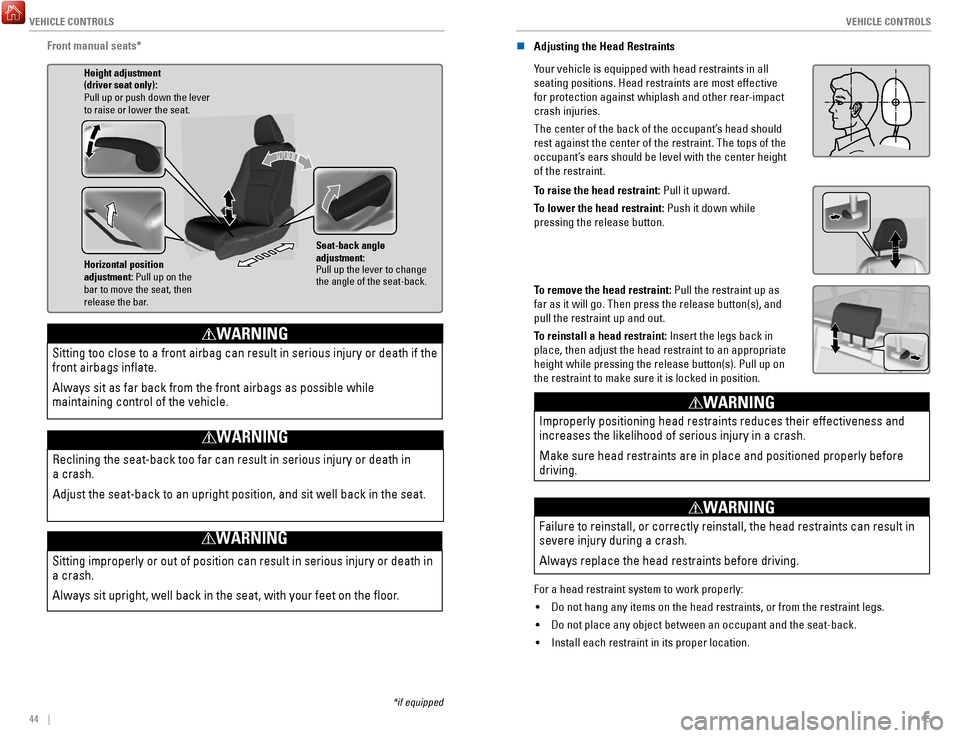
Front manual seats*
Horizontal position
adjustment: Pull up on the
bar to move the seat, then
release the bar. Height adjustment
(driver seat only):
Pull up or push down the lever
to raise or lower the seat.
Seat-back angle
adjustment:
Pull up the lever to change
the angle of the seat-back.
Sitting improperly or out of position can result in serious injury or de\
ath in
a crash.
Always sit upright, well back in the seat, with your feet on the floor\
.
WARNING
Sitting too close to a front airbag can result in serious injury or deat\
h if the
front airbags inflate.
Always sit as far back from the front airbags as possible while
maintaining control of the vehicle.
WARNING
Reclining the seat-back too far can result in serious injury or death in\
a crash.
Adjust the seat-back to an upright position, and sit well back in the se\
at.
WARNING
n Adjusting the Head Restraints
Your vehicle is equipped with head restraints in all
seating positions. Head restraints are most effective
for protection against whiplash and other rear-impact
crash injuries.
The center of the back of the occupant’s head should
rest against the center of the restraint. The tops of the
occupant’s ears should be level with the center height
of the restraint.
Position head in the
center of the head
restraint.
To raise the head restraint: Pull it upward.
To lower the head restraint: Push it down while
pressing the release button.
To remove the head restraint: Pull the restraint up as
far as it will go. Then press the release button(s), and
pull the restraint up and out.
To reinstall a head restraint: Insert the legs back in
place, then adjust the head restraint to an appropriate
height while pressing the release button(s). Pull up on
the restraint to make sure it is locked in position.
Improperly positioning head restraints reduces their effectiveness and
increases the likelihood of serious injury in a crash.
Make sure head restraints are in place and positioned properly before
driving.
WARNING
Failure to reinstall, or correctly reinstall, the head restraints can re\
sult in
severe injury during a crash.
Always replace the head restraints before driving.
WARNING
For a head restraint system to work properly: •
Do not hang any items on the head restraints, or from the restraint legs\
.
•
Do not place any object between an occupant and the seat-back.
•
Install each restraint in its proper location.
Page 47 of 85
86 || 87
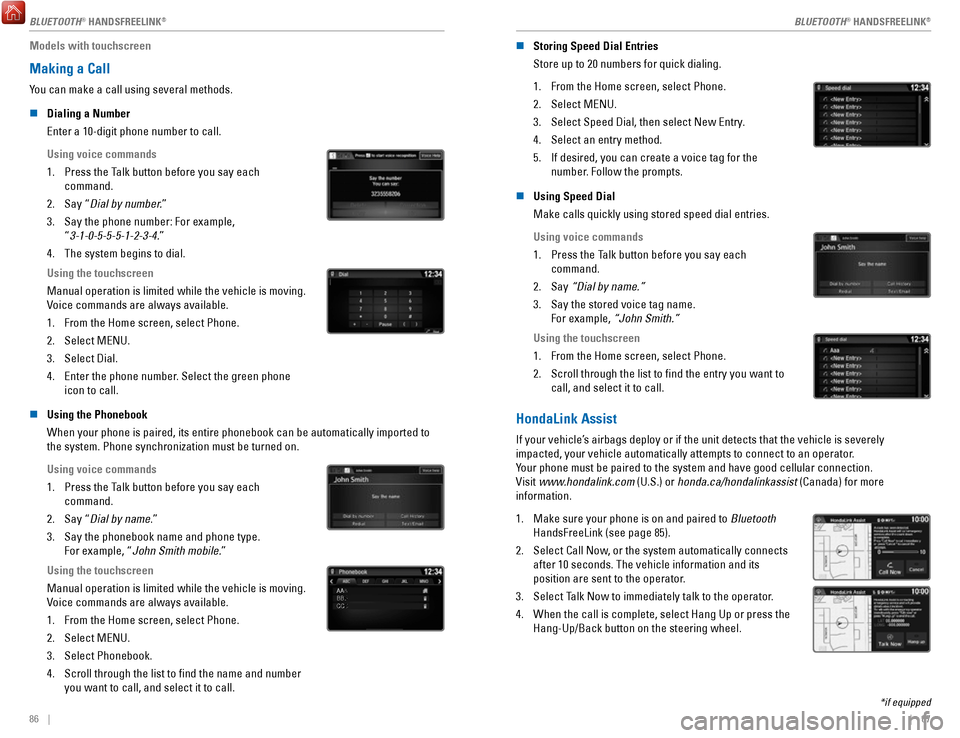
Models with touchscreen
Making a Call
You can make a call using several methods.
n
Dialing a Number
Enter a 10-digit phone number to call.
Using voice commands
1.
Press the Talk button before you say each
command.
2.
Say “Dial by number.”
3.
Say the phone number: For example,
“3-1-0-5-5-5-1-2-3-4.”
4.
The system begins to dial.
Using the touchscreen
Manual operation is limited while the vehicle is moving.
Voice commands are always available.
1.
From the Home screen, select Phone.
2.
Select MENU.
3.
Select Dial.
4.
Enter the phone number. Select the green phone
icon to call.
n Using the Phonebook
When your phone is paired, its entire phonebook can be automatically imp\
orted to
the system. Phone synchronization must be turned on.
Using voice commands
1.
Press the Talk button before you say each
command.
2.
Say “Dial by name.”
3.
Say the phonebook name and phone type.
For example, “John Smith mobile.”
Using the touchscreen
Manual operation is limited while the vehicle is moving.
Voice commands are always available.
1.
From the Home screen, select Phone.
2.
Select MENU.
3.
Select Phonebook.
4.
Scroll through the list to find the name and number
you want to call, and select it to call.
AAAAAABBBBBBCCCCCC
n Storing Speed Dial Entries
Store up to 20 numbers for quick dialing.
1.
From the Home screen, select Phone.
2.
Select MENU.
3.
Select Speed Dial, then select New Entry.
4.
Select an entry method.
5.
If desired, you can create a voice tag for the
number. Follow the prompts.
n Using Speed Dial
Make calls quickly using stored speed dial entries.
Using voice commands
1.
Press the Talk button before you say each
command.
2.
Say “Dial by name.”
3.
Say the stored voice tag name.
For example, “John Smith.”
Using the touchscreen
1.
From the Home screen, select Phone.
2.
Scroll through the list to find the entry you want to
call, and select it to call.
HondaLink Assist
If your vehicle’s airbags deploy or if the unit detects that the vehicle is severely
impacted, your vehicle automatically attempts to connect to an operator.
Your phone must be paired to the system and have good cellular connection\
.
Visit www.hondalink.com (U.S.) or honda.ca/hondalinkassist (Canada) for more
information.
1.
Make sure your phone is on and paired to Bluetooth
HandsFreeLink (see page 85).
2.
Select Call Now, or the system automatically connects
after 10 seconds. The vehicle information and its
position are sent to the operator.
3.
Select Talk Now to immediately talk to the operator.
4.
When the call is complete, select Hang Up or press the
Hang-Up/Back button on the steering wheel.
*if equipped
BLUETOOTH® HANDSFREELINK
Page 84 of 85

VOICE COMMAND INDEX
160 || 161
INDEX
n Audio Commands*
The system accepts these commands on most screens. Audio volume levels c\
annot
be controlled using voice commands.
FM/AM Radio Commands •
Audio on**
•
Audio off**
•
Radio FM
•
Radio AM
•
Radio tune to # FM (#: frequency,
e.g., 95.5)
•
Radio tune to # AM (#: frequency,
e.g., 1020)
•
Radio FM preset # (#: 1 to 12)
•
Radio AM preset # (#: 1 to 6)
SiriusXM Radio Commands •
Radio SXM
•
SXM channel # (#: 0 to 255)
•
SXM channel (channel name)
•
Radio SXM preset # (#: 1 to 12)
Pandora Commands (U.S. only) •
Pandora
•
Pandora play Disc (CD) Commands
*1
• Disc
•
Disc play
•
Disc play track # (#: 1 to 30)
USB Commands •
USB
•
USB play
•
USB play track # (#: 1 to 30)
iPod Commands •
iPod
•
iPod play
•
iPod play track # (#: 1-30)
Bluetooth Audio Commands •
Bluetooth audio play (may not
work on all phones)
AUX Commands •
Aux audio play
•
Music search
•
List album (specify album)
•
List artist (specify artist)
•
List composer (specify composer)
•
List genre (specify genre)
•
List playlist (specify playlist)
•
Play album (specify album)
•
Play artist (specify artist)
•
Play composer (specify composer) •
Play genre (specify genre)
•
Play playlist (specify playlist)
•
Play song (specify song)
•
What/Who am I listening to?
•
Who is this?
•
What’s playing?
•
Who’s playing?
•
What album is this?
Song By Voice
™ Commands
Available for tracks stored on an iPod or USB device.
*models with navigation *1 if equipped
**These commands toggle the function on and off, so the command may not match your intended action.
INDEX
Airbags................................................................ 12–17Advanced airbags ................................................ 12
Airbag care ............................................................ 17
Airbag system components ................................ 16
Airbag System Indicators ................................... 14
Front Airbags ......................................................... 12
Side airbags .......................................................... 13
Side-curtain airbags ............................................ 13
Android Auto ............................................................ 70
Apple CarPlay .......................................................... 69
Audio operation ................................................. 56–77
Android Auto ......................................................... 70
Apple CarPlay ....................................................... 69
Auxiliary input jack (AUX) ................................... 57
Bluetooth audio .............................................. 64, 77
Compact Disc ........................................................ 74
FM/AM radio ................................................... 61, 72
iPod ................................................................... 62, 75
MENU button ................................................... 74–79
Pandora .................................................................. 78
SiriusXM Radio ..................................................... 73
Song by Voice ..................................................... 160
Sound ..................................................................... 59
SOURCE ............................................................ 72–79
Steering-wheel controls ..................................... 58
Truck Bed Audio ................................................... 79
USB flash drive ............................................... 63, 76
USB port ................................................................. 56
Braking Anti-Lock Brake System (ABS)
........................ 108
Brake Assist System .......................................... 108
Collision Mitigation Braking System (CMBS) 117
Foot brake ............................................................ 108
Parking brake ...................................................... 108
Brightness control .................................................. 38
Carbon monoxide ...................................................... 8
Cargo lights .............................................................. 39
Child safety......................................................... 18–24 Childproof door locks
........................................... 35
Child seat Child seat with lap/shoulder belt
.................... 22
Child seat with tether ........................................ 23
LATCH-compatible ............................................. 21
Selecting a child seat ....................................... 20
Climate control .................................................. 50–53
Heated seats ......................................................... 53
Heated steering wheel ........................................ 52
Heated windshield ............................................... 52
Clock........................................................................\
.. 55 Contact us
.............................................................. 157
Cruise control ................................................ 111–113
Adaptive Cruise Control .................................... 112
Customized features ............................................... 54
Doors ........................................................................\
. 35Front-door inner handle
......................................
35
Lock tab .................................................................. 35
Master door-lock switch ..................................... 35
Engine Emergency engine stop
..................................... 128
Engine compartment cover .............................. 141
ENGINE START/STOP ................................ 106, 128
Floor mats ................................................................. 46
Forward Collision Warning (FCW) ...................... 117
Frequently-asked questions ................................ 156
Fuel Fuel information
.................................................. 122
Refueling ...................................................... 123–124
Fuses ............................................................... 134–136
Changing .............................................................. 136
Location ............................................................... 134
Gear selection ............................................... 107–109
Shifting ................................................................. 107
HandsFreeLink ................................................... 80–89
Dialing .............................................................. 82, 86
E-mail ...................................................................... 88
Making a call ................................................... 82, 86
Pairing a phone ............................................... 81, 85
Phonebook ....................................................... 82, 86
Siri Eyes-Free ........................................................ 89
SMS text messaging ............................................ 88
Speed dial ........................................................ 82, 87
Steering-wheel controls ............................... 80, 83
TALK button ........................................................... 84
Voice prompt ................................................... 86, 87
Headlights .......................................................... 39–40
Headlight-wiper integration ............................... 41
High beams ...................................................... 39–40
HomeLink .................................................................. 49
HondaLink................................................................. 67 Assist
...................................................................... 87
Immobilizer ............................................................... 28
INFO button .............................................................. 30
Instrument panel indicators ............................ 26–29
Jump starting ......................................................... 126
Keyless Access System ......................................... 32
Lane Keeping Assist System (LKAS).................. 115
LaneWatch
............................................................. 114
Lights ................................................................... 38–39
Cargo area lights .................................................. 39
Exterior lights ........................................................ 39
Fog lights ................................................................ 39
Interior lights ......................................................... 38
Light bulbs ........................................................... 154
Maintenance.................................................. 137–152 Battery
.................................................................. 145
Brake fluid ........................................................... 145
Engine oil ..................................................... 142–143
Maintenance Minder ................................. 138–139