Page 345 of 673
344
uuBlu-ray/DVD Rear Entertainment System*uPlayable Discs
Features
Playable Discs
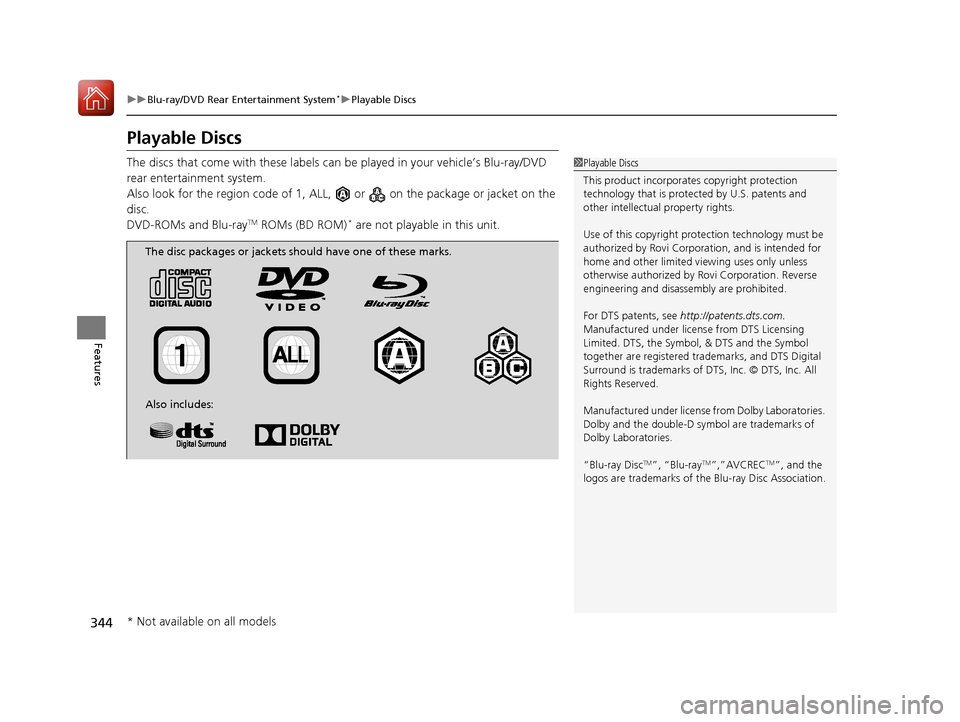
The discs that come with these labels can be played in your vehicle’s Blu-ray/DVD
rear entertainment system.
Also look for the region co de of 1, ALL, or on th e package or jacket on the
disc.
DVD-ROMs and Blu-ray
TM ROMs (BD ROM)* are not playable in this unit.
1 Playable Discs
This product incorporates copyright protection
technology that is protec ted by U.S. patents and
other intellectual property rights.
Use of this copyright prot ection technology must be
authorized by Rovi Corporation, and is intended for
home and other limited vi ewing uses only unless
otherwise authorized by Rovi Corporation. Reverse
engineering and disassembly are prohibited.
For DTS patents, see http://patents.dts.com.
Manufactured under licens e from DTS Licensing
Limited. DTS, the Symbol, & DTS and the Symbol
together are registered trademarks, and DTS Digital
Surround is trademarks of DTS, Inc. © DTS, Inc. All
Rights Reserved.
Manufactured under license from Dolby Laboratories.
Dolby and the double-D symbol are trademarks of
Dolby Laboratories.
“Blu-ray Disc
TM”, “Blu-rayTM”,”AVCRECTM”, and the
logos are trademarks of th e Blu-ray Disc Association.
The disc packages or jackets should have one of these marks.
Also includes:
* Not available on all models
17 PILOT-31TG76100.book 344 ページ 2016年9月20日 火曜日 午後4時9分
Page 346 of 673
345
uuBlu-ray/DVD Rear Entertainment System*uPlayable Discs
Continued
Features
■Java
Java is a registered trademark of Oracle and/or its affiliates.
■HDMI
HDMI, the HDMI Logo, and High-Definition Mult imedia Interface are trademarks or registered trademarks of HDMI Licensing LLC in the
United States and other countries.
■Cinavia
This product uses Cinavia technology to limit the use of unauthorized copies of some commercially-produced film and videos and their
soundtracks. When a prohib ited use of an unauthorized copy is detected, a message will be displayed and playback or copying wil l be
interrupted.
More information about Cinavia technology is provided at Cinavia Online Consumer Information Center at http://www.cinavia.com. To
request additional information ab out Cinavia by mail, send a postcard with your mailing address to: Cinavia Consumer Informatio n Center,
P.O. Box 86851, San Diego, CA, 92138, USA.
This product incorporates proprietary tech nology under license from Verance Corporatio n and is protected by U.S. Patent 7,369,677 and
other U.S. and worldwide patents issued and pending as well as copyright and trade secret protection for certain aspects of suc h
technology. Cinavia is a trademark of Verance Corporation. Copy right 2004-2012 Verance Corporation. All rights reserved by Vera nce.
Reverse engineering or disassembly is prohibited.
17 PILOT-31TG76100.book 345 ページ 2016年9月20日 火曜日 午後4時9分
Page 362 of 673
361
uuCustomized Features u
Continued
Features
Vehicle
Driver Assist
System Setup*Forward Collision Warning Distance*
ACC Forward Vehicle Detect Beep*
Road Departure Mitigation Setting*
Lane Keeping Assist Suspend Beep*
Blind Spot Info*
Meter SetupLanguage Selection
Adjust Outside Temp Display
“Trip A” Reset Timing
“Trip B” Reset Timing
Reverse Alert Tone*
Auto Engine Idle Stop Guidance Screen*
Adjust Alarm Volume
Turn by Turn Display*
Display km/Miles
* Not available on all models
17 PILOT-31TG76100.book 361 ページ 2016年9月20日 火曜日 午後4時9分
Page 374 of 673

373
uuCustomized Features u
Continued
Features
*1:Default SettingSetup
Group Customizable Features Description Selectable Settings
Vehicle Meter
SetupLanguage Selection
Changes the displayed language on the multi-
information display. English
*1/
French /
Spanish
Adjust Outside Temp.
Display Adjusts the temperature reading by a few degrees. -5°F ~ ±0°F
*1
~ +5°F
(U.S.)
-3°C ~ ±0°C
*1 ~ +3°C
(Canada)
“Trip A” Reset Timing Changes the setting of how to reset trip meter A and
average fuel economy A. With Refueled
/IGN Off /
Manually Reset
*1
“Trip B” Reset Timing Changes the setting of how to reset trip meter B and
average fuel economy B. With Refueled
/IGN Off /
Manually Reset*1
Reverse Alert Tone*Turns the audible notification on and off when you set
the gear position to
(R. On
/Off*1
Auto Engine Idle Stop
Guidance Screen*
Turns the engine idle-stop guidance displayed in the
meter display on and off during the auto engine idle-
stop system is in operation. On
/Off*1
Adjust Alarm Volume Changes the alarm volume, such as the buzzers,
warnings, turn signal sound, and so on. High
/Mid*1/Low
Turn by Turn Display
*Selects whether the turn-by-turn display comes on
during the route guidance. On*1/
Off
* Not available on all models
17 PILOT-31TG76100.book 373 ページ 2016年9月20日 火曜日 午後4時9分
Page 375 of 673
374
uuCustomized Features u
Features
*1:Default SettingSetup
Group Customizable Features Description Selectable Settings
Vehicle
Meter
Setup
Display km/Miles
Selects the trip computer units. Auto
/km /Miles
*1
(U.S.)
Auto /km*1/Miles
(Canada)
Driving
Position
Setup Easy Entry/Exit
Moves the seat rearward wh
en you get in/get out of
the vehicle. Changes the setting for this feature. On
*1/
Off
Memory Position Link
*Turns the driving position memory system on and off. On*1/Off
Keyless
Access
Setup Door Unlock Mode
Changes which doors unlock when you grab the
driver’s door handle. Driver Door Only
*1/
All Doors
Keyless Access Light Flash Causes some exterior lights to flash when you unlock/
lock the doors. On
*1/
Off
Keyless Access Beep Causes the beeper to sound when you unlock/lock the
doors. On
*1/
Off
Remote Start System On/
Off Turns the remote engine start feature on and off.
On
*1/Off
* Not available on all models
17 PILOT-31TG76100.book 374 ページ 2016年9月20日 火曜日 午後4時9分
Page 378 of 673
377
uuCustomized Features u
Continued
Features
*1:Default SettingSetup
Group Customizable Features Description Selectable Settings
Vehicle
Power
Tailgate
Setup
*
Power Tailgate
Keyless Open ModeChanges the keyless setting for when the power
tailgate opens.Anytime*1/
When
Unlocked
Power Tailgate Open
by Outer HandleChanges the setting to open power tailgate by
tailgate outer handle.On*1/ Off
Maintenance
Info.Maintenance ResetResets the engine oil life display when you have
performed the maintenance service.—
DefaultCancels/Resets all cust omized items in the
Vehicle group as default.Yes/No
* Not available on all models
17 PILOT-31TG76100.book 377 ページ 2016年9月20日 火曜日 午後4時9分
Page 452 of 673

451
Driving
This chapter discusses driving, refueling, and information on items such as accessories.
Before Driving................................... 452
Towing a Trailer ................................ 458
Off-Highway Driving Guidelines ..... 469
When Driving Starting the Engine .......................... 471
Automatic Transmission ................... 478
Shifting ............................................ 479
Auto Idle-stop
*................................ 489
Intelligent Traction Management*.... 495
Cruise Control*................................ 497
Front Sensor Camera*...................... 500
Adaptive Cruise Control (ACC)*....... 502Road Departure Mi tigation (RDM)
System*...................................... 514Lane Keeping Assist System (LKAS)*.. 519
Vehicle Stability Assist (VSA ®), aka Electronic
Stability Control (ESC), System ............. 527
Agile Handling Assist ....................... 529
Blind spot inform ation (BSI) System*.... 530
LaneWatchTM*.................................. 532Intelligent VTM4 (i-VTM4)*................. 534Tire Pressure Monitoring System (TPMS) with Tire Fill Assist .......................... 535
Tire Pressure Monitoring System (TPMS) -
Required Federal Explanation ......... 537
Braking Brake System ................................... 539
Anti-lock Brake System (ABS) ........... 541
Brake Assist System.......................... 542 Collision Mitigation Braking System
TM
(CMBSTM)*..................................... 543
Parking Your Vehicle
When Stopped ................................ 552
Parking Sensor System
*................... 553
Cross Traffic Monitor*..................... 557
Multi-view rear camera*.................. 561
Refueling Fuel Information .............................. 562
How to Refuel ................................. 563
Fuel Economy and CO
2 Emissions
Improving Fuel Economy and Reducing
CO
2 Emissions ................................ 565
* Not available on all models
17 PILOT-31TG76100.book 451 ページ 2016年9月20日 火曜日 午後4時9分
Page 453 of 673

452
Driving
Before Driving
Driving Preparation
Check the following items before you start driving.
• Make sure there are no obstructions on th e windows, door mirrors, exterior
lights, or other parts of the vehicle.
u Remove any frost, snow, or ice.
u Remove any snow on the roof, as this can slip down and obstruct your field of
vision while driving. If frozen solid , remove ice once it has softened.
u When removing ice from around the wheel s, be sure not to damage the wheel
or wheel components.
• Make sure the hood is securely closed.
u If the hood opens while driving, your front view will be blocked.
• Make sure the tires are in good condition.
u Check air pressure, check for damage and excessive wear.
2 Checking and Maintaining Tires P. 597
•Make sure there are no people or ob jects behind or around the vehicle.
u There are blind spots from the inside.
■Exterior Checks1Exterior Checks
NOTICE
When doors are frozen s hut, use warm water around
the door edges to melt any ice. Do not try to force
them open, as this can damage the rubber trim
around the doors. When done, wipe dry to avoid
further freezing.
Do not pour warm water into the key cylinder.
You will be unable to insert the key if the water
freezes in the hole.
Heat from the engine and exhaust can ignite
flammable material s left under the hood, causing a
fire. If you’ve parked y our vehicle for an extended
period, inspect and remove any debris that may have
collected, such as dried grass and leaves that have
fallen or have been carried in for use as a nest by a
small animal. Also check under the hood for leftover
flammable materials after you or someone else has
performed maintenance on your vehicle.
17 PILOT-31TG76100.book 452 ページ 2016年9月20日 火曜日 午後4時9分


