Page 607 of 673

606
Maintenance
Battery
Checking the Battery
The battery condition is being monitored by the sensor on the negative terminal.
If there is a problem with the sensor, the warning message on MID will let you know.
Have your vehicle checked by a dealer.
If your vehicle’s battery is disconnected or goes dead:
• The audio system is disabled.
2 Audio System Theft Protection P. 221
•The clock resets.
2 Clock P. 120
Charging the Battery
Disconnect both battery cables to prevent da maging your vehicle’s electrical system.
Always disconnect the negative (–) cable first, and reconnect it last.
1 Battery
WARNING: Battery post, terminals,
and related accessories contain lead
and lead compounds.
Wash your hands after handling.
When you find corrosion, cl ean the battery terminals
by applying a baking powder and water solution.
Clean the terminals with a damp towel. Cloth/towel
dry the battery. Coat the terminals with grease to
help prevent future corrosion.
When replacing the battery, the replacement must be
of the same specifications.
Please consult a dealer for more information.
3WARNING
The battery gives off explosive hydrogen
gas during normal operation.
A spark or flame can cause the battery to
explode with enough force to kill or
seriously hurt you.
When conducting any battery
maintenance, wear prot ective clothing and
a face shield, or have a skilled technician do
it.
17 PILOT-31TG76100.book 606 ページ 2016年9月20日 火曜日 午後4時9分
Page 608 of 673
607
uuBattery uCharging the AGM Battery*
Maintenance
Charging the AGM Battery*
AGM labeled batteries like those installed in your vehicle require a compatible
charger to be properly charged. Damage to the battery can result if the battery is
charged improperly or with the wrong equi pment. For more information on how to
charge your vehicle’s AGM battery, consult a dealer.1 Battery
The battery installed in this vehicle is specifically
designed for a model wi th Auto Idle-stop.
Using a battery other than this specified type may
shorten the battery life, a nd prevent Auto Idle-stop
from activating. If you need to replace the battery,
make sure to select the specified type. Ask a dealer
for more details.
Models with Auto Idle-stop
* Not available on all models
17 PILOT-31TG76100.book 607 ページ 2016年9月20日 火曜日 午後4時9分
Page 609 of 673
608
Maintenance
Remote Transmitter Care
Replacing the Button Battery
If the indicator does not come on when the button is pressed, replace the battery.
1. Remove the built-in key.
2. Remove the upper half of the cover by
carefully prying on the edge with a coin.
u Remove carefully to avoid losing the
buttons.
u Wrap a coin with a cloth to prevent
scratching the transmitter.
3. Make sure to replace the battery with the
correct polarity.1 Replacing the Button Battery
NOTICE
An improperly disposed of battery can damage the
environment. Always conf irm local regulations for
battery disposal.
Replacement batteries are commercially available or
at a dealer.
Battery type: CR2032
Battery
17 PILOT-31TG76100.book 608 ページ 2016年9月20日 火曜日 午後4時9分
Page 610 of 673
609Continued
Maintenance
Remote Control and Wireless Headphone Care*
Replacing the Battery
If it takes several pushes on the remo te control buttons to operate the rear
entertainment system, replace the battery.
1.Remove the cover.
2. Make sure to replace the battery with the
correct polarity.
■Remote Control
Models with Rear Entertainment System
1Replacing the Battery
NOTICE
An improperly disposed of battery can damage the
environment. Always conf irm local regulations for
battery disposal.
Replacement batteries are commercially available or
at a dealer.
Battery type: BR3032
* Not available on all models
17 PILOT-31TG76100.book 609 ページ 2016年9月20日 火曜日 午後4時9分
Page 611 of 673
610
uuRemote Control and Wireless Headphone Care*uReplacing the Battery
Maintenance
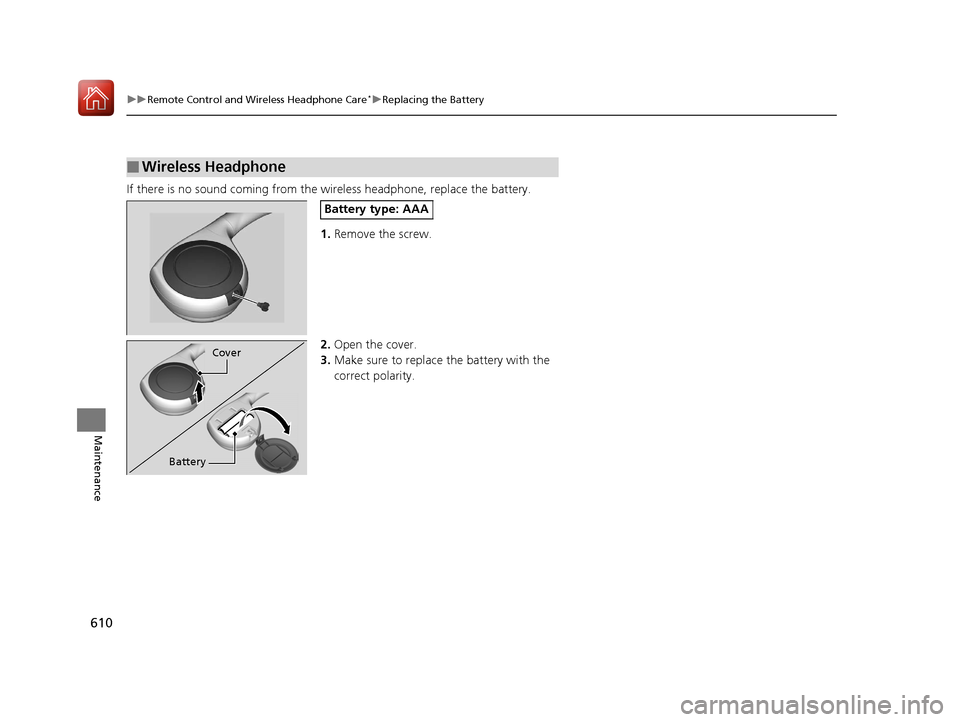
If there is no sound coming from th e wireless headphone, replace the battery.
1. Remove the screw.
2. Open the cover.
3. Make sure to replace the battery with the
correct polarity.
■Wireless Headphone
Battery type: AAA
Cover
Battery
17 PILOT-31TG76100.book 610 ページ 2016年9月20日 火曜日 午後4時9分
Page 617 of 673

uuCleaning uExterior Care
616
Maintenance
A good coat of automotive body wax helps protect your vehicle’s paint from the
elements. Wax will wear off over time and expose your vehicle’s paint to the
elements, so reapply as necessary.
If you get gasoline, oil, engine coolant, or battery fluid on resin coated parts, they
may be stained or the coating may peel. Prom ptly wipe it away using a soft cloth and
clean water.
Wipe using a glass cleaner.
Aluminum is susceptible to deterioration caused by salt and other road
contaminants. Use a sponge and mild detergent to wipe away promptly.
Be careful not to use harsh chemicals (inc luding some commercial wheel cleaners) or
a stiff brush. They can damage the clear coat of the aluminum alloy wheels that
helps keep the aluminum from corroding and tarnishing.
■Applying Wax
■Maintaining the Bumpers and Other Resin Coated Parts
■Cleaning the Window
■Maintaining Aluminum Wheels
1 Applying Wax
NOTICE
Chemical solvents and st rong cleaners can damage
the paint, metal, and plasti c on your vehicle. Wipe up
spills immediately.
1 Maintaining the Bumpers an d Other Resin Coated Parts
Ask a dealer about the correct coating material when
you want to repair the pa inted surface of the parts
made of resin.
17 PILOT-31TG76100.book 616 ページ 2016年9月20日 火曜日 午後4時9分
Page 619 of 673

618
Maintenance
Accessories and Modifications
Accessories
When installing accessories, check the following:
• Do not install accessories on the windshie ld. They can obstruct your view and
delay your reaction to driving conditions.
• Do not install any accessorie s over areas marked SRS Airbag, on the sides or backs
of the front seats, on front or side pillars, or near the side windows. Accessories
installed in these areas may interfere wi th proper operation of the vehicle’s
airbags or may be propelled into you or another occupant if the airbags deploy.
• Be sure electronic accessories do not over load electrical circuits or interfere with
proper operation of your vehicle.
2 Fuses P. 642
•Before installing any electronic accessory, have the inst aller contact a dealer for
assistance. If possible, have a d ealer inspect the final installation.
Modifications
Do not modify your vehicle in a manner that may affect its handling, stability, or
reliability, or install non-genuine Honda parts or accessories that may have a similar
effect.
The on-board diagnostic port (OBD-II/J2534 connector) installed on this vehicle is
intended to be used only with automobile system diagnostic devices. Use of any
other type of device may adversely affect the vehicle's electronic systems or allow
them to be compromised, and could result in a system malfunction, drained battery,
or other unexpected problems.
Even minor modifications to vehicle system s can affect overall vehicle performance.
Always make sure all equipment is prop erly installed and maintained, and do not
make any modification to your vehicle or its systems that might cause your vehicle
to no longer meet federal, state, prov ince, territory, and local regulations.
Do not modify or attempt to repair any of the electrical components.
1 Accessories and Modifications
Honda Genuine accessor ies are recommended to
ensure proper operati on on your vehicle.
3WARNING
Improper accessories or modifications can
affect your vehicle’s handling, stability, and
performance, and cause a crash in which
you can be seriously hurt or killed.
Follow all instruction s in this owner’s
manual regarding accessories and
modifications.
17 PILOT-31TG76100.book 618 ページ 2016年9月20日 火曜日 午後4時9分
Page 620 of 673

619
Handling the Unexpected
This chapter explains how to handle unexpected troubles.
ToolsTypes of Tools .................................. 620
If a Tire Goes Flat Changing a Flat Tire ......................... 621
Engine Does Not Start Checking the Engine ........................ 629
If the Smart Entry Remote Battery is Weak .......................................... 630
Emergency Engine Stop ................... 631
Shift Lever Does Not Move*............ 632
Jump Starting .................................... 633 Overheating
How to Handle Overheating............. 636
Indicator, Coming On/Blinking
If the Low Oil Pressure Indicator Comes On ............................................. 638
If the Charging System Indicator Comes
On ................................................. 638
If the Malfunction Indicator Lamp Comes On or Blinks ................................... 639
If the Brake System Indicator (Red) Comes On .................................................... 640
If the Electric Power Steering (EPS) System
Indicator Comes On ............................... 640
If the Low Tire Pressure/Tire Pressure Monitoring System (TPMS) Indicator Comes
On or Blinks........................................ 641
If the Transmission I ndicator Blinks along
with the Warning Message*.......... 641
Fuses
Fuse Locations ................................. 642
Inspecting and Changing Fuses ........ 646
Emergency Towing ........................... 647
When You Cannot Unlock the Fuel Fill Door.. 648
RefuelingRefueling From a Portable Fuel Container .... 649
When You Cannot Open the Tailgate.. 650
* Not available on all models
17 PILOT-31TG76100.book 619 ページ 2016年9月20日 火曜日 午後4時9分