2017 HONDA PILOT child lock
[x] Cancel search: child lockPage 69 of 673
uuChild Safety uSafety of Infants and Small Children
68
Safe Driving
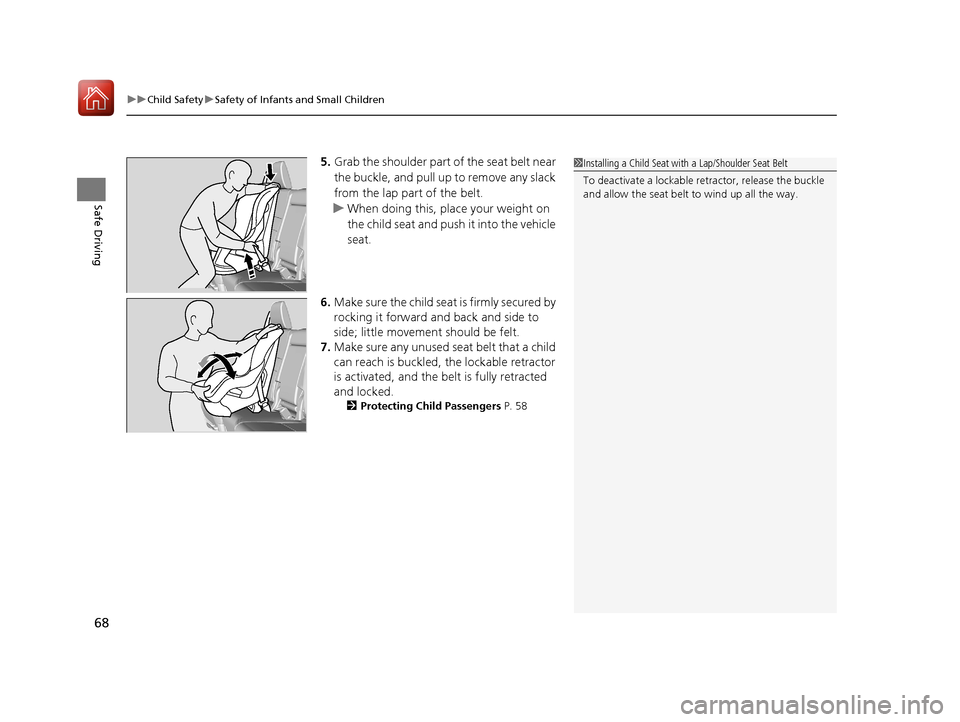
5. Grab the shoulder part of the seat belt near
the buckle, and pull up to remove any slack
from the lap part of the belt.
u When doing this, place your weight on
the child seat and push it into the vehicle
seat.
6. Make sure the child seat is firmly secured by
rocking it forward and back and side to
side; little movement should be felt.
7. Make sure any unused seat belt that a child
can reach is buckled, the lockable retractor
is activated, and the be lt is fully retracted
and locked.
2 Protecting Child Passengers P. 58
1Installing a Child Seat with a Lap/Shoulder Seat Belt
To deactivate a lockable retractor, release the buckle
and allow the seat belt to wind up all the way.
17 PILOT-31TG76100.book 68 ページ 2016年9月20日 火曜日 午後4時9分
Page 120 of 673

119
Controls
This chapter explains how to operate the various controls necessary for driving.
Clock.................................................. 120
Locking and Unlocking the Doors Key Types and Functions .................. 121
Locking/Unlocking the Doors from the Outside .......................................... 124
Low Smart Entry Remote Signal Strength ..... 123Locking/Unlocking the Doors from the Inside ............................................. 131
Childproof Door Locks ..................... 133
Auto Door Locking/Unlocking .......... 134
Opening and Closing the Tailgate ... 135
Security System
Immobilizer System .......................... 143
Security System Alarm ...................... 143
Opening and Closing the Windows.... 146
Moonroof*.............................................. 148Panoramic Roof*............................... 149
Operating the Switches Around the
Steering Wheel ENGINE START/STOP Button............. 152
Turn Signals ..................................... 155
Light Switches.................................. 156
Fog Lights
*...................................... 159
Auto High-Beam System*................ 160
Daytime Running Lights ................... 163
Wipers and Washers ........................ 164
Brightness Control ........................... 167
Defogger/Heated Door Mirror
*........ 168
Driving Position Memory System*.... 169
Adjusting the Steering Wheel........... 171 Adjusting the Mirrors
Interior Rearview Mirror ................... 172
Power Door Mirrors ......................... 173
Adjusting the Seats Adjusting the Seat Positions ............. 174
Rear Seats........................................ 183
Armrest ........................................... 186
Interior Lights/Interior Convenience Items
Interior Lights .................................. 188
Interior Convenience Items .............. 191
Heating and Cooling
*....................... 205
Climate Control System*.................. 210
* Not available on all models
17 PILOT-31TG76100.book 119 ページ 2016年9月20日 火曜日 午後4時9分
Page 133 of 673
uuLocking and Unlocking the Doors uLocking/Unlocking the Doors from the Inside
132
Controls
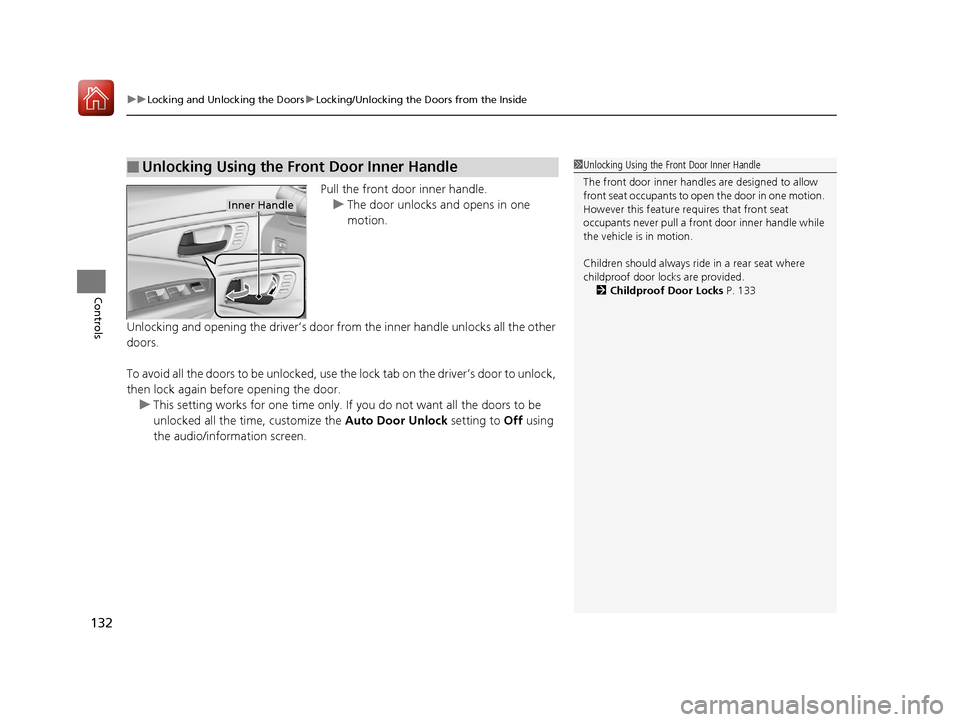
Pull the front door inner handle.
u The door unlocks and opens in one
motion.
Unlocking and opening the driver’s door from the inner handle unlocks all the other
doors.
To avoid all the doors to be unlocked, use the lock tab on the driver’s door to unlock,
then lock again before opening the door. u This setting works for one time only. If you do not want all the doors to be
unlocked all the time, customize the Auto Door Unlock setting to Off using
the audio/information screen.
■Unlocking Using the Front Door Inner Handle1 Unlocking Using the Front Door Inner Handle
The front door inne r handles are designed to allow
front seat occupants to open the door in one motion.
However this feature requires that front seat
occupants never pull a front door inner handle while
the vehicle is in motion.
Children should always ride in a rear seat where
childproof door locks are provided.
2 Childproof Door Locks P. 133
Inner Handle
17 PILOT-31TG76100.book 132 ページ 2016年9月20日 火曜日 午後4時9分
Page 134 of 673
133
uuLocking and Unlocking the Doors uChildproof Door Locks
Controls
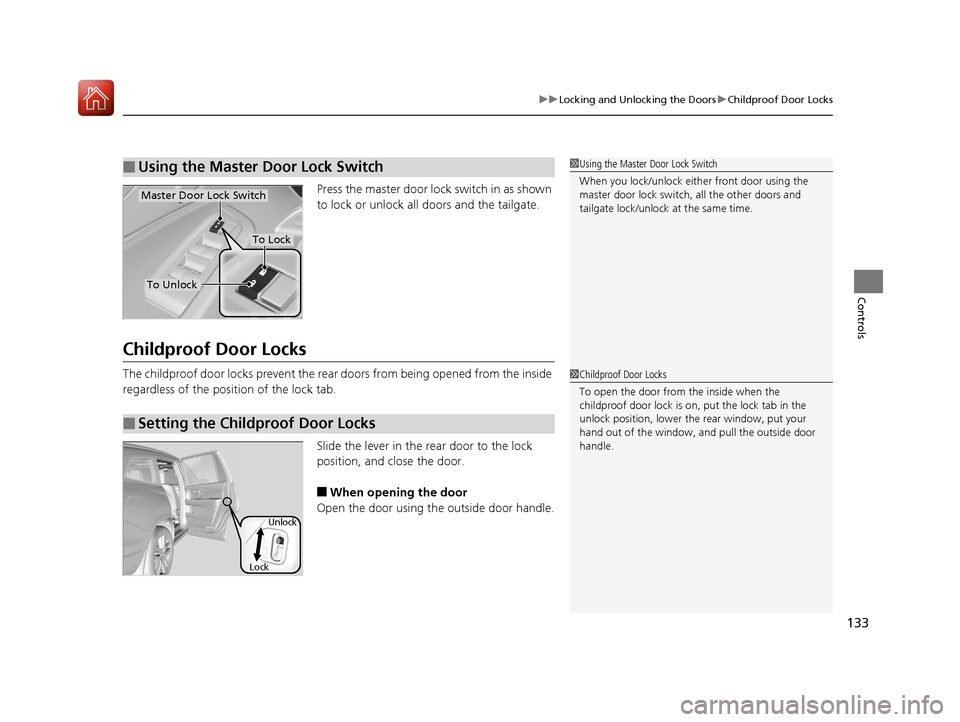
Press the master door lo ck switch in as shown
to lock or unlock all doors and the tailgate.
Childproof Door Locks
The childproof door locks prevent the rear doors from being opened from the inside
regardless of the position of the lock tab.
Slide the lever in the rear door to the lock
position, and close the door.
■When opening the door
Open the door using the outside door handle.
■Using the Master Door Lock Switch1 Using the Master Door Lock Switch
When you lock/unlock eith er front door using the
master door lock switch , all the other doors and
tailgate lock/unlock at the same time.
To Unlock
Master Door Lock Switch
To Lock
■Setting the Childproof Door Locks
1Childproof Door Locks
To open the door from the inside when the
childproof door lock is on, put the lock tab in the
unlock position, lower the rear window, put your
hand out of the window, and pull the outside door
handle.
Lock Unlock
17 PILOT-31TG76100.book 133 ページ 2016年9月20日 火曜日 午後4時9分
Page 139 of 673

138
uuOpening and Closing the Tailgate uOpening/Closing the Power Tailgate*
Controls
Opening/Closing the Power Tailgate*
The power tailgate can be operated by pressing the power tailgate button on the
remote transmitter or driver's door, or pressing the button on the tailgate.
■The power tailgate can be opened when:
• The tailgate is fully closed.
• The transmission is in
(P.
• Press and hold the tailgat e button on the remote transmitter for about one
second when the power mode is in VEHICLE OFF (LOCK).
u If you have changed the Keyless Open Mode setting to When Unlocked ,
you need to unlock the tailgate before you press the tailgate button to open it.
2Customized Features P. 351
■The power tailgate can be closed when:
• The tailgate is fully open.
• Press and hold the tailgat e button on the remote transmitter for about one
second when the power mode is in VEHICLE OFF (LOCK).
1Opening/Closing the Power Tailgate*
NOTICE
Do not push or pull on the power tailgate when it is
being automatically opened or closed.
Forcibly opening or closing the power tailgate while
in operation can deform the tailgate frame.
When operating the power tailgate, make sure there is
enough space around your vehicle. People near the
tailgate may be seriously hurt if the tailgate hits or closes on
their heads. Be especially cautious if children are around.
The power tailgate may not open or close under the
following conditions:
•The vehicle is park ed on a steep hill.•The vehicle is swayed in a strong wind.•The tailgate or the roof is covered with snow or ice.
If you close the power tail gate when all the doors are
locked, the power tailgate locks automatically.
If you replace the battery or the power tailgate fuse while
the tailgate is open, the power tailgate may be disabled.
The power tailgate resumes once you manually close the
tailgate and wait for about five minutes.
Installing aftermarket com ponents other than Honda
genuine accessories on the power tailgate may
prevent it from fully opening or closing.
Make sure the power tailgate is fully open before you
get your luggage in and out.
Make sure the power tailgat e is fully closed before
you start the vehicle.
* Not available on all models
17 PILOT-31TG76100.book 138 ページ 2016年9月20日 火曜日 午後4時9分
Page 147 of 673
146
Controls
Opening and Closing the Windows
Opening/Closing the Power Windows
The power windows can be opened and closed when the power mode is in ON,
using the switches on the doors. The driver’s side switches can be used to open and
close all of the windows.
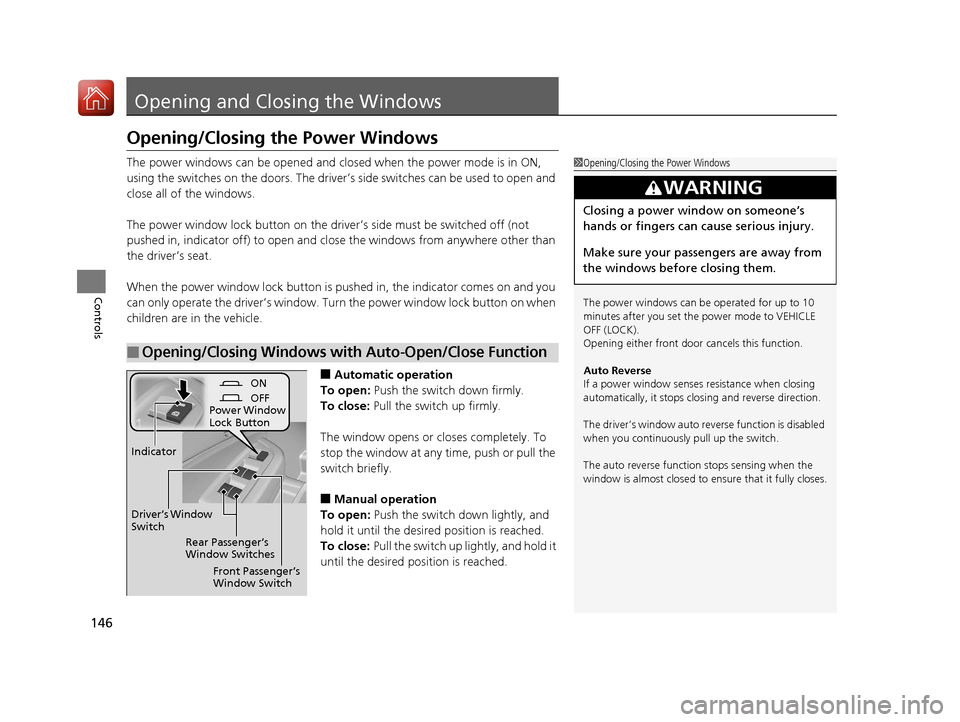
The power window lock button on the driver’s side must be switched off (not
pushed in, indicator off) to open and close the windows from anywhere other than
the driver’s seat.
When the power window lock button is pu shed in, the indicator comes on and you
can only operate the driver’s window. Turn the power window lock button on when
children are in the vehicle.
■Automatic operation
To open: Push the switch down firmly.
To close: Pull the switch up firmly.
The window opens or cl oses completely. To
stop the window at any time, push or pull the
switch briefly.
■Manual operation
To open: Push the switch down lightly, and
hold it until the desired position is reached.
To close: Pull the switch up lightly, and hold it
until the desired position is reached.
■Opening/Closing Windows with Auto-Open/Close Function
1 Opening/Closing the Power Windows
The power windows can be operated for up to 10
minutes after you set the power mode to VEHICLE
OFF (LOCK).
Opening either front door cancels this function.
Auto Reverse
If a power window senses resistance when closing
automatically, it stops clos ing and reverse direction.
The driver’s window auto re verse function is disabled
when you continuously pull up the switch.
The auto reverse function stops sensing when the
window is almost closed to en sure that it fully closes.
3WARNING
Closing a power window on someone’s
hands or fingers can cause serious injury.
Make sure your passengers are away from
the windows before closing them.
ON
OFF
Power Window
Lock Button
Rear Passenger’s
Window Switches
Front Passenger’s
Window Switch
Driver’s Window
Switch
Indicator
17 PILOT-31TG76100.book 146 ページ 2016年9月20日 火曜日 午後4時9分
Page 665 of 673

664
Index
USB Port .................................................. 219
Voice Operation....................................... 263
Wallpaper Setup .............................. 227, 248
Wi-Fi Connection ..................................... 300
Audio/Information Screen ................ 225, 243
Authorized Manuals ................................. 661
Auto Door Locking/Unlocking ................. 134
Customize ............................................... 376
Auto High-Beam System .......................... 160
Auto high-beam system Indicator ............. 87
Auto Idle-stop ........................................... 489
OFF Button .............................................. 490
Auto Idle-stop Indicator (Green) ............... 90
Auto Idle-stop System Indicator (Amber) .. 90
Automatic Intermittent Wipers ............... 165
Automatic Lighting .................................. 157
Automatic Transmission ........................... 478
Creeping ................................................. 478
Fluid ........................................................ 585
Kickdown ................................................ 478
Operating the Shift Button....................... 483
Shift Lever Does Not Move....................... 632
Shift Lever Operation ............................... 480
Shifting............................................ 479, 481
Auxiliary Input Jack .................................. 220
Average Fuel Economy ............................. 116B
Back-Up Light........................................... 592
Battery ...................................................... 606
Charging System Indicator................. 79, 638
Jump Starting .......................................... 633
Maintenance (Checking the Battery) ........ 606
Belts (Seat) .................................................. 37
Beverage Holders ..................................... 194
Blind spot information (BSI) System ........ 530
Indicator.................................................... 94
Bluetooth® Audio............................. 239, 293
Bluetooth® HandsFreeLink ®............. 390, 415
Blu-ray/DVD Rear Entertainment System ..................................................... 322
Audio Sources for Front and Rear Seats ... 343
Auxiliary Console Panel ........................... 323
DVD or Blu-ray
TM Player Error Messages ... 350
Front Control Panel Operation ................. 336
HDMI
TM Port ............................................ 324
Initial Settings.......................................... 334
Operating the Blu-ray/DVD rear entertainment system ............................ 336
Operating the System .............................. 325
Overhead Screen ..................................... 325
Playable Disc Region Codes ..................... 348
Playable Disc Types .................................. 348
Playable Discs .......................................... 344
Playing a Disc in the Rear......................... 342
Playing a DVD/Blu-ray
TM........................... 326
Playing AM/FM Radio in the Rear............. 341 Playing an iPod and a USB Flash Drive in
the Rear ................................................ 342
Playing Audio.......................................... 340
Playing SiriusXM ® Radio in the Rear ........ 341
Rear DVD or Blu-ray
TM Menu ................... 327
Rear System Setup .................................. 337
Recommended Discs ............................... 349
Screen and Surround Settings ................. 330
Selecting the Audio S ource using Front
Control Panel ........................................ 336
Setting the DVD or Blu-ray
TM Menu ......... 338
System Controls .............................. 326, 340
USB Ports ................................................ 324
Wireless Headphones .............................. 322
Booster Seats (For Children) ...................... 73
Brake System ............................................ 539
Anti-lock Brake System (ABS) .................. 541
Brake Assist System................................. 542
Brake System Indicator .............................. 78
Fluid ....................................................... 586
Foot Brake .............................................. 540
Indicator ........................................... 78, 640
Parking Brake.......................................... 539
Brake System (Amber) Indicator ................................................... 78
Brake System (Red) Indicator ........................................... 78, 640
Brightness Control (Instrument Panel) ... 167
Bulb Replacement .................................... 587
Back-Up Light ......................................... 592
Brake Light and Turn Signal Light ............ 591
17 PILOT-31TG76100.book 664 ページ 2016年9月20日 火曜日 午後4時9分
Page 666 of 673

665
Index
Daytime Running Light............................ 589
Headlights .............................................. 587
High-Mount Brake Light.......................... 592
Rear License Plate Light ........................... 592
Side Turn Signal/Emergency Indicator Light ..................................................... 590
Taillight and Rear Side Marker Light ........ 591
Bulb Specifications ................................... 652
C
Car Wash Mode........................................ 485
Carbon Monoxide Gas ............................... 74
Carrying Cargo ................................. 453, 455
CD Player .................................................. 278
Certification Label ................................... 654
Changing Bulbs ........................................ 587
Charging System Indicator ................ 79, 638
Child Safety ................................................ 58
Childproof Door Locks ............................ 133
Child Seat ................................................... 58
Booster Seats ............................................ 73
Child Seat for Infants ................................ 60
Child Seat for Small Children .................... 61
Installing a Child Seat with a Lap/Shoulder
Seat Belt ................................................. 67
Larger Children ......................................... 72
Rear-facing Child Seat............................... 60
Selecting a Child Seat ............................... 62
Childproof Door Locks ............................. 133
Cleaning the Exterior ............................... 615 Cleaning the Interior
................................ 613
Client Service Information ....................... 662
Climate Control System ............................ 210
Changing the Mode ................................ 210
Defrosting the Windshield and
Windows ............................................... 211
Dust and Pollen Filter ............................... 612
Recirculation and Fresh Air Mode ............ 211
Sensors .................................................... 216
Synchronized Mode ................................. 213
Using Automatic Climate Control ............ 210
Clock .......................................................... 120
Coat Hook ................................................. 198
Collision Mitigation Braking System
TM
(CMBSTM) .................................................. 543
Collision Mitigation Braking SystemTM
(CMBSTM)
Indicator .............................................. 95, 96
Compact Spare Tire .......................... 621, 653
Compass .................................................... 448
Console Compartment ............................. 191
Controls ..................................................... 119
Coolant (Engine) ....................................... 583
Adding to the Radiator ............................ 584
Adding to the Reserve Tank ..................... 583
Overheating ............................................ 636
Creeping (Automatic Transmission) ........ 478
Cross Traffic Monitor ................................ 557
Cruise Control ........................................... 497
CRUISE CONTROL Indicator ....................... 88
CRUISE MAIN Indicator .............................. 88 Indicator.................................................... 88
Cup Holders .............................................. 194
Customized Features ................................ 351
D
Daytime Running Lights .......................... 163
Dead Battery ............................................. 633
Defaulting All the Settings ...................... 386
Defrosting the Windshield and
Windows ......................................... 208, 211
Detachable Anchor .................................... 42
Devices that Emit Radio Waves ............... 655
Dimming Headlights ............................................... 156
Rearview Mirror....................................... 172
Dipstick (Engine Oil) ................................. 579
Directional Signals (Turn Signal) ............. 155
Display Button .......................................... 243
Door Mirrors ............................................. 173
Doors ......................................................... 121
Auto Door Locking .................................. 134
Auto Door Unlocking .............................. 134
Door Open Message.................................. 36
Keys ........................................................ 121
Locking/Unlocking the Doors from the Inside .............................................. 15, 131
Locking/Unlocking the Doors from the Outside ................................................. 124
Lockout Prevention System ...................... 130
DOT Tire Quality Grading ........................ 600
17 PILOT-31TG76100.book 665 ページ 2016年9月20日 火曜日 午後4時9分