Page 359 of 673
uuCustomized Features u
358
Features
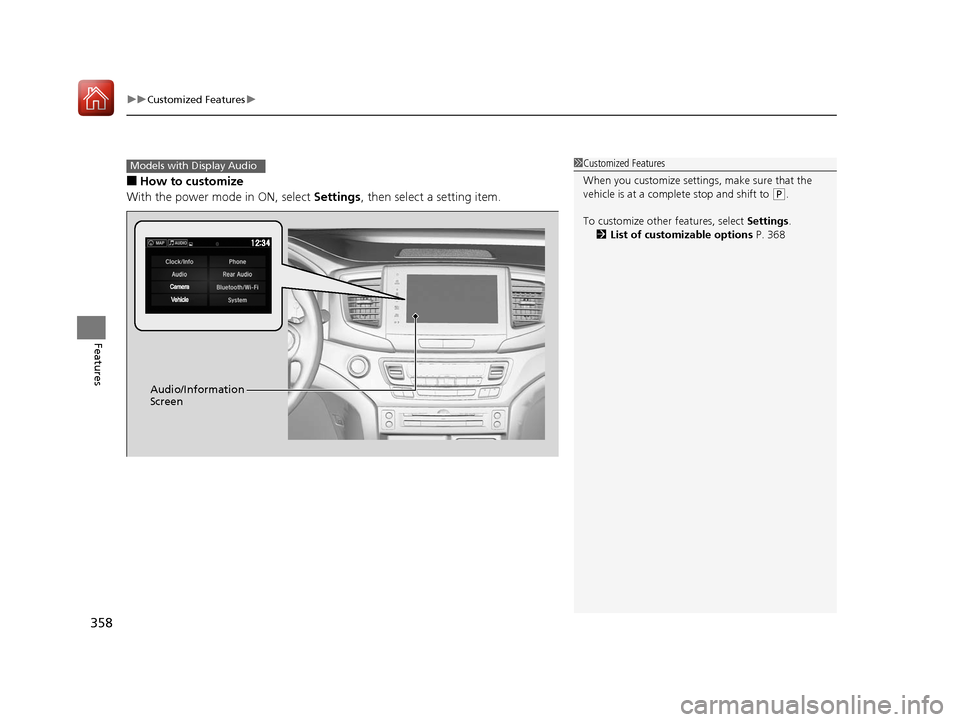
■How to customize
With the power mode in ON, select Settings, then select a setting item.
1Customized Features
When you customize settings, make sure that the
vehicle is at a complete stop and shift to
(P.
To customize other features, select Settings.
2 List of customizable options P. 368
Models with Display Audio
Audio/Information
Screen
17 PILOT-31TG76100.book 358 ページ 2016年9月20日 火曜日 午後4時9分
Page 365 of 673
364
uuCustomized Features u
Features
SoundAudioCommon
Audio Source Pop-Up
Cover Art
HD Radio Mode*FM/AM
RDS INFO
SXM*Tune Start
SportsFlash Setup(Interrupt)
SportsFlash Setup(Interrupt Beep)
SportsFlash Setup(Favorite Team)
Traffic & Weather Setup
DVD Auto PlayDVD*
Audio Language
Subtitle Language
Menu Language
Angle Mark
Bluetooth Device List
Dynamic Range
* Not available on all models
17 PILOT-31TG76100.book 364 ページ 2016年9月20日 火曜日 午後4時9分
Page 366 of 673
365
uuCustomized Features u
Continued
Features
Clock/Wallpaper TypeClockClock
WallpaperClock Adjustment*
Clock Format
Date Format
Auto Time Zone*
Manual Time Zone
Auto Daylight
Clock Display
Clock Location
Clock Reset
OtherInfo Screen Preference
Default
Clock/Info
BD Auto PlayBD*
Audio language
Subtitle Language
Menu Language
Angle Mark
Dynamic Range
Semi Resume
Primary Audio Only
Default
HondaLinkDiagnostic & Location Data
* Not available on all models
17 PILOT-31TG76100.book 365 ページ 2016年9月20日 火曜日 午後4時9分
Page 368 of 673
367
uuCustomized Features u
Continued
Features
Bluetooth On/Off Status
Default
Bluetooth/Wi-FiBluetooth
Bluetooth Device List
Edit Pairing Code
Wi-FiWi-Fi On/Off Status
Wi-Fi Network List
Wi-Fi Information
Default
Rear Audio*
Rear Control
Auto Speaker
Apple CarPlaySmartphone
Android Auto
* Not available on all models
17 PILOT-31TG76100.book 367 ページ 2016年9月20日 火曜日 午後4時9分
Page 369 of 673
368
uuCustomized Features u
Features
■List of customizable options
*1:Default Setting Setup
Group Customizable Features Description Selectable Settings
System
Display
Display
Settings
BrightnessChanges the brightness of the audio/information
screen.—
ContrastChanges the contrast of the audio/information screen.—
Black LevelChanges the black level of the audio/information
screen.—
Background ColorChanges the background color of the audio/
information screen.Blue*1/
Amber /Red /
Violet
Sound/
Beep
Guidance VolumeChanges the sound volume.
Adjusts the guidance volume of the navigation system.1 ~6*1~11
Text Message VolumeChanges the text/e-mail message reading volume.1~6*1~11
Voice Recog. VolumeChanges the volume of the voice prompt.1~6*1~11
Beep VolumeChanges the beep volume.Off*1/1 /2 /3
17 PILOT-31TG76100.book 368 ページ 2016年9月20日 火曜日 午後4時9分
Page 379 of 673

378
uuCustomized Features u
Features
*1:Default SettingSetup
Group Customizable Features Description Selectable Settings
Audio
Common
Sound
Adjusts the settings of the audio speakers'
sound.
2
Adjusting the Sound P. 260
-6 ~ 0*1 ~ +6 (BASS and TREBLE ),
RR9 ~0*1 ~FR9 (FADER ), L9 ~*1
0 ~R9 (BALANCE ), -6 ~ 0*1 ~ +6
( Center and Subwoofer)*, Off /
Low/ Mid*1/High (Speed Volume
Compensation ), On*1/Off
( Neural )
Audio Source Pop-
UpSelects whether the list of selectable audio
source comes on when Audio is selected
on the home screen.
On /Off*1
[Your selected media]
Cover ArtTurns the cover art display on and off.On*1/ Off
Bluetooth Device
ListPairs a new phone to HFL, edits or deletes
a paired phone.
2 Phone Setup P. 423
—
FM/AM
HD Radio Mode*
Selects whether the audio system
automatically switches to the digital radio
waves or receives the analogue waves
only.
Auto*1/Analog
RDS INFOTurns on and off the RDS information.On*1/Off
iPod or USB mode
FM/AM mode
* Not available on all models
17 PILOT-31TG76100.book 378 ページ 2016年9月20日 火曜日 午後4時9分
Page 380 of 673
379
uuCustomized Features u
Continued
Features
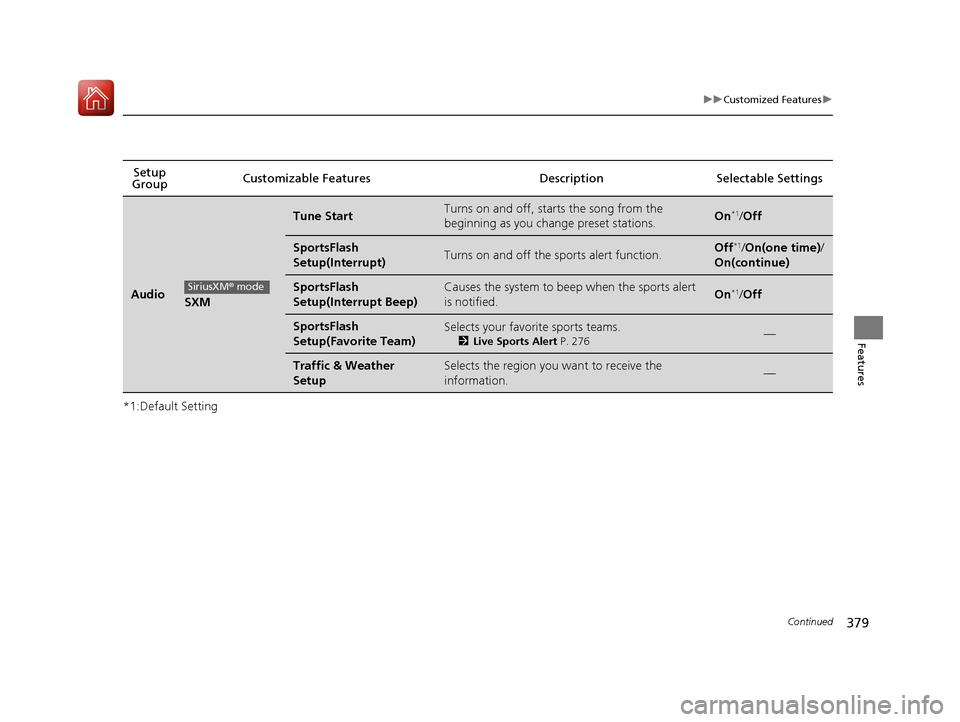
*1:Default SettingSetup
Group Customizable Features Description Selectable Settings
AudioSXM
Tune StartTurns on and off, sta
rts the song from the
beginning as you change preset stations.On*1/ Off
SportsFlash
Setup(Interrupt)Turns on and off the sp orts alert function.Off*1/On(one time) /
On(continue)
SportsFlash
Setup(Interrupt Beep)Causes the system to beep when the sports alert
is notified.On*1/ Off
SportsFlash
Setup(Favorite Team)Selects your favorite sports teams.
2 Live Sports Alert P. 276—
Traffic & Weather
SetupSelects the region you want to receive the
information.—
SiriusXM® mode
17 PILOT-31TG76100.book 379 ページ 2016年9月20日 火曜日 午後4時9分
Page 381 of 673
380
uuCustomized Features u
Features
*1:Default SettingSetup
Group Customizable Features Desc
ription Selectable Settings
AudioDVD*
DVD Auto PlayTurns on and off to automatically to
play a DVD disc.On/Off
Audio LanguageChanges the language of a DVD disc.
English*1, French , Spanish , Arabic ,
German , Italian, Dutch, Russian,
Chinese , Korean , Thai , Japanese ,
and Other .
Subtitle LanguageChanges the subtitle language of a
DVD disc.
English*1, French , Spanish , Arabic ,
German , Italian, Dutch, Russian,
Chinese , Korean , Thai , Japanese ,
and Other .
Menu LanguageChanges the menu language of a
DVD disc.
English*1, French , Spanish , Arabic ,
German , Italian, Dutch, Russian,
Chinese , Korean , Thai , Japanese ,
and Other .
Angle MarkTurns on and off the angle setting.On/Off*
Dynamic Range
Turns on and off the dynamic range
function only while playing the Dolby
Digital audio.
On*/ Off
* Not available on all models
17 PILOT-31TG76100.book 380 ページ 2016年9月20日 火曜日 午後4時9分