Page 280 of 565
279
uuRear Entertainment System*uOperating the System
Continued
Features
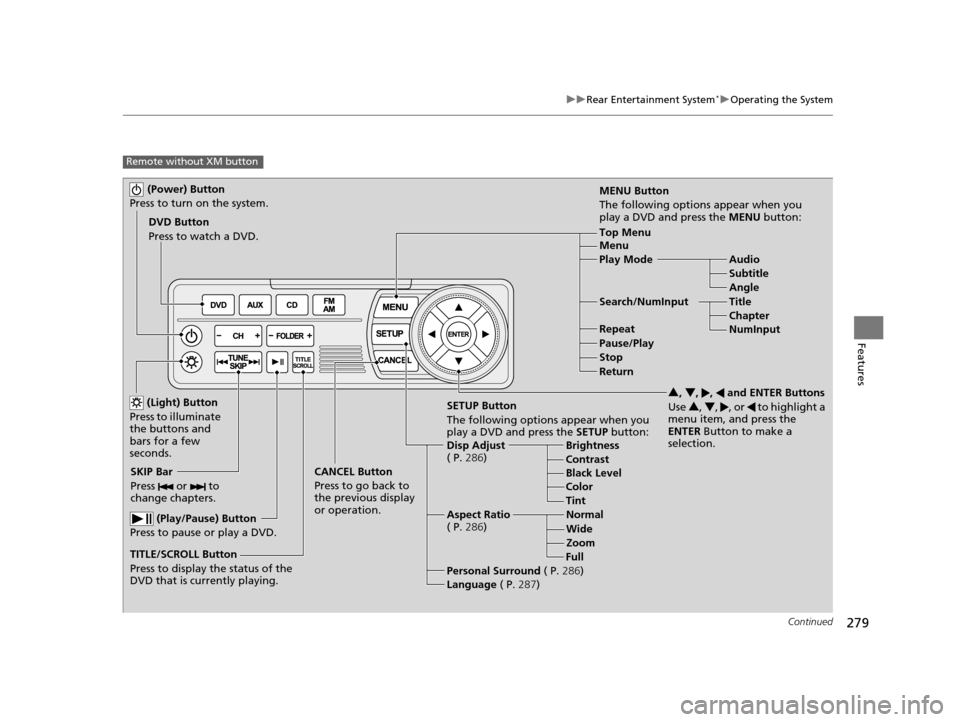
Remote without XM button
(Power) Button
Press to turn on the system.
DVD Button
Press to watch a DVD.
(Light) Button
Press to illuminate
the buttons and
bars for a few
seconds.
SKIP Bar
Press or to
change chapters.
(Play/Pause) Button
Press to pause or play a DVD.
TITLE/SCROLL Button
Press to display the status of the
DVD that is currently playing. MENU Button
The following options appear when you
play a DVD and press the
MENU button:
Top Menu
Menu
Play Mode Audio Subtitle
Angle
Search/NumInput Title Chapter
NumInput
Repeat
Pause/Play
Stop
Return
SETUP Button
The following options appear when you
play a DVD and press the SETUP button:
Disp Adjust
( P. 286) Brightness
Contrast
Black Level
Color
CANCEL Button
Press to go back to
the previous display
or operation. 3
, 4 , , and ENTER Buttons
Use 3, 4 , , or to highlight a
menu item, and press the
ENTER Button to make a
selection.
Tint
Normal
Wide Zoom
Full
Aspect Ratio
( P. 286)
Personal Surround ( P.286)
Language ( P.287)
17 US ODYSSEY (KA KC)-31TK86600.book 279 ページ 2016年10月24日 月曜日 午後4時2分
Page 283 of 565
uuRear Entertainment System*uOperating the System
282
Features
Rear Control:
Disables controls from the remote.
1. Press the SETTINGS button to display Settings menu in front.
2. Rotate to select Rear Ent Settings, then press .
3. Rotate to select Rear Control, then press .
4. Rotate to select On or Off , then press .
Rear Speaker:
Mutes the sounds from the rear speakers.
1. Press the SETTINGS button to display Settings menu in front.
2. Rotate to select Rear Ent Settings, then press .
3. Rotate to select Rear Speaker, then press .
4. Rotate to select On or Off , then press .
■TITLE/SCROLL button on the remote
Press the TITLE/SCROLL button while the DVD is playing to see the current status of
title, chapter, elapsed time, angle, su btitle, audio, and sound characteristics.
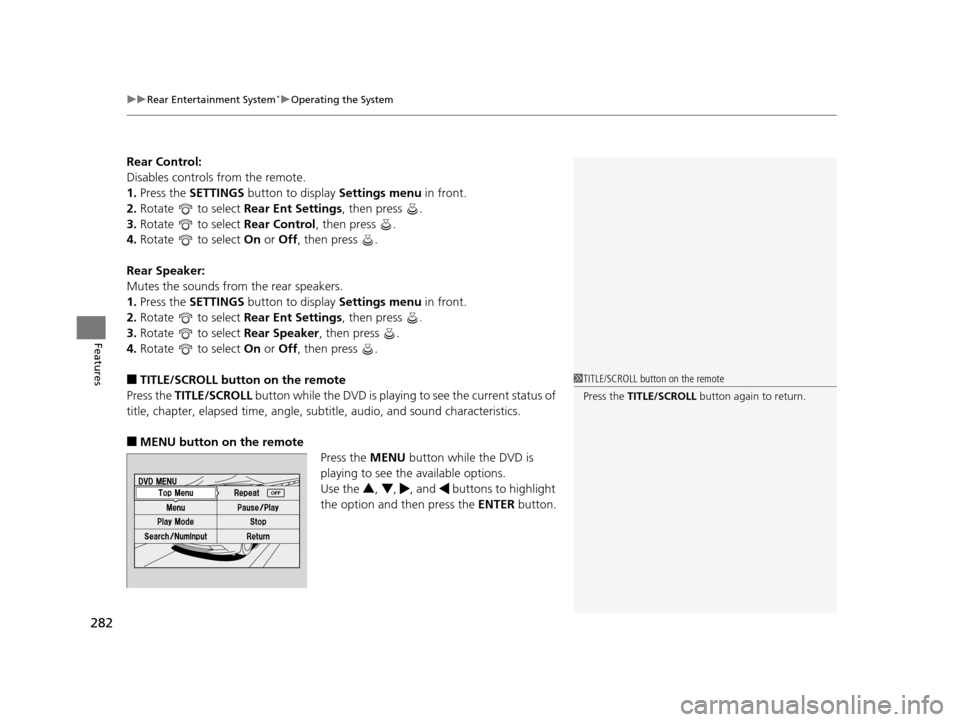
■MENU button on the remote
Press the MENU button while the DVD is
playing to see the available options.
Use the 3, 4 , , and buttons to highlight
the option and then press the ENTER button.
1TITLE/SCROLL button on the remote
Press the TITLE/SCROLL button again to return.
17 US ODYSSEY (KA KC)-31TK86600.book 282 ページ 2016年10月24日 月曜日 午後4時2分
Page 286 of 565
285
uuRear Entertainment System*uOperating the System
Continued
Features
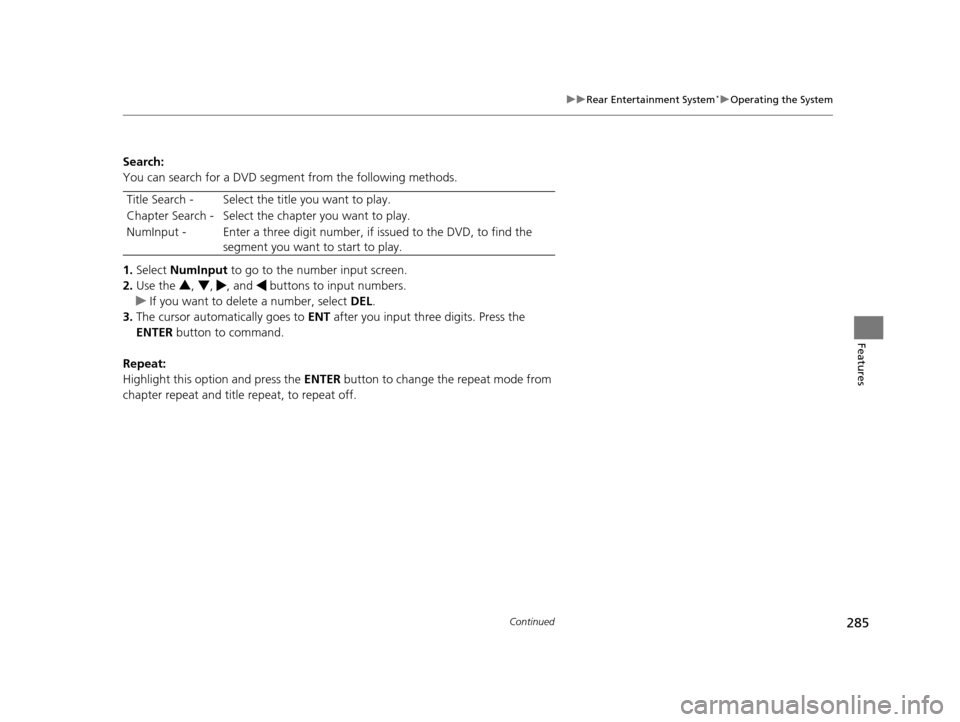
Search:
You can search for a DVD segment from the following methods.
1. Select NumInput to go to the nu mber input screen.
2. Use the 3, 4 , , and buttons to input numbers.
u If you want to delete a number, select DEL.
3. The cursor automatically goes to ENT after you input three digits. Press the
ENTER button to command.
Repeat:
Highlight this option and press the ENTER button to change the repeat mode from
chapter repeat and title repeat, to repeat off. Title Search - Select the ti
tle you want to play.
Chapter Search - Select the chapter you want to play.
NumInput - Enter a three digit number, if issued to the DVD, to find the
segment you want to start to play.
17 US ODYSSEY (KA KC)-31TK86600.book 285 ページ 2016年10月24日 月曜日 午後4時2分
Page 287 of 565
286
uuRear Entertainment System*uOperating the System
Features
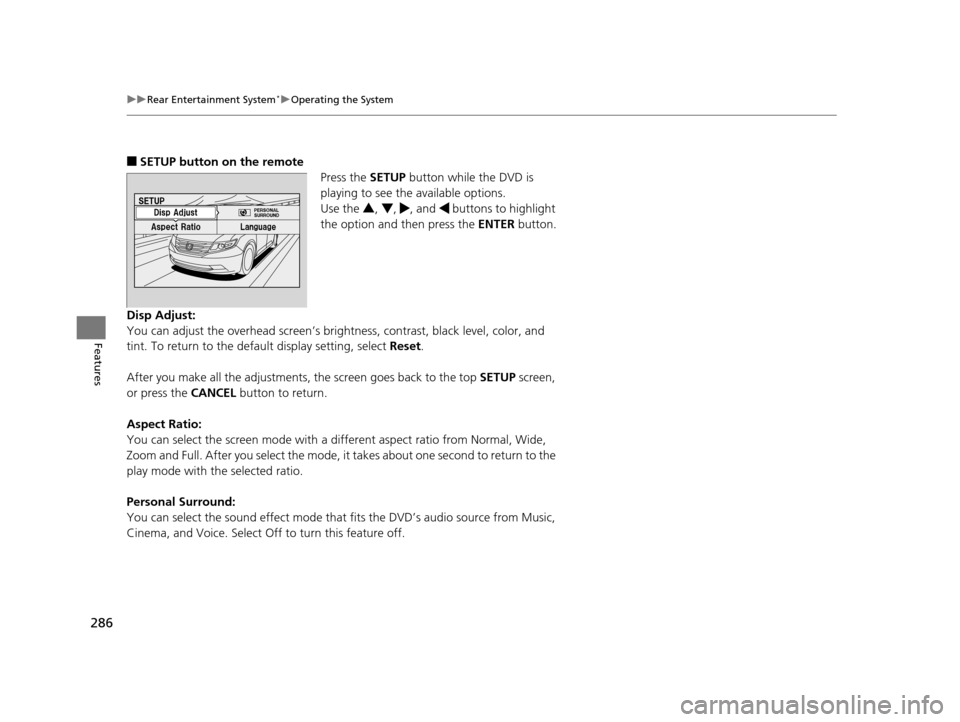
■SETUP button on the remote
Press the SETUP button while the DVD is
playing to see the available options.
Use the 3, 4 , , and buttons to highlight
the option and then press the ENTER button.
Disp Adjust:
You can adjust the overhead screen’s brightness, contrast, black level, color, and
tint. To return to the default display setting, select Reset.
After you make all the adjustments, the screen goes back to the top SETUP screen,
or press the CANCEL button to return.
Aspect Ratio:
You can select the screen mo de with a different aspect ratio from Normal, Wide,
Zoom and Full. After you select the mode, it takes about one second to return to the
play mode with the selected ratio.
Personal Surround:
You can select the sound effect mode that fits the DVD’s audio source from Music,
Cinema, and Voice. Select Off to turn this feature off.
17 US ODYSSEY (KA KC)-31TK86600.book 286 ページ 2016年10月24日 月曜日 午後4時2分
Page 289 of 565
288
uuRear Entertainment System*uOperating the System
Features
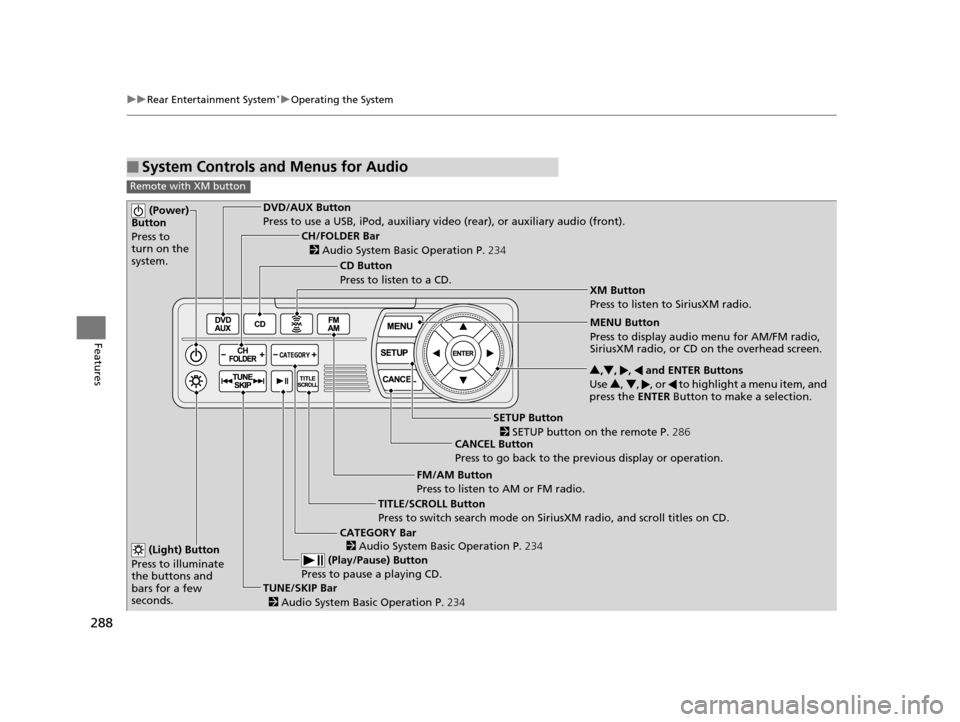
■System Controls and Menus for Audio
Remote with XM button
(Power)
Button
Press to
turn on the
system.DVD/AUX Button
Press to use a USB, iPod, auxiliary vi deo (rear), or auxiliary audio (front).
(Light) Button
Press to illuminate
the buttons and
bars for a few
seconds.
TUNE/SKIP Bar (Play/Pause) Button
Press to pause a playing CD.
TITLE/SCROLL Button
Press to switch search mode on Siri usXM radio, and scroll titles on CD.
CANCEL Button
Press to go back to the previous display or operation. 3
,4 , , and ENTER Buttons
Use 3, 4 , , or to highlight a menu item, and
press the ENTER Button to make a selection.
CATEGORY Bar
CH/FOLDER Bar
CD Button
Press to listen to a CD.
FM/AM Button
Press to listen to AM or FM radio.
SETUP Button XM Button
Press to listen to SiriusXM radio.
MENU Button
Press to display audio menu for AM/FM radio,
SiriusXM radio, or CD on the overhead screen.
2
Audio System Basic Operation P. 234
2
Audio System Basic Operation P. 234
2 SETUP button on the remote P. 286
2 Audio System Basic Operation P. 234
17 US ODYSSEY (KA KC)-31TK86600.book 288 ページ 2016年10月24日 月曜日 午後4時2分
Page 290 of 565
289
uuRear Entertainment System*uOperating the System
Continued
Features
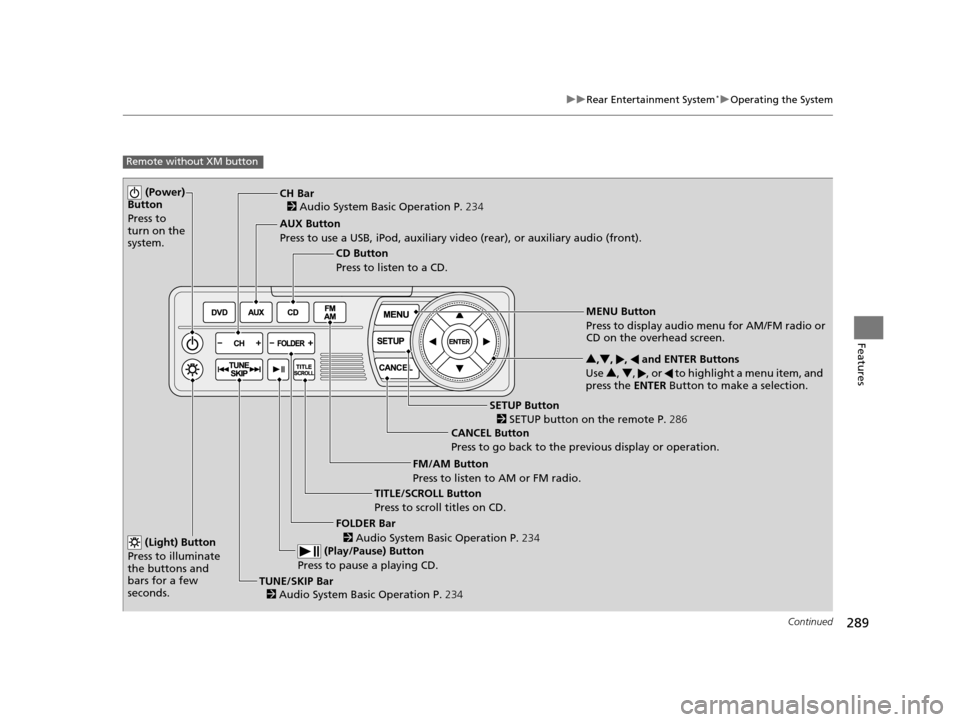
Remote without XM button
(Power)
Button
Press to
turn on the
system.
AUX Button
Press to use a USB, iPod, auxiliary video (rear), or auxiliary audio (front).
(Light) Button
Press to illuminate
the buttons and
bars for a few
seconds.
TUNE/SKIP Bar (Play/Pause) Button
Press to pause a playing CD.
TITLE/SCROLL Button
Press to scroll titles on CD. CANCEL Button
Press to go back to the previous display or operation. 3
,4 , , and ENTER Buttons
Use 3, 4 , , or to highlight a menu item, and
press the ENTER Button to make a selection.
FOLDER Bar
CH Bar
CD Button
Press to listen to a CD.
FM/AM Button
Press to listen to AM or FM radio.
SETUP Button
MENU Button
Press to display audio menu for AM/FM radio or
CD on the overhead screen.
2 Audio System Basic Operation P. 234
2
Audio System Basic Operation P. 234
2
Audio System Basic Operation P. 234
2 SETUP button on the remote P. 286
17 US ODYSSEY (KA KC)-31TK86600.book 289 ページ 2016年10月24日 月曜日 午後4時2分
Page 298 of 565
297
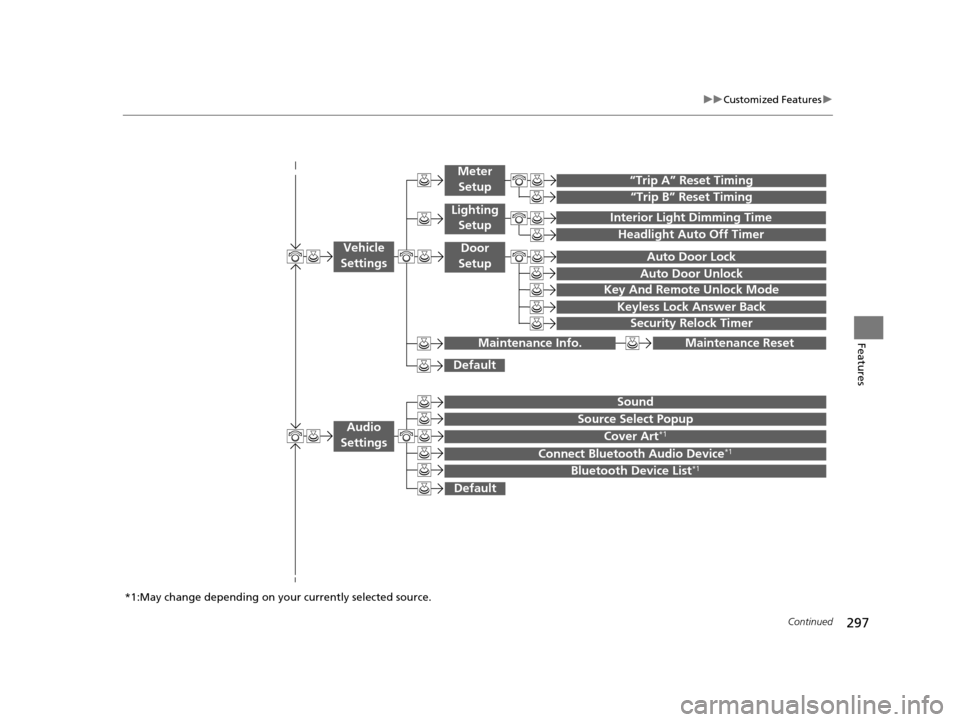
uuCustomized Features u
Continued
Features
“Trip B” Reset Timing
“Trip A” Reset Timing
Auto Door Lock
Auto Door Unlock
Interior Light Dimming Time
Headlight Auto Off Timer
Key And Remote Unlock Mode
Keyless Lock Answer Back
Security Relock Timer
Maintenance Reset
Default
Vehicle
Settings
Meter
Setup
Lighting Setup
Door
Setup
Maintenance Info.
Source Select Popup
Sound
Default
Cover Art*1
Connect Bluetooth Audio Device*1
Bluetooth Device List*1
Audio
Settings
*1:May change depending on your currently selected source.
17 US ODYSSEY (KA KC)-31TK86600.book 297 ページ 2016年10月24日 月曜日 午後4時2分
Page 302 of 565
301
uuCustomized Features u
Continued
Features
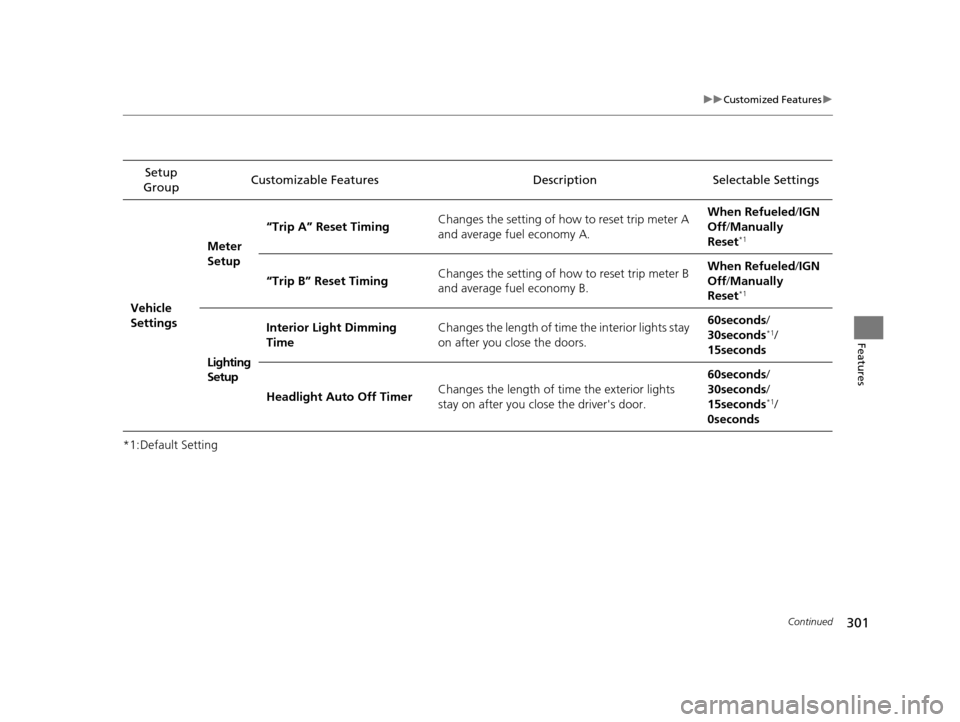
*1:Default SettingSetup
Group Customizable Features Description Selectable Settings
Vehicle
Settings Meter
Setup
“Trip A” Reset Timing
Changes the setting of how to reset trip meter A
and average fuel economy A. When Refueled
/IGN
Off /Manually
Reset
*1
“Trip B” Reset Timing Changes the setting of how to reset trip meter B
and average fuel economy B. When Refueled
/IGN
Off /Manually
Reset*1
Lighting
Setup Interior Light Dimming
Time
Changes the length of time the interior lights stay
on after you close the doors. 60seconds
/
30seconds
*1/
15seconds
Headlight Auto Off Timer Changes the length of time the exterior lights
stay on after you close the driver's door. 60seconds
/
30seconds /
15seconds
*1/
0seconds
17 US ODYSSEY (KA KC)-31TK86600.book 301 ページ 2016年10月24日 月曜日 午後4時2分