Page 190 of 565
Continued189
uuInterior Lights/Interior Convenience Items uInterior Convenience Items
Controls
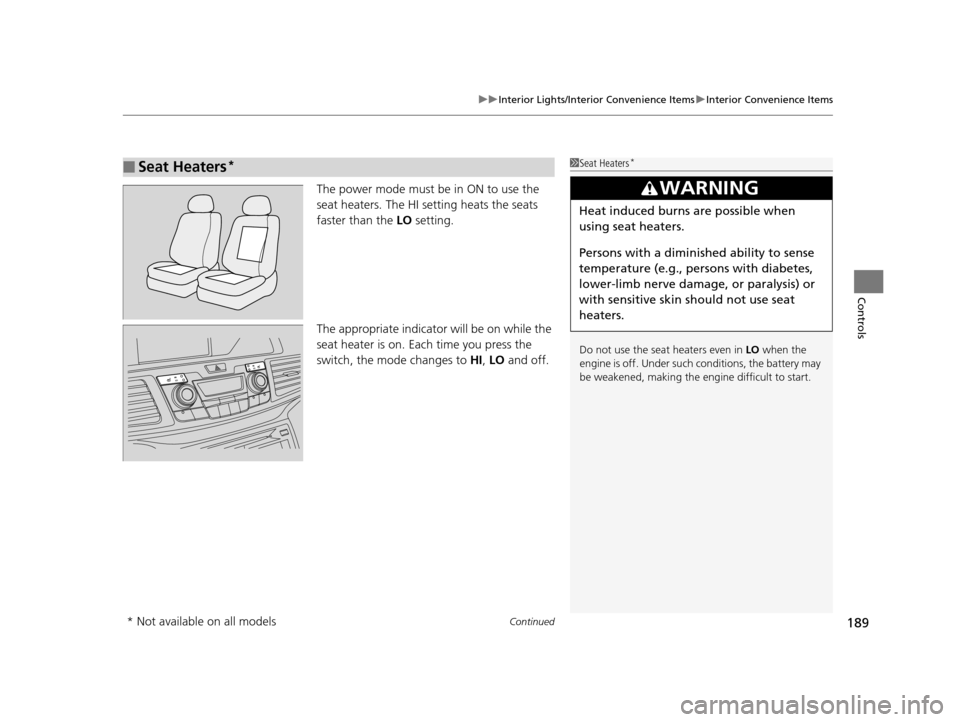
The power mode must be in ON to use the
seat heaters. The HI setting heats the seats
faster than the LO setting.
The appropriate indicato r will be on while the
seat heater is on. Each time you press the
switch, the mode changes to HI, LO and off.
■Seat Heaters*1Seat Heaters*
Do not use the seat heaters even in LO when the
engine is off. Under such conditions, the battery may
be weakened, making the engine difficult to start.
3WARNING
Heat induced burns are possible when
using seat heaters.
Persons with a diminished ability to sense
temperature (e.g., persons with diabetes,
lower-limb nerve damage, or paralysis) or
with sensitive skin should not use seat
heaters.
* Not available on all models
17 US ODYSSEY (KA KC)-31TK86600.book 189 ページ 2016年10月24日 月曜日 午後4時2分
Page 191 of 565
uuInterior Lights/Interior Convenience Items uInterior Convenience Items
190
Controls
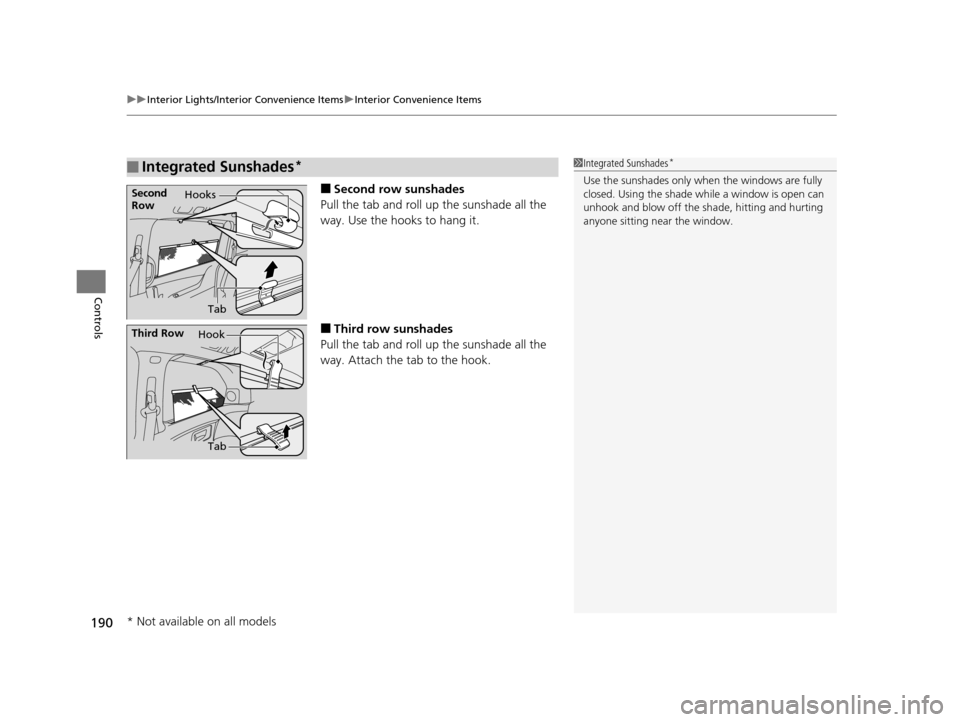
■Second row sunshades
Pull the tab and roll up the sunshade all the
way. Use the hooks to hang it.
■Third row sunshades
Pull the tab and roll up the sunshade all the
way. Attach the tab to the hook.
■Integrated Sunshades*1 Integrated Sunshades*
Use the sunshades only when the windows are fully
closed. Using the shade while a window is open can
unhook and blow off the sh ade, hitting and hurting
anyone sitting near the window.Second
Row Hooks
Tab
Third Row Hook
Tab
* Not available on all models
17 US ODYSSEY (KA KC)-31TK86600.book 190 ページ 2016年10月24日 月曜日 午後4時2分
Page 192 of 565
Continued191
uuInterior Lights/Interior Convenience Items uInterior Convenience Items
Controls
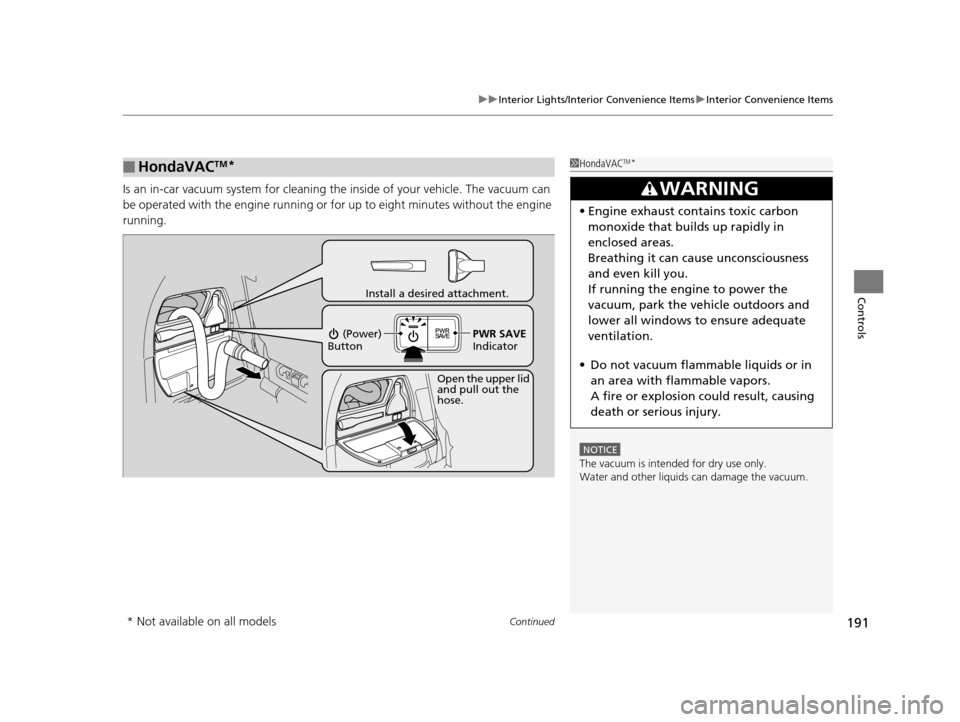
Is an in-car vacuum system for cleaning th e inside of your vehicle. The vacuum can
be operated with the engine running or for up to eight minutes without the engine
running.
■HondaVACTM*1 HondaVACTM*
NOTICE
The vacuum is intended for dry use only.
Water and other liquids can damage the vacuum.
3WARNING
•Engine exhaust contains toxic carbon
monoxide that builds up rapidly in
enclosed areas.
Breathing it can cause unconsciousness
and even kill you.
If running the engine to power the
vacuum, park the vehicle outdoors and
lower all windows to ensure adequate
ventilation.
• Do not vacuum flammable liquids or in
an area with flammable vapors.
A fire or explosion could result, causing
death or serious injury.
Open the upper lid
and pull out the
hose.
Install a desired attachment.
(Power)
Button
PWR SAVE
Indicator
* Not available on all models
17 US ODYSSEY (KA KC)-31TK86600.book 191 ページ 2016年10月24日 月曜日 午後4時2分
Page 193 of 565
uuInterior Lights/Interior Convenience Items uInterior Convenience Items
192
Controls
■To operate:
1. Set the parking brake.
2. Set the power mode to ACCESSORY.
2. Start the engine.
3. Press the button to turn on the system.1To operate:
The vacuum automatica lly shuts off and the PWR
SAVE indicator comes on if the system detects that
running the vacuum is over discharging the battery.
After seven minutes of operation:
The beeper sounds intermittently.
When eight minutes elapse:
The beeper sounds once and the PWR SAVE
indicator comes on. The va cuum automatically shuts
off.
To continue vacuumin g, start the engine.
Operate the engine only when there is sufficient
ventilation.
Without engine running
With engine running
Without engine running
With engine running
17 US ODYSSEY (KA KC)-31TK86600.book 192 ページ 2016年10月24日 月曜日 午後4時2分
Page 194 of 565

193
uuInterior Lights/Interior Convenience Items uInterior Convenience Items
Controls
■To empty the canister or change the debris bag
1. Open the lower vacuum lid.
2. Push the lever in.
3. Pull the canister down, then slide out from the track.
4.Push the three lid tabs outward and remove
the canister lid.
u The debris bag and canister can be
accessed.
To reinstall the empty canister:
After sliding the canister into the track, push the lever in to lift the canister up.
Release the lever to lock the canister in position. u The orange unlocked decal should not be visible.1To empty the canister or change the debris bag
Both the debris bag and th e filter are replaceable.
Contact a dealer for component replacement
information.
The vacuum can be used with or without the bag.
If you find the vacuum performance poor or there is
no suction:
•Check if the canister is locked in position.
•Check if the hose is attached to the vacuum.•Empty the canister or change the bag.
•Clean or replace the filter.
•Check the hose for clogs or damage.
Lower Vacuum Lid
Lever
Canister
Canister Lid
Three Lid Tabs
17 US ODYSSEY (KA KC)-31TK86600.book 193 ページ 2016年10月24日 月曜日 午後4時2分
Page 208 of 565
207
uuAudio System uUSB Port
Features
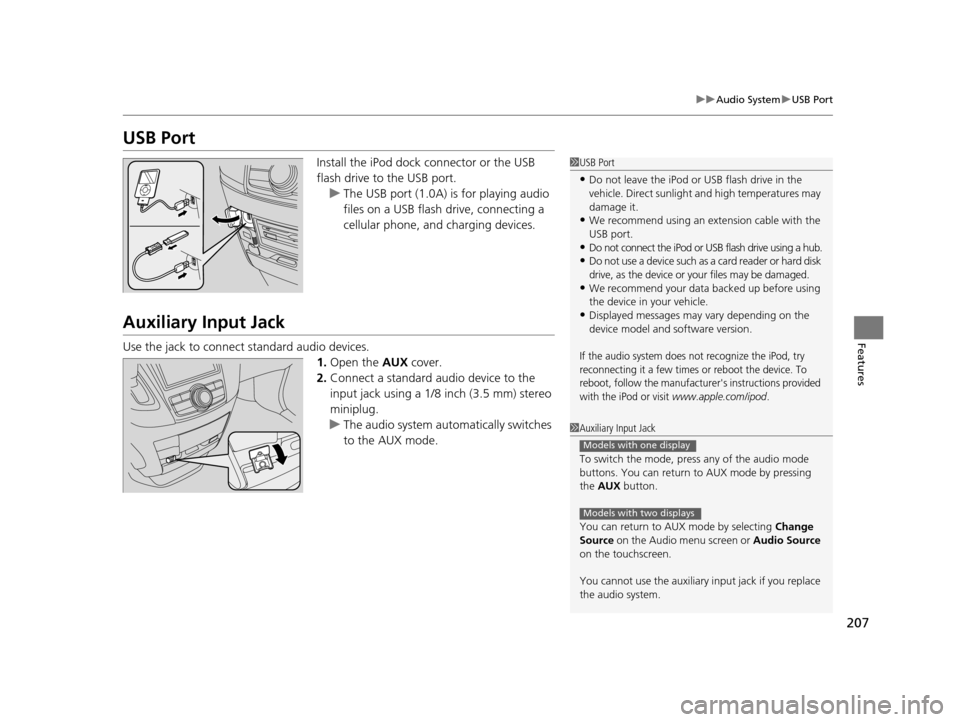
USB Port
Install the iPod dock connector or the USB
flash drive to the USB port.
u The USB port (1.0A) is for playing audio
files on a USB flash drive, connecting a
cellular phone, and charging devices.
Auxiliary Input Jack
Use the jack to connect standard audio devices.
1.Open the AUX cover.
2. Connect a standard audio device to the
input jack using a 1/8 inch (3.5 mm) stereo
miniplug.
u The audio system auto matically switches
to the AUX mode.
1 USB Port
•Do not leave the iPod or USB flash drive in the
vehicle. Direct sunlight and high temperatures may
damage it.
•We recommend using an extension cable with the
USB port.
•Do not connect the iPod or USB flash drive using a hub.
•Do not use a device such as a card reader or hard disk
drive, as the device or your files may be damaged.
•We recommend your data backed up before using
the device in your vehicle.
•Displayed messages may vary depending on the
device model and software version.
If the audio system does not recognize the iPod, try
reconnecting it a few times or reboot the device. To
reboot, follow the manufacturer's instructions provided
with the iPod or visit
www.apple.com/ipod.
1 Auxiliary Input Jack
To switch the mode, pres s any of the audio mode
buttons. You can return to AUX mode by pressing
the AUX button.
You can return to AUX mode by selecting Change
Source on the Audio menu screen or Audio Source
on the touchscreen.
You cannot use the auxiliary input jack if you replace
the audio system.
Models with one display
Models with two displays
17 US ODYSSEY (KA KC)-31TK86600.book 207 ページ 2016年10月24日 月曜日 午後4時2分
Page 275 of 565
uuGeneral Information on the Audio System uRecommended CDs
274
Features
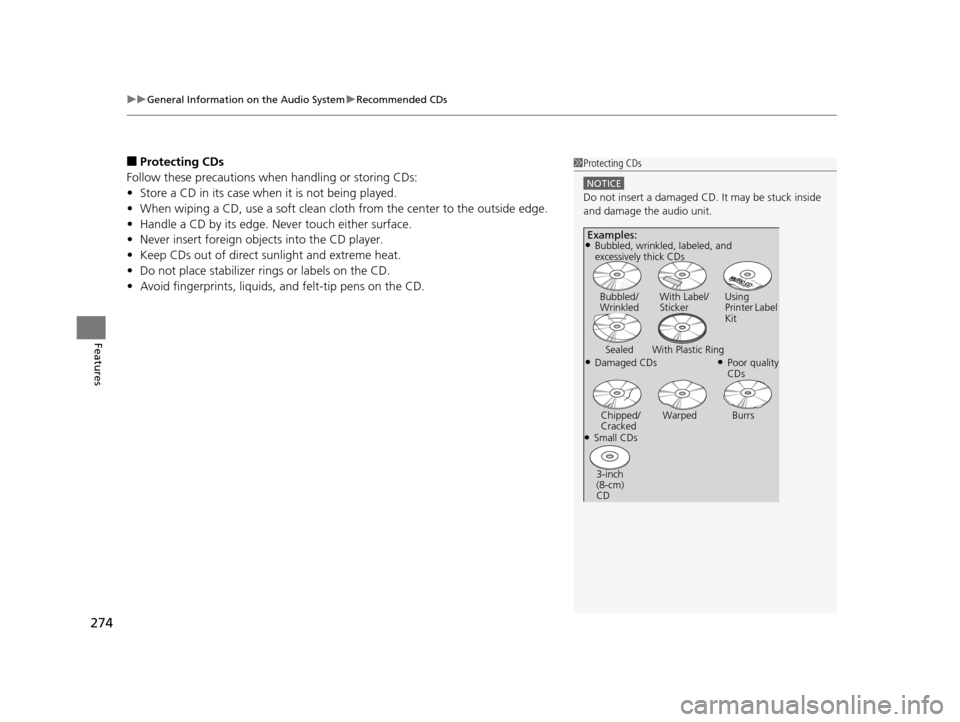
■Protecting CDs
Follow these precautions when handling or storing CDs:
• Store a CD in its case when it is not being played.
• When wiping a CD, use a soft clean clot h from the center to the outside edge.
• Handle a CD by its edge. Never touch either surface.
• Never insert foreign objects into the CD player.
• Keep CDs out of direct sunlight and extreme heat.
• Do not place stabilizer ri ngs or labels on the CD.
• Avoid fingerprints, liquids, and felt-tip pens on the CD.1Protecting CDs
NOTICE
Do not insert a damaged CD. It may be stuck inside
and damage the audio unit.
Examples:
●Damaged CDs Bubbled/
Wrinkled
With Label/
Sticker Using
Printer Label
Kit
Sealed With Plastic Ring●Poor quality
CDs
Chipped/
Cracked Warped Burrs
●Small CDs
3-inch
(8-cm)
CD
●Bubbled, wrinkled, labeled, and
excessively thick CDs
17 US ODYSSEY (KA KC)-31TK86600.book 274 ページ 2016年10月24日 月曜日 午後4時2分
Page 279 of 565
278
uuRear Entertainment System*uOperating the System
Features
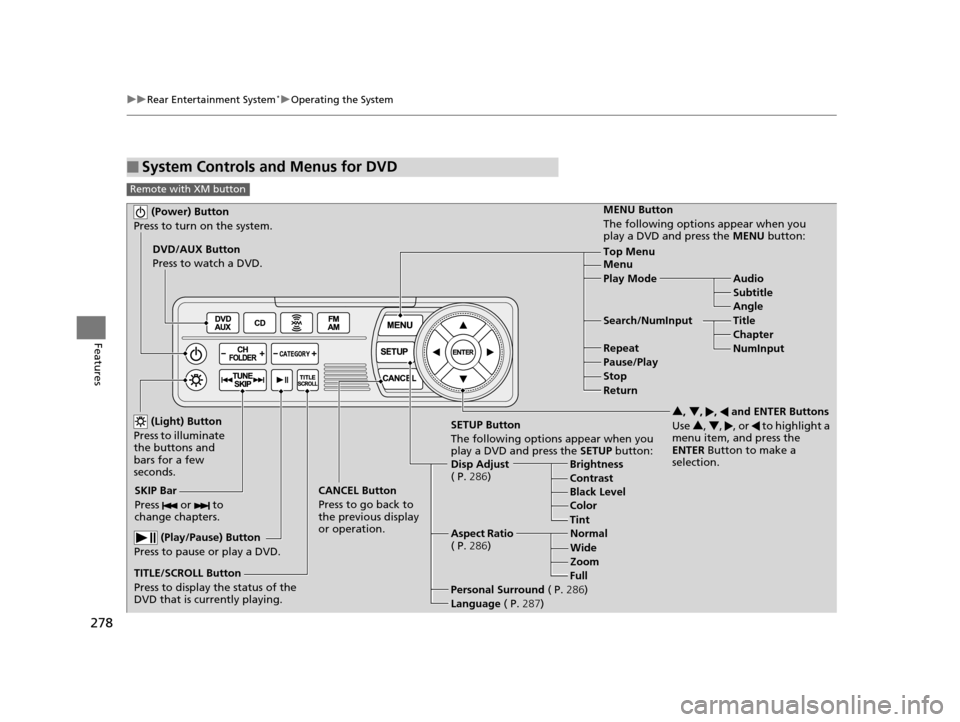
■System Controls and Menus for DVD
Remote with XM button
(Power) Button
Press to turn on the system.
DVD/AUX Button
Press to watch a DVD.
(Light) Button
Press to illuminate
the buttons and
bars for a few
seconds.
SKIP Bar
Press or to
change chapters.
(Play/Pause) Button
Press to pause or play a DVD.
TITLE/SCROLL Button
Press to display the status of the
DVD that is currently playing. MENU Button
The following options appear when you
play a DVD and press the
MENU button:
Top Menu
Menu
Play Mode Audio Subtitle
Angle
Search/NumInput Title Chapter
NumInput
Repeat
Pause/Play
Stop
Return
SETUP Button
The following options appear when you
play a DVD and press the SETUP button:
Disp Adjust
( P. 286) Brightness
Contrast
Black Level
Color
CANCEL Button
Press to go back to
the previous display
or operation. 3
, 4 , , and ENTER Buttons
Use 3, 4 , , or to highlight a
menu item, and press the
ENTER Button to make a
selection.
Tint
Normal
Wide Zoom
Full
Aspect Ratio
( P. 286)
Personal Surround ( P.286)
Language ( P.287)
17 US ODYSSEY (KA KC)-31TK86600.book 278 ページ 2016年10月24日 月曜日 午後4時2分